Where's My Phone: A Practical Guide to Finding Your Lost Device
Learn practical, step-by-step methods to locate a missing phone, protect your data, and recover from common scenarios with guidance from Your Phone Advisor.


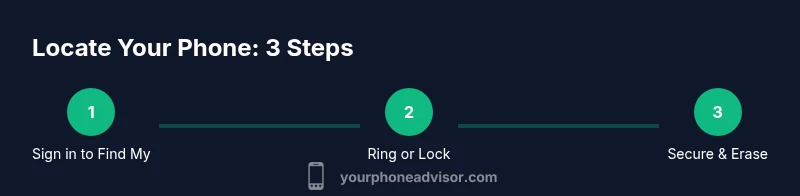
To locate a missing phone, start with built-in location services (Find My iPhone or Find My Device) and sign in to your account. If the device is online, you can see its location, ring it, and secure your data. If it's offline, review last-known locations and prepare to take protective steps like locking the device and changing passwords.
Why wheres my phone matters
When you ask yourself wheres my phone, you're really asking for two things: the physical device and the data it protects. Your phone is portable, constantly connected, and holds sensitive information: messages, photos, banking apps, work accounts. Losing it can expose you to privacy risks and financial losses, especially if the device is unprotected or left unattended. The Your Phone Advisor team has seen countless cases where a quick, calm response reduced the impact of a mislaid device. This guide walks you through reliable methods to locate it, protect your information, and minimize disruption to your day. The process works best when you’ve prepared in advance—enabling Find My Device or Find My iPhone, linking your device to your account, and keeping recovery options up to date. If you’ve just realized you can’t find your phone, stay organized: collect accessories, know the account you use to sign in, and have your backup contact methods ready. In the sections that follow, we’ll distinguish between devices that are online, offline, or powered down, and show you the most effective actions depending on the situation. By the end, you’ll understand how to act quickly, remain safe, and avoid common mistakes. You can rely on the Your Phone Advisor guidance to navigate these steps with confidence.
Quick-location steps you can do now
There are several immediate actions you can take that increase the odds of recovering your phone without unnecessary stress. Start by retracing recent locations: think about where you last used the device, where you kept it, and who was nearby. If you have both Find My iPhone (iOS) or Find My Device (Android) enabled, sign in from a computer or another phone and check the map for the device’s current or last known location. If the phone is nearby but silent, use the ring/play sound option to help you locate it by ear. Lock the device remotely to prevent unauthorized access, and display a contact message on the lock screen. Finally, review any recent sign-ins to your accounts; if you notice unfamiliar activity, change your passwords immediately. Keep in mind that location data can be noisy: GPS accuracy varies with weather, urban canyons, and battery level. The goal of these steps is to narrow down the search area while protecting your data in case the device is truly lost.
Using built-in location services effectively
Built-in location services are powerful when used correctly. For iPhone users, Find My iPhone provides live location data if the device is online and can trigger a loud ring even when silenced. Android users can leverage Find My Device to locate, lock, and erase remotely. To maximize success, ensure location permissions are enabled for the respective apps, double-check that the device is signed into the correct account, and enable notifications so you receive updates as soon as the location changes. When a device reports a location, interpret the data with caution: GPS can bounce between nearby coordinates, and urban environments can distort signals. Consider cross-checking with network-based location data and recent activity in your Google or Apple account for a clearer picture. Keep your recovery options up to date so you can act quickly when a device goes missing.
Dealing with offline or powered-off devices
If the device is offline or powered off, you may still gain useful clues from last-known locations and recent activity. Location data can still be delivered when the phone reconnects to the internet, so monitor the account for updates. Check the time stamps on last-seen events and consider setting a notification to alert you when the device comes online. In some cases, merely placing a temporary lock and a polite message on the screen discourages others from attempting to use the device while you arrange a formal recovery. If the device remains unreachable for an extended period, prepare a plan to report the loss to your carrier and local authorities, especially if there is a risk of theft or personal data exposure.
Privacy, security, and safety considerations
Your first priority is protecting your data. Remotely locking the device, displaying a contact message on the lock screen, and changing passwords on associated accounts are essential steps. Avoid sharing sensitive information via insecure channels and be cautious of phishing attempts that claim to help you locate the device. If the phone has been stolen, report the incident to the carrier and local law enforcement, and request location data only through official channels. Maintain awareness of how location data is used and for how long it remains accessible, and disable location services when you no longer need them after the recovery.
This content reflects guidance from Your Phone Advisor and emphasizes responsible privacy and security practices throughout the search process.
Android vs iPhone: practical tips
While both platforms offer robust tracking, there are some nuances. iPhone users rely on Find My iPhone, which integrates with iCloud and can trigger Lost Mode and remote erase features. Android users should use Find My Device, which integrates with Google services and can locate, ring, lock, and erase device data. In both ecosystems, ensure that the device is linked to your account, up-to-date, and set to share location with trusted devices. If you often misplace your phone, consider enabling additional protective settings like screen-off notifications or a background notification that helps you locate it quickly. Regardless of platform, establish and rehearse a recovery workflow so you can act decisively when a device goes missing.
When to involve your carrier and authorities
If a missing phone might be stolen, involve your carrier promptly. They can suspend service, prevent unauthorized usage, and help you track the device in conjunction with law enforcement. If you believe personal safety is at risk, contact local authorities immediately and provide any location information you have received from official sources. Do not attempt to retrieve the device yourself in hazardous situations. By coordinating with your carrier and authorities, you heighten the chances of safe recovery and protect your data integrity.
Tools & Materials
- Smartphone (Android or iPhone)(Ensure it is charged and that Find My Device or Find My iPhone is enabled.)
- Another trusted device (phone, tablet, or computer)(Used to sign into your account and view location data.)
- Access to your Google/Apple account(Necessary for location services and security controls.)
- Updated recovery options(Backup email and phone number for account recovery.)
- Battery and charger(Useful if you need to prolong device availability while searching.)
Steps
Estimated time: 60-90 minutes
- 1
Sign in to locate service
Open the appropriate service for your device (Find My iPhone for iOS or Find My Device for Android) on a trusted device. Sign in with your account credentials and verify two-factor authentication if prompted. This step establishes the connection to locate your device and set up protective actions.
Tip: Ensure you’re on a secure network and avoid public Wi-Fi when signing into sensitive accounts. - 2
Check the device map and play a sound
Review the map to identify the device’s current or last known location. If the device is nearby, trigger the play sound or ring option to help locate it by ear. Stay on the map view to coordinate your next steps as location updates come in.
Tip: If the map shows a recent drop in location, move toward that area slowly to avoid overheating the battery. - 3
Lock the screen and display contact info
Use Lost Mode or the remote lock feature to secure the device. Display a simple, helpful message with a contact method in case someone finds it. Locking prevents access to apps and data while you arrange recovery.
Tip: Avoid including sensitive details; keep the message short and actionable (e.g., contact via email). - 4
Review recent sign-ins and change passwords
Check for unfamiliar sign-ins or suspicious activity on your accounts associated with the phone. If you detect anything odd, change passwords and enable stronger authentication methods. This reduces the risk of data theft even if the device is found later.
Tip: Update recovery options if you think they’re out of date. - 5
Decide whether to erase remotely
If the device is unlikely to be recovered, consider erasing all data remotely to protect personal information. This is a last resort and should be done only after you’ve exhausted locating options and notified the relevant authorities.
Tip: Note that erasing data may permanently remove all stored information on the device. - 6
Notify your carrier and authorities
Contact your mobile carrier to suspend service if you suspect theft. If you believe there is a risk to safety, contact local authorities and provide any location data you have from official channels. Collaborate with them to maximize recovery chances.
Tip: Record a case number or ticket reference for follow-up.
Got Questions?
What should I do first when I realize my phone is missing?
Start by locating the device using Find My iPhone or Find My Device if it is online. Sign in from a trusted device, check the map, and ring the phone if you’re nearby. Then secure your accounts and consider a remote lock or erase if needed.
First, sign into Find My services on a trusted device, check the map, and ring the phone. Then protect your accounts and remotely lock or erase if necessary.
How do I know if my phone is online or offline?
Location updates appear on the map only when the device is online. If you don’t see a current location, the device could be offline or out of battery. In that case, rely on last-known location and set up alerts for when it reconnects.
If there’s no current location, the device might be offline. Use the last known location and wait for a reconnection.
Can I track my phone after a factory reset?
A factory reset typically erases data and disables Find My Device, making tracking impossible. If you recently reset for legitimate reasons, ensure you secure your accounts and contact support if you suspect unauthorized use.
A factory reset usually prevents tracking. Protect your accounts and contact support if you suspect misuse.
What should I do if I think my phone was stolen?
Notify your carrier to suspend service and prevent fraudulent charges. File a police report if you have reason to believe the device was stolen, and provide any relevant location data from official sources.
If stolen, contact your carrier to suspend service and report the incident to authorities with any location data you have.
Is it possible to locate a lost phone without the SIM card?
Yes, most location services work with data connections, not just cellular. The device can still report location via Wi-Fi or mobile data, but some carriers may require SIM-based verification for certain actions.
Location can still work over Wi-Fi or data, but may vary by device and carrier.
What information can my carrier provide about a lost device?
Carriers can suspend service, assist with device identification, and cooperate with law enforcement. They may provide logs related to service activity but will follow privacy laws and requests from authorities.
Carriers can suspend service and assist with recovery under legal processes, following privacy rules.
Watch Video
What to Remember
- Act quickly to maximize locating opportunities
- Use built-in tools to protect data and alert you to changes
- If necessary, contact your carrier and authorities for safe recovery
- Preserve privacy by locking data and updating credentials
- Plan ahead by enabling Find My features before loss