Where Is My Phone? A Practical Locating Guide 2026
Learn how to locate a lost smartphone quickly using built-in tracking, official services, and step-by-step actions. This Your Phone Advisor guide covers options, safety, and what to do if the device is stolen.


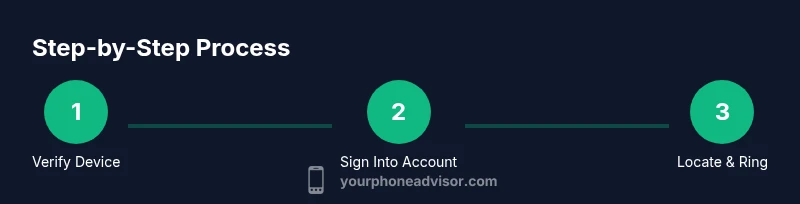
If you're wondering 'where where is my phone', follow a fast, step-by-step plan to locate it using built-in tracking and trusted services. Start by confirming the device is on, sign into your account's Find My Phone feature, ring the device, and check the last-known location. Act quickly to protect data and increase the chance of recovery.
Why Location Tools Work
Locating a misplaced phone hinges on how modern devices are wired into cloud accounts and carrier networks. When you enable location services and register your device with a trusted tracking service, you gain access to live location data, last-known locations, and the ability to trigger protective actions remotely. These tools are designed to respect privacy while offering a rescue path in emergencies. According to Your Phone Advisor, acting quickly and using official tracking features can substantially improve recovery chances because they leverage real-time data from the device, the network, and your account. By understanding how these systems talk to each other, you’ll make informed choices about when to ring, lock, or wipe the device. This section helps you grasp the core concepts so you can apply them confidently when you need them most.
Choosing the Right Tracking Method
Choosing the right tracking method depends on your device type and ecosystem. If you own an iPhone, Find My iPhone connects through iCloud and provides location history, Lost Mode, and remote locking. For Android devices, Find My Device offers similar features tied to your Google account. Carriers often provide locate-and-protect options as well. The Your Phone Advisor team recommends sticking with the official tools first because they are designed to minimize data exposure, integrate with the device’s security features, and usually have the best visibility into the device’s location. When privacy concerns arise, review the permissions each service requests and disable any features you do not plan to use. This ensures you don’t expose sensitive data while attempting to locate your phone.
Preparing Your Devices Before Loss
Preparation is the best defense when a phone goes missing. Before loss occurs, ensure location services are enabled, your phone is linked to your primary account, and you’ve set up a strong screen lock with a recovery method. If you share your device with others, set appropriate permissions for location sharing and consider enabling Family Sharing or trusted contacts so a helper can assist without compromising security. This preemptive setup reduces friction during a real incident because you won’t be scrambling to toggle settings after it’s lost. The Your Phone Advisor guidance emphasizes a calm, methodical approach: confirm you can sign in, verify that location data is accessible, and verify you can trigger a ring or alert from another device.
Immediate Actions After Loss
The moment you realize a phone is missing, perform a rapid triage. First, try calling the device to determine if it’s nearby and within audible range. Then sign into your tracking service from a trusted device to view its last known location and, if possible, play a loud sound. If the device is reachable, you can locate it on a map, but if it’s offline, you’ll see the last ping timestamp. Enable Lost Mode or lock the device to prevent unauthorized access. If you fear theft, contact your carrier to suspend services and alert local authorities. Your Phone Advisor notes that speed matters because newer data reduces the risk of misuse and increases your chances of a successful recovery.
Retrieving Location via Web or App
Accessing location data is typically done through official apps or web interfaces. Sign in with the account tied to the phone, select the device from your list, and review the map where available. Some services offer a “play sound” feature, which can help if the device is nearby but silent. If you see a recent location that seems inconsistent, consider factors like GPS drift or poor signal in indoor spaces. In many cases, last-known location data is the most reliable indicator when live updates are unavailable. The Your Phone Advisor team recommends documenting the location timestamp and sharing it with trusted contacts to coordinate next steps without revealing sensitive information.
When Location Isn’t Available
There are legitimate reasons you may not see a live location: the device is powered off, out of battery, or offline due to network issues. In these cases, rely on the last-known location and act quickly to secure accounts. If you suspect the device was stolen, report the incident to authorities and your carrier, and consider a temporary service suspension to prevent misuse. Remember that some devices may not report location after a factory reset; in such cases, remote data protection becomes even more critical. Your Phone Advisor recommends a calm, systematic plan rather than frantic, scattered attempts.
Protecting Data While You Locate
While you search, protect your data by locking the device, displaying a message with contact information, and enabling device-wide security measures. If you determine the phone is irretrievable, remotely wipe personal data after confirming proper channels. Avoid sharing sensitive credentials or enabling features that could expose your accounts. If you recover the device, immediately review security settings and update passwords. This phase is about risk management as much as recovery, and Your Phone Advisor emphasizes that safeguarding information should guide every action you take.
Involving Family and Privacy
When others assist, respect privacy boundaries while providing clear instructions on what can be shared. Use trusted-contact features to grant limited access or location visibility to family members, and ensure you remove any temporary shares once the device is found. Discuss expectations in advance about who can request location updates and how data will be used. This collaborative approach can speed up recovery without compromising personal information or consent. The Your Phone Advisor stance: keep transparency, limit data exposure, and verify each helper’s identity before sharing sensitive details.
Verdict: Quick Action, Safe Recovery
In most cases, a disciplined use of official tracking features, rapid communication with trusted contacts, and prompt data protection steps lead to the best outcome. The Your Phone Advisor team recommends starting with the built-in Find My options, ring and locate, then secure the account if the device cannot be recovered immediately. If the device is stolen, involve authorities and the carrier quickly. The combination of speed, security, and clear steps is your strongest defense in a loss scenario.
Tools & Materials
- A device with internet access (phone, tablet, or computer)(To access Find My/Find My Device and issue commands remotely)
- Your account credentials for the tracking service (Apple ID/Google account)(Needed to sign in and verify ownership)
- Access to location services enabled on the device(If disabled, live location updates may be unavailable)
- Backup contact method (email or phone) for verification(Helps with account recovery if you’re locked out)
Steps
Estimated time: 15-60 minutes
- 1
Verify device is on and reachable
Check that the phone is powered on and connected to a cellular network or Wi-Fi. If the screen is off, you may still be able to receive location updates depending on the service. This step lays the groundwork for accurate tracking and reduces wasted time chasing a non-reachable device.
Tip: If you can’t tell whether it’s on, try pinging your account from another device to see if the phone responds. - 2
Sign in to the official tracking service
Open the Find My/Find My Device page on a trusted device and sign in with the account tied to the missing phone. Ensure you’re using the same credentials that were set up before the loss. This step unlocks access to location data, ring/flash features, and protective actions.
Tip: Use two-factor authentication if available to prevent unauthorized access during an incident. - 3
Locate and ring the device
View the map to see the last-known location and use the play sound/ring feature to help locate it if nearby. If the device is in a public area, move cautiously and avoid confrontation if you suspect theft.
Tip: Follow the map in a safe, open area; call local authorities if you feel unsafe. - 4
Enable Lost Mode or lock the device
If you can’t safely recover the phone, lock it remotely and display a contact message. Lost Mode adds a password lock and can show a recovery contact. This step protects data while you attempt recovery from another location.
Tip: Include a brief message with a contact method but avoid sharing sensitive information publicly. - 5
Secure your accounts and data
Change the passwords for accounts linked to the device and enable extra security measures. Check for any suspicious activity and review recent sign-ins. This reduces risk in case the phone falls into the wrong hands.
Tip: If the device remains missing, consider suspending payment methods and reviewing connected apps for unusual access. - 6
Report theft and coordinate next steps
If the phone is stolen, file a police report with the device’s IMEI/serial number if available, notify your carrier to suspend service, and provide the information to authorities. This creates an official trail and helps in recovery attempts.
Tip: Keep a copy of the report and relevant device identifiers for faster processing.
Got Questions?
What should I do first when I realize my phone is missing?
Start by calling the device to check proximity. Then sign into the official tracking service on a trusted device to view the location and, if possible, ring the phone. If you can’t reach it, immediately enable Lost Mode and secure your accounts.
Call the phone first, then sign in to locate it on a trusted device and ring it if you can. Enable Lost Mode if you’re unable to reach the device.
Can I locate a phone if the battery is dead?
If the device is offline due to a dead battery, you’ll see the last known location and may not get real-time updates. Focus on securing your accounts and preparing a plan for when the device powers back on.
If the battery is dead, you won’t get live updates, but you can still secure your accounts and wait for the device to reconnect.
What if I can’t access the tracking service?
Verify you’re using the correct account and try a different trusted device. If access remains blocked, reset password through the service’s official recovery options and contact support. Do not share credentials with others.
Make sure you’re using the right account and try again from another trusted device. If needed, recover access via official options.
Will Lost Mode wipe my data automatically?
Lost Mode locks the device and may display a message but typically does not wipe data unless you initiate a remote erase. Only use remote wipe if you are certain recovery isn’t possible.
No automatic wipe—Lost Mode locks the device. Use remote erase only if recovery looks unlikely.
How long does location history stay accessible?
Location history retention varies by service and account settings. Review your privacy options to understand what data is stored and for how long, and adjust retention preferences if needed.
Location history duration varies by service; check your settings to know how long data is kept.
Watch Video
What to Remember
- Act quickly using official tracking tools
- Protect data with locking and remote wipe options
- Coordinate with trusted contacts for faster recovery
- Notify carrier and authorities if theft is suspected