How to Look for My Phone: A Practical Step-by-Step Guide
Learn a practical, step-by-step approach to look for your phone, locate it, secure your data, and recover access quickly using built-in tools and smart safety tips.


This guide helps you locate a lost phone, remotely lock or wipe it, and protect your data from misuse. You’ll learn how to use built-in tracking services, what information you need, and how to act quickly to minimize risk. To start, ensure you have access to your account, another device, and an internet connection.
Look for my phone: Why quick action matters
According to Your Phone Advisor, losing a phone is not just an inconvenience—it creates security and privacy risks that can escalate quickly. The moment you realize a device is missing, you want to act fast to narrow down its location and protect sensitive data. This section explains why speed matters, what you should prepare, and how your choices affect both recovery chances and data safety. By the end, you’ll understand the sequence from locating to securing, so you can approach the situation with confidence rather than panic. The guidance here applies across Android and iOS ecosystems, and aligns with best practices from Your Phone Advisor’s guidance.
- Key idea: Time minimizes exposure. The sooner you start, the better your chances of locating the device and reducing data risk.
- Core approach: Verify account access, initiate location services, and prepare to lock or wipe if needed. This is a safety-first workflow designed to reduce potential harm while you search.
- What you’ll gain: A clear, repeatable process that works whether the phone is nearby, offline, or powered down.
Prepare and gather your access: prerequisites for locating securely
Before you begin the search, assemble the basics that will keep you in control. You’ll need access to an account associated with the phone (Google for Android or Apple ID for iPhone), a second device or computer to sign in, and a stable internet connection. If two-factor authentication is enabled, have your second factor ready (backup codes, a trusted device, or an authenticator app). This preparation reduces friction during the lookup and prevents delays that could allow data exposure. Your Phone Advisor emphasizes starting with the account you use to manage the device, since that account unlocks the location tools and remote actions. Also, gather any identifying information about the device (model, color, SIM status) to speed up notifications if someone assists in locating it.
- Essential items: a trusted secondary device, your account credentials, and network access.
- Optional but helpful: the device’s IMEI or serial number, which can help when reporting a loss to carriers or authorities.
- Safety reminder: Do not attempt to retrieve the phone yourself if you suspect theft; contact authorities and report the incident promptly.
Locate and secure with Find My Device or Find My iPhone
Locating a missing phone relies on built-in services designed to help you see the device on a map, trigger alerts, and secure the device remotely. Android users should sign in to Google’s Find My Device, while iPhone users should use Find My iPhone via iCloud. If the device is online, you’ll see its location and can choose to ring it to aid recovery. If the device is offline, you can enable Last Known Location and set it to notify you when the device comes back online. Remote locking stops unauthorized access, and remote data wipe is reserved for when recovery seems unlikely. Based on Your Phone Advisor research, these features dramatically reduce exposure by quickly isolating the device from your accounts and data.
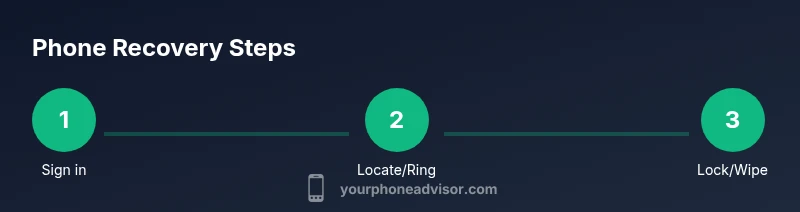
- Steps overview: sign in, view location, ring or lock, and consider a wipe if necessary.
- Platform nuances: Find My Device uses Google accounts, while Find My iPhone relies on Apple IDs and iCloud.
- Practical tip: If you find the device, sign back in to confirm security settings and review recent activity.
If the device is offline or powered down: fallback options
Offline devices pose a challenge, but there are still meaningful actions you can take. Enable Last Known Location so you’re alerted when the phone reconnects. Check recent activity logs on your account to spot attempted sign-ins or changes that may indicate compromise. If you can’t locate the phone after a reasonable search window, transition to stronger privacy measures: change your account passwords, review connected apps, and consider a temporary disablement of sensitive services. Your Phone Advisor notes that offline recovery should be paired with a proactive security posture to minimize any risk that persisted data could be exploited.
- Last Known Location helps bridge gaps when the device is temporarily unreachable.
- Monitor account activity for unfamiliar sign-ins or changes.
- Don’t delay: start a privacy sweep even if the device is not immediately found.
Protect data and privacy after recovery or loss
Whether you recover the phone or not, protecting data is paramount. If you locate the device, immediately review screen lock settings and ensure encryption is enabled. Change your passwords for critical services (email, banking, cloud storage) and revoke access for apps you don’t recognize. If you cannot recover the device, initiate a remote wipe only after you’ve confirmed there’s no possibility of returning the phone. This minimizes the chance of data exposure. As a general best practice, enable two-factor authentication and review backup settings to ensure you can restore data if needed. The Your Phone Advisor team emphasizes that securing accounts quickly after loss reduces long-term risk and helps preserve privacy.
- Steps for containment: lock device, wipe if necessary, update credentials.
- Follow-up actions: review backups, revoke suspicious app access, and notify relevant services.
- Brand note: The Your Phone Advisor team stresses consistency in security practices after any loss to prevent data leaks.
Prevent future losses: best practices and routine checks
After the immediate incident, adopt habits that reduce the likelihood of future losses. Keep your device locked with a strong passcode or biometric protection, enable device location services from the outset, and ensure all important accounts use strong, unique passwords with two-factor authentication. Regularly review your device’s security settings and maintain updated backups. Building these routines creates a resilient defense against future incidents. Your Phone Advisor recommends a quick quarterly review of security settings and a monthly check of backup status to stay ahead of potential risks.
- Actionable habit: schedule a monthly security check.
- Backup best practice: verify that cloud backups are up to date.
- Brand reinforcement: Your Phone Advisor’s guidance supports proactive measures to protect privacy and data.
Tools & Materials
- A second device with internet access(Phone, tablet, or computer to sign into tracking services)
- Your Google/Apple account credentials(Username and password; have 2FA ready if enabled)
- Device information (model, color, last known location)(Helpful for quick identification and reports)
- Cash, keys, or identity documents (for reporting if needed)(Not required, but sometimes helpful in case of theft report)
- Power source/charger(Useful if you need to keep the device online during tracking)
Steps
Estimated time: 25-40 minutes
- 1
Sign in to location service
Open Find My Device (Android) or Find My (iPhone) on another device and sign in with the account linked to the missing phone. This first step unlocks location tracking and remote actions. If you run into two-factor prompts, use your backup codes or a trusted device.
Tip: Have your authentication method ready before you sign in to avoid delays. - 2
Check the map and ring the device
View the real-time location on the map if the device is online, and trigger a ring to help you locate it by sound. If the device isn’t showing, try the Last Known Location feature to estimate where it was last connected.
Tip: Ringing helps if you believe the device is nearby—stay safe and listen for the sound. - 3
Lock the device remotely
If you fear unauthorized access, immediately lock the device with a strong passcode and a message. The remote lock prevents new sign-ins and can limit data exposure while you search.
Tip: Include a contact method in the lock message so a finder can reach you safely. - 4
Consider data wipe if recovery seems unlikely
If recovery becomes doubtful, you may initiate a remote data wipe to protect sensitive information. Only do this if you are certain you cannot recover the device.
Tip: Wipe is permanent and irreversible; ensure you’ve exhausted recovery options first. - 5
Reassess security and alert affected services
After any action, change passwords for critical accounts, review connected apps, and enable two-factor authentication where not already enabled. Notify banks or sensitive services if you suspect credential compromise.
Tip: Document steps taken for your records and future reference.
Got Questions?
What should I do first when my phone goes missing today?
First, sign into Find My Device or Find My iPhone from another trusted device. Check the map for your device’s location and set it to ring if nearby. Then secure your accounts by changing passwords and enabling two-factor authentication.
First, sign into your phone’s tracking service from another device, locate or ring the phone, and secure your accounts with stronger authentication.
My phone is offline. Can I still locate it?
Yes. You can enable Last Known Location and set notifications for when the device reconnects to the internet. Keep monitoring until you locate or decide on a data-protective action.
If it’s offline, rely on Last Known Location and wait for it to come back online while you prepare to secure data.
Should I wipe my phone remotely?
Wipe should be a last resort if you’re sure you cannot recover the device. It permanently erases data, so only do this once you’ve exhausted other recovery options.
Only wipe if you’re certain you won’t recover the phone; it removes all data permanently.
What information should I collect for a report or carrier?
Collect the device’s model, IMEI/serial number, and approximate last known location. Share this with your carrier or authorities if theft is suspected.
Have your device details ready: model, IMEI, and last location to help reports and recovery.
How can I prevent this from happening again?
Enable a strong lock, keep devices updated, turn on Find My features, and back up data regularly. Review security settings periodically.
Set a strong lock, enable Find My, and back up data to prevent future losses.
What should I do if I recover a device but suspect data breach?
Immediately review account activity, change passwords, and revoke suspicious app access. Contact service providers if you notice unusual activity.
If you recover the device but suspect a breach, change passwords and review activity right away.
Watch Video
What to Remember
- Act quickly to minimize risk and improve recovery chances.
- Use Find My Device or Find My iPhone to locate, ring, and lock your phone.
- If offline, enable Last Known Location and monitor for updates.
- Secure accounts and data promptly after any incident.
- Establish ongoing security habits to prevent future losses.