Where Phone Location: A Practical How-To Guide
Learn practical, privacy-conscious steps to locate a lost or misplaced phone, using official tools and secure practices. This guide covers Android and iOS options, account access, and safety tips to protect data while recovering your device in 2026.


Learn how to locate a phone quickly using built-in tools and trusted methods. This guide covers Android and iOS options, account access, and safety considerations—so you can recover a device while protecting data and privacy. Start by verifying location services are enabled and using official features such as Find My Device or Find My iPhone.
Why knowing where phone location matters
Understanding where phone location data comes from and how it can be used is essential for recovery, security, and privacy. The phrase where phone location appears in many device-support conversations because it highlights a core capability: locating a device quickly when it’s lost, stolen, or simply misplaced. For everyday safeguarding, these location signals help you act fast, minimize potential data exposure, and coordinate with family, friends, or authorities when appropriate. The Your Phone Advisor team emphasizes that awareness of location data should be paired with respectful privacy practices and legal compliance. In 2026, most mainstream smartphones provide reliable location features, but results depend on settings, connectivity, and user permissions. By understanding these dynamics, you’ll be better prepared to act confidently rather than panic when a device goes missing.
How location data is determined on modern smartphones
Smartphones determine location through a blend of GPS, cellular network data, and nearby Wi‑Fi signals. GPS provides precise coordinates outdoors, while cell towers and Wi‑Fi networks help triangulate a device indoors or in areas with weak GPS reception. Because different networks have varying accuracy, modern devices fuse data to produce a single location estimate. Factors like device motion, battery level, and permissions influence how often location is updated. For privacy-minded users, it’s important to know which apps have access to location services and to review app permissions regularly.
Official tools you can trust to locate your phone
Both major platforms offer built‑in, trusted tools designed specifically for recovery. iOS users rely on Find My iPhone, which shows a device’s last known location, lets you play a sound, enable Lost Mode, or erase data remotely. Android users typically use Find My Device, which similarly provides location tracking, device ring, secure locking, and data protection options. To maximize effectiveness, ensure your device is linked to the correct account and that location services are enabled. If you manage multiple devices (phone, tablet, watch), verify each one’s settings so no device remains untracked.
Privacy, consent, and legal considerations when location tracking
Location tracking can raise privacy concerns, especially if the device isn’t yours or if tracking is done without consent. Always follow legal guidelines and obtain proper authorization before monitoring someone else’s device. If you’re locating a family member or an employee with explicit permission, keep records of consent and use official tools rather than third‑party apps. The Your Phone Advisor team reminds readers that transparency, consent, and minimal data sharing are critical to maintaining trust while using location features.
Prepare your account before you need it
Before you need to locate a device, ensure your accounts are ready. Secure your Google or Apple ID with two‑factor authentication, review trusted devices, and confirm recovery options like backup email and phone numbers. Sign out of sessions you don’t recognize and enable findable device settings. Keeping these preparations up to date reduces friction during a potential recovery and helps you act quickly when a device goes missing.
Common limitations and what to do when offline
Location accuracy is strongest when a device is online and has a clear view of the sky for GPS. When offline, you may only see the last known location or a general area. If the device remains offline for extended periods, rely on the last ping data available, contact your carrier for assistance with device flags, and consider changing important passwords in case the device has been compromised. Always have a backup plan: know where to find your backup codes, and keep account recovery options current.
Additional methods and safety tips
If standard tools don’t provide a usable location, consider these extra steps: check recent activity on your Google or Apple account for sign‑ins or device status; contact the carrier to request a device block or to enable a temporary tracking flag; use Lost Mode or a remote wipe if you fear data exposure; and prepare a plan for safe retrieval or reporting to authorities. Remember to avoid risky confrontations; never attempt to recover a device in hazardous situations. Your Phone Advisor encourages a calm, methodical approach to reduce risk and maximize the chance of recovery.
What to do if a device is stolen or cannot be recovered quickly
If the device is confirmed stolen or cannot be recovered after multiple attempts, switch to protective measures immediately. Change your passwords for essential services, revoke access to sensitive accounts, and enable remote data wipe if you’re concerned about data leakage. Notify your network carrier to suspend services or mark the device as stolen. Preserve any evidence by documenting the last known location and time, and consider reporting to the relevant authorities with the device IMEI/serial number if you have it.
How to minimize future risks and improve resilience
Preventive steps are more effective than reactive measures. Regularly review location permissions, enable two‑factor authentication, and ensure that Find My features are enabled on all devices you own. Maintain a trusted contact list and share a recovery path with a close person so you can coordinate quickly. Finally, keep your devices updated with the latest security patches and use reputable security features to reduce the odds of loss in the first place.
Tools & Materials
- Smartphone with location services enabled(Power on; ensure device is linked to the correct account (Apple ID or Google account).)
- Active internet connection(Wi‑Fi or cellular data to fetch live location data.)
- Access to the associated account(Phone’s cloud service login credentials (iCloud/Google) ready and accessible from a trusted device.)
- Trusted secondary device(Helpful for verifying authentication codes or receiving location updates.)
- Carrier account information(Useful if you need to request a temporary block or guidance on recovery.)
Steps
Estimated time: 15-25 minutes
- 1
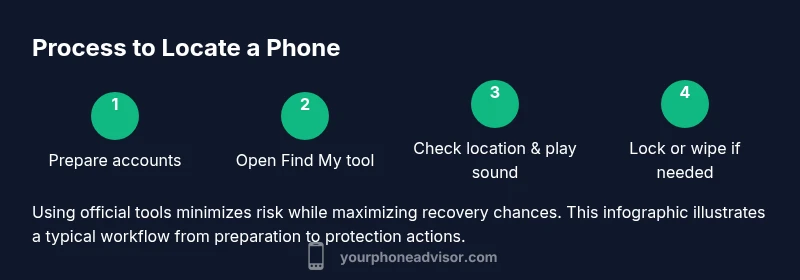
Prepare your accounts
Sign into Find My iPhone or Find My Device on a trusted device. Confirm that the phone is linked to the correct account and that location services are enabled. If you’re locating a family member or someone you’re authorized to track, ensure you have explicit consent documented.
Tip: Have backup codes or a secondary verification method ready in case you’re asked to confirm identity. - 2
Open the official location tool
Access Find My iPhone on iOS or Find My Device on Android. Use a computer or trusted mobile device to view the target phone’s current location on a map and familiarize yourself with any last known location data.
Tip: If you manage multiple devices, verify the correct device is selected before taking action. - 3
Check location and trigger a sound
If the device is within range, use the play sound feature to help you locate it indoors or near a static source like a desk or car. This can be especially helpful in a home or office environment where GPS accuracy is reduced.
Tip: If the phone is silent, engage Lost Mode to display a message and contact information on the lock screen. - 4
Lock the device remotely
Use Lost Mode or equivalent lock feature to secure the device. You can display a message with contact info for the finder and prevent access to apps and data.
Tip: Choosing to lock the device early can deter misuse while you arrange next steps. - 5
Consider a remote wipe if necessary
If the device cannot be recovered quickly or contains sensitive data, initiate a remote wipe. Ensure you’ve saved essential data beforehand where possible.
Tip: Remote wipe is irreversible; confirm you’ve secured essential accounts first. - 6
Coordinate with your carrier and authorities
If the device is stolen or remains missing beyond a reasonable window, contact your carrier to suspend services and request device blocking. If there’s risk of harm, report to local authorities with the IMEI/serial number.
Tip: Keep a record of any case numbers and the last known location for reference.
Got Questions?
Can I locate someone else's phone without their consent?
No. Tracking another person’s device without explicit consent and proper authorization can violate laws and privacy rights. Only use official tools with clear permission from the device owner.
Tracking another person without consent is not appropriate. Use the official tools only when you have explicit permission and legitimate need.
What if the location data seems wrong or outdated?
Location data can be approximate and may lag. Check last known location, refresh the map, and verify that the device is powered and connected. If needed, try alternative methods or wait for the device to reconnect.
If the map looks off, refresh and check again later. It can be a temporary inaccuracy or a device offline issue.
Is a device that’s turned off still traceable?
When a phone is off, you may still see the last known location or receive a notification when it comes back online. Real-time updates require the device to be powered and connected.
If the phone is off, you’ll often see the last-known location until it reconnects.
How can law enforcement access location data?
Law enforcement access is granted only through proper legal processes and with appropriate warrants or authorizations. Your data request should go through official channels.
Authorities access follows legal procedures; you’ll need proper authorization.
How long is location history stored by these services?
Storage duration depends on the platform’s policy and user settings. Review privacy and account settings to understand history retention and controls.
Retention depends on platform policy and your settings, so check those to know how long data stays available.
What should I do if I think my device was stolen?
If stolen, immediately lock accounts, use remote wipe if necessary, contact your carrier to suspend services, and file a report with local authorities.
If stolen, secure accounts, consider remote wipe, and contact authorities.
Can third-party apps help locate a device?
Rely on official tools first. Third-party apps can pose privacy risks; use them only if you fully understand permissions and have trusted sources.
Stick with official tools first; third-party apps carry privacy and security risks.
Watch Video
What to Remember
- Act quickly using official tools to locate devices.
- Keep location services on and accounts secured.
- Know privacy and legal boundaries when tracking others.
- Prepare in advance to reduce friction during an actual loss.
- Coordinate with carriers and authorities if needed.