Find a Lost Phone: Practical Recovery Guide
Learn to locate a lost phone quickly via built-in tools, carrier support, and security steps. This guide covers iOS and Android, offline scenarios, and what to do after recovery.


Ready to locate a lost phone? This guide shows you how to use built-in Find My tools, carrier options, and quick security steps to recover or protect your device. Whether you have iPhone or Android, you’ll learn effective actions that minimize data risk and maximize your chances of a swift recovery.
How locating a lost phone works across platforms
According to Your Phone Advisor, the quickest recoveries usually combine built-in location services with proactive security actions. On iOS devices, Find My iPhone (or Find My in iOS) lets you see a device on a map, play a sound, enable Lost Mode, lock the device, and even erase data remotely if necessary. Android users can leverage Find My Device to locate, ring, secure, or wipe their phone. In both ecosystems, the device must be powered and connected to the internet or have recently reported a location to provide a current update. If the device is offline, you’ll often see the last known location and can set up alerts for when it comes back online.
Knowing which tool to use depends on what you can access and what happened to the device. Your Phone Advisor emphasizes starting with your account and trusted devices to avoid giving someone your location data through risky third-party apps.
Prerequisites and essential tools
Before you start, make sure you can access the right accounts and have a plan. You’ll need your primary Apple ID or Google account, a trusted device (phone, tablet, or computer) with internet access, the phone’s IMEI if available, and carrier login details. If the phone might be stolen, have a police report ready for reference. Updating your contact methods and recovery options now reduces delays later. Your Phone Advisor notes that being prepared with these basics dramatically speeds up recovery and safeguards your data.
Quick actions you can take immediately
If you think your phone is nearby, try calling or sending a text first. If you can access Find My My iPhone or Find My Device, use the option to play a sound to reveal the device’s location by sound. If you’re comfortable with security, enable Lost Mode or lock the device remotely and display a contact message. These actions can deter misuse and provide your location to you or trusted people without exposing personal data. Avoid visiting locations you shouldn’t, and keep others informed about your status.
Step-by-step: Use built-in tools to locate your device (iOS/Android)
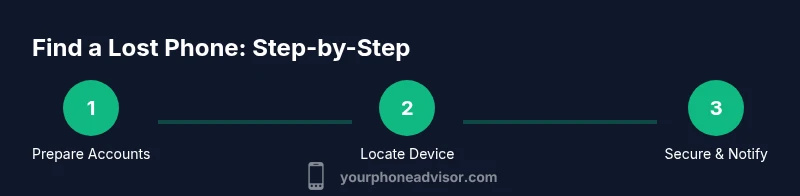
Step 1: Sign in to your account on a trusted device (iCloud.com for Apple or Google Account for Android). Step 2: Open Find My iPhone (iOS) or Find My Device (Android) and select the missing device. Step 3: Check the map for current or last-known location and review available actions (Play Sound, Lock, Lost Mode, Erase). Step 4: If the device is nearby, use Play Sound to trigger an audible alert. If lost, enable Lost Mode or Lock with a message and contact number. Step 5: If you suspect theft, consider remote data protection steps and notifying your carrier. Tips: Always sign out of accounts on a device you don’t control only after securing data.
Step-by-step: If the device is offline or powered off
When a device is offline, you’ll typically see the last reported location. Enable “Notify when found” and place a radical security lock if possible. You can still request a location alert the moment the device reconnects to the internet. If you regularly lose devices, ensure location history and last-seen data are enabled in your account settings so you have a fallback location.
Tip: Don’t rely on stale data; set up automated alerts for when the device reports a location again.
Step-by-step: Involving your carrier and authorities
Contact your mobile carrier to suspend service temporarily to prevent unauthorized use while keeping your account secure. Provide the IMEI if requested and ask if they can flag the device for lost or stolen status. If the phone is stolen, file a police report and share the incident reference with your carrier and your device’s serial number. Local authorities can help with recovery when there’s evidence of a crime and a location to pursue.
Tip: Keep a log of all actions and dates to present to authorities or your carrier if needed.
Security and data protection during the process
While searching, secure your accounts by changing passwords and enabling two-factor authentication where possible. Review connected apps and revoke access from devices you don’t recognize. If you recover the phone, immediately review and update security settings on critical apps (email, banking, social networks). If you cannot recover the device, consider remote wipe to protect sensitive information. Your Phone Advisor recommends prioritizing data protection alongside the recovery effort.
After recovery or securing the device
Once you regain access, check for any unauthorized activity and change passwords for essential services. Review recent sign-in locations and revoke sessions that seem suspicious. Update your device with the latest OS and security updates, re-enable Find My/Find My Device, and consider enabling extra protections like screen lock and biometric unlock. If the device is repaired or replaced, back up data regularly and review recovery options to prepare for future incidents.
Preventive measures to avoid future losses
Regularly update recovery options, enable two-factor authentication, and keep contact details current. Use a strong passcode and biometric locks, enable device tracking, and review app permissions. Consider adding a secondary security measure, like a trusted contact who can help coordinate recovery. Your Phone Advisor suggests routine checks on account security and device settings to reduce future risk.
Tools & Materials
- Account access (Apple ID/Google account)(You must be able to sign in to Find My services.)
- A trusted device with internet access(Phone, tablet, or computer to sign in and view location.)
- Phone's IMEI number(Helpful for carrier and police reference; if unavailable, use carrier records.)
- Carrier account details (login, PIN)(Needed to place a temporary block or request locate services.)
- Police report (if stolen)(Useful for theft cases and insurance, if applicable.)
Steps
Estimated time: Total time: 45-90 minutes
- 1
Prepare your accounts and devices
Verify you can sign in to your Apple ID or Google account on a trusted device. Update recovery options and ensure you can access Find My services. Gather the phone’s IMEI if you have it and collect your carrier login details.
Tip: Have a password manager ready to avoid credential issues during sign-in. - 2
Open the appropriate location service
On iPhone, open Find My iPhone (via iCloud.com or the Find My app). On Android, open Find My Device via your Google account. Choose the missing device from the list.
Tip: If you can’t access a browser, use a trusted device with the Find My app installed. - 3
Check the map for current or last-known location
Review the map to see the phone’s current location or last reported location. If the device hasn’t connected recently, rely on the last known point and enable alerts for when it reconnects.
Tip: Try refreshing the map and zooming in on nearby streets for accuracy. - 4
Play a sound or secure the device
Use Play Sound to locate if nearby. If not, enable Lost Mode or lock the device and display a contact message to deter misuse.
Tip: Do not reveal sensitive information in the lock message. - 5
Notify the carrier and consider security actions
Contact your carrier to suspend service temporarily if theft is suspected and to block misuse. Use the IMEI to flag the device where available.
Tip: Ask about device-blocking options and emergency assistance codes. - 6
Prepare for offline or delayed reporting
If the device is offline, rely on last location and set up a notification for when it comes online. Continue monitoring regularly.
Tip: Don’t rely solely on real-time updates; offline devices can reappear later. - 7
Protect data on your accounts
Change passwords, enable 2FA, and review active sessions on critical apps. Consider a remote wipe only if recovery seems unlikely and data is at risk.
Tip: Prioritize protecting banking and email accounts first. - 8
Recovery steps after you regain access
When recovered, update security settings, re-enable tracking, and perform a full OS/security update. Backup data and review app permissions.
Tip: Document the recovery steps for future reference. - 9
Prevent future losses
Regularly update recovery options, keep device updates current, and educate household members about reporting suspicious activity quickly.
Tip: Set a calendar reminder to review security settings quarterly.
Got Questions?
Can I find my lost phone if it’s turned off?
If the device is off, you can still see the last reported location and use Lost Mode to lock the device and display your contact information. You may receive a notification when the device goes online again.
If your phone is off, you can still check its last known location and lock it to protect your data until it reconnects.
What should I do if I think my phone was stolen?
Contact your carrier to suspend service and block the device if possible. File a police report if theft is suspected and use the device’s security tools to protect data. Gather your IMEI and other identifiers for reporting.
If stolen, suspend service with your carrier and secure your accounts right away; report the incident to the authorities.
Will my data be protected if the phone is locked?
Locking the device and enabling Lost Mode reduces the risk of data exposure. You should also change passwords for important apps and enable two-factor authentication on critical accounts.
Locking helps keep your information safe, but you should also secure your accounts right away.
Can I locate someone else’s phone?
No. You should only locate devices that you own or have explicit permission to locate. Tracking someone else without consent can be illegal and dangerous.
You can only locate devices you own or have permission to track.
What if I recover the phone after it was lost?
Once recovered, perform a security check: update OS, reset passwords, review active sessions, and re-enable tracking. Consider a backup to prevent future data loss.
After recovery, update security settings and back up data to stay protected.
What information can the carrier provide during a finding?
Carriers can help suspend service, check SIM status, and flag devices for misuse. They may require a police report or account verification for sensitive requests.
Carriers can suspend service and help locate the device when available.
Watch Video
What to Remember
- Act quickly to maximize location chances
- Use built-in tools before third-party apps
- Coordinate with carrier to secure service
- Protect your accounts and data during recovery
- Document actions for safety and accountability