What to Do If You Lose Your Phone: A Practical Guide
Learn step-by-step actions to protect data, locate or lock your device, contact your carrier, and recover from a lost phone. This practical guide from Your Phone Advisor keeps you safe and prepared.


What to do when you lose your phone? Act quickly to protect data, locate or lock the device, and minimize risk. Start by using built-in locating services, contact your carrier, and consider remote wipe if recovery isn’t possible. You’ll also learn how to safeguard essential services and privacy, with practical steps you can take right away. Act fast, document events, and monitor financial accounts for unusual activity.
Immediate actions after you realize the phone is lost
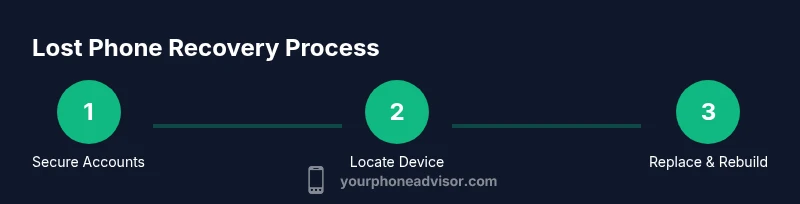
When you first realize your device is missing, the clock starts ticking for your data security. According to Your Phone Advisor, the first objective is to prevent unauthorized access while preserving the possibility of recovery. Start by logging into your Google or Apple account from another device and enabling Lost Mode or equivalent. This locks the screen, displays a contact message, and suspends sensitive actions. If you can't access your accounts quickly, contact your carrier to suspend service and prevent misuse of the SIM. Also consider temporarily turning off or restricting access to payment apps and banking apps by changing passwords from a secure computer. If there’s a chance you can retrieve the device, avoid wiping data immediately—certain recovery attempts may preserve information for later. Keep a record of last known locations and any sightings. Quick actions like these reduce risk and increase the odds you’ll recover the device or protect your data.
Securing accounts and data after a loss
Your next priority is securing accounts and data across services. Change passwords for email, banking, social, and cloud storage from a trusted device. Enable two-factor authentication on critical accounts and revoke sessions on devices you no longer control. Review connected apps and revoke access for anything unfamiliar. If you use a password manager, ensure it is secured with a strong master password. The Your Phone Advisor team emphasizes that tightening authentication now helps prevent unauthorized access even if the phone remains missing. Document any suspicious activity and set up alerts for unusual login attempts to catch abuse early.
Locating the device and deciding on next steps
Utilize built-in location services like Find My iPhone, Find My Device, or a cross-platform security app from another device to see if the phone is reachable. If the device appears online, enable Lost Mode, set a contact message, and keep monitoring for movement. If the location is offline or uncertain, prepare for recovery attempts or data protection actions. Consider the value of waiting for a sighting versus triggering a remote wipe if the device seems unlikely to return. The key is to balance potential recovery with data protection, not to risk more exposure by delaying decisions.
Contacting carriers and financial institutions
Call or log in to your carrier to suspend service or block the SIM so it cannot be misused. Ask for a temporary or permanent SIM lock and report the loss to prevent fraudulent charges. Notify banks and card issuers immediately if you have financial apps on the phone; request temporary blocks or alerts for unusual activity. If you used digital wallets, revoke access and rebind them on a secure device. This step helps prevent unauthorized purchases while you search for the device or arrange a replacement.
Remote wipe and data protection when the device is unrecoverable
If recovery seems unlikely and security risks remain high, prepare to wipe the phone remotely. This erases personal data from the device to prevent misuse, but note that once done you will lose the ability to locate it. Only perform remote wipe if you have exhausted all recovery options and you cannot ensure the data will stay protected. After a wipe, change passwords, reconfigure devices, and restore data from backups on a new phone. The Your Phone Advisor guidance is to proceed with caution and ensure you can still access essential services.
Replacing or securing essential services after loss
With a replacement device or a secured account, focus on reestablishing access to critical services. Log into your primary accounts from the new device, re-enable two-factor authentication, and review security questions. Restore from backups where possible and ensure that cloud backups are current. If you had important apps on the old phone, install them on the new device and reauthorize access. Consider updating your security posture, such as enabling biometric unlock only on trusted devices and enforcing stricter app permissions.
Preventive measures for the future
To reduce the consequences of future losses, enable security features before a loss happens. Turn on device encryption, locate services, and screen-lock with biometric authentication. Regularly back up data to a trusted cloud service and keep a secure password manager. Establish a recovery plan that includes trusted contacts, backup codes, and emergency access to critical accounts. By integrating these practices, you’ll be better prepared for any future device loss.
Tools & Materials
- Another device with internet access(To sign in to accounts and locate the lost phone)
- Your account credentials (Google/Apple)(Needed to lock, locate, and recover data)
- Carrier login or app access(To suspend service or block the SIM)
- Two-factor authentication access(To secure accounts during recovery)
- Password manager or secure notes(Helps manage new credentials securely)
- Backup data access(Restore data on a replacement device)
- Proof of ownership (optional)(May help with police or carrier support)
- Camera or contact list access(For locating or messaging a finder)
- Secure bag or safe place for the replacement device(Safe storage during transition)
Steps
Estimated time: 30-60 minutes for initial actions
- 1
Hold steady and protect accounts
Pause usage of the missing phone, log in to a trusted device, and secure accounts with strong passwords and 2FA. This reduces risk while you determine the next move.
Tip: Act quickly to minimize exposure. - 2
Lock and display contact info remotely
Use Lost Mode or equivalent on your accounts to lock the device and show a message with contact details for return.
Tip: Keep the message simple and non-sensitive. - 3
Contact your carrier to suspend service
Call or use the carrier app to block the SIM or suspend service to prevent fraudulent use while you search.
Tip: Ask for a temporary SIM block if you expect a quick return. - 4
Check location services and try to locate
Open Find My iPhone / Find My Device on a trusted device to see if the phone is reachable and to enable Lost Mode if needed.
Tip: If location is uncertain, plan for data protection steps. - 5
Notify banks and sensitive apps
Change passwords and revoke sessions for apps handling money or sensitive data; enable alerts for unusual login activity.
Tip: Do this from a secure device, not the lost phone. - 6
Decide on remote wipe if needed
If recovery seems unlikely, consider erasing data remotely to protect privacy, understanding you’ll lose the device’s data and tracking capability.
Tip: Only wipe after confirming no other recovery options exist. - 7
Prepare a replacement device
Set up a new device, install essential apps, and re-enable security features like 2FA and biometric unlock.
Tip: Back up data regularly to avoid future losses. - 8
Review and adjust security posture
After stabilization, review backup routines, app permissions, and password hygiene to reduce future risk.
Tip: Keep security habits consistent across devices.
Got Questions?
What should I do first if I realize my phone is missing?
Start by securing your accounts on a trusted device, enable two-factor authentication, and unlock Lost Mode if available. Then contact your carrier to suspend service and preserve the possibility of recovery.
First, secure your accounts from another device and contact your carrier to suspend service while you try to locate the phone.
Can I locate my phone after it’s turned off or offline?
Locating features work best when the device is online. If it’s offline, focus on securing accounts and preparing for a potential return or replacement.
If the device is offline, you should still secure your accounts and be ready for recovery or replacement.
Will my data be wiped automatically if the device is lost?
No automatic wipe occurs unless you initiate a remote wipe after evaluating recovery chances. Wipes protect privacy but remove local data and disable tracking.
A remote wipe only happens if you choose it; it protects your data but erases the device.
How can I protect my accounts after a loss?
Change passwords from a secure device, enable two-factor authentication where possible, and revoke sessions on devices you no longer control.
Change your passwords from a safe device and enable two-factor authentication to protect your accounts.
What should I do about the SIM card if my phone is lost?
Ask your carrier to suspend or block the SIM to prevent misuse, and consider a temporary replacement SIM if you’ll be transitioning to a new device soon.
Block the SIM with your carrier to prevent misuse and get a replacement if you’re moving to a new phone.
What if I find my phone later?
If you recover the device, contact your carrier to re-enable service and verify any security changes you made are still in place. Check for any unfamiliar activity.
If you recover the device, re-enable service and review security changes you made.
Watch Video
What to Remember
- Act quickly to protect data and reduce risk.
- Lock accounts and suspend services before recovery attempts.
- Use official locate features to guide next steps.
- Notify carriers and financial services to prevent abuse.
- Establish a solid replacement and backup plan for future.