Call Lost Phone: Locate, Lock, and Protect It
A practical, step-by-step guide to locating a lost phone, locking it remotely, and safeguarding data with built-in tools, carrier help, and safe next steps.


With this guide you will learn how to locate a lost phone, lock it remotely, and protect your data within minutes. You'll use built‑in services (Find My Device or Find My iPhone), your carrier’s tools, and quick safety steps to prevent unauthorized access before returning the device or erasing data as a last resort.
Why call lost phone quickly matters
Losing a phone creates more than a missing device; it opens a window into your personal data. The phrase 'call lost phone' might be something you say out loud, but the real action is to run through security steps immediately. The Your Phone Advisor team emphasizes that quick action reduces the window in which unauthorized access can occur and increases the odds of recovering the device. When you realize your phone is missing, act calmly and methodically: secure your accounts, gather essential details (IMEI, carrier, device model), and start the location-and-protection workflow. Built-in tools like Find My Device (Android) or Find My iPhone (iOS) give you commands to ring, lock, track, or erase the device remotely. Even if you can't see the phone right away, you can create a protective barrier by changing passwords, enabling two-factor authentication, and notifying your carrier. This section sets the foundation for a practical, step-by-step response that you can follow in real time rather than guessing what to do next.
According to Your Phone Advisor, preparation is key. If you’ve already enabled device location services and recovery options, you’ll move through the steps faster and with more confidence during a stressful moment. The goal is to minimize risk, protect sensitive information, and maximize the chance of a safe recovery.
Immediate steps you can take in the first 15 minutes
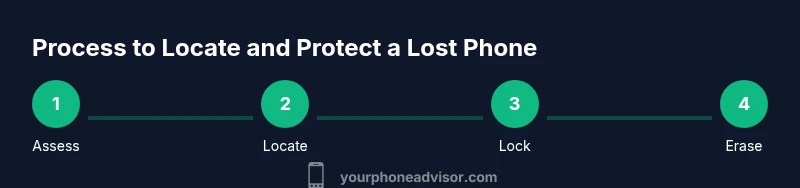
The initial window after a loss is critical. Focus on three core goals: stop data exposure, locate if possible, and coordinate with your carriers and accounts. Here are practical actions you can take within minutes:
- Call the number on the lost phone from another device to hear if it rings or is on vibrate; this helps confirm whether it’s nearby and audible.
- Sign in to Find My Device (Android) or Find My iPhone (iOS) from a trusted device and check the device’s last known location.
- Put the phone in Lost Mode with a message that provides a contact method and your preferred return instructions.
- Lock the screen and sign out of sensitive apps remotely if the service allows it.
- Change the passwords for your critical accounts (email, banking, social) and enable two‑factor authentication where available.
- Contact your mobile carrier to suspend service or enable a temporary lock on the SIM to prevent misuse.
- Document the loss with a quick note including the time, location, and any relevant identifiers (IMEI/Device model).
If the device is turned off, you can still send a remote command that will execute when it powers back on. The objective is to reduce risk quickly while maintaining the option to recover the device later.
How to locate your device with Find My Device (Android) or Find My iPhone (iOS)
Both major ecosystems offer reliable, built-in ways to locate a missing device, even if it’s offline for a period. The steps below explain how to initiate a locate, ring the device, display a message, and enable Lost or Lock mode. You should perform these actions from a secure device and ensure you’re logged into the correct account associated with the lost phone:
- Android: Open Find My Device, select your missing device, choose Ring (to locate by sound), Secure Device (lock with a message and contact number), or Erase Device (data wipe as a last resort).
- iPhone: Open Find My iPhone, select the missing device, use Play Sound, Mark as Lost (display contact info and a custom message), or Erase iPhone (data wipe). If the phone comes back online, Lost Mode will reenable protection automatically.
Note that location accuracy depends on the device’s last online state and the availability of network connections. The Your Phone Advisor team recommends keeping location services enabled and ensuring the device has a linked account for best results. If you don’t see the device, try again periodically and review recent location history within the app.
If you’re in a region with strict privacy laws, avoid sharing sensitive information publicly in messages displayed on the device. The goal is to present a clear way for the finder to contact you without exposing more data than necessary.
Protecting your data before your device is recovered
Data protection should be your top priority in any lost‑phone scenario. Even if the phone isn’t recovered quickly, you can minimize risk by configuring protections that stay in place once you lock the device. These steps help safeguard personal information and reduce the odds of misuse while you search. Key actions include:
- Immediately enable device lock and require a strong passcode or biometric authentication.
- Turn off sensitive shortcuts or apps that may reveal private data when the phone is unlocked.
- Enable a display message with the contact method so finders know how to reach you without exposing personal details publicly.
- Ensure two‑factor authentication is active on all important accounts.
- Review connected apps and recent sign‑in activity; revoke access for any unfamiliar sessions.
- Prepare a backup of essential data (photos, contacts) if possible, to facilitate restoring access on a new device if needed.
- If you have a work device, notify your IT department about the loss so they can apply additional protections and logs.
The aim is to create a protective barrier around your data while you pursue recovery. Even if the device does not immediately reappear, you’ve reduced the risk of unauthorized access and data exposure.
How to contact your carrier for help
Carriers can be a critical ally when a device is lost. They can suspend service, place a temporary lock on the SIM, and help prevent fraudulent charges. The process is often quick but varies by carrier. Here are practical steps to engage effectively:
- Call your carrier’s support line using a trusted number from their official website or your contract documents.
- Request a temporary SIM lock or suspension of service to prevent misuse if the phone remains missing for an extended period.
- Have your IMEI/Device ID ready; this helps the carrier identify the exact device and facilitates blocking or tracking.
- Ask about any additional protections they offer, such as account notifications for new devices or unusual activity.
- If the device is part of a family plan, consider temporarily disabling access for that line to protect other users.
Coordinate with the carrier to understand timelines and the steps required to restore service if the device is recovered. Some carriers can also help you rewrite the SIM card with a new number if needed, keeping your data safe while you search.
How to secure accounts after a loss
Data protection extends beyond the device itself. After you’ve taken immediate protective steps, focus on securing accounts and credentials to minimize risk of unauthorized access. Here are practical strategies to implement quickly:
- Change passwords for primary accounts (email, banking, cloud storage) from a secure, trusted device. Use strong, unique passwords and avoid reusing credentials.
- Enable two‑factor authentication (2FA) wherever available, especially for financial services and email.
- Review account recovery options and update trusted devices and alternative contact methods.
- Refrain from logging into sensitive services from the lost device if you must, and sign out remotely if possible.
- Monitor your bank and credit card statements for unusual activity for at least a few weeks following the loss.
- If you use work accounts, inform your IT/security team and follow their recommended steps.
The goal is to prevent someone else from gaining access to your digital life while you attempt recovery. Strong credentials and 2FA are your best defenses during this period.
If the phone is recovered: steps to take
If you locate your device or someone returns it to you, there are important steps to confirm integrity and prevent ongoing risk. First, do not immediately trust the return; verify ownership and ensure the device is truly yours. Then:
- Remove any temporary Lost Mode messages and re‑establish your security settings.
- Sign back into your accounts and review recent activity for any suspicious sign‑ins.
- Change passwords again if you suspect credentials were compromised during the loss.
- Restore data from backups if you performed a precautionary backup before the loss.
- Update your device with the latest OS and security patches to reduce future risk.
- Re-enable location services and app permissions to maintain protection going forward.
If you suspect foul play, consider reporting the incident to the local authorities and sharing any relevant logs or device IDs. The goal is to safely reinstate normal use while maintaining security.
When to consider professional help or police report
There are scenarios where professional assistance or police involvement is prudent. If the device was stolen or you cannot recover it after a reasonable search window, you should file a report with local law enforcement. Provide the IMEI/serial number, model, approximate time and location of loss, and any identifying details. In some regions, police reports help with insurance claims and proof of loss. If you believe sensitive data has been accessed, seek advice from a cybersecurity professional about monitoring and remediation.
Your Phone Advisor recommends documenting every step you take, keeping receipts, and saving any communications with operators or authorities for future reference. This helps you stay organized and improves your odds of recovery or recompense.
Common pitfalls and misconceptions
Many people believe that calling a lost phone is enough to recover it. In reality, network and device protections are essential. Misconceptions include assuming a lost device can still be tracked without an active SIM or internet connection, or that erasing the device will always prevent data recovery; sometimes, data can remain accessible via backups. Another pitfall is delaying protective actions because you hope the device will turn up; this can expose you to data breaches or unauthorized purchases. Always treat a loss as a security incident: act quickly, use official tools, and keep records. If you follow a structured approach, you’ll maximize your chances of recovery and minimize risk.
Quick action checklist you can print
- Verify loss and secure accounts immediately.
- Sign in to Find My Device or Find My iPhone and initiate Lost Mode or Ring.
- Lock the device and display a contact message.
- Change passwords and enable 2FA on critical accounts.
- Contact carrier to suspend service and request SIM lock if needed.
- Monitor accounts for unauthorized activity.
- File a police report if the device is stolen or if you suspect foul play.
- Keep a record of all actions and any responses from carriers or authorities.
Having a printed checklist helps you stay calm and methodical in the moment of loss. It also ensures you don’t miss any vital steps during a stressful incident.
Important note on safety and privacy
Never share sensitive credentials or personal data with strangers who contact you about the lost device. If you’re contacted by someone claiming to have found your phone, verify their identity before sharing any information. Use official channels to verify status and avoid phishing attempts. This is especially important when you are forced to disclose recovery information or unlock codes. Your safety and privacy should guide every action you take during a loss scenario.
Tools & Materials
- Internet-enabled smartphone(Phone you want to locate; ensure Find My service is enabled)
- Access to Google/Apple account(Your login for Find My Device or Find My iPhone)
- Trusted device or computer(To securely sign in and manage settings)
- IMEI/Device serial number(Helpful for carrier or police reports)
- Carrier account access(To request suspension or device lock)
Steps
Estimated time: 60-90 minutes
- 1
Assess the situation and secure accounts
As soon as you realize the phone is missing, take a breath and assess what you can do to minimize risk. Immediately sign out of sensitive apps from another device if possible, review recent activity, and prepare to change passwords. This sets the stage for subsequent actions and reduces the chance of unauthorized access.
Tip: Act quickly; even a few minutes can reduce risk. - 2
Sign in to locate services
Open Find My Device (Android) or Find My iPhone (iOS) from a trusted device and verify the missing device appears on your account. If the device is online, you can perform remote actions such as ring, lock, or display a message with contact details.
Tip: Ensure you’re logged into the correct account tied to the device. - 3
Use Lost Mode or equivalent
Enable Lost Mode or its equivalent to remotely lock the device and display instructions for returning it. This helps prevent data access and communicates a return method to the finder.
Tip: Include only essential contact info to protect privacy. - 4
Notify the carrier
Call your mobile carrier to suspend service or place a temporary lock on the SIM to prevent fraudulent charges. This also helps you avoid extra costs while the device is missing.
Tip: Have your IMEI ready to expedite the process. - 5
Consider remote wipe as a last resort
If the device remains unrecoverable and contains sensitive data, you may opt to erase all data remotely. Remember, this is a final step that prevents data misuse but will erase saved information on the device.
Tip: Only use this if recovery seems unlikely. - 6
Document and inform
Record the loss details (time, location, IMEI, carrier) and notify relevant parties, such as your employer or financial institutions, if required. Documentation helps with claims or reports later.
Tip: Keep a simple log of actions and responses.
Got Questions?
What should I do first when I realize my phone is missing?
Take a calm, structured approach: secure accounts, check Find My services, and prepare to contact your carrier. This reduces data risk while you search.
First, secure your accounts and check your device locator; then contact your carrier if needed.
Can I locate a lost phone without internet access?
Location requires the device to be online or recently connected. If offline, you can still lock or erase and enable notifications for when it comes online.
If the phone is offline, you won’t see live location, but you can set lock or erase and wait for it to reconnect.
What if Find My Device or Find My iPhone is not enabled?
You should still contact your carrier and report the loss. They can suspend service and help with tracking using the device’s identifiers. Prepare your IMEI if possible.
If location services weren’t enabled, contact your carrier and report the loss to explore other protections.
Should I call the lost phone to locate it?
Calling the number can reveal if the phone is nearby and help locate it if it’s on or loud. It should be done from a secure device and not delay other protective steps.
Calling it can help if it’s nearby and audible; use other steps concurrently.
What should I do if the phone is stolen?
File a police report if theft is suspected. Provide model, IMEI, time/location, and any identifying details. Take steps to protect accounts immediately.
If stolen, file a report and secure accounts right away.
Is remote wipe safe for data?
Remote wipe protects data but is irreversible for the device. Use it only if recovery is unlikely and you need to prevent data exposure.
Remote wipe is a last resort to protect data when recovery seems unlikely.
Watch Video
What to Remember
- Act quickly to protect data and improve recovery chances
- Leverage Find My Device/Find My iPhone to lock and locate
- Coordinate with your carrier to suspend service and prevent charges
- Secure accounts with strong passwords and 2FA
- If necessary, erase data as a last resort