Where My Phone Is: A Practical How-To Guide
Learn how to locate your missing phone quickly using built-in Find My features, plus practical steps to secure data and prevent misuse. A comprehensive, easy-to-follow guide by Your Phone Advisor.


Learn how to locate your missing phone fast using built-in tracking like Find My iPhone/Find My Device, plus practical steps to secure data. Confirm internet access, sign in to your accounts, and follow a clear locate-and-secure sequence. By following this guide, you’ll maximize chances of recovery with minimal data exposure.
Why locating your phone quickly matters
Losing a phone is more than the cost of a device; it’s a risk to both privacy and security. The Your Phone Advisor team has consistently found that the fastest recoveries happen when you act immediately using built-in location services and a clear, repeatable plan. Starting with a quick check of your online accounts, confirming location services are enabled, and knowing where to look can dramatically reduce downtime and data exposure. In this guide, we walk through how to locate your phone, what to do if it’s offline, and how to protect your information during and after the recovery process. The goal is to empower you with practical, actionable steps that work for both Android and iPhone users.
Prerequisites you should have in place before you lose track
Before you ever misplace a phone, set up these essentials: sign into Find My iPhone or Find My Device, enable location sharing, turn on location services, and ensure your device is connected to the internet. Have another trusted device handy to sign in and check location updates, and remember to keep your account recovery options up to date. If you haven’t done these, you’ll still be able to locate, but it may take longer or be less precise. Plan to test these settings when you’re calm so you know they work when you’re rushed.
Using built-in tracking: Find My Phone services
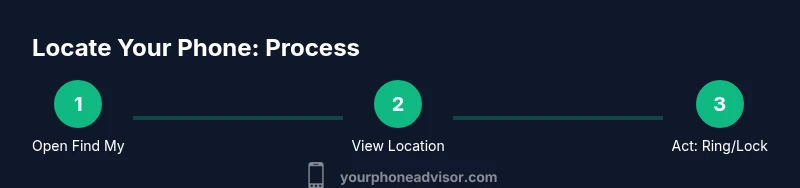
For iPhone users, open the Find My app, sign in with your Apple ID, and select your device to view its location on a map. For Android users, open Find My Device via a browser or app, pick your device, and see its location. Both services offer practical tools: Play Sound to locate the phone if nearby, Lost Mode to lock the device and display a contact message, and remote wipe if the device is irretrievably lost. If you see a location, act quickly to recover, then secure your accounts afterward.
When the phone is offline or location isn’t updating
If the device is powered off or has no recent location, you’ll still see last known location and the approximate area. Use this information as a starting point, but don’t rely on it alone. Check recent activity in your Google or Apple account for sign-in events, and examine trusted devices that may reveal proximity. If you’re in a high-risk situation, prioritize securing accounts first and plan for a data-protection strategy rather than chasing a potentially outdated coordinate.
Extending your search: family sharing, trusted devices, and carriers
Location sharing with family or trusted devices can extend your search radius. For Android, you can share your location with loved ones via Google Maps settings. For iPhone, Family Sharing and Share My Location enable others to see your device’s whereabouts. Carriers can also help by flagging the device as lost on the network, which may enable additional location data or temporary service holds. Use these options responsibly and always respect privacy considerations.
Data protection and next steps after recovery or if the phone remains missing
If you recover the device, immediately change critical passwords and review recent account activity. Revoke access to any apps that might expose sensitive data and enable two-factor authentication where possible. If the phone remains missing, contact your carrier to suspend service and consider a remote wipe to protect your information. Finally, report the loss to local authorities if theft or danger is involved and update your disaster-recovery plans for devices.
Tools & Materials
- Smartphone with internet access(Sign in to your Apple ID or Google account; keep location services enabled.)
- Another trusted device (computer or tablet)(Use it to access Find My services and account dashboards.)
- Accounts ready (Apple ID / Google account)(Ensure you can sign in and view location history.)
- Recent access to your account security settings(Helpful for enabling two-factor authentication and reviewing recent activity.)
Steps
Estimated time: 15-40 minutes
- 1
Verify prerequisites
Confirm that Find My iPhone or Find My Device is set up, location services are on, and your device is online. If you’re unsure, test these settings now while you’re not in a hurry.
Tip: Testing prerequisites during calm moments prevents delays during a loss. - 2
Open the appropriate locate tool
On iPhone, launch Find My and select your device. On Android, open Find My Device in a browser or app and select your device. Ensure you’re logged into the correct account.
Tip: Use a trusted device to avoid signing into a compromised session. - 3
Check the live location and last activity
Review the map for current or last known location. If you see a location, plan your safe retrieval path. Note the time of the last update for context.
Tip: If the location is ambiguous, check nearby places or known frequent spots. - 4
Ring or secure the device remotely
Use Play Sound (or Ring) to locate the phone if nearby. If you cannot retrieve it safely, enable Lost Mode or lock the device and display a contact method.
Tip: Lost Mode adds a temporary passcode and a message on the lock screen. - 5
Take protective steps for data
If the device is confirmed lost or stolen, sign out of accounts, enable two-factor authentication, and prepare for a remote wipe if needed.
Tip: Only wipe if recovery seems unlikely to prevent data exposure. - 6
Contact your carrier and authorities if necessary
Report the loss to your carrier to suspend service and consider filing a report with local authorities if theft is suspected or if there’s risk to personal safety.
Tip: Provide serial number or IMEI if available to speed up assistance.
Got Questions?
Can I locate a phone that is powered off?
If the device is off, you’ll typically see the last known location. You can enable the option to get notified when it comes online, but recovery will depend on the device coming back online.
If it’s off, you’ll usually see the last known location; you’ll get a notification when it’s back online.
What if the phone is offline for a long time?
Offline periods lessen location accuracy. Use any associated accounts to check sign-in activity and rely on last-known location as a starting point.
If offline for a while, rely on last known location and check account activity for clues.
Is this service available for both iPhone and Android?
Yes. iPhone uses Find My, while Android uses Find My Device. Both services provide live location, ring, and secure options.
Both platforms offer locate and secure features, though the apps differ.
What should I do if I believe the phone was stolen?
Immediately suspend services with your carrier, secure accounts, and file a police report if necessary. Remote wipe is an option if recovery is unlikely.
If stolen, suspend service, secure accounts, and consider a remote wipe.
Can I locate a phone for someone else?
Location services are tied to the owner’s account. You generally cannot locate another person’s phone without their explicit consent and access.
You usually need the owner’s consent and login details to locate their device.
Watch Video
What to Remember
- Act quickly using built-in locate tools.
- Verify prerequisites before a loss happens.
- If offline, use last-known location and nearby clues.
- Secure data and notify carriers if the device remains missing.