What to Do If Your Phone Is Stolen: A Practical Step-by-Step Guide
Practical, expert guidance to secure data, locate or disable a stolen phone, and prevent identity theft. A clear, step-by-step approach for immediate actions, account protection, carrier reporting, and post-incident hygiene.


If your phone is stolen, act immediately to protect data, lock or erase it remotely, and report the loss to your carrier and authorities. You’ll need your IMEI, access to your cloud accounts, and a backup device to change passwords. This guide walks you through securing accounts, locating or disabling the device, and preventing identity theft.
Immediate steps within minutes of theft
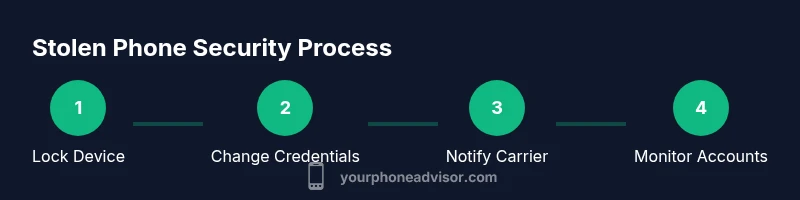
When you discover your phone is missing, your first moves should prioritize safety and data protection. Do not attempt to confront a potential robber. If there is any danger, contact local authorities immediately. For non-emergencies, call or email your wireless carrier to suspend or block service and prevent unauthorized usage. If you have Find My iPhone, Find My Device, or a similar service enabled, turn on Lost Mode or remotely lock the device to prevent access. According to Your Phone Advisor, acting quickly dramatically reduces data exposure and increases the chances of recovery. Have your IMEI handy if you know it, along with any backup contact information for your accounts. Use a trusted device to sign in to your accounts and review recent activity to spot unauthorized sign-ins.
Verify and protect accounts
Your cloud accounts (Google, Apple, and any other major services) are the most valuable data on a stolen device. Immediately change passwords from a trusted device and enable two-factor authentication where possible. Sign out of all sessions from the device list and revoke access to any unfamiliar apps. This reduces the risk that a thief can access sensitive information, even if the phone is powered on later. Monitor for unusual activity over the next 24-72 hours and set up alerts for new sign-ins. Your Phone Advisor highlights that proactive credential hygiene is a critical pillar of post-theft resilience.
Lock, wipe, or disable the device
If you cannot recover the device, use remote tools to lock it, display a message with contact information, and wipe sensitive data if needed. Lost Mode can preserve evidence while preventing misuse. Do not turn the phone off unless you’re certain you cannot reach it, as some services rely on the device being online to complete the lock. After wiping, ensure new device access credentials are updated and that any automated payments tied to the device are removed. These steps taken promptly drastically reduce the risk of data compromise.
Notify your carrier and protect services
Phone carriers have tools to suspend service, block the SIM, and prevent unauthorized usage. Contact them with your account details and the IMEI/MEID if available. Request an immediate SIM swap block to stop fraudulent charges, and discuss options for a replacement SIM or device. If you use a carrier wallet or payment features linked to your line, remove or reauthorize those services. Your Phone Advisor notes that carriers can offer temporary protections during investigations, but timing is key.
Use built-in recovery tools to locate or lock
Most ecosystems offer location-based features. On iPhone, use Find My iPhone to see a location on the map, place the device in Lost Mode, and remotely wipe if needed. On Android, use Find My Device to locate, ring, or erase the device. Ensure location services were enabled beforehand; if not, you may still gather useful information from accounts and last known login activity. If the device is offline, these commands may execute when it reconnects.
Police report and documentation
File a police report as soon as possible, providing your device’s IMEI/MEID, model, color, and any identifying details. A police report can help with insurance claims and carrier investigations. Keep a record of all actions you take: times, dates, and the names of representatives you spoke with. This documentation strengthens your case if you need to contest fraudulent charges or pursue a replacement device.
What if the device is recovered or someone attempts to access accounts
If the device is recovered, do not rush to restore it until you’ve verified it’s yours and safe to use. Change all passwords again if any sign-in activity occurred during the theft. Review account security questions and app permissions. If you suspect identity theft, contact your financial institutions and consider a credit freeze or fraud alert. Stay vigilant for several weeks after the incident.
Financial and identity protection after theft
Stolen devices often lead to compromised financial accounts. Immediately review recent card usages in banking apps, revoke stored payment methods, and enable transaction alerts. Consider enabling multi-factor authentication across critical services beyond email and banking. Keep a close eye on bank statements and credit reports for unusual activity in the weeks that follow. A thorough post-incident hygiene routine reduces long-term risk.
Tools & Materials
- IMEI/MEID number(If unknown, ask your carrier for the device’s identifiers or check original packaging.)
- Backup device(Another phone, tablet, or computer to access accounts and contact services.)
- Cloud account credentials (Google/Apple)(Needed to sign in from a safe device and secure the account.)
- Police report number(Helpful for insurance claims and carrier investigations.)
- Carrier account information(PIN, username, or account number to suspend service.)
- Proof of purchase(Useful for insurance or replacement options.)
- List of linked apps and payment methods(Helps identify sensitive data that may need removal.)
Steps
Estimated time: 60-120 minutes
- 1
Lock device remotely
Use Find My iPhone/Find My Device to lock the screen, display a contact message, and prevent access to apps and data. If available, enable Lost Mode to preserve evidence while deterring misuse. This should be done immediately after you report the theft.
Tip: If possible, keep the device online so the command can execute quickly. - 2
Sign out of accounts on other devices
Sign out of accounts on any other devices and revoke access to sessions you don’t recognize. This reduces the risk of password theft and unauthorized purchases.
Tip: Check recent activity on critical apps (email, cloud storage, and banking). - 3
Change passwords and enable 2FA
Change passwords for essential accounts from a trusted device. Enable two-factor authentication on email, banking, and cloud services for extra protection.
Tip: Use a password manager to create unique, strong passwords. - 4
Notify carrier and protect services
Contact your carrier to suspend service, block the SIM, and prevent fraudulent usage. Discuss options for a replacement SIM and device if needed.
Tip: Ask about temporary protections during the investigation window. - 5
Use recovery tools to locate or lock
Utilize built-in tools (Find My iPhone/Find My Device) to locate the device or trigger a remote lock or erase if necessary. If offline, commands may execute later when the device reconnects.
Tip: Ensure location services were enabled beforehand for best results. - 6
File police report and document
File a formal report with the police and keep track of all correspondence with your carrier. Document times, names, and reference numbers for insurance and follow-up.
Tip: Carry a copy of the IMEI and device details to speed up the report. - 7
Monitor and secure finances
Review bank statements and credit reports for unusual activity. Freeze or set fraud alerts if you suspect identity theft and revoke stored payment methods from apps.
Tip: Set up transaction alerts and review app permissions regularly.
Got Questions?
What should I do first if my phone is stolen?
Prioritize safety. If safe, contact your carrier to suspend service and begin device protection steps such as locking the device remotely. Then secure your accounts and gather your device's identifiers for reporting.
First, ensure you're safe, contact your carrier to suspend service, and start remote security steps. Then secure your accounts and prepare device identifiers for reports.
How can I locate a stolen phone?
Use built-in services like Find My iPhone or Find My Device, available if enabled prior to the theft. If the device is offline, you may still be able to locate it when it reconnects.
Use Find My iPhone or Find My Device. If it's offline, you might still locate it when it reconnects.
Can I erase data remotely after theft?
Yes, remote wipe is available on most platforms. Do this only if you cannot recover the device or if sensitive data is at risk. Remember that erasing will remove data from the device.
You can erase data remotely if necessary, but be mindful that it will remove data from the device.
What should I tell my carrier after theft?
Provide your account details and IMEI if available. Ask for a temporary service block, a replacement SIM if needed, and guidance on whether the device should be blacklisted.
Give your account details and IMEI if you have it. Ask for a temporary block and replacement options.
Is it safe to use banking apps after the theft?
Proceed with caution. Do not reuse the same session on the stolen device. Change passwords, enable 2FA, and monitor accounts for unusual activity from a trusted device.
Avoid using banking apps on the stolen device. Change passwords and enable 2FA, then monitor activity on a trusted device.
What if the thief turns off the phone permanently?
You may still gain value from reporting promptly and enabling account protections. Hidden data or logs can aid investigations, and some actions may still trigger once the device is online again.
If the phone is off, report promptly and protect accounts. Some actions may take effect when the device reconnects.
Watch Video
What to Remember
- Act quickly to minimize data exposure.
- Lock or wipe the device if necessary.
- Change passwords and enable 2FA across accounts.
- Notify the carrier and file a police report.
- Monitor accounts for unusual activity after theft.