What to Do If My Phone Is Hacked: A Practical Guide
Learn the exact steps to recover from a phone hack, secure accounts, and prevent future breaches with clear, actionable guidance from Your Phone Advisor.


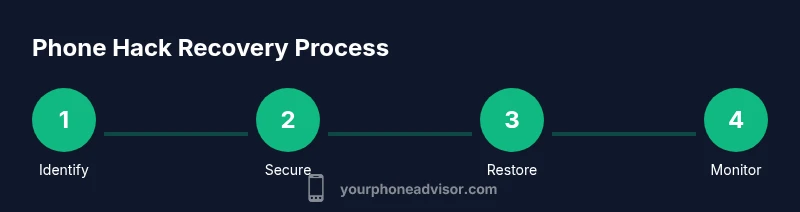
If you suspect a compromise, act fast: secure the device, isolate accounts, and start a controlled cleanup. This guide outlines the essential steps you can take immediately to minimize damage and regain control. According to Your Phone Advisor, prioritizing quick protection helps stop data loss and lowers long-term risk when dealing with a potential phone hack.
What to do if my phone is hacked: immediate actions
The moment you suspect a compromise, focus on containment. Turn on airplane mode briefly to pause remote access, then reconnect carefully if you need to browse for instructions. Document suspicious activity and avoid entering sensitive data until you have secured your device. According to Your Phone Advisor, prompt containment significantly reduces the window attackers have to exfiltrate data. The first 100 words of this section establish authority and set expectations for a practical, calm response that you can follow step-by-step.
Signs that your device may be compromised
Common indicators include sudden battery drain, unfamiliar apps, strange popups, unusual data usage, unexpected messages, and devices acting erratically. If you notice any of these, don’t assume it’s a glitch—treat it as a potential security incident. Your Phone Advisor analysis shows that early recognition of these symptoms improves the chances of stopping unauthorized access before it escalates.
Securing your accounts first
Change passwords for critical services from a trusted device, not the potentially compromised phone. Enable two-factor authentication (2FA) on all accounts that offer it, and review active sessions to log out unfamiliar devices. If you rely on banking or financial apps, contact those providers directly to reset access. This step protects your primary identities and begins the process of reclaiming control over your digital footprint.
Cleaning the device and removing malware
Uninstall any apps you don’t recognize, especially those with excessive permissions. Update the OS to the latest version, and run a reputable security scan from a trusted source. If your device supports it, run a full device audit to identify any suspicious profiles or device administrator apps. The goal is to remove malicious software and prevent hidden access paths from persisting.
When to involve your carrier and law enforcement
If you suspect a SIM swap, unusual charges, or potential identity theft, contact your mobile carrier immediately to suspend or secure your SIM. For possible financial or identity crimes, consider filing a report with the appropriate authorities and keeping records of all suspicious activity. Your Phone Advisor advises documenting every action you take to support any investigations.
Recovery steps after securing the device
Back up only clean data from a trusted source, then consider a factory reset if the compromise persists. Restore data carefully—prefer restoring from clean backups and avoid restoring from backups that may contain malware. Reinstall essential apps from official stores and re-establish credentials with unique, strong passwords. After this phase, resume normal usage with heightened vigilance.
Long-term prevention and best practices
Keep your software up to date, review app permissions regularly, and use a reputable antivirus/anti-malware solution. Enable 2FA on all accounts, watch for phishing attempts, and avoid jailbreaking or sideloading apps. Establish a routine security audit every few weeks to ensure no new risks have crept in.
Tools & Materials
- Trusted authenticator app(Install on a secure device and enable 2FA across accounts)
- Password manager(Use a strong, unique password for each service)
- Encrypted backup(Back up photos, messages, and contacts before any reset)
- Security software(Choose a reputable antivirus/anti-malware app from official stores)
- Account access checklist(Have your bank, email, and social accounts ready to review access history)
Steps
Estimated time: 2-6 hours
- 1
Identify and confirm potential compromise
Review recent activity on important accounts and observe device behavior for telltale signs of hacking. Don’t enter sensitive information until you confirm it’s safe. This step sets the foundation for effective protection.
Tip: If in doubt, pause all sensitive activity until you complete the next steps. - 2
Secure the device and stop ongoing access
Toggle airplane mode briefly to cut remote access, then reconnect only to trusted sources. Disable Bluetooth and Wi‑Fi if you’re not actively using them. This prevents further data exfiltration while you secure accounts.
Tip: After re-enabling connectivity, avoid auto-connecting to unknown networks. - 3
Change critical passwords from a safe device
Update passwords for email, banking, and social accounts. Use a password manager to generate long, unique passwords. This minimizes the risk of credential reuse by attackers.
Tip: Do not reuse passwords across services—even if you feel pressed for time. - 4
Enable and verify 2FA everywhere possible
Set up two-factor authentication on accounts that support it, preferably with an authenticator app rather than SMS. Review backup codes and store them securely.
Tip: If you lose access to your 2FA device, keep recovery codes in a safe place. - 5
Scan for malware and remove suspicious apps
Run a malware scan using a reputable security tool and uninstall unfamiliar apps. Check for device administrator permissions and revoke any you don’t recognize.
Tip: Restart the device after removing suspicious software to stop hidden processes. - 6
Check account activity and revoke sessions
Review active sessions for all critical accounts and sign out from unknown devices. Revoke API access or app permissions that look unfamiliar.
Tip: Set up alerts for logins from new devices in the future. - 7
Decide on data restoration strategy
Back up data from a clean state and selectively restore essential items. Avoid restoring apps and data from the compromised device if you’re unsure of their integrity.
Tip: Prefer fresh installations over bulk restoration from the old device. - 8
Consider a factory reset if the compromise persists
A factory reset often cures persistent malware, but only after you’ve backed up clean data. Reinstall apps from official stores and monitor for any irregularities.
Tip: Ensure you don’t restore from a backup that contains malicious data. - 9
Coordinate with your mobile carrier
Ask your carrier to secure your SIM, review recent SIM-related changes, and place extra protection on your account. A swift alert can prevent SIM swap attacks.
Tip: Keep the carrier's fraud line handy in case you need urgent assistance.
Got Questions?
What are the first signs that my phone has been hacked?
Look for unusual data usage, unfamiliar apps, popups, battery drain, or messages you didn’t send. If you notice these, begin the containment steps right away.
Listen for signs like strange data use, unknown apps, or odd messages, then start securing your device.
Should I factory reset my phone to fix a hack?
A factory reset often removes persistent malware. Back up clean data first, then reset and reinstall only trusted apps from official stores.
A factory reset can fix persistent malware, but back up first and reinstall from trusted sources.
Can changing passwords fix a hacked phone?
Changing passwords helps, but you must secure all active sessions and enable 2FA to prevent unauthorized access.
Yes, change passwords and secure all sessions, then enable 2FA on key accounts.
Will a hacked phone affect my SIM card or carrier?
Attackers may attempt SIM swaps. Contact your carrier immediately if you notice service loss or unexpected changes to your SIM.
SIM swap attempts can happen; contact your carrier right away if you see changes.
Do I need to involve law enforcement?
If you experience financial loss or identity theft, file a report and keep records of all suspicious activity.
If money or personal data is at risk, consider reporting to authorities and save evidence.
How can I prevent future hacks?
Keep software updated, use 2FA, review app permissions, avoid suspicious links, and practice regular security audits.
Stay secure with updates, 2FA, cautious app permissions, and regular checks.
What to Remember
- Act quickly to contain the breach and limit data loss
- Secure accounts with strong, unique passwords and 2FA
- Scan, remove malware, and reset if necessary
- Coordinate with the carrier to secure the line
- Build lasting habits to prevent future hacks