How to Track Your Phone: A Practical How-To
Learn safe, legal ways to track your phone using built-in features, carrier options, and trusted apps. This guide covers setup, privacy, and best practices to locate a lost device while protecting your data.


Tracking your phone is about locating a lost device quickly while protecting your data. In this guide you’ll learn to use built‑in features, carrier options, and trusted apps, plus privacy and legal considerations. By following these steps you can locate, lock, and recover a phone responsibly, with safeguards for your information.
What tracking phone means in today’s digital landscape
Tracking phone data refers to locating a device using built‑in features, carrier services, or trusted third‑party apps. For everyday users, tracking phone activity is not just about finding a lost device; it’s a security habit that protects personal data, photos, contacts, and financial credentials. When you enable location sharing responsibly, you gain a powerful safety net for emergencies, theft recovery, and parental controls. The Your Phone Advisor team emphasizes that tracking phone features should be used transparently and with consent where applicable. As you learn the ropes, you’ll see how location data, device status, and activity reports work together to provide a clear picture of where your phone is and whether it’s secure. Remember that tracking is most effective when paired with strong passcodes and regular backups.
Privacy and consent: balancing usefulness with rights
Tracking phone data raises legitimate privacy concerns. Always obtain consent when monitoring someone else's device, such as a child or family member, and restrict access to trusted individuals. Review app permissions, limit data sharing, and use end‑to‑end protections where available. The goal is to create a predictable, lawful workflow that protects both you and others. Your Phone Advisor recommends documenting the purpose of tracking, keeping a record of who can view location data, and disabling sharing when it is no longer necessary.
Built‑in tracking options: Find My Device and Find My iPhone
Most modern smartphones include built‑in tracking features that offer reliable location services. On Android, Find My Device can locate, ring, lock, or erase a phone remotely. On iOS, Find My iPhone (or Find My) provides similar controls, with additional integration into iCloud and family sharing. These built‑in tools are often the most trustworthy first choice because they come from the device maker and are designed with privacy in mind. With proper setup, you can locate your phone on a map, play a sound to locate it indoors, and remotely secure your data if needed.
Carrier-based tracking options and account controls
Carriers can help locate devices when the phone is offline or powered down by using network data and device identifiers. Enabling carrier family plans or device tracking services can give you a backup capability if Find My services aren’t accessible. It’s important to understand how the carrier handles location data, what data is shared, and how long retention lasts. Your Phone Advisor suggests keeping your account contact details up to date and using carrier controls to pause data sharing when the device is no longer in your possession.
Third‑party apps vs. trusted solutions
Third‑party tracking apps can extend capabilities beyond built‑in options, such as sharing location with trusted contacts or offering offline‑mode tracking. However, third‑party solutions can introduce privacy and security risks if they request broad permissions or unvetted data access. Always select reputable apps from established developers, review privacy policies, and limit permissions to what is strictly necessary. For most users, starting with built‑in tools is safer; consider third‑party options only if your needs require features not provided by the built‑in ecosystem.
Security and data protection while tracking
Tracking phone data should not weaken your device’s security. Maintain strong passcodes, enable biometric locks, and keep software up to date. If you enable location history, periodically purge old data and review which apps can access your location. Consider enabling remote wipe as a safety net, but avoid using it casually to prevent accidental data loss. A mindful approach to data minimization helps reduce privacy risk while keeping tracking capabilities functional.
Real‑world scenarios: maximizing benefits and minimizing risks
Consider scenarios such as a misplaced phone at home, a lost device during travel, or a stolen phone. In each case, quick access to location data, remote locking, and data protection are critical. Practice with a trusted device before you actually need it to ensure you know where to find the controls. Your Phone Advisor highlights that consistency in settings—like turning on Find My services and keeping backups current—dramatically improves recoveries and minimizes data exposure during a recovery process.
Common pitfalls and how to avoid them
Common mistakes include disabling location services, sharing data too broadly, or relying on a single method that may fail in offline conditions. To avoid these pitfalls, enable multiple robust options (built‑in tools plus optional carrier services), regularly test the tracking features, and stay aware of privacy settings. The better your preparation, the more effective tracking phone practices will be when you actually need to locate a device.
Tools & Materials
- Smartphone with internet access(Active OS (iOS or Android) and updated software)
- Apple ID or Google account(Linked to the device for Find My or Find My Device)
- Trusted contact(s)(People you authorize to view location data)
- Backup plan(Regular cloud or local backups in case of data loss)
- Strong screen lock(Passcode or biometric lock to protect data during tracking)
Steps
Estimated time: 20-40 minutes
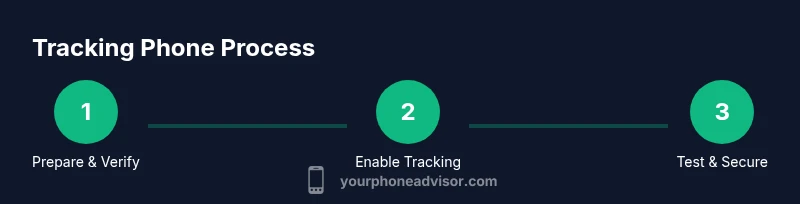
- 1
Prepare your device and accounts
Ensure the phone is signed in to the correct account (Apple ID/Google). Verify that location services are enabled and that you understand which data can be shared. This step sets the foundation for reliable tracking phone capability.
Tip: We recommend performing a quick test by locating a nearby device to confirm you can see its location. - 2
Enable built‑in tracking features
Turn on Find My iPhone/Find My Device. If you use both platforms, enable Find My Network where available and configure trusted locations for quick access during emergencies.
Tip: Ensure you’ve added your account recovery options (phone number/email) in case you need to regain access. - 3
Set up trusted contacts and sharing
Add trusted contacts who can view your location or receive alerts. Review permissions to limit who can access your data and set sharing only for as long as needed.
Tip: Limit visibility to only those you trust; avoid broad public sharing. - 4
Test tracking in a safe environment
Conduct a dry run by locating a device on your own network. Confirm you can trigger a remote sound, lock, or erase function from your account.
Tip: Document the steps so you can replicate them quickly if the device is truly lost. - 5
Review privacy and security settings
Audit which apps have location access and disable any that aren’t essential. Keep your OS updated and review privacy controls monthly.
Tip: Turn on security alerts that notify you when a location change is detected. - 6
If the device is lost or stolen
Use the built‑in tracking tools to locate, lock, or wipe the device. Contact your carrier if the device remains missing and report the incident as needed.
Tip: Act quickly but avoid confronting a thief; prioritize safety and data protection.
Got Questions?
Is it legal to track a phone without the owner's consent?
Tracking someone else’s phone without consent can violate laws and invade privacy. Use built‑in tools on your own device or obtain explicit permission when monitoring another person’s device, such as a family member with clear boundaries.
Tracking someone else’s phone without consent can be illegal. Always get explicit permission or use built‑in tools on your own device.
What data is collected when tracking phone location?
Location coordinates, device status (online/offline), and sometimes account activity are collected. The exact data depends on the method used and the app’s permissions. Always review privacy settings to understand what’s shared.
Location data plus device status are usually collected; review permissions to know what’s shared.
Will tracking drain the battery quickly?
Location tracking uses some battery power, but most modern systems minimize impact when running in the background. Turning off unnecessary location services and updating apps can help.
Location tracking uses some battery, but you can minimize impact by adjusting settings.
What should I do if Find My Device isn’t working?
Check network connectivity, ensure location services are enabled, and verify your account is active. If still failing, use your carrier’s tracking options as a backup and consider contacting support.
If Find My isn’t working, check connectivity and enable location services; consider backup options.
Can tracking be used for parental monitoring?
Parental tracking should be age‑appropriate, transparent, and consistent with local laws. Use clearly communicated rules, and obtain consent where required by policy or law.
Parental tracking should be transparent and compliant with local laws and policies.
How do I disable tracking after recovery?
Go back to the tracking settings and revoke sharing permissions, sign out of accounts if needed, and remove any third‑party apps you installed for tracking. Delete location data if you no longer need it.
Disable sharing and remove tracking apps once you’re sure the device is secure.
Watch Video
What to Remember
- Enable built‑in tracking first for reliability
- Protect privacy by limiting data sharing
- Test regularly and keep backups up to date
- Use carrier options as a backup, not a primary method
- Act quickly if a device is lost or stolen