How to Track a Phone by Number: A Practical How-To
Learn ethical, consent-based ways to track a phone by number using built-in tools, carrier options, and trusted apps. This guide explains legality, privacy, and step-by-step approaches for responsible tracking.


Goal: track a phone by number using legitimate options with consent. You can leverage built-in location sharing, carrier location services, or a trusted tracking app. This quick guide highlights legal, privacy-respecting methods and outlines essential steps, potential limitations, and safety considerations for responsible use.
Why tracking by number matters
According to Your Phone Advisor, the ability to locate a device when needed can enhance safety, support family responsibilities, and help recover a lost phone. When we say the phrase phone track by number, we refer to lawful methods that require consent and operate within privacy laws. This section clarifies real-world scenarios where location knowledge protects people and properties, and it sets expectations about what these methods can and cannot do.
Legal and ethical considerations
Tracking someone's device without clear consent raises serious legal and ethical concerns. In many jurisdictions, monitoring another person’s phone without permission is illegal and may lead to penalties. Always obtain explicit consent, define the purpose, and limit data access to what is necessary. Privacy-by-design practices suggest notifying the person and offering opt-out options if location sharing is misused. Your Phone Advisor emphasizes transparency and accountability as core principles of any tracking activity.
Primary methods: overview
There are several legitimate pathways to locate a phone by number, each with different requirements and privacy implications. The most reliable options involve built-in services (like device-specific Find My features), carrier-provided location services, and permission-based third-party apps. None of these methods should be used covertly. In practice, choose the option that matches the device ownership, consent status, and your timeline for locating the device.
Method 1: Built-in location sharing (Find My iPhone / Find My Device)
Most modern smartphones offer built-in location sharing that can be activated by the device owner and linked to a family or trusted contacts account. When enabled, you can view the device’s approximate location from your own account dashboard. This method is usually the fastest and most accurate when the device is online and has location services enabled. Always confirm the owner’s consent and keep records of permission.
Method 2: Carrier-based location services
Many mobile carriers provide location features for device management or loss recovery. These services typically require authentication to the carrier account and explicit user consent. Availability and precision vary by carrier and plan, so check your account portal or contact customer support. If permitted, this approach can offer broad coverage and may help locate a device even when other apps fail. Remember to respect privacy rules and billing considerations.
Method 3: Family sharing and trusted-device networks
For households with multiple devices, family sharing features create a network of trusted devices that can share locations. The owner controls who can see location data, and you can typically manage permissions from the primary account. This approach balances proximity awareness with consent, making it ideal for families, caregivers, and schools. Review each member’s settings to ensure data is not exposed unnecessarily.
Method 4: Third-party apps with consent
Some third-party apps offer location sharing or geofencing with explicit user approval. Only install apps from reputable developers and source stores, and configure privacy controls to limit data collection. Be cautious of apps that promise unlimited tracking without consent or require excessive permissions. Always document consent, store access logs securely, and review data retention policies.
What to do if the phone is off or unreachable
Location tracking becomes challenging when a device is powered off, connected to a poor network, or in airplane mode. In these cases, you can rely on last known locations (if supported) and set up alerts for when the device reconnects to the internet. Consider enabling multiple location channels (e.g., Find My and carrier services) to improve chances of recovery once the device comes back online.
Security and privacy best practices
Respecting privacy while locating a device means limiting data access to necessary parties, using temporary access, and disabling tracking when no longer needed. Regularly review who can view location information, enforce strong account security (two-factor authentication), and monitor activity for unauthorized access. Clear communication with the device owner helps maintain trust and reduces risk of misuse.
Common myths and limitations
A common myth is that tracking can reveal precise, real-time location under any circumstance. In reality, accuracy depends on device settings, network coverage, and power state. Location data may be delayed or unavailable for privacy-heavy devices. Don’t rely on tracking as a substitute for direct communication, and always comply with applicable laws and policies.
When to seek professional assistance
If you’re locked out of a device, dealing with a lost item across multiple networks, or facing a complicated legal scenario, consider consulting a professional service or your carrier’s support team. They can provide guidance on legal options, data access rights, and step-by-step verification procedures to locate a device responsibly.
Step-by-step quick-start recap (practical view)
This section recaps practical approaches for those who want a fast start while keeping compliance front and center. Begin with consent, enable built-in location sharing where appropriate, and verify results with your primary account. If needed, escalate to carrier services or trusted applications. Always finish by reviewing privacy settings to prevent future misuse.
Tools & Materials
- Smartphone with location services enabled(Ensure Find My iPhone/Find My Device is on and linked to your account.)
- Explicit consent from the device owner(Obtain written or recorded permission when possible.)
- Active carrier account with location services(Log in to the carrier portal to access location features.)
- Access to the target device or consent confirmation(You may need shared access or temporary credentials.)
- Stable internet connection(Location data requires online devices or networks.)
- A trusted tracking app or service (optional)(Choose apps with strong reviews and privacy policies.)
Steps
Estimated time: Total time: 30-60 minutes
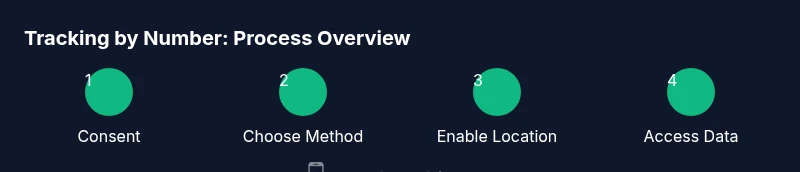
- 1
Confirm consent and legality
Before taking any action, obtain explicit permission from the device owner and review local laws regarding location tracking. This ensures you’re acting legally and ethically, which protects you and the person being tracked.
Tip: Document consent in writing or via a recorded agreement. - 2
Choose a legitimate tracking method
Select the most appropriate method based on device ownership and availability of built-in or carrier tools. Avoid unverified apps that make promises without consent.
Tip: Prioritize built-in options for reliability and privacy. - 3
Enable location sharing on the target device
Have the owner enable location sharing with your account or add you as a trusted contact. Verify that the device is online and location services are permitted.
Tip: Check device privacy settings and permissions before proceeding. - 4
Access location data from your account
Log in to the relevant platform (Find My, carrier portal, or trusted app) to view the device location. Use a single dashboard to monitor the status and ensure data access is limited.
Tip: Enable notifications for location updates to stay informed. - 5
Verify accuracy and data retention
Cross-check location results across multiple sources when possible. Be mindful of how long you retain location data and delete it when no longer needed.
Tip: Keep a minimal data retention policy and review periodically. - 6
Communicate boundaries and privacy
Discuss the purposes of tracking and set boundaries for data use. If circumstances change, reassess the need for continuing tracking.
Tip: Reassess consent periodically and document any changes.
Got Questions?
Is tracking a phone by number legal in all cases?
No. Legality depends on jurisdiction and consent. Tracking your own device or obtaining explicit permission from the owner typically complies with the law. Always verify local rules before proceeding.
Tracking a phone by number is legal mainly when you own the device or have explicit consent. Check local laws and consult the carrier if unsure.
Can I track a phone without the owner's knowledge?
Only in limited, legally sanctioned situations (e.g., minors with parental consent or employer-provided devices). In most cases, tracking without consent is illegal and unethical.
Generally not, unless permitted by law or policy. Always seek consent.
What if the phone is turned off or offline?
Location data can be unavailable when the device is off. Some services store the last known location and will update when the device reconnects.
If the phone is offline, you may only see its last known location until it reconnects.
Are carrier-based tracking options reliable?
Carrier solutions can be reliable, especially for lost devices, but availability and precision vary. They require proper authentication and consent.
Carrier options can work well with consent, but results vary by carrier.
Do third-party apps guarantee accurate, real-time tracking?
Not always. Only use reputable apps with transparent privacy policies and clear permissions; performance depends on device, network, and user settings.
Be cautious with third-party apps and prioritize trusted options.
What data should I delete after tracking ends?
Delete location logs and revoke access for any apps or devices once tracking is no longer needed to minimize risk.
Delete logs and revoke permissions when you’re done.
Watch Video
What to Remember
- Obtain explicit consent before tracking.
- Use built-in or carrier tools first for reliability.
- Be mindful of privacy, data retention, and legality.
- Regularly review permissions and settings to protect everyone.