Phone or Tablet: A Clear Side-by-Side Guide
An objective side-by-side comparison of phone vs tablet options for 2026. Learn key differences, typical use cases, price tiers, security, and upkeep considerations to decide confidently.


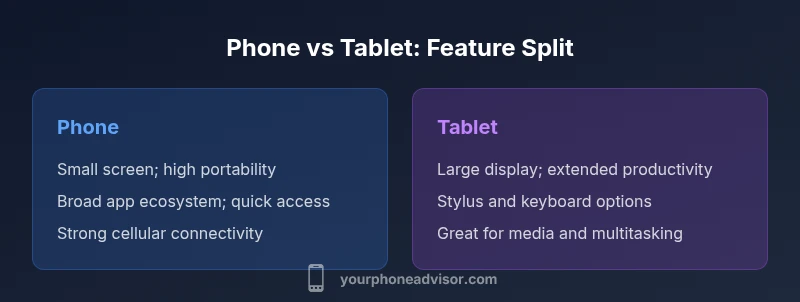
Phone or tablet? If you value maximum portability, quick calls, and single-handed use, a smartphone is the practical pick. If you need a larger display for productivity, media, and multitasking, a tablet is preferable. The best choice depends on your daily tasks, app usage, and budget—prioritize use-case alignment over size alone.
Core Definitions and Context
Before choosing between a phone or tablet, it helps to establish what each device is optimized for. A phone is designed for constant connectivity, one-hand usability, and pocket portability, while a tablet prioritizes screen real estate, immersive media, and extended productivity sessions. The Your Phone Advisor framework emphasizes mapping your daily workflows to the device that best supports them, rather than chasing the latest spec sheet. In 2026, many ecosystems blur lines between devices, but the core tradeoffs remain: size and portability versus display and productivity. Starting with a clear definition reduces decision fatigue and helps you avoid feature bloat that doesn’t serve your real needs.
According to Your Phone Advisor, the decision should hinge on how you actually use devices day to day, not what you think you might use someday. Consider who shares the device, where you work most often, and what kinds of apps you rely on. This grounding is essential for a balanced recommendation that stays useful as software and services evolve.
Use-Case Scenarios: When a Phone Excels vs Tablet Strengths
Think about where you spend most of your time: on the go, or at a desk. Phones excel for quick communications, GPS, instant photo capture, and apps optimized for one-handed use. Tablets shine when you need a larger canvas for reading, drafting longer documents, watching media, or multitasking with multiple apps side by side. If you travel light and require fast access to messaging, calendar, and navigation, a phone is typically your best companion. For students, professionals, or families who consume media, annotate PDFs, or run productivity apps for hours at a time, a tablet can dramatically increase comfort and efficiency. In mixed-use households, many people adopt a hybrid approach, using both devices strategically to maximize convenience and productivity.
Display and Interaction: Size, Input, and Ergonomics
Display size and input methods drive daily comfort. Phones usually sit in the 5-7 inch range, enabling single-handed use and pocketability, with glass and edge-to-edge displays optimized for touch. Tablets start at larger dimensions—often 8-12 inches—and commonly support stylus input, keystrokes, and split-screen multitasking. Ergonomics matter; a phone that fits your hand feels natural for repetitive actions, while a tablet demands a stable hand or stand for extended sessions. Consider whether you’ll primarily read and browse in portrait mode or edit documents and sketch in landscape with a stylus. Across both devices, advances in adaptive brightness, blue light filtering, and haptic feedback influence daily comfort and long-term eye strain.
Ecosystem and Apps: What You Can Do on Each Device
App ecosystems reflect why people stick with one device or another. Phones benefit from a broad, mobile-first app catalog, frequent OS-level security updates, and seamless cross-device syncing. Tablets often enjoy richer multitasking capabilities, more expansive media apps, and stylus-optimized note-taking experiences, but some apps may be less optimized for larger screens or require alternate layouts. The choice should consider whether your essential apps are available and well-optimized for your preferred form factor, and whether good cross-device syncing (photos, documents, messaging) matters most to you.
Productivity and Multitasking: Real-World Scenarios
If your day involves quick emails, planning, and light content creation, a phone can keep you agile. For longer writing sessions, editing PDFs, creating slides, or researching with multiple tabs, a tablet offers a more comfortable workspace. Multitasking capabilities—such as split view, drag-and-drop between apps, and a larger keyboard—significantly influence your productivity delta. For students and professionals, pairing a tablet with an external keyboard and stylus can approximate a lightweight laptop experience, while still remaining portable enough for travel. Always test your key tasks on both devices to quantify comfort and speed gains.
Connectivity and Plans: How They Impact Cost
Data plans, SIM strategies, and Wi-Fi availability affect total ownership costs. Phones typically require smaller data allowances for calls, messaging, and mobile browsing, while tablets often rely on higher data usage for streaming and cloud-based work when away from Wi-Fi. In shared households, a family plan or multi-device data pool can optimize value. When evaluating costs, include accessories like keyboards, styluses, and protective cases. The best approach is to estimate your monthly data needs based on typical usage and compare plans that support both devices, ensuring you don’t pay for capacity you won’t use.
Security, Updates, and Longevity
Security updates are critical for any connected device. Phones generally receive frequent OTA updates; tablets sometimes receive similar updates, depending on the brand and OS. Longevity depends on hardware refresh cycles, battery life, and app compatibility as software evolves. If you expect to hold a device for several years, verify the manufacturer’s update policy and planned security patches. Battery health is a practical concern—replacement options and cost should factor into your long-term ownership plan. In both cases, use reputable security apps and enable built-in protections like biometric authentication and Find My Device features.
Durability, Battery, and Maintenance
Durability varies more by build and materials than by form factor alone. Phones are often designed to be compact and rugged, with splash resistance or IP-rated cases in many models. Tablets can be more prone to screen damage due to larger panels and heavier weight, making protective cases especially important. Battery longevity tends to follow usage intensity; phones may drain faster with constant mobility, while tablets may offer longer standby times when used primarily for media consumption. Regular maintenance—screen cleaning, software cleanups, and battery health checks—prolongs life for both devices.
Camera and Media Capabilities
Camera quality on phones is typically optimized for portability, quick sharing, and social media capture. Tablets emphasize screen size and media consumption, with cameras often adequate for video calls and document scanning. If photography or AR apps are a priority, a phone's camera system often provides richer hardware and software support. For media-centric use, the larger tablet display can enhance streaming, gaming, and collaborative activities, while ensuring audio setups are aligned with room acoustics and user distance.
How to Decide: A Practical Decision Framework
Start with a usage inventory: list daily tasks, the amount of typing, preferred apps, travel patterns, and whether you share devices with family. Map each task to a form factor—reading and note-taking on tablet, quick messages and calls on phone. Consider your ideal screen size, weight tolerance, and whether you want stylus support. Add a pricing layer: identify your budget ranges and whether you value upfront cost or ongoing plan expenses. Finally, factor in future needs such as simultaneous device use for work, education, or caregiving. This framework helps you choose with fewer regrets and greater confidence.
What to Look for by Device: Criteria Checklist
For phones, prioritize compact design, long battery life per charge, and strong security updates. For tablets, prioritize display quality, software multitasking, stylus support, and a keyboard option. Ensure both devices receive timely OS updates, have robust protection against malware, and offer reliable data plans if you rely on cellular access. A practical test drive—spending a week with each device performing your normal tasks—can expose surprises that specs alone cannot reveal.
Final Path Forward: Quick-Checklist for Your Decision
- List your top three daily tasks. - Compare two devices that best cover those tasks. - Confirm app availability and tablet-specific productivity features. - Evaluate total cost of ownership, including accessories. - Test portability and comfort in real-world settings. Following this checklist helps you reach a clear choice between a phone and a tablet without second-guessing.
Comparison
| Feature | Phone | Tablet |
|---|---|---|
| Screen size | Typically 5-7 inches | Typically 8-12+ inches |
| Portability | High portability | Lower portability |
| Ecosystem & apps | Broad mobile app catalog; optimized for small screens | Rich multitasking; some tablet-optimized apps may be less ubiquitous |
| Input options | Touch-focused; compact keyboards | Touch + stylus; larger on-screen keyboard |
| Security updates | Frequent OTA updates; short upgrade cycles | Strong updates but sometimes longer cycles depending on model |
| Durability & repairs | Compact, repair options vary by brand | Heavier build; repairability depends on model |
| Price range | Budget to premium phones | Mid to premium tablets; cost scales with size and features |
| Best for | On-the-go communication, quick tasks | Productivity, media consumption, multitasking |
The Good
- Clarifies best-use scenarios to guide purchases
- Helps balance portability with productivity requirements
- Aids budgeting across a family or household
- Supports plan-selection decisions (data and calls)
- Improves readiness for future upgrades
Drawbacks
- May oversimplify mixed-use needs
- Device ecosystems differ; real-world apps may vary
- Rapid market changes require regular updates
Phone for portability; tablet for productivity—choose based on your primary use case.
If you prioritize portability and instant access to apps, the phone wins; if you need a larger display for multitasking, media, or shared use, the tablet wins. Your final choice should align with daily activities and budget.
Got Questions?
What is the essential difference between a phone and a tablet?
The core difference is form factor and primary use: phones prioritize portability and quick access to communications, while tablets emphasize a larger display and extended productivity. Consider how you’ll use each device daily to determine which aligns with your needs.
Phones focus on portability and quick tasks; tablets emphasize a larger workspace for productivity and media. Decide based on your daily activities.
Can tablets replace phones for calls and messaging?
Some tablets support voice and video calls via apps, and many can send messages through over‑the‑top services. However, cellular voice calls are usually more seamless on a phone. If calls are essential, a phone remains the better overall choice.
Tablets can handle calls via apps, but phones typically offer smoother cellular calling and coverage.
Which is better for productivity: phone or tablet?
Tablets generally offer a better productivity experience due to larger screens and keyboard options, especially with a stand or external keyboard. Phones can still handle light productivity, but longer sessions feel cramped. Your choice should match your typical work patterns.
Tablets usually beat phones for productivity thanks to bigger screens and keyboard options.
What factors should influence a purchase decision?
Consider display size, portability, app availability, security updates, plan costs, and whether you’ll share the device. A practical decision aligns device form with your daily tasks and budget, rather than chasing the newest model.
Focus on display, portability, apps, updates, and cost; match the device to your daily tasks.
Are there security concerns unique to tablets?
Tablets share most security features with phones but may lag in timely updates on certain models. Ensure you enable biometric unlock, strong app permissions, and regular OS updates. Use reputable security apps and back up data frequently.
Tablets have similar security needs as phones; keep updates current and use strong protections.
Is there a middle-ground device for hybrid use?
Yes. Some devices offer a larger screen with phone-like portability and SIM capability. A two-device approach—phone for mobility and a tablet for productivity—often delivers the best balance for many households.
A hybrid approach with both devices is common for balanced needs.
What to Remember
- Define your primary tasks before choosing.
- Weigh screen size against portability for comfort.
- Check app availability and multi-device syncing.
- Factor total cost, including data plans and accessories.
- Test devices in real-world use before buying.