Phone is Better or tab: Which Device Wins in 2026?
An analytical side-by-side guide comparing phones and tablets on screen size, portability, apps, security, value, and use-case scenarios to help you decide.


TL;DR: For everyday tasks, a phone is typically better for portability and quick access, while a tablet excels at reading, streaming, and productivity on a larger screen. If you value one-handed use and on-the-go security, choose a phone; if screen size and multitasking at a desk matter most, a tablet often wins. The choice depends on your daily tasks and budget.
Is there a clear winner? The phone vs tab question explained
The central question in 2026 is not a simple yes or no, but a balance of daily tasks, context, and budget. When people ask the question, 'phone is better or tab', they’re really weighing portability against screen real estate. Your choices depend on where you spend most of your time: commuting, small-group meetings, or extended reading sessions. In practical terms, a phone shines when you need instant access, biometric security, and a pocketable device that travels with you. A tablet excels when you want immersive media, easier multitasking, and a larger canvas for notes or design work. Throughout this guide, we’ll unpack these dimensions and offer a decision framework that respects Your Phone Advisor’s emphasis on security, upkeep, and long-term value.
Screen size and ergonomics: matching tasks to form factors
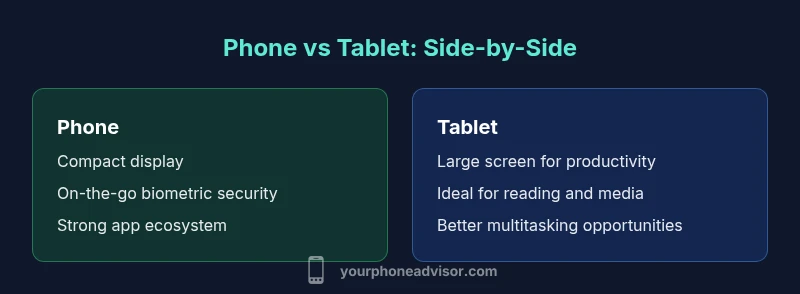
Screen real estate is the most obvious differentiator between a phone and a tab. Tablets typically offer 10–13 inch displays with stylus support, which makes reading, drawing, and multi-window tasks feel natural. Phones, by contrast, sit in the 4.7–6.7 inch range and are designed for single-hand control, one-handed typing, and rapid swipes. The ergonomic sweet spot depends on your daily rhythm: long reading sessions or complex editing often benefit from a tablet, while quick checks, messages, and navigation are more comfortable on a phone. When the question comes up—phone is better or tab?—the answer usually lands on how easily you can carry and use the device during your typical day.
Portability, battery life, and charging habits
Portability is not just about weight; it’s about how consistently you can reach for a device without friction. Phones are designed to slip into pockets, purses, or a car cup holder for constant on-the-go use. Battery life on phones is generally built around a full-day pattern for mixed tasks, with fast charging making up for heavy days. Tablets, while excellent for at-desk productivity and media, tend to require more frequent charging when used away from a plug due to larger screen brightness and higher power demands. Your decision should balance the urge for all-day usage against the convenience of recharging. When you ask the question—phone is better or tab—consider where you usually recharge and how often.
App ecosystems, software features, and multitasking
A phone’s app ecosystem prioritizes mobile-optimized experiences, quick actions, and portability. Tablets often offer expanded multitasking features—split view, drag-and-drop, and stylus-friendly note-taking—that can boost productivity. The choice hinges on how you work: if most apps you rely on are designed for mobile, a phone may be sufficient; if you frequently juggle documents, presentations, and long-form media, a tablet’s larger canvas can be a productivity multiplier. The reality is that both platforms continuously improve, but the critical factor remains whether your most-used apps scale well to the larger display and whether your preferred input method (typography vs. stylus) aligns with your tasks.
Cameras, media consumption, and video calls
For photos and quick video calls, phones have the advantage of compact cameras that are always with you and optimized for a variety of lighting conditions. Tablets can stream media more comfortably and offer a cinema-like viewing experience, but camera quality and video capture features are often secondary to what a phone provides in everyday moments. When considering color accuracy, stabilization, and dynamic range, phones typically lead for on-the-go content, while tablets excel for long-form media consumption and collaborative viewing with others.
Security, privacy, and longevity
Security on mobile devices is a function of hardware features (biometrics, secure enclaves) and software updates. Phones generally receive frequent OS updates and stronger biometric options due to higher user turnover. Tablets share the same security frameworks but often have longer update cadences depending on the brand and model. Longevity is influenced by how you maintain the device, the reliability of the charger, and how quickly you replace aging accessories. For the overarching question of phone is better or tab, security and longevity often tip toward phones in daily life because of portability and constant accessibility.
Cost, value, and total ownership over time
Initial cost is only part of the story. Phones typically have lower up-front prices at entry-level tiers, but tablets can offer more life on a single screen experience if you assume a multi-year horizon. Total ownership depends on how you factor accessories, protection plans, and software subscriptions. If you plan to upgrade every two to three years, a phone cluster with a reliable OS update track can deliver better long-term value. If your priority is a large, flexible workspace for years, a tablet could be the better investment.
Practical decision guide: 7 questions to answer
- What is my primary task each day—communication, productivity, or media consumption? 2) Do I value one-handed usage or a larger display for work? 3) Where do I spend most of my time: commuting, travel, home, or office? 4) How important is app availability and mobile optimization for my most-used tasks? 5) Do I need stylus support for notetaking or design work? 6) What is my budget for the device and ongoing services? 7) How important are security features and software updates to me? Answering these questions will help you decide whether the phone is better or tab for your situation, and Your Phone Advisor emphasizes practical up-front planning to prevent buyer's remorse.
Common myths and realistic expectations
A frequent myth is that larger always equals better for productivity. Reality shows that many users pair a compact phone with cloud-based tools to stay productive on the go, while others prefer a tablet for at-home work. Another misconception is that security is weaker on tablets; in truth, both platforms benefit from strong biometric protection and regular OS updates when you stay within the ecosystem you trust. Understanding your personal workflow is the best way to bridge the gap between the popular notion of phone is better or tab and your actual needs.
Comparison
| Feature | Phone | Tablet |
|---|---|---|
| Screen size | 4.7-6.7 inches | 10-13 inches |
| Portability | Pocketable, lightweight | Less pocketable, heavier |
| Battery life (typical intensive use) | Day-to-day use varies by task | Extended sessions with power-intensive apps |
| App ecosystem & multitasking | Strong mobile app focus | Better for multitasking & reading |
| Camera quality | Integrated cameras with strong light handling | Cameras depend on device; often supplementary |
| Productivity features (stylus, keyboards) | On-device keyboards; faster texting | Stylus support commonly stronger; multi-window features |
| Cost & value | Lower upfront cost for entry phones | Higher upfront cost but components last longer in some cases |
| Security & privacy | Biometric options; frequent OS updates | Same OS lineage; updates depend on vendor |
The Good
- Phone portability enables constant connectivity and quick use
- Biometric security and regular updates on phones
- Strong, widely supported mobile app ecosystems
- Always-on network access for calls, messages, and navigation
- Compact devices suit travel, commuting, and emergencies
Drawbacks
- Small screens can hinder productivity and reading comfort
- Camera and speaker experiences may be limited on tablets designed primarily for media
- Tablets can be bulkier for daily carry and one-handed use
- Total cost may rise with accessories and protective cases
Neither device is universally better; choose based on your daily tasks.
If portability and quick access define your day, a phone is the safer bet. If you primarily work at a desk with long-form reading or design tasks, a tablet offers a larger canvas and improved multitasking. Your choice should align with how you actually use devices daily.
Got Questions?
Is a phone better for everyday tasks or should I choose a tablet for most activities?
The answer depends on what you do most. For quick communications and on-the-move tasks, a phone is typically better. For long reading, note-taking, and multitasking at a desk, a tablet offers a more comfortable workspace. The key is matching the device to your daily routine.
For everyday tasks, a phone is usually best for portability; for lengthy writing or multitasking, a tablet can be more comfortable.
Can a tablet replace a laptop for work tasks?
Tablets can replace some laptop tasks, especially with attachable keyboards and cloud-based tools. However, many complex workflows still rely on a laptop or desktop. The decision should consider software compatibility, file access, and preferred input methods.
Tablets can cover many work tasks with accessories, but laptops remain essential for heavy editing and complex apps.
Do phones have enough screen real estate for productivity?
Phones can support productivity with split-screen apps and keyboard accessories, but large-screen tablets often offer a more comfortable multitasking experience. Your choice depends on whether you value portability over screen space.
A phone can be productive, but tablets offer more space for multitasking.
How should I think about cost and ownership over 3–5 years?
Initial cost matters, but consider upgrades, OS updates, accessories, and service plans. Phones generally require more frequent replacements for cutting-edge features, while tablets can last longer if they meet your core needs. A total-cost view helps you avoid short-term bias.
Think beyond sticker price; include updates, accessories, and replacement cycles.
Are tablets more secure than phones or vice versa?
Both platforms benefit from strong security architectures, but phones often receive more frequent updates due to higher turnover. Security hinges on the device, updates, and user practices, not just the form factor.
Security comes from updates and habits on any device; phones may see faster updates in practice.
What about hybrid devices like foldables or 2-in-1s?
Hybrid devices blur the line between phone and tablet but can introduce compromises in durability, price, and software optimization. They’re worth exploring if you want flexibility, but ensure the use-case justifies the premium.
If you need flexible form factors and can tolerate a higher price, hybrids can work well.
What to Remember
- Identify your primary daily tasks to decide between phone and tab
- Weigh screen size against portability for your typical environments
- Factor app compatibility and input methods (keyboard vs. stylus)
- Consider total ownership costs including accessories
- Prioritize security features and OS update cadence