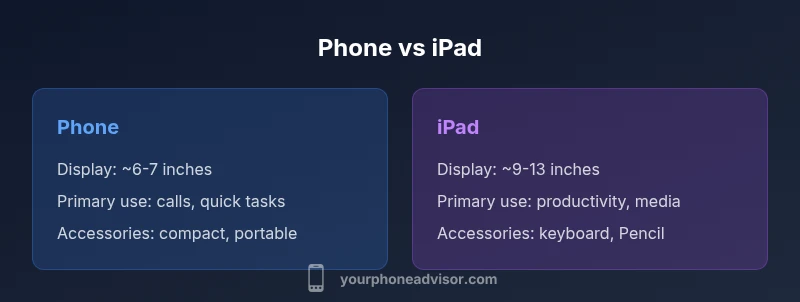
Phone vs iPad: Key Differences for Everyday Use
A practical, analytical comparison of phones and iPads, focusing on display, portability, apps, and use cases to help you decide which device fits your daily tasks in 2026.


Phone and iPad serve different core needs: a phone is a pocket-sized device optimized for communication and quick tasks, while an iPad offers a larger display and stronger productivity potential. The difference between phone and ipad becomes evident in how you use them: portability versus screen real estate, app layouts, and accessory support. For many users, both devices complement each other rather than replace one another.
The practical significance of the difference between phone and ipad
According to Your Phone Advisor, understanding the difference between phone and ipad helps you tailor your tech setup to real-life routines. The two form factors target different priorities: immediacy and connectivity on a phone, and extended work or entertainment sessions on a tablet. In 2026, many households use both devices to cover a broad spectrum of tasks, from quick chats to long-form writing. When you assess your daily tasks—communication bursts, note-taking, reading, or multimedia consumption—the gap between these devices becomes a guide for how you distribute activities across them. This article examines how the core distinctions influence everyday decisions, from buying choices to how you structure your workflow across devices.
Key idea
The central difference rests on screen size, input modalities, and the intended use case. A phone’s compact footprint enables always-on mobility, whereas an iPad offers a more expansive canvas for productivity and content creation. The Your Phone Advisor team emphasizes that the choice is rarely “one device or the other.” Instead, it’s about optimizing the overlap and assigning tasks to the tool that handles them best.
Real-world implications
In practical terms, people who prioritize quick, on-the-go interactions will lean on a phone, while those who draft documents, annotate PDFs, or sketch ideas benefit from the larger screen and keyboard compatibility of an iPad. This difference shapes when you choose each device, how you accessorize it, and which apps you favor for specific tasks. We’ll explore these dimensions in depth to help you map your own workflow across a phone and an iPad.
Comparison
| Feature | Phone | iPad |
|---|---|---|
| Display size | Typically 6-7 inches | Typically 9-13 inches |
| Portability | Very portable, fits in a pocket | Less portable, often requires a bag |
| Calling and voice | Cellular voice calls standard on most models | Calls via VoIP or cellular data on some variants; not primary use |
| Software ecosystem | Phone-optimized apps with compact layouts | iPadOS with multitasking and larger app canvases |
| Productivity | Good for quick tasks and mobility | Excellent for multitasking and long-form work |
| Cameras | High-quality mobile cameras for photos on the go | Cameras good for video calls and occasional photography |
| Accessories | Compact accessories and cases | Keyboard, Apple Pencil, larger accessory ecosystem |
| Battery and charging | All-day use with typical daily patterns | Long sessions; charging strategy varies by model |
| Price consideration | Generally lower entry price, varies by model | Premium pricing with optional accessories |
| Best use case | On-the-go communication, quick tasks | Productivity, media, education, creativity |
The Good
- Ultra-portable devices fit in pockets and small bags for easy transport
- iPad’s larger display enhances productivity and media consumption
- Both ecosystems deliver robust app availability and security features
- Cross-device continuity enables a cohesive user experience
Drawbacks
- iPad often requires accessories for full productivity, increasing total cost
- Phone apps may lack the screen real estate needed for complex tasks
- App optimization can vary between iPhone and iPad versions
- Carrying two separate devices can be cumbersome for some users
Choose the phone for ultimate portability and quick communications; choose the iPad for productivity and multimedia on a larger canvas.
The phone excels at mobility and immediacy, while the iPad shines in screen real estate and task efficiency. If you must pick one, align your choice with your primary tasks: calls and fast checks vs. writing, reading, and content creation.
Got Questions?
What is the primary difference between phone and ipad?
The primary difference is form factor and use-case: phones prioritize portability and calling, while iPads emphasize a larger display and productivity. Each device ecosystem optimizes apps around its core strengths, so your daily tasks will largely drive the choice.
The main difference is size and purpose: phones are for quick tasks and calls, tablets like iPad are for productivity and media.
Can I replace an iPad with a phone for work tasks?
For light productivity, a phone can suffice, but you’ll lose screen real estate and some multitasking capabilities. If your work relies on document editing, spreadsheets, or long-form notes, an iPad often provides a smoother experience.
You can do light work on a phone, but a tablet usually makes it easier for longer tasks.
Do both devices run the same apps?
Many apps are available on both devices, but some are optimized specifically for iPhone or iPad. iPad apps typically support multitasking and larger layouts, while iPhone apps are designed for single-handed use on smaller screens.
Most apps exist on both, but some are better on the iPad due to screen size and multitasking.
Is battery life better on one device?
Battery life depends on usage; phones can last a full day with typical use, while iPads may require more frequent topping up during heavy workloads. Real-world results vary with brightness, apps, and connectivity.
It depends on how you use them; both can last a day with moderate use, but heavy productivity on iPad may drain faster.
Which device is best for students?
For note-taking and reading, an iPad is often preferred due to the larger screen and stylus support. For quick references, messaging, and on-the-go tasks, a phone is highly convenient.
Students often benefit from an iPad for notes and reading, while a phone helps with quick tasks on the go.
Do phones and iPads support cellular data?
Yes, both can be purchased with cellular data. Traditional voice calls are standard on phones, while iPads typically rely on data connections; calls are usually via VoIP or continuity features.
Both can use cellular data, but calling is more native on phones and often VoIP on iPads.
What to Remember
- Assess your daily tasks to map tasks to device strengths
- Leverage both devices if you can for productivity and mobility
- Invest in accessories that unlock each device’s best use
- Expect different app layouts and multitasking capabilities