Phone or iPad: A Practical Side-by-Side Comparison
A comprehensive, data-backed comparison of a phone versus an iPad, focusing on everyday use, security, performance, costs, and ecosystem. Learn which device fits your lifestyle and budget in 2026.


TL;DR: If you prioritize pocketability, calling, and instant access, a phone wins. If you want a larger screen for productivity, reading, and media, an ipad is preferable. This comparison helps general smartphone users understand how a phone or ipad aligns with daily tasks, budget considerations, and security needs. According to Your Phone Advisor, the right choice depends on how you use apps, manage data, and travel.
Context and Core Considerations
Choosing between a phone and an ipad isn’t just about screen size. It’s about how you live with technology day-to-day: how you communicate, consume content, work on the go, and protect your data. YourPhoneAdvisor’s framework emphasizes three core questions: What will you do most often on the device? Where will you use it (home, commute, travel)? And how important is ease of maintenance and security to you? For many readers, the decision hinges on whether you need a pocketable device for quick queries and calls or a larger canvas for productivity, drawing, and media. This guide keeps the focus on practical outcomes and typical use cases for general smartphone users, with security and upkeep in mind.
Ecosystem and OS Commitments
Every device ecosystem shapes app availability, software updates, and long-term value. A phone running a flexible Android or a closed iOS approach offers different app ecosystems, notification controls, and cross-device syncing. An ipad, while often paired with other Apple gear, expands productivity features such as multitasking and stylus support. Your Phone Advisor notes that ecosystem loyalty can influence data continuity across devices, access to family sharing, and the ease of transferring settings between a phone and an ipad. The balance between flexibility and polish is a central theme in this decision.
Display, Interactivity, and Daily Tasks
Display size fundamentally alters how you read, sketch, or edit documents. Phones offer compact, fast interactions with one-hand reach and instant wake. iPads provide more real estate for reading, composing emails, and multitasking, which reduces switch costs when you juggle several apps. Keyboard and stylus compatibility on iPad models can accelerate note-taking, diagramming, and annotation workflows. The trade-off often comes down to whether you value portability over a larger visual workspace for extended sessions.
Comparison
| Feature | Phone | iPad |
|---|---|---|
| Display size | Phone: typically 5–7 inches (compact for one-hand use) | iPad: typically 9–13 inches (larger workspace) |
| Primary use case | Communication, quick tasks, on-the-go access | Productivity, reading, media consumption, multitasking |
| App ecosystem depth | Mobile-optimized apps with quick interactions | Rich multitasking, keyboard, and stylus support |
| Portability | High portability, fits most pockets | Less portable due to larger footprint and weight |
| Cellular options | Broad carrier support; many models offer eSIM | Cellular variants exist but vary by size and price |
| Price range | Lower upfront cost on many models; frequent promotions | Higher upfront cost; long-term value depends on use and accessories |
| Best for | On-the-go calls, fast communications, quick apps | Productivity, reading, design, and immersive media |
The Good
- Phone offers unmatched pocketability and instant access on the go
- iPad provides a larger, more comfortable canvas for productivity and media
- Both ecosystems offer robust security updates and app ecosystems when kept current
- Cross-device continuity can streamline workflows if you own multiple devices
Drawbacks
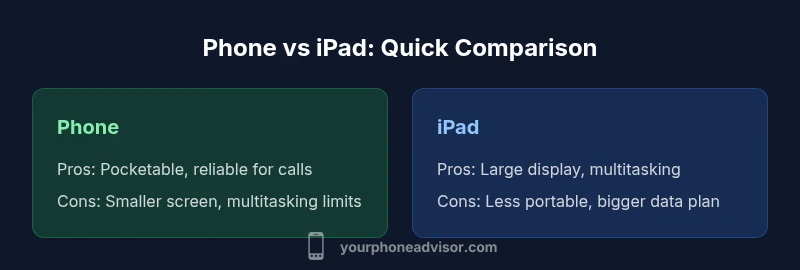
- Phone’s smaller screen can limit multitasking and reading comfort
- iPad’s larger size reduces portability and one-handed ease
- Ecosystem loyalty can complicate data transfer across platforms
- Owning both devices may increase total ownership costs
Phone excels for mobility; iPad excels for productivity and media
Choose the phone if you need constant connectivity and pocket-friendly use. Choose the iPad if you require a larger display, robust multitasking, and dedicated productivity tools.
Got Questions?
Which device is more affordable in the long run, a phone or an ipad?
Affordability depends on usage. A phone generally has lower upfront costs and quicker replacement cycles, while an iPad may involve a larger initial investment but can offer longer app support and a broader productivity payoff when used heavily. Consider maintenance, accessories, and data plans in your total cost of ownership.
In the long run, phones tend to be cheaper upfront and easier to upgrade, while iPads can offer longer usefulness for productivity if you use them extensively.
Can you run phone apps on an ipad?
Many iPhone apps run on iPad via compatibility modes, and most major apps are available in both sizes. Some features may look or behave differently on the larger display, and a few apps are optimized only for iPad. Overall, you won’t lose the core app experience on most popular services.
Most iPhone apps work on iPad, but some features might differ and a few apps are iPad-only.
Is an ipad better for productivity than a phone?
For many users, the iPad offers a superior productivity experience due to its larger screen, multitasking, and optional keyboard/pencil accessories. However, a phone remains unbeatable for constant connectivity, quick replies, and on-the-move tasks. The best mix depends on how you structure your day.
If productivity is your main goal, the iPad often wins for multitasking, while the phone wins for portability.
Are there security differences between phones and iPads?
Both devices emphasize strong security, but update cadence and app vetting vary by platform. iPadOS typically benefits from longer support windows on certain devices, while Android devices offer flexible security options across brands. Keeping the OS and apps updated is the best defense on either device.
Both platforms are secure, but the update pattern differs; stay current on both.
Should I buy both devices for a family?
If multiple family members need different use cases, having both may reduce friction and improve collaboration. Consider shared apps, parental controls, and data plans. If one device suffices for most tasks, a single device with family sharing could be more practical.
For families, assess each member’s needs; one device can work, but two may be better for diverse tasks.
What about compatibility with cellular networks?
Both phones and iPads can use cellular data through SIM or eSIM where supported. Availability varies by carrier and model, so check compatibility before purchase. If you travel often, a device with broad band support and easy data plan options is advantageous.
Cellular options exist for both; verify carrier compatibility before buying.
What to Remember
- Define your primary tasks before choosing between devices
- Prioritize display needs when evaluating apps and documents
- Assess ecosystem commitments and data syncing across devices
- Balance upfront cost with long-term value and upgrade cadence