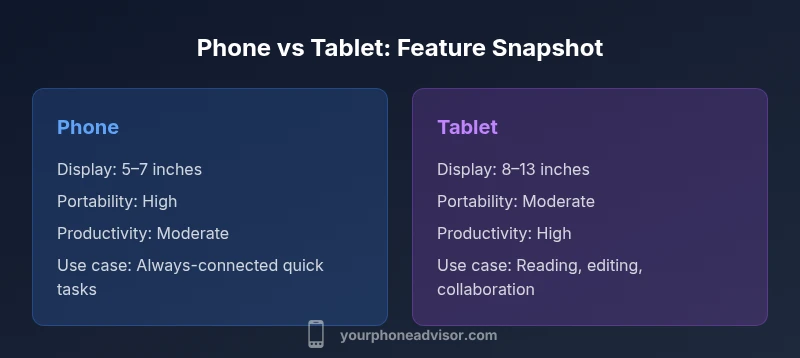
Phone vs Tablet: A Practical Comparison for 2026
An objective, in-depth comparison of phone vs tablet, covering use cases, hardware, software, and price ranges to help you choose the right device for tasks.


In the phone vs tablet decision, your daily tasks, mobility needs, and screen requirements drive the choice. This quick guide offers a concise recommendation based on core use cases, hardware trade-offs, and value. For most users, a phone handles calls, navigation, and fast access, while a tablet excels at productivity and immersive media. Read on for a deeper, practical comparison.
Core Differences at a Glance
Phone vs Tablet: a practical split centers on portability versus productivity. Phones are designed to stay in your pocket, always connected, and ready to handle calls, messaging, and quick tasks with one hand. Tablets, by contrast, offer larger displays, higher comfort for extended reading or writing, and a broader ecosystem of keyboards, stands, and styluses. According to Your Phone Advisor, the decisive trade-off is clear: portability and immediate access to connectivity versus screen real estate and workspace. If you spend most of your day in motion, a phone is likely your primary device; if your work or leisure relies on multitasking, reading, and drawing, a tablet often delivers a superior experience. The remainder of this guide dives into practical implications, with real-world scenarios and a step-by-step decision framework to help you pick the right device for your lifestyle.
Use Case Scenarios: When a Phone is Better
A phone shines when mobility, quick communication, and constant availability are your priorities. It is ideal for commuting, mapping, and spontaneous photo capture. If you frequently travel with only one device, a phone keeps important apps, payments, and messaging at your fingertips. For families or students who rely on calls and text messages, the phone’s compact form factor translates into fewer compromises during daily errands. Battery life in modern phones is generally optimized for all-day use with fast charging, and cellular models ensure connectivity where Wi-Fi isn’t available. When you value instant multitasking without accessories or setup, a high-quality phone can handle many tasks efficiently. This section covers typical profiles and how they map to your daily schedule, ensuring you make a choice that aligns with your routines.
Use Case Scenarios: When a Tablet Shines
Tablets become your best partner when you need a larger canvas for productivity, media, or collaboration. Reading eBooks, drafting reports, presenting slides, and sketching ideas benefit from a bigger display and optional stylus support. A tablet is also compelling for households with shared devices or for remote work scenarios where a keyboard and stand can turn the tablet into a lightweight workstation. If you frequently engage in long-form reading, movie marathons, or group brainstorming, the tablet’s display lets you retain context with less eye strain. While tablets are excellent for travel and home use, they depend more on a carrying case, keyboard, or stand—an investment that should be weighed against your actual needs.
Hardware, Software, and Ecosystem Considerations
The underlying hardware and software ecosystems shape how a phone and tablet perform in daily life. Phones emphasize compact DNA: pocketable dimensions, quick app launches, and optimized camera stacks. Tablets emphasize a larger canvas, multi-window interfaces, and input options like styluses and external keyboards. App developers increasingly design responsive layouts so popular apps work smoothly on both form factors, but some creators still prioritize mobile-first interfaces for phones. OS updates matter for security and features; ensure your chosen device receives regular updates and has access to essential apps in your region. When evaluating ecosystems, consider compatibility with other devices you own (laptop, smartwatch, smart home gear) and whether you prefer a seamless handoff between devices or independent operation.
Connectivity and Longevity: Battery, Data, and Accessories
Battery life and data connectivity are central to the phone vs tablet choice. Phones typically deliver strong all-day performance with efficient power management and quick charging. Tablets may house larger batteries, which translates into longer screen-on time for media or productivity, but they can take longer to charge fully. Cellular variants exist for both, but tablets often rely on Wi‑Fi with optional cellular data via a SIM or eSIM, plus hotspot sharing from a phone if you need internet on the go. Accessories like keyboards, styluses, and durable cases add value but also cost. If you regularly rely on long reading sessions, writing, or design tasks, a tablet with a keyboard and stylus might save you time and strain compared with a phone.
Productivity and Multitasking: Where Tablets Edge Phones
Multitasking capabilities increasingly blur the line between phones and tablets. High-end phones support split-screen apps and floating windows, but tablets excel at true multi-window productivity and external keyboard/mouse support. If your work involves creating documents, editing spreadsheets, or managing multiple streams of information, the tablet’s larger real estate provides a tangible advantage. Stylus support on many tablets enables precise sketching, markup, and note-taking. On the other hand, phones offer true portability and a more natural, one-handed interaction model for quick edits, quick replies, and on-the-go decision making. Your choice should reflect whether you need a compact device for quick tasks or a bigger device for extended sessions and collaboration.
Media Consumption and Collaboration
For media consumption, the tablet’s larger screen makes videos, comics, and ebooks more immersive, with less pinching and zooming to read fine text. Tablets are excellent for collaborative tasks during meetings or study sessions, since the bigger display is easier for groups to view together. Phones remain highly capable for entertainment when you’re out and about; you’ll enjoy crisp displays, robust speakers on many models, and a highly portable form factor that makes commuting feel lighter. If you often share content with others in a limited space, a tablet’s screen is the natural hub for group viewing and interaction, while a phone keeps pace for personal, on-demand consumption.
Security, Privacy, and App Management
Security considerations are nuanced across phones and tablets. Both platforms receive regular security updates, but the cadence and scope can vary by device and region. App management differs by ecosystem: phones often have broader app vetting, while tablets may offer more robust privacy controls for work-related apps. Biometric options—fingerprint or face recognition—remain common, but hardware placement and performance can influence usability. If you are handling sensitive data or prefer strict separation between personal and work profiles, evaluate how each form factor supports containerized workspaces, enterprise management, and app permissions. The goal is a balance between convenience and control.
Choosing Based on Lifestyle: Practical Scenarios
Consider a few representative profiles to anchor your decision. A student who travels between classes might opt for a compact, always-connected phone to stay organized and communicate quickly, while keeping a tablet at home for studying sessions and longer reading periods. A remote worker or freelancer who spends hours drafting documents and presenting ideas could benefit from a tablet paired with a keyboard and stylus, enabling comfortable editing and collaboration. A frequent traveler who prioritizes quick access to maps and live updates may still lean toward a phone as the core device, with a portable tablet as a secondary tool for planning and entertainment. In each case, assess how you’ll use the device most often, and whether you value a single, ultralight device or a larger, more capable workstation on the go.
Common Mistakes and Hidden Costs to Consider
A common error is overestimating the value of a larger screen without considering portability and price. Accessories—such as keyboards, cases, and styluses—can elevate the overall cost of a tablet setup. Likewise, choosing a tablet with limited cellular options or relying solely on hotspot data can lead to reliability gaps in travel or areas with poor Wi-Fi. Storage needs are another pitfall; apps and media can quickly fill up space, especially on tablets used for creative work. Finally, mirror expectations about app availability and optimization; some apps don’t scale well to larger screens, which affects your daily workflow.
Summary and Next Steps
Ultimately, the best choice depends on your priorities: portability and instant connectivity versus workspace comfort and extended media capabilities. If you’re often on the move, a high-quality phone remains indispensable for communication and quick tasks. If your routine includes long work sessions, detailed reading, or creative tasks, a tablet paired with the right accessories can significantly boost productivity and enjoyment. The decision is personal, based on how you spend your days and where you’re willing to compromise. Test both form factors if possible, and consider a staged purchase—experiment with a tablet for a few weeks before fully replacing your phone, or vice versa—to ensure you have the right tool for your life.
Comparison
| Feature | Phone | Tablet |
|---|---|---|
| Display size | Phone typically 5–7 inches | Tablet typically 8–13 inches |
| Portability | Highly portable; fits in a pocket | Less portable; designed for desk or bag |
| Productivity features | Quick tasks, calls, maps, on-the-go apps | Multitasking, external keyboard, stylus support |
| Media and reading | Compact media consumption | Immersive reading, drawing, and viewing |
| Battery life and charging | All-day use with compact battery; rapid charging common | Larger batteries; longer sessions with external charging options |
| Price range | Broad range; entry-level to premium phones | Wide range; accessories can add to total cost |
| Connectivity options | Cellular models common; eSIM supported | Cellular models less common; often relies on hotspot |
The Good
- Better portability and quick access to apps and calls
- Tablets provide larger displays for productivity and media
- Strong ecosystem and app quality across both form factors
- Balanced options across budget and premium ranges
Drawbacks
- Tablets are less pocketable and require accessories for full productivity
- Accessories can add to total cost and bulk
- App optimizations may vary by screen size and orientation
Neither device dominates; choose based on primary tasks and lifestyle
Pick a phone for portability and instant connectivity; choose a tablet for extended productivity and immersive media when you don’t need true pocketability.
Got Questions?
What are the core differences between a phone and a tablet?
The core differences lie in display size, portability, and intended use. Phones prioritize instant access, communication, and one-handed operation, while tablets emphasize a larger canvas for productivity, reading, and collaborative tasks. Both run similar app ecosystems, but layout and input options vary, influencing how you work and play on each device.
Phones are built for portability and quick tasks; tablets focus on a bigger screen for productivity and media. Consider what you’ll do most and pick accordingly.
When should I choose a phone over a tablet?
Choose a phone when mobility and constant connectivity matter most. If you need to navigate, communicate, and manage daily tasks on the go, a phone is the more practical choice. It also minimizes the number of devices you carry and reduces accessory clutter.
Pick a phone if you want a single, portable device for calls and quick tasks.
Can a large phone replace a tablet for productivity?
A larger phone can handle many light productivity tasks, but true multitasking and extended document work are typically better on a tablet with a keyboard and larger display. Consider your workload and whether you value portability over screen real estate.
A big phone can do some work, but a tablet usually handles longer, multitasking tasks better.
Do tablets support phone calls and SMS?
Some tablets support voice calls and SMS through cellular variants or integrated apps, but this capability varies by model and region. Most users rely on a paired smartphone or hotspot for messaging when away from Wi-Fi.
Some tablets can handle calls, but many rely on a connected phone or hotspot.
Which is better for reading and streaming?
Tablets offer larger screens ideal for reading and immersive streaming, reducing eye strain during long sessions. Phones remain convenient for quick bursts of streaming on the move but may require zooming and scrolling for comfortable reading.
For long reads and big-screen streaming, tablets win; phones are better for quick, on-the-go viewing.
Are tablets more secure than phones?
Security is strong on both platforms if you keep software updated and use strong authentication. Some business users may benefit from additional device management features on tablets, but general consumer risk is similar when best practices are followed.
Both can be very secure with updates and good habits; manage settings to maximize privacy.
What storage considerations matter most?
Apps, photos, and media can consume space quickly. Choose a device with expandable storage if available, or rely on high-capacity internal storage and cloud backups. Regularly review apps you don’t use to maximize available space on either form factor.
Think about how much you’ll store; consider cloud backups and model storage options.
How should I test before buying?
If possible, test screen size comfort, keyboard usability, and app layouts on both a phone and a tablet. Consider how you’ll carry and use each device in typical scenarios (commute, desk work, travel) and evaluate accessory compatibility like keyboards and stands.
Test size, keyboard feel, and app layouts to see what fits your routine.
What to Remember
- Prioritize portability if you travel light daily
- Choose a tablet for productivity and media immersion
- Account for accessory costs when evaluating tablets
- Check app layouts and updates for your preferred screen size
- Test both form factors if possible before committing