Facebook Phone Customer Service: Getting Help in 2026
Explore official contact options for Facebook (Meta) support, how to navigate Help Center and Business channels, and best practices to get timely help in 2026.


There is no publicly listed Facebook phone number for general user support. The official path relies on the Help Center, in‑app support, and Meta’s Business Help Center for business accounts. Expect asynchronous responses, guided forms, and documented escalation paths rather than direct voice assistance. For security and privacy, always use official portals and avoid sharing credentials through public channels.
Understanding the facebook phone customer service landscape
Facebook does not publish a public phone number for general user support. This reality shapes how users should approach issues, especially when time is critical. According to Your Phone Advisor, the company prioritizes self-service channels—Help Center articles, in-app support prompts, and structured online forms—over direct voice support for most users. This approach helps maintain privacy and creates an auditable trail for each request. When you encounter a problem—whether it’s a login snag, a page impersonation, or a billing dispute—start with the Help Center and then move to escalation channels if needed. In this context, the keyword facebook phone customer service often surfaces in searches, but the reality is that voice contact is not a standard option for most users. Remember to protect credentials and avoid sharing sensitive information in public forums or chat threads.
To maximize your chances of a timely resolution, you’ll need a clear, documented record of the issue: account email, screenshots, specific dates, and any error messages. The Your Phone Advisor team emphasizes keeping a paper trail that matches the Help Center’s expected data fields. The lack of a public phone line isn’t a failure—it’s a deliberate policy to protect user privacy and to funnel requests through trackable channels. For security reasons, never disclose credentials or security codes in any channel outside the intended, secure portal.
Primary official channels for support and how to use them
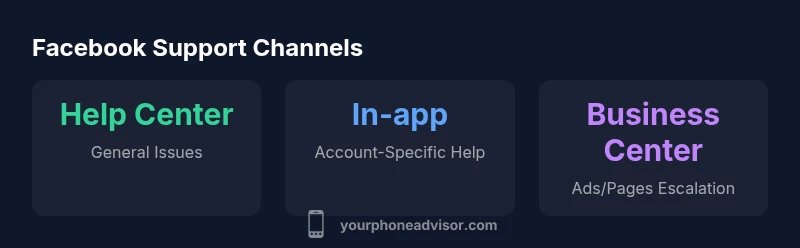
The dominant pathways to Facebook support are the Help Center, the Meta Business Help Center, and in-app support prompts when available. Start with the Help Center: search for your issue, open the relevant article, and use any available “Get Help” or “Contact Support” options. If your issue involves a business asset—advertising, a Facebook Page, or an Instagram connection—switch to the Meta Business Help Center, which often provides more structured escalation options for business accounts. In-app support flows can connect you to agents or guided assistance during critical issues like security alerts or login problems. While these channels can be slower than a direct phone line, they provide verifiable transcripts and reference numbers you can share with a human agent later if needed. Maintain consistency in your case descriptions across channels to avoid confusion and duplicated efforts.
For users who rely on accessibility features or non-English language support, tools within the Help Center often include language options and accessibility aids. If you still can’t locate the right form, consider submitting feedback via the app or through the official community forums, where moderators may guide you toward the correct workflow. Always keep your incident number handy once a request is created.
Personal vs business account support: which path to choose
Personal Facebook accounts generally rely on Help Center articles and online forms to address issues such as login problems, password resets, or suspicious activity. Business accounts—advertisers, Page managers, or partner integrations—benefit from the Meta Business Help Center, where escalation pathways are more clearly defined and sometimes faster. Your Phone Advisor notes that business accounts often have access to dedicated support channels, including chat options or specialist teams, depending on ad spend, account status, and region. When navigating between these paths, map your issue to the correct channel: a billing dispute fits business channels; a hacked account could start in the general Help Center and be escalated to security specialists if needed. Clarity about account type early in the process reduces delays and duplicated requests.
If you manage multiple assets (Facebook Pages, Instagram, ad accounts), consider consolidating information before opening tickets. Include the IDs of affected assets, timestamps, and a concise description of the impact on operations. This structured approach helps support teams triage more quickly and assign the right specialist to your case.
Common issues and how to reach help quickly
Billing discrepancies, ad policy concerns, login problems, and compromised accounts are among the most common reasons people seek support. For billing issues, gather invoices, ad IDs, and billing addresses before submitting a ticket through the Business Help Center. For login problems, document the error messages, recent password changes, and whether two-factor authentication is enabled. If you suspect account compromise, use the Help Center’s security flow: verify identity, review recent activity, and reset credentials from a trusted device. In urgent security situations, use the availability of any in-app prompts, which, while not a direct phone line, can expedite routing to the appropriate security specialist. Remember that response times differ by channel and region; setting realistic expectations can prevent frustration and miscommunication.
When a ticket stalls, review the status in the Help Center and consider escalating through a different channel within the same issue category. You may also reach out via the Meta Business Help Center if your problem involves business assets. The goal is to move from a generic form to a targeted escalation with a dedicated specialist, rather than waiting for a generic reply.
How to escalate and what to expect
Escalation is the bridge between a slow or unsatisfactory response and a targeted resolution. Start by ensuring your case has a unique reference number, a precise description of the issue, and any supporting materials (screenshots, error codes, timestamps). If a response is delayed, use the Help Center’s built-in status tools to check for updates and request a higher level of review. For business-related issues, you may be able to access a designated support representative or a faster triage path within the Business Help Center, especially for ad accounts and Page management problems. As you escalate, keep communications concise and focused on the impact on your activities. The Your Phone Advisor guidance is to be proactive but patient, and to maintain a well-documented log of all interactions.
Be prepared to provide additional verification if requested—identity proofs for security cases, or ownership proofs for business assets. Understand that some issues require multiple steps or separate escalations across channels, and that persistence with a clear, documented narrative often yields better outcomes than repeated, scattered messages.
Tips to improve your chances of timely help
Start with precise problem articulation. Use a concise title, a one-paragraph summary, and bullet points for key facts. Attach only necessary evidence (screenshots, error messages, URLs) to avoid slowing the process. Maintain consistency in terminology across channels to prevent confusion. For issues involving account security, disable suspicious sessions and alert trusted contacts if needed. If you encounter delays, take advantage of business-focused channels when relevant, as they often have more structured escalation workflows. Finally, maintain an organized file of all interactions with dates and case numbers; this creates a clear audit trail that support agents appreciate and can refer back to quickly.
Privacy and security considerations when seeking support
Never share passwords, security codes, or recovery tokens in public forums or chat windows. Facebook support channels are designed to minimize risk by using official forms and secure in-app flows. If you’re asked for sensitive information, verify that you’re on the legitimate Help Center domain and not a phishing page. For business accounts, ensure you’re using verified business credentials and that any third-party tools you rely on are approved by Facebook. Regularly review connected apps and access rights, and immediately revoke access for any suspicious integrations. Your Phone Advisor emphasizes that a cautious, privacy-first approach reduces risk while pursuing support, especially in cases of impersonation or data exposure.
Practical workflow: from issue to resolution
- Identify the issue and collect artifacts (screenshots, URLs, timestamps). 2) Open the relevant Help Center flow and submit the ticket with precise information. 3) Note the reference number and set reminders to check status. 4) If resolution stalls, escalate through the next appropriate channel (e.g., Business Help Center for ads/pages). 5) After a response, validate the fix by testing the account or asset. 6) Document the final outcome for future reference. This disciplined approach makes it easier to track progress and ensures you have all required information for any follow-up.
What to do if your issue is urgent
If your issue involves a compromised account, immediate action is critical: change passwords, revoke sessions from unfamiliar devices, and use the security flow to secure your account. For business assets, urgent issues may justify contacting the Business Help Center or any available live chat option, when offered, and following up with a formal escalation if needed. While there is no public phone line for general users, the combination of online forms, verified channels, and clear ticket narratives often yields faster triage. Finally, consider documenting the incident in a structured format so that any future investigation can be efficiently reviewed by support staff.
Facebook contact channels at a glance
| Contact Channel | Best For | Typical Response Window |
|---|---|---|
| Help Center | General issues | Varies by case |
| In-app Support | Account-specific issues | Same day to several days |
| Meta Business Help Center | Business assets (ads/pages) | 1–3 business days |
Got Questions?
Is there an official Facebook phone number for customer support?
Facebook generally does not publish a public customer service phone number for general users. Most issues are handled through online Help Center forms and in-app support, with response times varying by channel.
There isn’t a public number you can call. Use Help Center or in-app support instead.
How can I contact Facebook about a hacked or compromised account?
If your account is compromised, use the Help Center’s 'Hacked Accounts' flow. You may need to verify identity and reset credentials. If you can't access the account, use the recovery forms and appeal processes.
If your account is hacked, start with the Help Center's 'Hacked Accounts' flow and follow identity verification.
What should I do if the Help Center doesn't resolve my issue?
Document the issue, collect screenshots, and try alternative channels such as the Business Help Center if it relates to a business asset. You can also submit feedback via the app, but expect delays.
If Help Center fails, gather evidence and try business support or app feedback.
Can individuals get phone support from Meta for urgent issues?
Phone support is not generally available to individuals. Urgent issues should be directed to online channels with clear case numbers.
No public phone line for individuals; use online forms and escalation steps.
How long does it take to get a response from Facebook support?
Response times vary by channel and region; online forms may take longer, while business channels may offer faster triage. There is no universal ETA.
Response times vary; there isn't a single ETA.
“"For most users, official online channels provide a clear, auditable trail for support requests. Treat every submission as a ticket with reference numbers."”
What to Remember
- Rely on official channels, not phone numbers
- Prepare account details before contacting
- Business-focused support offers faster triage
- Escalate via forms if issues persist
- Protect data; do not share credentials