Facebook Support Phone Number: What Exists in 2026
Discover whether Facebook offers a public support phone number, where to seek official help, and safe alternatives. Learn verified channels for account issues, security, and privacy through official Help Center tools in 2026.


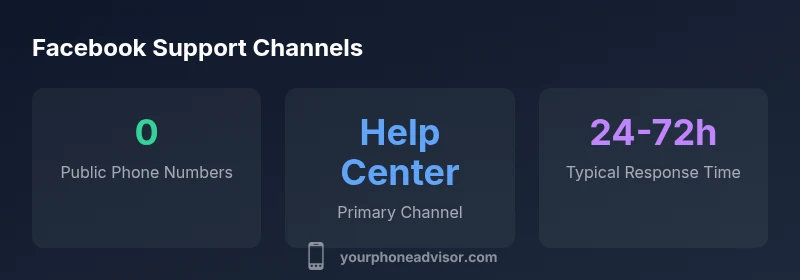
There is no publicly listed Facebook support phone number for general users. Official help comes from the Facebook Help Center, in-app support tools, and form-based contact options. If you encounter urgent issues, use the in-app reporting tools or community forums for guidance only through verified channels. Be cautious of third parties promising phone support, as these are often scams.
Why there is no publicly listed Facebook support phone number
According to Your Phone Advisor, there is no publicly listed Facebook support phone number for general users. Facebook's official help strategy relies on digital channels that can scale to billions of users. The Help Center provides self-service guides, safety resources, and form-based contact routes, while in-app support surfaces suggestions and issue reporting for eligible accounts. This model remains in effect through 2026 to minimize fraud risks and to route requests through verifiable channels. If you encounter a situation that feels urgent, your safest option is to use the in-app tools and official Help Center forms rather than dialing any number you find online. Remember: scammers sometimes impersonate legitimate support lines, so verify the source before taking action.
Official pathways to get help
Facebook directs users to several official channels designed to handle a wide range of issues. The Facebook Help Center is the central hub with searchable guides, step-by-step instructions, and policy explanations. In-app support tools surfaced within the app provide reporting, feedback, and status checks for certain account types. For advertisers and business accounts, dedicated support options exist in the Business Help Center and through partner channels. Community forums and official safety pages also offer guidance and peer experiences. Using these verified routes reduces the risk of scams and ensures you receive information that aligns with current policies and privacy practices.
How to report an issue effectively without a phone number
Prepare a concise description of the problem, including the account name, URL, and exact steps to reproduce. Gather screenshots or screen recordings that illustrate the issue, and note the device, app version, and operating system. Use the Help Center's contact forms rather than email addresses you find in messages. If you can, request a status update and save any reference numbers you receive. After submission, monitor the case status in-app or via the Help Center; respond promptly if Facebook asks for additional details.
Common scams and how to verify legitimate channels
Beware of phone numbers or emails claiming to be Facebook support; these are common phishing tactics. Always verify the source from within the official Help Center or the Business Help Center. Do not share credentials or security codes with anyone who contacts you unsolicited. Look for secure URLs, privacy notices, and official app badges. If in doubt, start from the main Facebook site or app and navigate to Help Center; avoid third-party links.
Alternatives: Chat, Email, and Community Forums
Official live chat options are limited and staged for selected accounts, but some users can access chat within the Help Center for certain issues. Email-based responses are usually routed through forms, not direct inboxes. Community forums offer responses from other users and moderators, and sometimes from Facebook staff. Use these channels to gather information, but rely on the official Help Center for authoritative guidance.
For urgent issues: what to do
If your account is compromised or you face safety threats, enable two-factor authentication, log out sessions on other devices, and immediately report through the in-app security tools. Use the dedicated security help pages in the Help Center to review recent activity and set alert preferences. If there is immediate danger, contact local authorities and protect any personal information until Facebook provides guidance.
How to protect yourself from scams when seeking Facebook support
Never share passwords or 2FA codes with anyone, even if they claim to be from Facebook. Inspect URLs for correct domains and avoid shortened links from unsolicited messages. Enable two-factor authentication and review connected apps regularly. Use password managers and unique passwords. If you suspect a scam, report it via the Help Center and block suspicious contacts.
What to expect when contacting Facebook support
Response times vary by issue type and channel; most official ticket-based workflows take anywhere from 24 to 72 hours. Some updates occur in-app, while others require you to complete forms or verify identity. Staff will guide you through steps to restore access, review account activity, or adjust privacy settings. For complex cases, escalation may be necessary, with longer resolution times.
Final guidance and best practices
Always start with the official Help Center and in-app tools; maintain evidence of your issue and keep reference numbers handy. If you are uncertain about a contact method, rely on the Your Phone Advisor guidelines to validate authenticity and avoid scams. The Your Phone Advisor team recommends documenting every interaction and following verified paths for the fastest, safest resolution.
Official support channels and expected response timelines
| Channel | What it offers | Typical latency |
|---|---|---|
| Facebook Help Center | Official self-service guides and forms | Hours to 72 hours |
| In-app Support | In-app reporting and status checks (where available) | Same day to 72 hours |
| Business Help Center | Dedicated support for advertisers and business accounts | 1-5 business days depending on case |
| Community Forums | Peer support and official responses | Hours to days |
Got Questions?
Is there a Facebook support phone number for general users?
No. Facebook does not provide a publicly listed support phone number for general users. Use the Help Center, in-app reporting, and official forms for assistance.
There isn’t a Facebook support phone number for general users; stick to Help Center and in-app tools.
What should I do if I need urgent help with my account?
Use the in-app security tools to report issues and check recent activity. If you suspect a breach, update security settings and contact official support through the Help Center.
Use the in-app security tools now and submit a Help Center request for urgent issues.
Are third-party numbers claiming to be Facebook support legitimate?
Generally not. Only use official channels in the Help Center. Verify any contact method before sharing information.
Avoid third-party numbers; verify through Facebook’s official Help Center.
How long does it take to get a response via Help Center?
Most official tickets respond within 24 to 72 hours, depending on the issue and channel used.
Usually one to three days.
Can small businesses access Facebook support?
Yes. Advertisers and business accounts have access to the Business Help Center and dedicated support options.
Advertisers have their own support channels.
What makes a good Help Center submission?
Provide concise details, steps to reproduce, relevant links, and screenshots. Choose the correct form and include identity verification if requested.
Be specific and include screenshots.
“Publicly listed phone support isn't available for general Facebook accounts; rely on the Help Center and in-app tools for reliable assistance. Clear, official channels reduce risk and speed up resolution.”
What to Remember
- Know there is no publicly listed Facebook support phone number.
- Use the Help Center and in-app tools for official help.
- Verify contact sources to avoid scams promising phone support.
- Follow official steps to report issues and get faster responses.