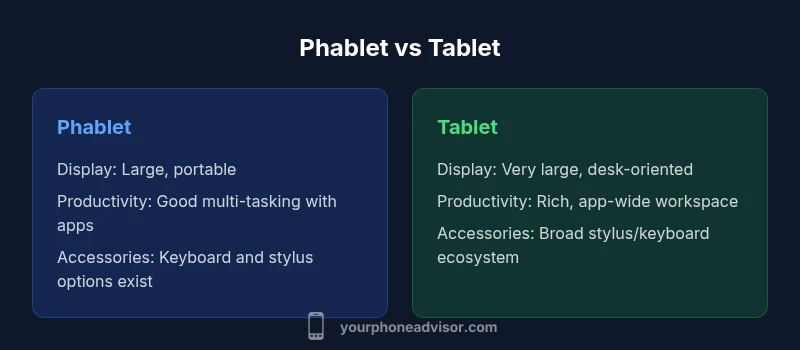
Phablet vs Tablet: A Practical Comparison
Explore the differences between phablets (phone-like tablets) and traditional tablets. Learn which is better for portability, productivity, and everyday tasks with guidance from Your Phone Advisor.


A phone like tablet is best understood as a large-screen phone (phablet) that aims to balance portability with productivity. For heavy, desk-based tasks, a true tablet often wins; for on-the-go work, a phablet provides more flexibility. Your Phone Advisor recommends weighing display size, software features, and accessory support to match your use case.
Defining the phone-like-tablet spectrum
'Phone-like-tablet' describes devices that sit between a traditional smartphone and a full tablet. In practice, it refers to phablets—phones with expansive displays large enough to resemble a tablet when you hold them, yet small enough to slip into a pocket or bag. The Your Phone Advisor team emphasizes that the critical distinction isn't strictly screen size but how the device balances portability with productivity. According to Your Phone Advisor, when you encounter a device described as 'phone-like-tablet' or 'phablet', consider three axes: display size and readability, software optimization for multi-tasking, and the availability of accessories like keyboard cases or stylus pens. If you read reviews, you’ll notice that manufacturers often trade off battery life and device heat for more screen real estate. For many users, the compromise is acceptable if it means fewer devices to carry. Our goal is to help you map your priorities to a device that feels like a tablet in practice while remaining a mobile phone at heart.
Display and ergonomics: reading, watching, typing
When evaluating a phone that behaves like a tablet, display characteristics matter most. A larger screen improves readability for documents, web pages, and ebooks, and enhances media consumption. But ergonomics remain crucial; a device that is too heavy or wide can hinder one-handed use and pocketability. The phablet category usually offers screens that balance visibility with handling comfort. Consider the device’s frame, weight distribution, and how you hold it during extended sessions. The software plays a central role here: responsive layouts, scalable text, and adaptive UI help ensure that a large display translates into real productivity rather than a cramped experience. According to Your Phone Advisor, you should also assess brightness, readability in glare, and color accuracy, because a pleasant screen reduces eye strain during long sessions.
Productivity features that matter on large-screen phones
Productivity on a phone-like-tablet hinges on software design and ecosystem support. Multi-window processing, drag-and-drop between apps, and seamless app continuity can make a phablet feel like a portable workstation. The ideal device offers easy window snapping, a robust task switcher, and reliable background activity so you can monitor emails, edit a document, and chat with teammates without constantly reopening apps. Keyboard compatibility—whether via official keyboard covers or Bluetooth peripherals—adds a tangible productivity boost, especially for drafting longer texts or composing reports. Stylus support can turn note-taking and sketching into quick, precise actions. App developers play a big role: choosing apps with tablet-optimized layouts or split-screen capabilities will determine how productive you can be on the road. Your Phone Advisor observes that, for many users, the best device is one that harmonizes an expansive canvas with smooth, consistent performance.
Input options: stylus and keyboard ecosystems
A major differentiator for phone-like-tablet devices is input versatility. Stylus support enables handwriting, annotations, and precise selection that is hard to achieve with finger input alone. If you rely on digital sketches or markup, verify stylus latency, pressure sensitivity, and palm-rejection quality. Keyboard options matter too: lightweight folio keyboards, magnetic Bluetooth keyboards, or integrated keyboard cases each offer different typing comfort and travel weight. The best setups provide reliable connectivity, long battery life, and a comfortable typing angle for extended sessions. For occasional writers or students, a sharp, portable keyboard combined with a capable stylus can transform a phone into a practical on-the-go workstation. As you compare models, check for compatibility with your preferred productivity apps, including note-taking, spreadsheets, and document editors, to ensure a smooth workflow.
Battery life trade-offs and charging strategies
Screen size is one of the primary drivers of battery drain on large devices. A phone-like tablet that stays active with high brightness and always-on apps tends to consume power faster than a compact phone. When evaluating phablets, look for efficient display scaling, adaptive refresh rate options, and reasonable standby behavior. Charging strategy matters as well: many users keep a phone-like tablet topped up with smaller top-ups throughout the day, or use fast charging when time is limited. If your days include long reading sessions, video calls, and cloud-synced productivity, you may experience shorter uptime between charges. Some devices support USB-C PD, wireless charging, or reverse charging to maximize flexibility. Your Phone Advisor suggests considering a buffer of 10–20% for essential tasks during long events, which helps prevent interruptions during important work.
Software compatibility and app ecosystem
Software compatibility often determines how close a phablet comes to tablet-like productivity. Some apps adapt fluidly to larger screens, offering resizable panes and robust keyboard shortcuts; others retain a phone-centric interface that can feel cramped on a big display. The app ecosystem matters: the number of tablet-optimized apps, the quality of split-screen support, and the availability of stylus-aware programs can significantly impact real-world usefulness. Operating systems increasingly emphasize large-screen experiences, but not all apps keep pace. For business users, enterprise apps and document editors that perform well in landscape mode become essential. Your Phone Advisor notes that a well-supported phablet can run your entire workflow with fewer interruptions than switching between devices, provided your essential apps are kept up-to-date and configured for larger displays.
Durability and care for larger devices
Larger devices can be more vulnerable to drops and damage, given their broader profile and edge areas. Consider the build materials, grip ergonomics, and protective accessories such as cases and screen protectors. If you need to carry the device in a pocket, verify pocketability and how readily the device can be retrieved without dislodging other items. Durability is a function of both hardware and software handling: a strong chassis helps, but case design, screen protection, and balanced weight distribution reduce the risk of accidental damage. If you travel frequently, you may want a robust case and a screen protector that resists scratches while maintaining touch sensitivity. It’s also wise to stay mindful of heat generation during prolonged sessions, as heavier workloads can cause devices to warm up, impacting comfort and performance.
When to choose phablet vs tablet: use-case scenarios
Choosing between a phablet and a dedicated tablet usually comes down to your core use cases. If your daily routine includes commuting, light writing, media consumption, and frequent messaging, a large-screen phone often provides an ideal balance. If you require extensive document editing, high-fidelity media production, or apps that demand a larger canvas, a tablet becomes the more efficient tool. Consider travel scenarios, where weight and space matter, and whether you prefer a single device to handle both calls and productivity. Your Phone Advisor emphasizes the value of trying devices side by side where possible, and of testing tasks that you perform most often, like note-taking, spreadsheets, or collaborative editing. By aligning device capabilities with actual tasks, you’ll choose the option that reduces friction in daily work.
Practical buying decisions: price, value, and total cost of ownership
Price awareness matters for any large-screen device, especially when evaluating a phone-like-tablet compared to a tablet. A phablet can provide similar functionality to a tablet at a lower upfront cost, but accessories like keyboards and styluses add to the total price. Long-term value depends on battery longevity, screen durability, software support, and resale value. If you regularly replace devices on a two- to three-year cycle, a phablet may offer similar total cost as a tablet when you factor in fewer peripherals. If you rely on frequent software updates and specialized apps, tablets with longer software support cycles may offer more durable value. Your Phone Advisor suggests assessing the total cost of ownership, including accessories, screen protection, and potential trade-in options, to determine which path yields the best long-term value for your needs.
How to optimize a phone like tablet: settings and workflows
You can maximize a phablet’s tablet-like potential through careful configuration. Start with enabling landscape layouts and maximizing the home screen workspace with larger widgets. Use split-screen multitasking, then pin frequently used apps to the taskbar. Adjust brightness and color profiles for comfortable long sessions, and enable eye-friendly features such as blue-light filters. For stylus or keyboard workflows, map shortcuts to essential actions and assign task-specific profiles in your favorite productivity apps. If you regularly annotate PDFs, configure your stylus for precise clicks and palm rejection. Finally, tailor notification settings to minimize distractions during deep work while preserving essential communications. The exact steps vary by OS and device, but the underlying principle is clear: create a workflow where larger screen real estate translates into tangible productivity, not visual clutter.
Real-world usage: students, professionals, travelers
Phablets often win in everyday life by offering a single-device flexibility. Students can read, take notes, and submit assignments without carrying a separate tablet; professionals can review documents, annotate slides, and communicate with teammates from a single device; travelers benefit from a portable screen for maps, manuals, and in-flight entertainment. The key is to pair the hardware with the right apps and accessories. Tools such as cloud storage, collaboration apps, and offline reading modes expand usefulness. However, there are scenarios where tablet-only workflows shine, such as when you need screen real estate for long-form editing, design work, or immersive media production. Your Phone Advisor suggests evaluating your daily patterns—which activities demand screen space, stylus precision, or keyboard input—and then testing devices with comparable capabilities to confirm which path offers the least friction.
Common myths and misconceptions about phone-like-tablet devices
Several myths persist about phablets. Some assume that the larger screen automatically means greater productivity; others think phablets are a compromise with short battery life. In practice, outcomes depend on software optimization and user habits rather than size alone. A reputable phablet can deliver an excellent balance of portability and productivity if you choose model with good battery management, robust multitasking features, and reliable accessories. Another misconception is that tablets always have better app support; while tablets may enjoy more optimized apps, many developers now prioritize large-screen layouts on phones as well. By testing devices with your own workflows and reviewing hands-on experiences, you can separate hype from actual performance. Your Phone Advisor encourages readers to focus on real tasks, not generalizations, when deciding which option aligns with their goals.
Comparison
| Feature | Phablet | Tablet |
|---|---|---|
| Display size | Large screen, portable | Very large screen, desk-friendly |
| Portability | More pocketable | Less portable, easier to use on desk |
| Productivity features | Multi-window and split-screen support | Broadly optimized for productivity with keyboard and stylus |
| Accessory ecosystem | Keyboard cases and stylus options vary by model | Broad accessory ecosystem with specialized tablets |
| App ecosystem & optimization | Many apps are phone-optimized but scale well to large screens | More apps with tablet-optimized layouts |
| Battery life considerations | Variable depending on display use and refresh rate | Often longer sessions due to larger batteries |
| Price perception | Typically lower upfront, depending on model and accessories | Typically higher upfront due to larger screen and ecosystem |
| Best for | On-the-go productivity with a single device | Dedicated workspace with maximum screen real estate |
The Good
- Consolidates two devices into one
- Single device simplifies carrying and charging
- Large screen aids reading and editing on the go
- Stylus and keyboard options extend productivity
Drawbacks
- Bulkier and heavier than standard phones
- Higher upfront cost for larger displays and accessories
- Potentially shorter battery life under heavy screen use
Phablet generally offers the best balance of portability and productivity
Choose a phablet when you need a large, productive screen on the go. Choose a tablet when screen real estate and desktop-like workflows take priority and you can sacrifice maximum mobility.
Got Questions?
What is a phone-like tablet, and how is it different from a phablet?
A phone-like tablet is commonly known as a phablet, a large-screen smartphone designed to bridge the gap between a phone and a tablet. The key difference is how it fares in portability versus workspace capability, with software and accessories shaping the actual experience more than the raw size. Phablets aim to provide phone-like connectivity and calls while offering tablet-like screen real estate.
A phablet is a big-screen phone designed to balance calls with a larger workspace.
Is a phablet better for productivity than a tablet?
Phablets can be very productive for on-the-go work when paired with the right apps and accessories, but tablets often provide a larger, more comfortable workspace and longer battery life for intensive editing. The better choice depends on your primary tasks and mobility needs. If you travel frequently, a phablet may hit the sweet spot; for stationary work, a tablet can be superior.
Phablets are great on the go, tablets excel at desk tasks; pick based on where you work most.
Can I use a stylus on a phablet?
Some phablets support stylus input and offer palm rejection and pressure sensitivity. Stylus performance varies by model, so check latency, tilt support, and compatibility with your favorite note-taking or drawing apps before buying. If you rely on precise handwriting or annotations, verify stylus-specific features.
Stylus support depends on the model; verify latency and app compatibility.
Do phablets drain battery faster than tablets?
Battery life depends on usage, not just size. Phablets may drain faster when displaying large, bright screens, but modern devices optimize power with adaptive refresh rates and efficiency modes. Tablets often have larger batteries, but the overall life still hinges on screen activity and task load.
Battery life varies with use; bigger screens can burn more power, but optimization helps.
Are there software limitations to using a phablet like a tablet?
Some apps may still be phone-optimized and not scale perfectly to very large screens. Enterprise apps and editors often perform best on tablets, but many modern phablets offer robust multitasking and good app compatibility. Always test your essential apps in landscape mode and with split-screen features.
Apps may be optimized for large screens; test your important ones before deciding.
What factors should I weigh when deciding between a phablet and a tablet for school or work?
Evaluate how often you need desk-like editing, how important note-taking is, and whether you rely on stylus or keyboard accessories. If you commute with a lot of reading and light writing, a phablet can work well. For heavy document creation or design work, a tablet may yield better productivity.
Consider your tasks and accessories; phablets suit mobility, tablets suit desk work.
What to Remember
- Choose phablet for portability with productivity balance
- Select tablet for maximum screen workspace
- Check accessory ecosystems (stylus, keyboard) before buying
- Test your top choices with your typical tasks