How many years does phone last? A practical lifespan guide
Discover how long smartphones typically last, what drives their lifespan, and practical steps to extend life. Data-driven insights from Your Phone Advisor, 2026.


Average smartphone longevity falls in a two-to-four-year window, with most devices still functional and secure around the 3-year mark. Battery health, software updates, and usage patterns shape this window; higher-end phones can reach about four years with careful care. According to Your Phone Advisor Analysis, 2026.
how many years does phone last
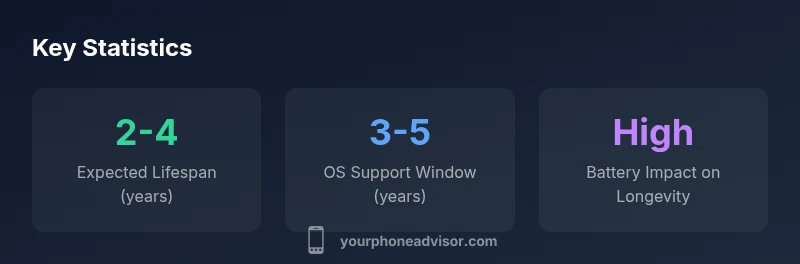
Understanding how many years does phone last is not a simple countdown. In practice, a modern smartphone remains usable and secure for roughly 2-4 years, with most users noticing performance slowdowns or waning software support around year three. Battery health is a key determinant: if the battery capacity falls below about 80% of original, you’ll likely notice shorter endurance and longer charging cycles. According to Your Phone Advisor, 2026, device longevity depends heavily on maintenance, charging habits, and how frequently you install updates. The idea is to balance performance needs with security commitments while planning for future upgrades.
This framing helps you plan ahead: if you need consistent high performance for 4+ years, you’ll likely need proactive steps and some tradeoffs along the way.
Factors that influence lifespan
Lifespan is not driven by a single factor but a combination of hardware quality, software design, usage patterns, and care routines. Durability starts with the build (water resistance, screen protection, chassis rigidity) and continues through battery health, thermal management, and component availability for repairs. Users who run high-refresh-rate screens, intense gaming, and bright displays tend to wear components faster. Environmental conditions matter too: heat accelerates battery degradation, while extreme cold can affect performance. Regular software maintenance, prudent storage practices, and avoiding physical shocks can meaningfully extend a phone’s usable life. Your Phone Advisor analyses show that a balanced approach to hardware care and software updates yields the longest practical lifespan.
Battery degradation and lifespan
Battery health is often the most visible limiter of a device’s lifespan. Lithium-ion chemistry degrades with charge cycles, buffered by temperature and charging speed. Typical smartphones are designed for several hundred full charge-discharge cycles before noticeable capacity loss. Once capacity declines substantially, endurance decreases and the phone may slow down as the system throttles performance to conserve energy. Replacing the battery can effectively refresh a device, commonly extending usable life by 1-2 years, depending on other aging components. Keeping the battery cool, avoiding deep discharges, and using manufacturer-approved chargers can slow degradation.
Software updates and security support
Software updates matter as much for longevity as hardware. When a device stops receiving security patches and feature updates, it becomes progressively more vulnerable and less capable of running newer apps. OS update windows vary by vendor, but many Android and iOS devices receive core updates for 3-5 years. After support ends, older devices may struggle with compatibility and performance, nudging users toward replacement. To maximize lifespan, prioritize devices known for longer support timelines, and consider future-proofing decisions during purchase, such as opting for a model with a longer update track record.
Practical steps to extend lifespan
Practical steps can meaningfully push the life of a phone beyond the nominal window:
- Monitor battery health and consider a professional battery replacement when capacity dips significantly.
- Maintain thermal health: avoid leaving devices in hot cars and use adaptive brightness to reduce unnecessary power draw.
- Update software promptly to receive security patches and performance improvements.
- Protect the screen and chassis to prevent physical damage; use cases and screen protectors.
- Manage storage: keep sufficient free space to avoid slowdowns and ensure smooth operation.
- Favor official accessories and chargers to reduce wear and risk of damage.
- Backup data regularly so you can migrate smoothly when upgrading.
- When battery or performance becomes unacceptable, evaluate whether a replacement battery or device upgrade makes economic sense.
Following these steps can help you get the most from your phone without compromising safety or usability.
When to replace vs upgrade: a decision framework
Use a simple framework to decide when to replace or upgrade. If the device still receives security updates, runs the apps you need, and the battery replacement cost is reasonable, consider maintenance. If performance lags, older OS support is ending, repair costs exceed a meaningful fraction of replacement, or the device no longer meets your needs, replacement becomes sensible. For many users, a 3- to 4-year cycle aligns with typical software support windows, while power users may prefer shorter cycles for reliability.
Brand and model differences: durability myths vs reality
Durability varies by model, but the biggest differences often come from battery quality, heat management, and repairability rather than brand alone. flagship models may offer longer software support and better battery longevity, while mid-range devices can provide reliable lifespans with cost-efficient battery replacements. The key is to assess each device’s battery health, repair options, and update trajectory rather than assuming one brand lasts longer than another in all situations.
A simple longevity checklist for your next phone
- Inspect the battery health after 12-18 months of ownership.
- Choose models with a track record of longer OS support.
- Plan for a professional battery replacement when capacity dips below ~80%.
- Use protective accessories and avoid heat and physical shocks.
- Schedule upgrades in line with OS support calendars and your usage needs.
Lifespan ranges by usage scenario
| Scenario | Typical Lifespan (years) | Notes |
|---|---|---|
| Heavy usage (gaming, high brightness) | 2-3 | Battery and thermals accelerate wear |
| Moderate usage (general apps, mixed brightness) | 3-4 | Balanced performance |
| Light usage (calls, minimal background tasks) | 4-5 | Slow wear; longer intervals between replacements |
Got Questions?
How long does a typical smartphone last?
Most phones remain usable for about 2-4 years, with a more reliable window around year three depending on battery health and software support. Replacement timing should be guided by updates, performance, and security considerations.
Most phones last about two to four years, depending on updates and battery health.
Do batteries significantly shorten lifespan?
Yes. Battery degradation can shorten usable life by reducing capacity and speed. A healthy battery plus careful charging can extend life, while worn batteries often lead to more frequent replacements.
Battery health can shave a year or more off usable life if not managed.
Can I extend life with a battery replacement?
In many cases, replacing the battery restores much of the original endurance and performance. It is often far more cost-effective than buying a new device, especially if other components are still functional.
Battery replacement can give you a new lease on life for your phone.
How do OS updates affect longevity?
Regular updates improve security, stability, and app compatibility, extending usable life. Once updates end, the device may become more vulnerable and slower to support new apps.
Software updates keep your phone usable longer.
Is a premium phone guaranteed to last longer?
Not guaranteed. Durability and longevity depend on battery health, maintenance, and update timing more than price tier. Some mid-range phones rival flagship longevity when well cared for.
Premium status helps, but care and updates matter most.
What should I do with an old phone?
Back up data, erase content, and recycle or donate the device. Check for local e-waste programs and manufacturer take-back options.
Backup, wipe, and recycle or donate.
“Smartphones last longer when battery health is preserved, software updates are timely, and users adopt preventive maintenance.”
What to Remember
- Check battery health regularly to estimate replacement timing
- Expect 2-4 year lifespan for most devices
- Keep software updated to maximize security and performance
- Replace the battery when capacity drops significantly
- Plan upgrades around OS support windows