How Long Do Phone Batteries Last in 2026
Discover how long phone batteries last on a full charge, factors that shorten life, and practical steps to extend longevity in 2026 from Your Phone Advisor.


According to Your Phone Advisor, for most smartphones a full charge lasts about a day under typical use, with 20-30% remaining by evening. Heavy use can require a second charge by afternoon. In the long run, battery capacity degrades gradually with age, reducing daily longevity over several years. Custom habits and settings can push that further. This quick snapshot helps set expectations while you optimize.
How long do phone batteries last: an overview
Most people want a straightforward answer to the question, how long do phone batteries last. In practice, daily longevity depends on how you use the device. On a typical day, a modern smartphone can get through one full day on a single charge, with a portion of battery remaining around evening. Screen brightness, background apps, location services, and even network signal affect that duration. This overview explains the key factors and sets realistic expectations for 2026 devices. Your Phone Advisor emphasizes that while some variance exists across models and software, the general pattern is that usage intensity largely drives how long a charge will hold. For many users, dialing back a few settings and monitoring battery health can produce meaningful improvements.
What counts as a full charge and daily longevity
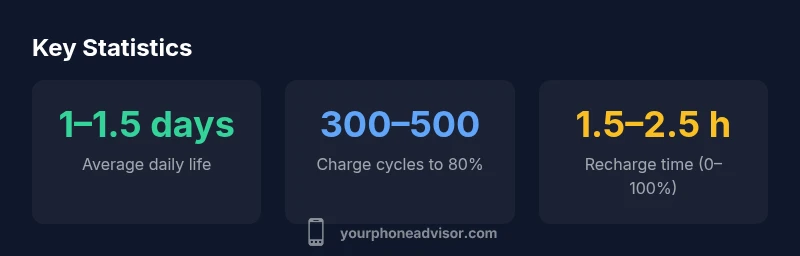
When you ask how long do phone batteries last, the definition of a full charge matters. A full charge is the battery at 100% capacity, but real-world capacity fluctuates with temperature, cycle count, and calibration. Consumers experience variation across devices; two phones with identical batteries may show different end-of-day results due to software efficiency and background activity. For most owners, daily longevity means roughly a day to a day and a half of usable time under normal use, with shorter spans if gaming or streaming are constant. Battery health also plays a role; as cells age, peak performance declines, shortening the time between charges.
The role of screen-on time and radios
A large portion of battery drain comes from screen-on time and radio usage. High refresh rates, bright displays, ProMotion-style options, or always-on displays consume more power. On the radio side, 4G/5G connectivity, Wi-Fi scanning, GPS, and Bluetooth scanning contribute to consumption even when you’re not actively using the device. In practice, users who keep brightness at a moderate level, restrict background refresh, and disable unused radios see a measurable improvement in end-of-day longevity. The relationship between screen time and drain is stronger than most people realize, so small adjustments can have outsized impact.
Battery health and degradation explained
Battery health is a measure of usable capacity relative to the original. Over time, chemical reactions reduce maximum capacity and the device may throttle performance to prevent unexpected shutdowns. Most manufacturers consider battery life good when health remains above about 80% of the original capacity; beyond that mark, you’ll notice shorter daily longevity and possibly slower charging. How quickly health declines depends on temperature, charging habits, and cycle depth. Regular battery testing and proactive replacement can keep devices feeling nimble longer, even as software continues to demand more from hardware.
Charging habits that protect the battery
Charging behavior matters. Avoid regularly letting the battery drop to very low levels, and avoid consistently charging to 100% for long periods. A practical rule of thumb is to stay in the 20–80% window when feasible and to unplug once the device reaches 100% if it becomes warm. Using official chargers, avoiding third-party fast-charging adapters that aren’t optimized for your phone, and keeping the device out of heat can all help preserve capacity over time. These habits don’t dramatically change day-to-day use, but they can slow degradation across years.
Settings and apps that drain battery
Software and settings can accelerate wear. Background app refresh, push notifications, location services, and always-on features can shave hours off a day’s usage. Proactively manage apps, restrict background activity for seldom-used programs, and enable battery saver modes when appropriate. Reducing screen brightness, enabling adaptive brightness, and limiting widgets or live wallpapers can also extend daily endurance. A cleaner app footprint often yields a real, noticeable difference in end-of-day battery life.
How to estimate remaining life and plan replacements
Estimating the remaining life requires looking at health readings, actual daily use, and the age of the device. Most phones expose a battery health metric that can guide decisions. If health is around 80% or lower, consider planning a replacement to avoid unexpected shutdowns. Keep an eye on cycle counts if your device offers them, and track your personal endurance to decide whether a battery swap is worth the cost compared to a new device. The goal is sustainable performance rather than chasing a perfect day every day.
Replacing vs upgrading: when to choose
If battery health drops noticeably, you have two practical options: replace the battery or upgrade the device. Replacements are often cost-effective for mid-range phones when the rest of the hardware remains solid. Upgrading may provide longer-term gains in efficiency, performance, and overall longevity, but it also involves more upfront investment. Review usage patterns, anticipated software support, and your budget when deciding. A battery swap can restore near-original daily life without changing your phone’s other features.
Realistic expectations for 2026 devices
Manufacturers continue to optimize energy efficiency, chips, and battery chemistry. Even so, battery life remains a balance between hardware performance and user habits. In practical terms, most users can expect a full day of use on a single charge under normal activity, with some extra wiggle room on lighter days. If you frequently push the device with high-refresh displays, gaming, or cloud-based tasks, you may rely on a second charge. Prioritizing charging discipline and battery health can keep devices feeling responsive longer, aligning with real-world needs for 2026 devices.
Daily battery life by usage level
| Usage scenario | Avg daily life | Charging time (typical) |
|---|---|---|
| Casual user | 1-1.5 days | 1.5-2.5 hours |
| Medium-heavy user | 0.5-1 day | 1.5-3 hours |
| Older battery (health < 80%) | 0.5-1 day | 2-3 hours |
Got Questions?
How long does a new phone battery last on a single charge?
A new phone typically lasts a full day of moderate use, varying with screen brightness, apps, and radios. Heavy use can shorten it.
A new battery usually lasts a full day with moderate use.
Does fast charging shorten battery lifespan?
Fast charging can generate more heat, which may accelerate degradation if used frequently. Use standard charging when possible and avoid charging to 100% while hot.
Fast charging can heat the battery and shorten life if overused.
Will updating software affect battery life?
Software updates can improve efficiency but may also introduce background tasks. Monitor battery after updates and adjust settings.
Updates can change power usage; check settings after updating.
Is it better to drain the battery to 0% before charging?
Deep discharging is not recommended; modern cells do not need it. Keeping between 20-80% is a good practice.
Don't run to 0%; avoid deep discharges.
How often should I replace my phone battery?
Consider replacement when health drops to around 80% or daily life is noticeably affected; cost-benefit varies.
Replace when performance drops and health is around 80%.
Do some brands offer better battery longevity?
Battery longevity depends on design, materials, and software; some brands optimize power efficiency more, but user habits matter most.
Brand matters, but how you use it matters more.
“Battery longevity is driven by both hardware quality and daily habits; small tweaks in charging and usage can yield meaningful gains.”
What to Remember
- Track daily battery life to set realistic expectations.
- Keep charge cycles within 20–80% to extend life.
- Use battery saver modes and manage background activity.
- Monitor health—replace around 80% capacity to avoid outages.
- Balance replacement or upgrade with usage and budget.