How Long Is My Phone? A Practical Longevity Guide
Discover how long a typical smartphone lasts, what factors influence longevity, and actionable steps to extend usable life. Learn the difference between device lifespan and battery health, plus when to upgrade.


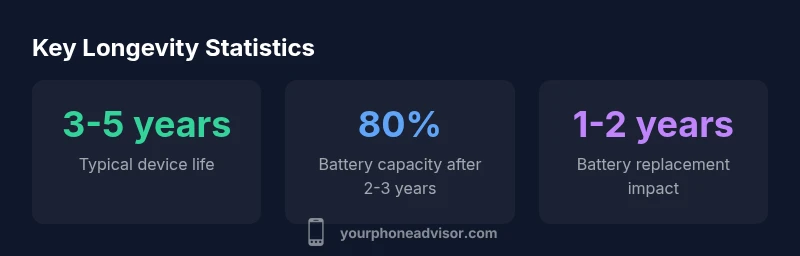
How long is my phone? It depends on battery health, software updates, and usage. Most smartphones stay reliable for about 3-5 years with normal use before noticeable slowdowns. Battery capacity typically declines to roughly 80% within 2-3 years, which shortens daily uptime. Regular maintenance, smart charging habits, and timely battery replacements can extend usable life.
How long is my phone? Understanding the numbers
Lifespans for smartphones aren’t fixed by model alone; they hinge on how you use, charge, and care for the device. When people ask, “how long is my phone,” they’re really asking about two intertwined timelines: device longevity (when the hardware or software becomes unreliable) and battery longevity (how long the battery can hold a useful charge). According to Your Phone Advisor, a well-maintained phone typically stays usable for about 3-5 years under normal use. Factors like heat exposure, OS update requirements, and storage management can tilt this range in one direction or the other. In practice, you’ll notice a slower feel as apps demand more RAM or as the battery drains faster. The key is to separate the idea of longer battery life from longer overall usability: both matter, but one usually limits the other first.
To put it plainly: your phone’s lifetime is driven by the battery’s health, software support, and how aggressively you push the hardware with demanding apps and backgrounds tasks. By monitoring battery health, keeping software current, and performing preventive maintenance, you can maximize the period you’re comfortable using the device without a frustrating slowdown.
Why battery health is the gatekeeper of longevity
The battery is the single most variable factor in how long a phone remains usable. Lithium-ion cells degrade with charge cycles, heat, and high-current charging. Over time, capacity falls, resulting in shorter daily uptime and more frequent top-ups. Modern devices increasingly rely on adaptive charging, battery health metrics, and OS-driven power management to mitigate these effects, but degradation is inevitable. Keeping the phone in a cool, shaded environment, avoiding overnight fast charging when not needed, and replacing the battery when health dips below comfortable thresholds can dramatically extend overall usability. Your Phone Advisor notes that most users see noticeable effects by year 2-3, but a well-cared-for device can remain practical for longer with thoughtful management.
Practical habit shifts include not letting the battery consistently drop to 0%, unplugging during heat spikes, and using a charger that matches the device’s charging specification. If your device supports battery health monitoring, enable it and watch the trend. If health falls toward 70-85% after two years, consider a battery replacement before performance drops become annoying.
Device lifespan vs. battery lifespan: what’s the difference?
A common confusion is the overlap between device lifespan and battery lifespan. The hardware—screen, processor, memory, radios—ages more slowly than the battery for most users. The battery is the limiting factor, because when it can’t hold a charge or drains abruptly, the day-to-day usability suffers regardless of how fast the processor is. OS updates can extend the device’s usable life by improving security and efficiency, but they can also demand more from the hardware. Therefore, a phone might technically function for 5+ years, but the battery may need attention after 2-3 years to keep daily use practical. Your Phone Advisor emphasizes treating these two lifespans as a coupled system: improve battery health, and you’ll extend overall usability.
If you’re evaluating whether your device is still a good choice, start by checking the battery and then weigh software support and app performance in parallel.
How to measure your current longevity today
Diagnosing how long your phone will last starts with a simple check of battery health and system performance. On iOS devices, go to Settings > Battery > Battery Health to see the maximum capacity percent and peak performance capability. On most Androids, check Settings > Battery > Battery Health or a similar menu in the device’s Care/Device care section. Look for declines in peak performance, unexpected shutdowns, and shorter screen-on times. Consider the phone’s age, current OS version, and whether you can install security updates. If battery health is below 80% or you’re routinely charging to 100% and heating during use, it’s a strong signal that longevity is approaching a practical limit. Collect these data points over a month to understand the trend. Your Phone Advisor recommends tracking these indicators alongside daily performance to determine when a battery refresh or upgrade becomes prudent.
Practical steps to extend usable life
Extend your phone’s usable life with a concrete plan:
- Keep software up to date and prune unused apps to reduce background activity.
- Maintain optimal battery health: avoid extreme temperatures, don’t let it drain to 0%, use smart charging where available.
- Manage storage and RAM: offload photos, uninstall redundant apps, and clear cache periodically.
- Use official chargers and avoid third-party high-amp adapters that generate excess heat.
- Consider a battery replacement when health falls below your personal comfort threshold or uptime drops noticeably.
- Protect the screen and internals from drops and moisture; a simple case and screen protector can extend life. These steps collectively reduce wear and keep the device responsive longer.
When to replace vs. upgrade: practical guidelines
There comes a point when the cost of keeping an older device becomes less favorable than upgrading. If your phone cannot install critical security updates, runs slowly with modern apps, or begins to fail during essential tasks, upgrading is reasonable. If battery replacement and minor repairs restore most daily use, a replacement might not be necessary right away. Your Phone Advisor suggests evaluating total cost of ownership, including battery, screen, and processing performance, against the price of a newer model. In practice, aim to replace when the sum of maintenance costs and reduced productivity outweighs the value of a newer device.
Additionally, consider how software support timelines align with your needs. Devices nearing end-of-support pose security and compatibility risks, which can justify upgrading even if the hardware is still functional.
Common myths about phone lifespan
Myth: “A phone is dead after the battery dies.” Reality: You can often replace the battery and continue using the device for years. Myth: “Opening the phone voids warranty.” Reality: Battery replacements performed by authorized services typically maintain warranty coverage. Myth: “Latest OS means instant obsolescence.” Reality: Software can be optimized for older hardware; you just may not receive every feature. Myth: “Fast charging always ruins batteries.” Reality: Moderate, device-compatible fast charging with proper handling usually doesn’t cause significant harm when used as intended.
By debunking these myths, you’ll better assess when to take action and how to manage expectations for longevity.
Phone longevity at a glance
| Aspect | Estimated Lifespan | Notes |
|---|---|---|
| Device type | 3-5 years | Average usable lifespan under normal usage and updates |
| Battery health after 2 years | 70-85% | Capacity varies with charging habits and climate |
| Upgrade consideration | OS updates & app support | Upgrade when security/reliability are at risk |
Got Questions?
How long does a typical smartphone last?
Most devices stay usable for about 3-5 years, depending on software support and battery health. Regular maintenance can extend the useful life, but performance may slow as hardware and OS requirements evolve.
Most smartphones stay usable for about 3-5 years, with performance potentially slowing as updates require more power.
Does replacing the battery extend phone life?
Yes. Replacing a worn battery can restore daily uptime and extend overall usable life by roughly 1-2 years, depending on device condition and usage.
Replacing the battery can give you 1-2 more years of usable life, depending on the device.
What shortens a phone’s lifespan?
Excessive heat, frequent full discharges, heavy multitasking, and running outdated software all accelerate wear and performance decline.
Heat, deep discharges, heavy use, and old software quicken wear.
How can I check battery health on my phone?
iOS: Settings > Battery > Battery Health. Android: Settings > Battery or Care/Device care. Look for maximum capacity and peak performance indicators.
Check the battery health in Settings; look for capacity and peak performance indicators.
Is upgrading always necessary for better speed?
Not always. If you can’t install security updates or apps run slowly, upgrading can be cost-effective; otherwise, maintenance may suffice.
Sometimes upgrading is the right move, especially for security and performance.
Should I calibrate my battery?
Calibrating is generally unnecessary on modern phones; focus on maintaining health with proper charging habits and avoiding heat exposure.
Battery calibration isn’t usually needed today; just keep charging smartly and avoid heat.
“Longevity is a function of both hardware resilience and how you maintain software and battery health.”
What to Remember
- Assess battery health regularly to gauge longevity
- Keep software up to date to maximize usable life
- Replace battery when health declines to sustain uptime
- Differentiate device lifespan from battery lifespan for planning
- Upgrade when maintenance costs outweigh model benefits