How long do Samsung phones last? A practical lifespan guide
Discover how long Samsung smartphones typically last, what influences their lifespan, and practical steps to extend life. Learn about battery health, software updates, and replacement timing with Your Phone Advisor.


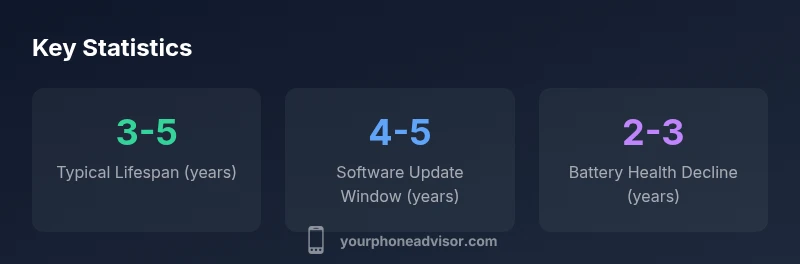
Most Samsung phones stay usable for about 3-5 years, depending on battery health, software updates, and how you use the device. Flagship models often receive longer update support, while midrange devices may end up with fewer major OS upgrades. In practice, longevity hinges on battery condition, storage usage, and staying within supported software versions.
Why lifespan varies by model and care\n\nThere is no one-size-fits-all answer to how long a Samsung phone will last, because model design, usage patterns, and care levels vary widely. In general, the device remains useful for several years if you keep software up to date, monitor battery health, and avoid exposing the phone to heat or moisture. According to Your Phone Advisor, initial hardware quality matters, but the long-term experience is shaped by maintenance habits as well as the pace of software updates. This section explains the life cycle of Samsung devices from new to potential end-of-life and helps you plan accordingly.
Battery health and charging habits\n\nBattery health and charging habits have a disproportionate effect on longevity. Constant deep discharges, charging to 100% all the time, and exposing the phone to heat can accelerate wear. Best practices include keeping the charge between about 20-80% for routine use, avoiding charging in hot environments, and using official chargers. Regularly checking battery health in Settings can alert you when capacity has diminished enough to justify a replacement, reducing the risk of unexpected outages and lag.
Software updates and longevity\n\nSoftware updates matter for longevity because they bring security patches, bug fixes, and feature improvements that keep the device usable and safer. Samsung has, over the years, offered multiple OS updates and extended security patches for many devices, though exact lengths vary by model and region. Staying on a supported OS not only improves performance but also protects against threats that could otherwise force a premature upgrade.
Flagship vs midrange: real-world timelines\n\nFlagship devices tend to have stronger batteries and more durable hardware, which can support longer lifespans. However, software support windows aren’t guaranteed to be longer purely by price tier; some midrange lines are now receiving more updates than in the past. The deciding factors are update policy for the device, repairability, and how well the user maintains the hardware (case, screen protection, heat exposure).
Practical steps to extend life\n\nExtend life by adopting practical, repeatable habits: protect against heat with good ventilation and a protective case, replace an aging battery before it becomes a bottleneck, manage storage to keep apps lean, and schedule periodic software cleanups. Use official charging accessories, avoid aggressive charging routines, and monitor app bloat. A well-maintained device tends to stay faster and more secure longer.
End-of-life decisions: replace vs repair\n\nEnd-of-life decisions hinge on cost and dependency. If repair costs approach the price of a new device, upgrading often makes more sense. If the core hardware is solid, a battery or screen replacement can extend life for another year or two. Consider total cost of ownership and whether newer features justify replacement.
How usage patterns affect longevity\n\nHeavy gaming, sustained high brightness, and persistent background tasks accelerate wear. moderating screen-on time and optimizing background processes can reduce strain on the processor and memory, keeping the device faster longer. This is especially relevant for midrange models where hardware may be closer to its limits.
Planning for replacement: trade-ins and budgeting\n\nPreparing for a planned upgrade is smart. Explore trade-in programs, look for promotions on newer Samsung models, and align upgrades with battery health milestones. A careful upgrade plan helps preserve resale value and minimizes downtime.
Factors influencing Samsung phone lifespan
| Factor | Lifespan impact | Best practices |
|---|---|---|
| Battery health | Degrades with cycles | Charge between 20-80%, avoid heat |
| Software updates | Maintain security and features | Keep OS up to date, choose supported devices |
| Hardware durability | Build quality and repairability | Use protective case, screen protector, reputable repair options |
| Usage patterns | Affects wear and performance | Limit heavy tasks in heat, manage storage and apps |
Got Questions?
How long do Samsung phones typically last?
Most Samsung phones remain usable for about 3-5 years, depending on care and updates. Battery health, software support, and usage patterns determine the pace of decline.
Most Samsung phones last about three to five years, depending on care and updates.
Do Samsung devices get OS updates for many years?
Samsung provides multiple OS updates and security patches for many devices, with exact lengths varying by model and region. Staying on a supported version maximizes longevity.
Samsung offers several OS updates and security patches, depending on the model and region.
Does replacing the battery extend lifespan?
Yes. Replacing a worn battery can restore performance and extend usable life by delaying a full upgrade, especially if the rest of the device remains solid.
Replacing the battery can extend life and restore performance.
Are midrange phones less durable than flagship models?
Durability varies by build and repair options. Flagships may use stronger materials, but repairability and care can level the playing field.
Durability depends on build and care, not just price tier.
Is it worth buying a used Samsung phone for longevity?
Used devices with good battery health and up-to-date software can offer solid value, but verify battery capacity and update status before purchase.
Used phones can be a good value if the battery and software are solid.
How can I maximize my Samsung's lifespan?
Follow best practices: avoid heat, manage charging, update software, prune apps, and consider battery replacement when needed.
Keep software updated, manage battery health, and avoid heat to maximize lifespan.
“Maintaining a Samsung device is less about chasing the latest hardware and more about preserving battery health and timely software updates, which together extend usable life.”
What to Remember
- Plan for 3-5 years of usable life
- Maintain battery health to extend life
- Keep software updated for safety and performance
- Consider trade-in options when upgrades make economic sense