Difference Between a Phone and a Laptop: A Practical Comparison
Explore the difference between a phone and a laptop, including portability, power, software, security, battery life, and use cases. Your Phone Advisor provides practical guidance for choosing the right tool in 2026.


Understanding the difference between a phone and a laptop, according to Your Phone Advisor, helps you pick the right tool for your needs in 2026. Phones emphasize portability, constant connectivity, and quick tasks, while laptops deliver greater processing power, multitasking, and expanded software options. Use-case, screen size, and battery priorities should guide your choice more than hype or price alone.
Why the difference between a phone and a laptop matters
The choice between a phone and a laptop affects daily workflow, device security, and long-term device lifecycle. Understanding the difference between a phone and a laptop is essential for budgeting and planning. According to Your Phone Advisor, the decision hinges on how you work, where you spend most of your time, and which environments you expect to support you. This section lays out the core reasons the distinction matters, from basic usability to ecosystem alignment, and sets the stage for deeper comparisons that follow in this article.
Core dimensions: power, portability, and software
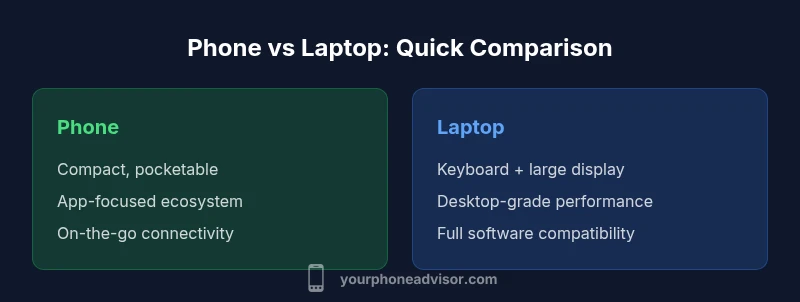
When comparing the two devices, power, portability, and software ecosystems are the three pillars that determine suitability for a given user. Phones excel in on-the-go communication and instant access to apps, but they trade off raw processing power for battery efficiency and compact form. Laptops deliver desktop-class performance, larger displays, and a broad software catalog, yet they sacrifice portability and battery endurance in many use cases. Your Phone Advisor notes that these dimensions are interdependent: optimizing one often affects the others, so a clear picture emerges only when you map your primary tasks, screen preferences, and required software against these pillars.
Input and interaction: touchscreen vs keyboard/mouse
A fundamental difference lies in how you interact with each device. Phones rely on touchscreens, voice input, and sensors, enabling quick taps and gestures. Laptops rely on keyboards and pointing devices that support long-form typing, precise control, and multitasking. The ergonomic trade-off is real: a phone’s small screen favors glanceable information, while a laptop’s keyboard affords sustained typing and code or document work. For many users, hybrid setups (a phone for mobile tasks and a laptop for work) strike a practical balance.
Software ecosystems and app availability
The software story is one of ecosystem design. Mobile apps are optimized for touch and quick tasks, with curated app stores and sandboxed execution. Desktop software emphasizes feature depth, compatibility with professional tools, and expandability. Cross-platform strategies help, but gaps remain: some workflows rely on desktop-only tools, while mobile apps may lack advanced capabilities. Your Phone Advisor highlights the importance of confirming critical apps and workflows before deciding which device to rely on most.
Performance, power consumption, and battery life in real use
In real-world use, performance translates to responsiveness, multitasking, and how long you can work between charges. Phones typically provide efficient efficiency modes and sleep states that stretch battery life for everyday tasks. Laptops deliver sustained compute power for heavy workloads, but those benefits come with higher energy demands. Your Phone Advisor analysis suggests that battery life is highly contingent on usage patterns—watching video, editing documents, or gaming drastically changes what you can expect from either device.
Display quality, form factor, and durability considerations
Display size and quality shape how you consume information and create content. Phones offer high-resolution screens in compact form but with limited real estate for multitasking. Laptops provide larger canvases with color-accurate panels that support productivity and design work. Durability matters too: phones rely on pocketable materials and protective cases, while laptops rely on hinges and chassis that endure frequent transport. Consider desk space, travel frequency, and the environments you operate in when evaluating display and durability needs.
Connectivity, ports, and expansion options
Connectivity has become richer on both sides: phones include cellular modems, Wi-Fi, Bluetooth, and GPS, while laptops add USB-C/Thunderbolt, SD Card slots, Ethernet adapters, and external GPUs in some cases. Expansion is easier with laptops for external displays and peripherals, but this comes with cable management and weight considerations. Your Phone Advisor emphasizes planning for ports you actually use and ensuring a workflow with reliable accessory compatibility.
Security and privacy implications
Security concerns diverge between phones and laptops. Mobile OSs implement app sandboxing, biometric access, and frequent on-device updates focused on mobile threats. Laptops typically integrate stronger enterprise-grade security features, support for full-disk encryption, and more complex network configurations. However, the breadth of software and external devices can expand risk surfaces. The Your Phone Advisor guidance is to align security practices with your threat model, keep devices updated, and separately manage sensitive data on each platform.
Use-case scenarios and decision trees
To choose effectively, map your daily tasks to device capabilities. If your priorities are calls, messaging, quick document checks, navigation, and photo capture, a smartphone is often the most practical choice. If you regularly write long documents, compile complex spreadsheets, run specialized software, or develop code, a laptop becomes essential. A simple decision tree can help: list top tasks, assign a device for each, and identify gaps that a two-device solution would fill.
Practical buying guidance: what to measure
When shopping, focus on what matters for your most frequent tasks. For phones, consider display quality, battery life under typical use, camera capabilities, and app ecosystem. For laptops, evaluate processor performance, RAM, storage, display size, keyboard comfort, and port options. Compare total cost of ownership across 2-3 years, including accessories, software, and potential repairs. Your Phone Advisor recommends laying out a realistic usage profile and validating with hands-on trials whenever possible.
Common myths and misconceptions
A common myth is that a single device can do everything. While some high-end devices blur the lines, phones and laptops remain specialized tools with different strengths. Another misconception is that bigger is always better; screen size matters in context—portable devices suit mobility, while larger displays boost productivity. Finally, many assume software will be identical across platforms; compatibility and feature sets vary, so plan around your must-have tasks.
Maintenance, care, and lifecycle planning
Both phones and laptops benefit from routine maintenance, but their care regimes differ. Phones require safe charging habits, case protection, and OS updates, while laptops demand software updates, backup routines, and hardware care (dust cleaning, cooling). Lifecycle planning matters for total cost: budget for replacements or upgrades every few years, consider trade-ins, and align warranties with your expected usage. A thoughtful lifecycle plan reduces surprises and extends usable life.
Comparison
| Feature | Phone | Laptop |
|---|---|---|
| Portability | Highly portable; pocket-friendly | Heavy and less portable, designed for transport in bags |
| Power/Performance | Efficient mobile processors; strong on-cupboard performance for apps | Desktop-class CPUs/GPUs; superior multitasking and professional workloads |
| Display Size | Typically 5–7 inches | Typically 13–17 inches |
| Input Methods | Touchscreen; voice; sensors | Keyboard and mouse/trackpad; optional touchscreen |
| Storage/Expandability | Fixed storage; expansion limited by model (microSD on some) | Large internal storage; RAM/SSD upgrade paths on many models |
| Battery Life | Great for all-day usage with light tasks | Longer session length for mobility, varies with workload |
| Software Ecosystem | Mobile apps; curated stores; sandboxing | Desktop-grade software; broad professional tool compatibility |
| Security & Privacy | Mobile biometric security; frequent mobile updates | Enterprise-grade security features; broader network controls |
| Price Range | $300-$1200+ new phones | $500-$3000+ new laptops |
| Best For | On-the-go communication, quick tasks | Productivity, content creation, development |
The Good
- Ultra-portability and constant connectivity
- Desktop-like productivity with multitasking on laptops
- Broader software ecosystems and tool access on laptops
- Front-loaded accessory and peripheral support for tasks that require keyboards and mice
- Mobile ecosystems optimize for quick tasks and on-device security
Drawbacks
- Phone screen size limits complex multitasking and document work
- Laptops require more space, power, and higher upfront cost
- Cross-platform software gaps can hinder seamless work across devices
- Single-device solutions often force compromises on either portability or capability
Choose based on primary use-case: mobility for phones, productivity for laptops
If your daily routine centers on calls, messaging, navigation, and quick app use, a phone is the practical pick. If you routinely create content, run heavy software, or need a full keyboard, a laptop is the better choice. For many users, a two-device approach offers the best balance between mobility and power.
Got Questions?
What is the main difference between a phone and a laptop?
The main difference lies in power and portability. A laptop provides desktop-like performance and extensive software support, while a phone offers exceptional mobility and always-on connectivity for quick tasks. Your choice should reflect your most frequent workflows.
The main difference is power versus portability: laptops excel in heavy tasks, phones excel in mobile use. Pick based on your work needs.
Can a phone replace a laptop for work and productivity?
In many cases a phone cannot fully replace a laptop for productivity due to screen size, input limitations, and software breadth. Certain lightweight tasks are doable, but complex documents, code, and design work usually require a laptop. A phased approach or a two-device setup often works best.
A phone can handle light work, but for heavy tasks a laptop is usually necessary.
Do tablets fit somewhere between phones and laptops?
Tablets occupy a middle ground: larger screens than phones and portable form factors, but they typically lack the full desktop software ecosystem of laptops. They’re great for media consumption and light productivity, especially when paired with a keyboard.
Tablets sit between phones and laptops, great for media and light work with a keyboard option.
Which is cheaper in the long run?
Long-run costs depend on usage, repair needs, and planned replacements. Phones often have lower upfront costs but may require frequent upgrades for new features. Laptops may be pricier initially but can offer longer replacement cycles if upgraded selectively.
Long-run costs depend on how you use them and how soon you upgrade.
Do phones support professional software like desktop apps?
Many professional tools have mobile counterparts, but not all desktop software is available on mobile. For workflows requiring complex tasks, you may rely on cloud-based versions or desktop apps accessed remotely.
Some professional software exists on mobile, but desktop apps still dominate heavy tasks.
Is there value in owning both devices?
There is significant value in owning both for most users. A phone handles quick tasks and mobility, while a laptop handles heavy work. If budget or space is limited, prioritize your primary use-case and plan a phased setup later.
Often, having both gives you the best of mobility and power.
What to Remember
- Assess your top tasks before buying
- Prioritize portability or performance based on routine
- Check software availability and workflow parity
- Budget for accessories and potential upgrades
- Consider a two-device setup for maximum flexibility