Why Your Phone Overheats While Charging: Quick Fixes and Prevention
Practical fixes to stop your phone from overheating during charging. Learn causes, follow a safe diagnostic flow, and prevent future issues with guidance from Your Phone Advisor.


The most likely cause of why phone overheating while charging is a combination of battery aging, high ambient temperature, and heavy background activity. Start by unplugging from power, removing the case, and charging with the original charger at a cool room temperature. If it remains hot, close unused apps, enable battery saver, and avoid wireless charging in hot environments. Seek professional help if it persists.
Why It Happens
When you notice why phone overheating while charging, a few core factors come into play. The heat you feel is a sign that the device is taxing its battery and power system. According to Your Phone Advisor, the top contributors are battery health, charging method, and environmental conditions. A degraded cell heats up faster under load, while high room temperatures reduce the device's ability to shed heat. Fast charging can push the battery beyond its optimal thermal window, and using a bulky or poorly ventilated case can trap heat. Software load matters too; background processes and a bright display add to the thermal footprint. Understanding these factors helps you tailor a safer charging routine and prevent unnecessary wear.
Quick Checks You Can Do Right Now
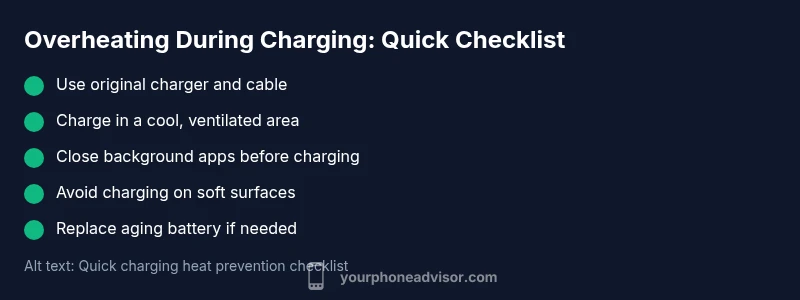
These checks are safe, fast, and don’t require tools. Start by moving the phone to a cooler area and removing any protective case that might trap heat. Use the original charger and a high-quality cable, and try a different outlet or charger to rule out a faulty adapter. Check for software updates since a bug could affect charging temperatures. Close background apps, enable battery saver, and dim the screen to reduce power draw while you observe the temperature. If you were using wireless charging, test wired charging and vice versa. Avoid using the phone during charging in hot conditions. Let the device rest and cool completely before retrying a longer charge. If the heat persists, discontinue charging and seek help.
Diagnostic Flow: Symptom to Diagnosis
A systematic approach helps identify the root cause. Start with the symptom overheats when plugged in. If the device cools when unplugged, the charger or environment is likely at fault. If heat remains with a replacement charger, the issue may be the battery or software. If charging heat occurs even in a cool room, inspect software, running processes, and background apps. The goal is to isolate variables: charger, environment, and battery health. Once you identify the culprit, apply the corresponding fix.
Step-by-Step Fixes for the Most Common Cause
Follow these steps to fix the most frequent reason for overheating during charging. Step 1: Power down and cool the device. Step 2: Inspect charger and cable for damage and replace if needed. Step 3: Remove the phone case during charging. Step 4: Close background apps and enable battery saver. Step 5: Charge with the original charger and avoid fast charging in hot environments. Step 6: If the battery is aged or swollen, replace it or seek professional service.
Safety, Warnings, and Prevention
Never charge a damaged battery or continue charging if you notice a strong smell, swelling, or smoke. Keep devices away from flammable materials and avoid charging under pillows or on soft surfaces. Regularly inspect charging accessories for wear and tear, and store chargers in a cool, ventilated area. For long-term health, monitor battery capacity and perform periodic checks, especially if you rely on your device for critical work.
Long-Term Prevention and Best Practices
Adopt habits that minimize heat generation over time. Use original charging gear, avoid charging in direct sun, and keep the device out of hot environments like cars on sunny days. Keep software updated, reduce background activity, and enable battery optimization features. If your device runs hot during routine use, schedule charging during cooler parts of the day and consider a battery health check with professional support. By maintaining battery health and avoiding extreme temperatures, you reduce the risk of overheating when charging.
When to Seek Professional Help
If overheating persists after trying these steps, contact the device manufacturer or a certified technician. A swollen battery or abnormal heat during charging warrants immediate attention to prevent safety risks. Document any changes in charging behavior and avoid DIY battery replacements for devices under warranty or with venting heat signs.
Steps
Estimated time: 30-45 minutes
- 1
Power down and cool the device
Turn the phone off and move it to a cooler area. Let it sit for several minutes to dissipate built-up heat before resuming charging.
Tip: Cooling time helps restore safe operating temperatures. - 2
Inspect charger and cable
Check for frayed wires, bent connectors, or loose fittings. Replace damaged cables and use the original charger for a stable power supply.
Tip: A cheap or damaged cable often causes heating. - 3
Remove the phone case during charging
Some cases trap heat. Take the case off to improve air flow and re-test charging.
Tip: This simple step can make a noticeable difference. - 4
Close background apps and reduce load
Swipe away or force stop apps that run in the background. Enable battery saver while charging in hot conditions.
Tip: Less background activity lowers thermal load. - 5
Use the correct charging method
Charge with the original charger and avoid fast charging in hot environments unless necessary.
Tip: Fast charging is convenient but hotter environments amplify heat. - 6
Check battery health and seek replacement if needed
If the device continues to overheat after fixes, consider battery health replacement or professional service.
Tip: A swollen or aged battery is not safe to ignore.
Diagnosis: Phone overheats during charging
Possible Causes
- highAging or degraded battery
- highAmbient heat or direct sun exposure
- highUsing third-party charger or damaged cable
- mediumHeavy CPU/GPU usage or apps running in background
- lowPhone case trapping heat
Fixes
- easyStop charging in hot environments; move to a cooler room
- easyUse the original charger and a high-quality cable
- easyClose background apps and enable battery saver
- easyRemove the case while charging to improve airflow
- hardIf the battery is old or swollen, replace it and seek professional service
Got Questions?
Why does my phone get hot when charging overnight?
Charging overnight can keep the battery under load for extended periods, especially if background processes remain active. Cooler ambient temperatures and using optimized charging can help manage heat. If heat persists, stop charging and check battery health.
Overnight charging can keep the battery under load. Try reducing background activity and ensure proper charging with a healthy battery.
Can fast charging cause overheating?
Fast charging delivers more power quickly, which can raise temperatures, especially in warm environments or with a damaged charger. Use standard charging when heat is an issue and keep the device unloaded while charging.
Fast charging can heat the device, especially in hot rooms. Use standard charging if it feels warm.
Is it safe to use a third-party charger?
Third-party chargers vary in quality and can cause heat or electrical issues. Prefer original or high-quality certified accessories and inspect cables for wear before use.
Use high-quality chargers and avoid damaged or cheap third-party options.
When should I replace the battery due to heat?
If the phone consistently overheats during charging despite fixes, the battery may be aging or swollen. Replacement by a professional is recommended, especially for devices under warranty.
Persistent overheating with age may require battery replacement by a pro.
What is a safe charging temperature range?
There is no universal temperature value for all devices, but staying in a cool, ventilated environment and avoiding direct sun generally keeps temps safe. If your device feels hot to touch, discontinue charging and investigate.
If it feels hot, stop charging and check the charger and battery health.
Watch Video
What to Remember
- Unplug and cool the device before retesting
- Use the original charger and good cables
- Close background apps to lower heat
- Charge in cool environments and avoid direct sun
- Replace aging batteries and seek professional help if persistence