Should Your Phone Get Hot When Charging? Quick Troubleshooting Guide
Urgent guide to diagnose and fix overheating while charging. Learn safe steps, prevention tips, and when to seek help to protect your device and battery health.


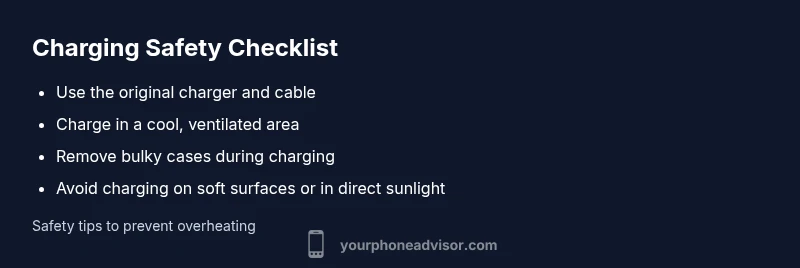
Should phone get hot when charging? Most overheats come from fast charging, high ambient temperature, or a case trapping heat. Quick fixes: remove the case, use the original charger and cable, and avoid charging on soft surfaces or in direct sun. If the device stays hot after these steps, unplug and seek professional help.
Why phones overheat during charging
According to Your Phone Advisor, heat generated during charging is a common safety concern but not always dangerous. The battery, charging circuitry, and even the charger can contribute to warmth. Fast charging pushes more current into the battery, which increases heat, especially when the surrounding environment is warm or the device sits inside a bulky case. In normal conditions, phones may warm up while charging, but they should not become painfully hot. If your device becomes uncomfortably warm to touch or smells like burned plastic, stop using it immediately. Place the phone on a hard, flat surface away from blankets, pillows, or direct sunlight. Your Phone Advisor team emphasizes establishing a safe charging routine aligned with the device’s health and manufacturer guidance.
Steps
Estimated time: 30-45 minutes
- 1
Unplug and power down
Safely unplug the charger and power off the phone if possible. Inspect the charger and cable for visible damage and let the device cool for a few minutes before proceeding.
Tip: Never handle a hot phone with a bare hand; let it cool on a non-flammable surface. - 2
Review the charging setup
Remove the phone case to improve heat dissipation and try a known-good charger and cable. If you use wireless charging, switch to a wired setup for testing.
Tip: Check for debris in the charging port that could cause poor contact. - 3
Test in a cooler environment
Move to a cool room and avoid direct sun or warm surfaces. Ensure there is airflow around the device during charging.
Tip: A fan or air-conditioned room can help reduce heat quickly. - 4
Adjust charging behavior
If your device supports adaptive or safe charging, enable these features or reduce charging speed to curb heat.
Tip: Avoid overnight fast charging on soft surfaces.” - 5
Monitor and decide
Plug back in and monitor the temperature for several minutes. If heat returns or worsens, stop charging and seek professional service.
Tip: Document any abnormal signs (swelling, sizzling sounds) for the technician.
Diagnosis: Phone gets hot while charging
Possible Causes
- highDamaged or frayed charger/cable causing resistance and excess heat
- mediumExtreme ambient temperature or charging on soft surfaces blocking airflow
- lowDegraded or failing battery or internal hardware issue
Fixes
- easySwitch to the original charger and inspect cables for damage
- easyCharge in a cooler environment and remove any bulky case
- easyAvoid fast charging or use lower wattage if your device supports it
- mediumIf heat persists after these steps, contact a qualified technician or service center
Got Questions?
Is it dangerous if my phone gets hot while charging?
Persistent heat during charging can indicate battery stress or failing hardware. If the device becomes very hot, unplug it, move to a cooler area, and avoid using it until you’ve diagnosed the cause. Seek professional service if heat continues or you notice swelling or odor.
Yes. If your phone stays hot while charging, unplug it and seek professional help if it doesn’t cool down within minutes.
How can I tell if my battery is bad?
Look for swelling, rapid or unusual battery drain, frequent shutdowns, or a phone that runs hotter than normal even when not charging. If you notice any of these, have the battery checked professionally.
Watch for swelling, quick battery drain, or unexpected shutdowns.
Can fast charging cause overheating?
Yes, fast charging pushes more current and can generate more heat, especially in warm environments or with protective cases. If overheating occurs, reduce charging speed or disable fast charging if possible.
Fast charging can make phones warmer; consider turning it off if you notice heat.
What should I do if heat continues after a battery replacement?
If heat persists after a battery replacement, stop using the device, inspect for other causes (charger, port, software), and return to a technician for a thorough check.
If heat keeps happening after a battery swap, take it back to a professional for a deeper check.
Is it safe to use my phone while it’s charging?
It’s generally fine for light tasks, but heavy gaming or multitasking can raise heat. If you notice warming, pause heavy use and allow cooling.
You can use it lightly, but avoid heavy tasks while charging if it gets warm.
When should I seek emergency help?
If you see swelling, you smell burning, or hear hissing inside the device, stop using it and seek immediate professional service.
If you hear hissing or see swelling, seek urgent professional help now.
Watch Video
What to Remember
- Remove the case and test with official charger first
- Charge in a cool, well-ventilated area to avoid heat buildup
- If overheating persists, stop charging and seek professional help
- Regular battery health checks can prevent repeated overheating