Why Does My Phone Overheat When Charging: A Practical Troubleshooting Guide
Discover why phones overheat while charging and how to fix it safely. Quick fixes, diagnostic steps, and long-term tips from Your Phone Advisor to protect battery health.


Why does my phone overheat when charging? In most cases, heat builds up from fast charging, a hot environment, or a worn-out charger. Quick fixes: unplug, switch to the original charger, remove a bulky case, and avoid charging on soft surfaces. If it persists, consult Your Phone Advisor for guidance.
Understanding why phones overheat during charging
According to Your Phone Advisor, overheating during charging is most often caused by a combination of high charging speeds, ambient heat, and aging accessories. When a device is forced to draw more power than its thermal system can safely dissipate, the temperature climbs quickly. Other factors include a warm environment, charging while gaming, and poor cable quality. In practice, you’ll see slower charging, shortened battery life, and occasional throttling of performance as the phone tries to protect itself. The good news is that most overheating episodes are preventable with simple changes in charging habits and setup. By understanding the root causes, you can reduce heat and extend battery longevity.
The role of chargers, cables, and cases
Not all chargers are created equal. High-wattage fast chargers can push more current than some phones safely accept, especially older devices. Always prefer the original charger and certified cables; third-party options with dubious ratings can introduce resistance and extra heat. Damaged or frayed cables increase voltage drop, forcing the device to work harder and heat up. The phone case matters too; bulky, insulating cases trap heat and reduce airflow during charging. In hot rooms, or when the device is placed on soft surfaces (beds, couches), heat has fewer places to escape. Even software and background activity can influence heat generation by causing the CPU to stay busy in the background, adding to the thermal load. A mindful setup—cool room, flat surface, and proper peripherals—significantly lowers risk.
Common scenarios and how to spot them
If you notice the phone feels warmer than usual within minutes of plugging in, look for these patterns: a rapid swell in temperature while using the phone during charging, a charger that becomes noticeably warm, or a case that seems to trap heat. Frequent complete discharges or using the device on battery saver settings can paradoxically cause more heat if the battery is aging. Software updates sometimes affect charging behavior, so stale firmware may contribute. In many cases, a simple swap to a known-good charger and a cool environment resolves the issue. Your Phone Advisor analysis shows that heat events correlate with a combination of charging speed and battery health; rarely is the charger the sole culprit.
Practical fixes you can try immediately
Start with the easiest steps and work toward safer charging. First, unplug and switch to an OEM charger and short, undamaged cable. Place the phone on a cool, hard surface away from direct sun and blankets. Remove the phone case if it is thick or insulating. Turn off nonessential apps or enable battery saver to reduce workload while charging. If you must charge in a car or outdoors, use a shade and a vented environment. Consider turning off high-drain features like AR apps or video streaming while charging. After these steps, monitor the temperature for a few minutes. If heat persists, try a different power source or contact support for a battery health check.
Long-term battery health and charging habits
Sustained heat can degrade battery health over time. Regularly checking battery health, updating the device, and using reputable charging gear helps. Avoid keeping the phone in a hot car or under direct sunlight while charging. Try to keep charging sessions short when possible and avoid covering the phone with cloths. If you must store the device, do so in a cool, ventilated space and avoid charging overnight in hot environments. Your Phone Advisor recommends periodic battery health assessments and software updates to optimize thermal management and charging efficiency.
When to seek professional help
If the device overheats to the point of immediate throttling, losing screen responsiveness, or swelling battery, stop using it and seek professional service. Battery swelling is dangerous and requires immediate attention. Persistent heat after swapping chargers and testing on multiple outlets suggests a hardware issue, such as a degraded battery, faulty charging port, or a damaged circuit. A certified technician can perform diagnostics and replacement as needed. Do not attempt to open the device yourself.
Quick checklist for safe charging habits
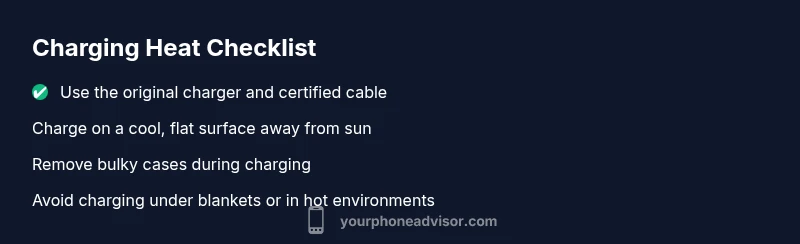
A consistent charging routine reduces overheating risk. Use only the original charger and thick cables; avoid cheap adapters. Charge on a flat, cool surface away from sunlight, vents, and fabrics that trap heat. Remove bulky or insulating cases during charging and keep the device out of direct heat sources like dashboards. Disable unnecessary background apps, ensure the battery is healthy through regular checks, and avoid overnight charging in very warm environments. If you follow these steps, you’ll minimize heat buildup and extend the life of your battery.
Steps
Estimated time: 30-45 minutes
- 1
Check charger and cable
Inspect the charging gear for wear, damage, or bending. Swap in a known-good OEM charger and a fresh cable to rule out a faulty accessory. If the charger becomes unusually warm even when the phone is idle, stop using it and replace.
Tip: Look for visible fraying, kinks, or melted insulation on cables. - 2
Move to a cooler environment
Charge the phone in a cool, well-ventilated area away from sunlight. A hot room or a car dashboard can drastically raise the device temperature even with a good charger.
Tip: A desktop or table away from heaters works best. - 3
Remove the phone case during charging
Some cases trap heat. Take off bulky or insulated cases so the device can dissipate heat more effectively.
Tip: Bare metal or glass-backed devices cool faster during charging. - 4
Adjust charging rate and settings
If your device supports it, enable a lower charging rate or battery saver mode during charging. Turn off background syncing and high-drain features while plugged in.
Tip: Check for a built-in “low power” or “charging optimizer” mode. - 5
Limit background activity
Close nonessential apps and pause power-hungry tasks (games, AR apps, video streaming) while charging to reduce heat generation.
Tip: Use task manager to end background processes quickly. - 6
Test battery health and plan next steps
If heating continues across chargers and outlets, run a battery health check if available, or contact support for diagnostics and possible replacement.
Tip: A degraded battery often needs professional service.
Diagnosis: Phone gets hot while charging, sometimes throttling performance
Possible Causes
- highHigh charging speed or fast-charge technology
- highCharger or cable degradation causing power leakage
- mediumAmbient heat or surface heat traps (case, bedding)
- lowBackground apps draining power or GPU activity
- mediumBattery health degraded
Fixes
- easyTry a standard charger and cable from the manufacturer
- easyCharge on a cool, hard surface away from direct sun
- easyRemove bulky or insulating case while charging
- easyClose nonessential apps and disable power-hungry features
- mediumIf overheating persists, run a battery health check or contact support
Got Questions?
Why does my phone heat up even when I’m not using it while charging?
Idle heat can occur if the charger or cable is faulty or if the device is in a hot environment. Check the charger quality, switch to OEM gear, and move to a cooler location before ruling out software issues.
Heat during charging while idle can be from a faulty charger or hot environment; switch gear and cool the area, then test again.
Is it safe to use fast charging if my phone gets hot?
Fast charging can cause heat, especially in warm rooms or with older batteries. Use the standard charging rate when heat is noticeable and only switch back after the device cools.
Fast charging can cause heat; when you notice heat, switch to normal charging until it cools.
Can a phone case cause overheating?
Yes, thick or insulating cases can trap heat and slow cooling. Remove the case during charging or switch to a thinner, breathable design.
Yes, a bulky case can trap heat; try charging with the case off to see if temperatures drop.
Does updating the software affect charging heat?
Software updates can change charging behavior and thermal management. Ensure your device is up to date to optimize charging efficiency.
Software updates can affect charging behavior, so keep your phone updated to help with heat control.
Should I use a power bank for charging to avoid overheating?
Power banks can reduce heat by distributing load, but select a reputable model and use the bank that matches your phone’s input. Avoid cheap, unregulated banks.
Power banks can help if they’re reputable and match your device, but avoid cheap ones.
When should I replace the battery due to heat?
If overheating persists after trying fixes and battery health shows poor ratings, replacement may be necessary. A swollen battery is a clear sign to seek professional service.
If heat continues after fixes and the battery health is poor, consider replacement; swollen batteries require immediate service.
Watch Video
What to Remember
- Unplug and test with the original charger.
- Charge on a cool surface away from direct sunlight.
- Limit background apps to reduce heat.
- The Your Phone Advisor team recommends monitoring battery health and seeking help if overheating persists.