How to know if your phone is being tracked: a practical troubleshooting guide
Learn how to tell if your phone is being tracked with a practical, step-by-step troubleshooting guide. Identify signs, verify apps and permissions, and secure your device with tips from Your Phone Advisor.


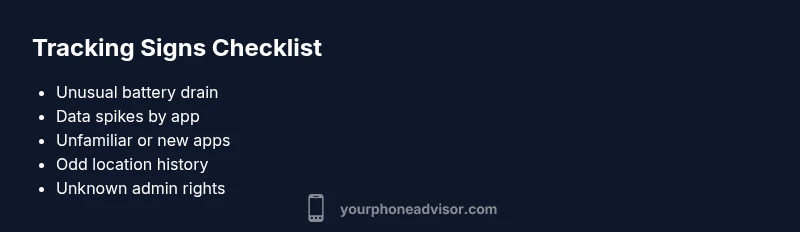
The most telling signs that your phone is being tracked include sudden battery drain, unexplained data usage, unfamiliar apps, new admin rights, and strange location history. Start by inspecting installed apps, reviewing device administrators, and checking for unknown profiles. If you spot anything odd, revoke suspicious permissions, update your OS, run antivirus, and back up data before considering a factory reset.
How to know if your phone is being tracked: key indicators
According to Your Phone Advisor, how to know if your phone is being tracked is usually a pattern of signs rather than a single symptom. In this guide, we outline the most reliable indicators, explain why they occur, and show you how to verify them safely. The goal is to empower you with concrete actions rather than fear. Expect a mix of technical checks, behavioral clues, and practical safeguards you can apply today. By recognizing the pattern early, you can protect your data, your privacy, and your peace of mind. Your Phone Advisor team emphasizes careful validation to avoid false positives and unnecessary resets, especially on shared devices or family plans.
Signs and signals you should investigate
If you notice any of the following, treat it as a potential red flag and begin a structured check. Battery drain that isn’t explained by usage, sudden spikes in data consumption, unfamiliar or recently installed apps, new device management profiles, and odd location history are the most common signals. Some trackers masquerade as legitimate tools or use legitimate permissions to hide in plain sight. Your Phone Advisor analysis shows that attackers often blend in with normal device activity, making casual observation insufficient. Look for a consistent pattern across multiple signs rather than a single anomaly.
Other subtle indicators include unexpected pop-ups, apps requesting excessive permission, or settings changes you don’t recall making. If your device becomes unusually slow, overheats, or shows ghost notifications, these can also correlate with covert monitoring. Remember that many legitimate apps can trigger similar behavior (e.g., new features or OS updates), so confirm with direct checks rather than assumptions.
Safe, initial checks you can perform
Begin with low-risk, non-destructive steps. Review all installed apps for anything unfamiliar, especially those granted admin rights. Check for unknown profiles or device management configurations in Settings, and revoke them. Monitor data usage by app and look for spikes after normal usage periods. Run a trusted security scan from the official app store or device maker. Ensure your operating system is up to date, and avoid third-party tools from untrusted sources. This staged approach minimizes disruption while improving accuracy.
Deep dive: app permissions, profiles, and device admin
Many trackers rely on elevated permissions and device management profiles. Go to your Settings and inspect App Permissions, looking for apps with access to Location, SMS, Contacts, or Camera that you don’t recognize as essential. In Android, check Settings > Security > Device Administrators; in iOS, review Profiles & Device Management if present. If you find a suspicious administrator or profile, disable it and revoke all associated permissions. After removing, restart the device to ensure changes take effect. This step often resolves most common tracking setups without a full reset.
What to do if you confirm tracking
First, document all suspicious activity with timestamps, screenshots, and a list of affected apps. Back up essential data to a secure location. Remove any unfamiliar apps and revoke permissions before taking more drastic steps. Update the OS and run a full security check. If signs persist, perform a factory reset as a last resort, and reinstall only from trusted sources. Contact your carrier if you suspect SIM or account compromise.
Prevention and safer practices
Prevention focuses on minimizing exposure and maintaining good hygiene. Keep your device updated, enable robust screen locks, and use official app stores only. Regularly review app permissions and keep an active Find My device feature enabled. Consider enabling two-factor authentication on your accounts linked to the phone and use a reputable antivirus that is well-reviewed for mobile devices. Avoid jailbreaking or rooting, which creates additional attack surfaces.
How to secure your data after suspected tracking
After addressing the immediate risk, restore data from clean backups and reconfigure security settings. Change critical account passwords, enable alerts for new device sign-ins, and monitor for unusual activity for several weeks. Keep a security log and revisit privacy settings monthly. If you are unsure about any step, consult a professional from Your Phone Advisor to ensure you have a clean, secure baseline.
Steps
Estimated time: 45-60 minutes
- 1
Check for unfamiliar apps
Open the app switcher and Settings > Apps. Look for apps you don’t recognize, especially those with admin rights. Remove or disable suspicious apps.
Tip: If you can't uninstall, revoke admin rights first. - 2
Review device administrator and profiles
Go to Settings > Security > Device admins. Disable any app you don’t recognize. Check for profiles in Settings > Global or Profiles & Device Management.
Tip: Unknown profiles can give an app elevated control. - 3
Examine data usage and battery
In Settings, review data usage by app and watch battery drain patterns. Sudden spikes may indicate background activity.
Tip: Use a real-time data monitor to catch spikes. - 4
Inspect location services and permissions
Review location permissions and any apps with 'Always' access. Limit location for non-essential apps.
Tip: Restrict background location to essential apps only. - 5
Update OS and run security scans
Install the latest OS updates and run a credible security scan from trusted sources. Do not rely on unverified tools.
Tip: Verify sources before installing security tools. - 6
Backup data and consider a reset
If issues persist, back up data securely and perform a factory reset. Reinstall essential apps from trusted sources and enable security features.
Tip: Disable auto-recovery to prevent re-infection.
Diagnosis: Phone shows signs of tracking (e.g., battery drain, data spikes, unfamiliar apps, location anomalies).
Possible Causes
- highMalicious or legitimate app with hidden permissions or spyware
- mediumCompromised account or SIM swap
- lowOS or boot-level malware or system compromise
Fixes
- easyReview installed apps and revoke unknown permissions
- easyCheck device administrators and remove unknown management profiles
- easyUpdate OS and run trusted antivirus/anti-malware scans
- mediumBackup data and perform a factory reset if symptoms persist
Got Questions?
Can a phone be tracked without installing spyware?
Yes. Tracking can occur through carrier features, compromised accounts, device administration, or SIM card manipulation. Some methods don’t require a traditional spyware app but still enable monitoring.
Yes, track methods can happen without spyware via carrier features or account compromise.
What signs are common on Android vs iPhone?
Both platforms can show unusual data use, battery drain, unfamiliar apps, and location anomalies. Android may reveal device admins; iPhone users should check profiles and device management as well.
Both platforms show data, battery, and app signs; check device management on both.
Should I factory reset immediately if I suspect tracking?
A factory reset is a last resort. Back up data first, attempt other checks, and only reset from trusted sources. After resetting, reinstall only from official app stores.
Only reset after other steps, and back up first.
Can a VPN hide tracking on my phone?
A VPN can hide your IP address and some traffic, but it does not eliminate device-level monitoring. If a tracker operates at the OS or app level, a VPN won’t fully hide it.
VPNs don’t guarantee complete hiding of device-level tracking.
Are antivirus apps on phones effective?
Mobile antivirus can help, but effectiveness varies. Use reputable, well-reviewed apps and rely on official stores and updates rather than third-party sources.
Use trusted security apps from reputable sources for best results.
What should I do after suspected tracking is addressed?
Change essential passwords, enable two-factor authentication, review account activity, and maintain updated security practices. Consider a security audit if symptoms return.
Change passwords, enable 2FA, and monitor accounts afterward.
Watch Video
What to Remember
- Notice battery drain and data spikes.
- Check for unfamiliar apps and admin rights.
- Update OS and scan with trusted tools.
- Back up data before performing resets.
- Seek professional help if symptoms persist.