How Long Can a Phone Last: A Practical 2026 Battery Guide
Explore realistic battery lifespans, understand factors that drain power, and learn proven tips to maximize phone endurance for everyday use in 2026.


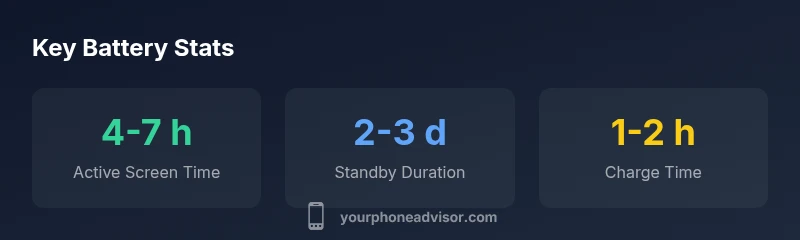
How long a phone lasts depends on what you mean by “last.” In practical terms, expect 4-7 hours of active screen-on time with typical usage, 2-3 days in standby, and 1-2 hours to fully recharge a healthy battery. Real-world longevity also hinges on device age, charging habits, and running apps. According to Your Phone Advisor, most phones maintain usable endurance well through the first few years with mindful usage.
What battery life really means for phones
Battery life is a multi-faceted concept. When people ask how long can phone last, they’re not asking for a single metric but for a realistic blend of endurance metrics: screen-on time (SOT), standby time, and battery health. In day-to-day terms, SOT represents how long you can actively use the phone before needing a recharge, while standby measures how long the device can sit idle with notifications enabled. Battery health shows how well the battery can hold a charge compared with when it was new. For most users, a healthy phone should comfortably last through a full workday on moderate use and still have charge left for evening activities. Understanding these metrics helps you set reasonable expectations and plan charging around your routines. Your Phone Advisor’s practical guidance emphasizes real-world scenarios over theoretical limits, aligning with how most people actually use their devices. How long can phone last is ultimately about optimizing a combination of usage patterns and charging habits to fit your lifestyle.
Typical endurance on a single charge
On a typical modern smartphone, you can expect roughly 4-7 hours of screen-on time with mixed usage, including streaming, social, light gaming, and productivity tasks. If you mostly text and browse, you might lean toward the lower end; heavy gaming or video streaming can push you toward the higher end of the range. Standby endurance—days rather than hours—depends on how many apps stay active, how often notifications wake the device, and the efficiency of background processes. Fast charging can shorten recharge time significantly, but the total endurance you gain depends on your battery’s health and the charger’s quality. Remember that every device ages differently, so a two-year-old phone may not perform the same as a new model, even with identical software. This is why periodic battery checks are valuable, especially if you notice sudden drops in life between charges.
How usage patterns shift endurance
Usage profile is the biggest lever on how long a charge lasts. Streaming high-definition video, online gaming, and camera-heavy tasks consume power faster than light browsing or calls. Bright screens, high refresh rates, and always-on locations drain faster, while features like adaptive brightness, dark mode, and battery-saver modes extend life. Background apps with real-time sync or location tracking can quietly sap energy. People who work remotely, travel, or rely on push notifications throughout the day may see shorter endurance in practice. To maximize longevity, switch to power-saving modes during long days, close unused apps, and monitor battery usage by app. Your Phone Advisor’s analysis shows that small, intentional changes often yield meaningful gains in daily endurance.
Battery health and aging: why life changes over time
Battery capacity declines over time as a natural consequence of charging cycles. Most smartphones start showing noticeable degradation after hundreds of full-charge cycles, with the rate of decline influenced by temperature, charging habits, and battery chemistry. Aging batteries may deliver lower peak voltage, charge more slowly, and discharge more quickly under load. To offset aging, many devices implement software optimizations and adaptive charging to reduce strain. It’s common to experience shorter endurance at around year two or three, especially if the device frequently operates at high temperatures or is charged to 100% for long periods. This is why battery health awareness is critical for planning replacements and preserving overall device performance.
Device category differences: budget vs flagship
Endurance expectations vary by device tier. Budget phones often feature smaller batteries and less aggressive power management than flagships, leading to shorter SOT under identical tasks. Flagship models may include more efficient processors, LTPO displays, and smarter background-processing, which can extend endurance despite higher performance demands. However, newer budgets have closed the gap with improved efficiency. Regardless of price tier, the two biggest enhancers are display technology and charging ecosystem: OLED/AMOLED with adaptive refresh and fast-charging compatibility can meaningfully influence how long you can last between charges.
Measuring endurance on your device
A practical way to measure your own endurance is to run a controlled test: fully charge the device, perform your typical daily tasks (screen-on time, streaming, gaming), and track the time to reach a 20-15% remaining battery while observing battery health in the settings. Use built-in battery stats to identify which apps consume the most power. Keep a log for a week to see how daily routines affect SOT and standby. This personal data will help you tailor charging habits to your routine and establish realistic expectations for how long can phone last in your environment.
Practical strategies to stretch every charge
- Reduce screen brightness and enable adaptive brightness to save juice.
- Limit background activity by closing unused apps and turning off unnecessary notifications.
- Use power-saving modes during long days, especially when you won’t have easy access to a charger.
- Turn off location services or use a battery-saving mode when you don’t need precise tracking.
- Opt for dark mode on OLED displays and reduce high-refresh-rate usage when battery is critical.
- Schedule charging before long workdays or trips; avoid leaving the battery at 100% for extended times.
- Use a quality charger and avoid cheap cables, which can affect charging efficiency.
- Keep your device cool; heat accelerates battery degradation and reduces performance.
Planning for long trips or heavy device days
On travel days or multi-day events, plan charging breaks around meals or downtime to keep device usage uninterrupted. Pack a compact power bank with a reliable output, and consider a spare charging cable to minimize downtime. If you rely on maps, video calls, or offline content, pre-download content and enable offline modes to reduce live data usage, which can indirectly conserve battery. A well-prepared plan helps you extend the time between charges and reduce anxiety about power shortages during important activities.
When to replace the battery or phone
If you notice consistent struggles to finish the day, frequent recharges, or a phone that rapidly drops to critical levels, it may be time to evaluate a battery replacement or phone upgrade. Many devices support battery replacement services that restore most of the original endurance, but factor in cost, device age, and the availability of newer models with improved efficiency. Consider Your Phone Advisor’s guidance on whether a replacement battery or a full device upgrade provides the best long-term value for your usage pattern.
Representative endurance ranges by common metrics
| Aspect | Typical duration | Notes |
|---|---|---|
| Active screen-on time | 4-7 hours | Varies by tasks and brightness |
| Standby time | 2-3 days | Depends on background activity |
| Full-charge time | 1-2 hours | Affects by charger and health |
| Battery health (2 yrs) | Good to Moderate | Affects endurance over time |
Got Questions?
How long can a phone last on a single charge?
Most phones deliver about 4-7 hours of screen-on time with typical use, with standby lasting 2-3 days. Exact numbers depend on screen brightness, apps, and network activity.
Most phones last around half a day to a full day on a single charge, depending on how you use it.
Does charging to 100% harm battery life?
Keeping a battery at 100% for long periods can contribute to slower long-term health. Using a smart charging routine or default charging to 80-90% helps preserve capacity.
Charging to 100% every time can wear the battery faster, so consider setting a cap if your device supports it.
Is it better to keep charge between 20-80%?
The 20-80% rule is a practical guideline to reduce wear, but modern lithium batteries are resilient. Use it when convenient, especially during long idle periods.
Keeping between 20 and 80 percent is a good habit when you can, but don’t stress if you need to go beyond during busy days.
Do idle apps drain battery on iOS/Android?
Some background tasks drain power. Regularly review battery usage, disable unnecessary background refresh, and close unused apps to minimize drain.
Yes, background apps can drain power; check settings to limit background activity.
How long do new batteries last before needing replacement?
New batteries typically maintain strong performance for several years; performance degrades gradually with charging cycles and heat exposure. If daily endurance drops noticeably, consider service.
A healthy battery usually lasts years, but you may want to replace it if endurance diminishes quickly.
“Real-world endurance comes from a mix of how you use your phone and how you care for its battery. Even small tweaks can add hours to your day.”
What to Remember
- Plan for day-long endurance with mixed usage
- Usage patterns drive most of the difference in life
- Battery health declines with cycles; plan replacements
- Small habit changes yield meaningful daily gains