Move Your Phone Number to a New Phone: A Complete Guide
Learn how to transfer your phone number to a new device, whether via SIM swap or eSIM provisioning. This step-by-step guide covers timing, carrier requirements, and practical tips to keep your service uninterrupted.


To move your number, decide between reusing your current SIM or provisioning an eSIM on the new phone, then authorize the port with your carrier. Have your account PIN ready and follow your carrier's prompts to complete the transfer, which may take minutes to hours. In many cases you can complete the port within a few hours, but some carriers may require extra verification.
Understanding the basics of transferring a phone number
Moving a phone number to a new phone is a common task during device upgrades or when changing carriers. At its core, you are either reusing your existing SIM in the new device or provisioning your number on an eSIM installed in the new phone. In many cases the process is quick and seamless, but success hinges on carrier rules and correct account information. According to Your Phone Advisor, knowing the fundamentals helps you avoid downtime and frustration. The main concepts to grasp are porting (moving your number from one carrier to another) and device compatibility (SIM size, eSIM support, and carrier provisioning).
- Porting vs SIM swap: Porting means moving your number between carriers; a SIM swap is the physical transfer of a card within the same account.
- SIM vs eSIM: If your new phone supports eSIM, you can provision digitally instead of moving a physical card.
- Identity verification: Most carriers verify ownership before porting, using a PIN, password, or verification code.
- Timing: Ports can be instant or take hours; rare cases may require a full day.
SIM swap vs. eSIM provisioning: pros and cons
Choosing between a physical SIM and an electronic SIM (eSIM) affects setup speed and device compatibility. A SIM swap is straightforward if you’re staying with the same carrier and have a compatible card. It can work instantly in many scenarios but requires that the old SIM physically be usable and the new device has a compatible SIM tray. An eSIM is a digital profile that can be installed on the new phone without a physical card. It’s convenient for switching devices or carriers, but not all devices or carriers support it yet. If you plan international travel, verify how eSIMs behave in roaming. Your Phone Advisor notes that eSIM provisioning is increasingly common and can streamline multi-device setups, but always confirm with your carrier for specific steps and limitations.
Your prep checklist: gather details before you start
Before you initiate a number transfer, assemble the essentials. You’ll need your carrier account information (account number or porting PIN), your billing name and address, and the device details for the new phone (model, IMEI/MEID if requested). Have your current SIM card, if you’re using a physical swap, and a backup plan in case of brief service interruption. If you intend to use an eSIM, locate the carrier app or settings path to generate or install the eSIM profile. Finally, ensure you know the exact name on the account and any security questions or codes your carrier requires for port verification. This preparation minimizes friction during the actual transfer.
Step-by-step overview: what to expect during the transfer
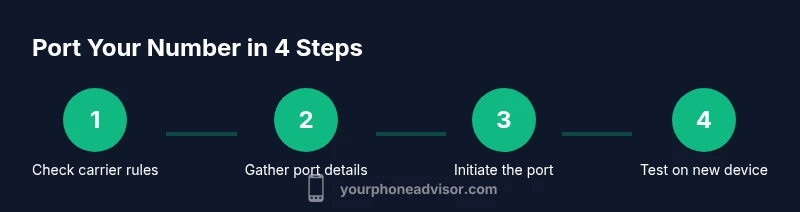
With SIM or eSIM, the transfer typically follows a similar arc: verify ownership with your carrier, initiate the port from the new device, and confirm activation on the target phone. You'll be guided through prompts—either on the screen or in your carrier app—to approve the port. In most cases you’ll keep service active on the old device until the port completes on the new one. If you’re moving to an eSIM, you’ll scan a QR code or install a profile from the carrier app. If you’re swapping a SIM, you’ll insert the card into the new device and follow on-device setup steps. Either path ends with a test call or text to confirm the number works on the new phone.
Common pitfalls and how to avoid them
Hitting roadblocks during a port is common if information doesn’t match the carrier’s records. Double-check the account name, phone number, and any PIN or port code. Ensure the old SIM is active and the new device is compatible with the selected transfer method. If you’re transferring from one carrier to another, be aware of potential downtime and plan accordingly. Keep both phones powered and nearby during setup, and avoid canceling service on the old line before the port is confirmed. If something looks off, pause and contact customer support rather than attempting a second port immediately.
Timing, status checks, and communications with your carrier
Port timing varies by carrier and region. While many transfers complete within minutes to a few hours, some can take up to 24 hours in rare cases. Throughout the process, monitor carrier messages (SMS or app alerts) for status updates. If you don’t receive a port confirmation within the carrier’s stated window, contact support to verify the port request and ensure all required information was provided. Keep your reference numbers handy in case you need to reference the port in a callback.
Security and privacy considerations during porting
Treat porting like a financial transaction for your phone line. Do not share your PIN, password, or port code with anyone other than your official carrier channels. Avoid using public Wi‑Fi during activation if you’re entering sensitive information, and enable any on-device security features (biometrics, screen lock) during setup. After the port completes, review your carrier account for any changes in plan, roaming settings, or security options to maintain your privacy and protection.
Carrier-specific tips by brand: iPhone, Android, and beyond
Apple, Samsung, and other manufacturers often provide guided steps within their settings to move a number to a new phone. On iPhone, for example, you can transfer a number via Settings > Cellular > Add Cellular Plan for eSIM, or follow prompts for SIM transfer if your device is using a physical card. Android devices vary by OEM and carrier—look for Network & Internet settings, then Mobile Network or SIM Management. If you’re unsure, start with your carrier’s official support page and then cross-check device-specific guides. Your Phone Advisor recommends validating the exact steps for your carrier and device model to avoid surprises.
Quick-reference checklists and next steps
- Verify eligibility for SIM swap vs eSIM provisioning on your new phone.
- Gather account info: PIN, port code, account number, and carrier contact details.
- Prepare both devices for a potential brief service interruption.
- Choose the port method (SIM or eSIM) based on device compatibility and carrier support.
- Initiate the port and confirm activation on the new device with a test call/text.
Tools & Materials
- Current carrier SIM card(Keep until port completes; ensure it’s active.)
- New phone with SIM slot or eSIM capability(Ensure device supports your chosen transfer method.)
- Carrier account credentials (PIN or password)(Needed to authorize the port.)
- Porting details (account number or PAC/code)(Know which porting identifiers your carrier uses.)
- Old device IMEI/MEID (optional)(Helpful if your carrier requests device identifiers.)
- ID or billing information (optional)(May be requested for identity verification.)
Steps
Estimated time: 1-24 hours
- 1
Gather account details
Collect your carrier account number or PAC, PIN/password, and any security questions or verification codes. This information verifies ownership and speeds up the port process. Have your latest bill handy in case you need it for reference.
Tip: If you don’t know your PIN, log in to your carrier app or contact support before you start. - 2
Decide SIM or eSIM path
Check whether your new phone supports eSIM and whether your carrier can provision a digital profile. If you’re staying with the same carrier and prefer a physical card, plan for a SIM swap. If you like convenience and multi-device setups, eSIM is usually the better option.
Tip: If you’re unsure, contact your carrier’s support to confirm options for your device. - 3
Prepare the old phone and new device
Make sure both phones are charged and up to date. On the old phone, back up data and sign out of sensitive apps if you want extra security during the transfer. If using a physical SIM, verify you have the correct SIM size for the new phone.
Tip: Backups prevent data loss if you need to reset one device during the transfer. - 4
Set up the new phone with SIM or eSIM
If using a physical SIM, insert it and power on the new device. If using an eSIM, follow the carrier’s prompts to scan the QR code or install the profile via the carrier app. Sign in to essential accounts and enable device protections.
Tip: Keep the old phone handy until activation is confirmed on the new device. - 5
Initiate the port with your carrier
Open the carrier app or contact customer support to start the port. Provide required identifiers and confirm you authorize the transfer. You may receive a confirmation message once the port has been approved.
Tip: Save any port reference number for future inquiries. - 6
Test and verify on the new device
Make a test call and send a message to ensure the number works correctly on the new phone. If there’s any issue, contact your carrier promptly with the port reference and device details.
Tip: If service is interrupted, avoid canceling accounts until the port is fully completed.
Got Questions?
Can I keep my current phone number if I upgrade but stay with the same carrier?
Yes. You can keep your number by transferring it to the new device. If you’re staying with the same carrier, this is usually a SIM swap or an in-app eSIM transfer. Activation occurs on the new phone while the old line remains active until confirmation.
Yes—you can keep your number when upgrading with the same carrier; you’ll swap the SIM or activate the eSIM on the new phone.
What information will my carrier require to port my number?
You’ll typically need your account number, a porting PIN or password, and sometimes a verification code. Some carriers also request a recent bill or device details. Having these ready speeds up the port.
You’ll usually need your account number, PIN or password, and sometimes a verification code; have your latest bill handy as a backup.
How long does a port usually take to complete?
Most ports complete within a few hours, but the timeline can vary by carrier and country. In rare cases, a port may take up to a day. You’ll receive status updates from your carrier as the port progresses.
Most ports finish in a few hours, but it can take up to a day; you’ll get status updates from your carrier.
Do I need a new SIM card or can I use the old one?
If your new phone uses the same SIM format, you can reuse the current SIM. If the new phone requires an all-digital setup, opt for an eSIM. In some cases a new physical SIM is issued by the carrier.
You may reuse the existing SIM if compatible; otherwise set up an eSIM or obtain a new SIM from your carrier.
What if the port fails or stalls?
Double-check account details and ensure the information matches what your carrier has on file. Contact carrier support with your port reference, then re-submit if advised. Port failures are usually fixable with updated verification.
If the port stalls, verify details with your carrier and use the port reference when requesting help.
Can I move a number to an eSIM on both iPhone and Android?
Yes, most carriers support moving a number to an eSIM on both iPhone and Android devices. Follow the carrier’s iOS or Android instructions to transfer the number to the eSIM profile.
Yes—most carriers support eSIM transfers on iPhone and Android; follow your carrier’s steps to install the eSIM.
Watch Video
What to Remember
- Verify whether SIM or eSIM is best for your device.
- Have carrier credentials ready to verify ownership.
- Schedule a test call to confirm the port worked on the new phone.
- Expect possible downtime and plan accordingly.
- Follow carrier prompts exactly to avoid delays.