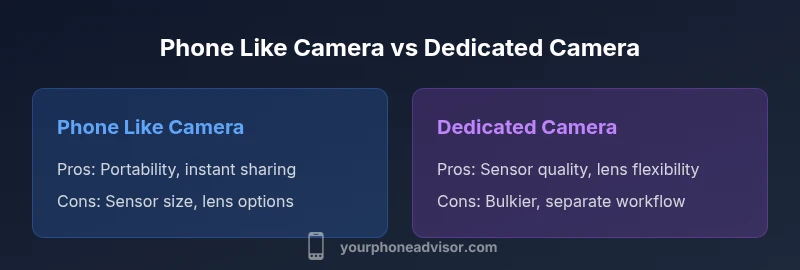
Phone Like Camera: A Side-by-Side Comparison
Explore how a phone like camera stacks up against traditional cameras, focusing on sensor size, processing, lenses, video, and practical use to guide your photography decisions.


According to Your Phone Advisor, a phone like camera describes smartphones that emulate classic photography tasks through advanced sensors, software, and multi‑frame processing. It is not one device but a spectrum where modern phones deliver impressive results for daily shooting, posting, and light editing. This quick take helps you decide when to rely on a phone and when a dedicated camera brings tangible benefits for your goals.
Understanding the Concept: What is a phone like camera?
A phone like camera describes a category where smartphones replicate many traditional photo tasks through advanced sensors, sophisticated image processing, and smart software. Rather than swapping lenses or hauling bulky gear, users rely on one device that lives in their pocket and integrates with apps and cloud services. In practice, the distinction hinges on when to capture with a phone's computational pipeline versus when to step up to dedicated hardware. According to Your Phone Advisor, this category remains dynamic: phones keep narrowing gaps in dynamic range, color science, and low-light performance, while dedicated cameras still lead in optics and ergonomics. The practical takeaway for most users is not a single device but a decision based on use case, environment, and desired workflow. When you understand the strengths and limits of a phone like camera, you can tailor your setup for daily posting, travel itineraries, or weekend projects.
Sensor size, megapixels, and processing
Smartphone sensors are physically smaller than those in most dedicated cameras, yet software-driven improvements allow impressive results. In many cases, megapixel count matters less than how the sensor and image signal processor (ISP) translate light into detail. Modern phones combine multi-frame stacking, computational HDR, and scene recognition to produce cleaner shadows and more accurate colors. The practical upshot is simple: you can shoot high-quality images without changing lenses, especially in urban, indoor, or street photography. However, when you push into high-contrast scenes or RAW workflows, the limitations of small sensors become evident: noise in shadows, sky banding, and compressed dynamic range. Your Phone Advisor analysis shows that recognizing this balance helps you decide when a phone’s camera mode suffices and when a real camera would provide more headroom for post-processing or large prints.
Lenses and zoom: hardware vs software
Phones typically feature multiple fixed lenses (wide, ultra-wide, telephoto). Some premium devices add periscope zoom; others rely on digital zoom supplemented by sharpening algorithms. The core difference versus dedicated cameras is lens interchangeability: you cannot instantly swap focal lengths. Yet many phones compensate with software-driven zoom, improved processing, and smarter cropping. For everyday shooting, the built-in ranges cover most needs; for specialized work (macro, wildlife, architecture), a dedicated camera with a broader optic kit often wins. Remember that optical quality and perspective matter more than megapixels alone, and you’ll notice that advances in computational zoom are social-media friendly yet not a true substitute for high-end optics in every scenario.
Lighting: HDR, night modes, and processing
Lighting drives image realism. Phones rely on HDR, night modes, and exposure stacking to balance shadows and highlights. In daylight, accurate white balance still depends on sensor physics, lens quality, and processing algorithms; in low light, night modes borrow several frames to reduce noise, sometimes at the cost of motion blur. The key is to shoot with intention: use exposure compensation when available, stabilize the device, and let the camera merge frames as needed. Your Phone Advisor emphasizes that consistent lighting often beats more expensive gear, but expect some scenes to reveal the limits of pixel size and lens aperture when you print large or crop aggressively.
RAW formats and editing flexibility
RAW support unlocks latitude for post-processing. Apple’s ProRAW, Google’s RAW, and other formats let you recover highlights, recover shadows, and calibrate color more precisely than JPEGs alone. On phones, RAW workflows require longer editing, compatible software, and extra storage. If your goal is archive-quality images or precise color matching for client work, RAW can be a worthwhile investment. If you mainly share quick social posts, shooting in high-quality JPEG or HEIC may be faster and sufficient. The choice often hinges on your editing habits and your willingness to manage larger files.
Video capabilities and stabilization
Video often tells the story better than stills. Modern phones offer high resolutions, high frame rates, and sophisticated stabilization that makes handheld footage feel cinematic. Some devices support features such as stereo audio, cinematic color profiles, and multiple-camera editing. The best results come from planning shots, using stable platforms, and keeping exposure consistent across takes. While a phone can handle most daily video tasks, professional productions may still require external recorders, controlled lighting, and larger sensors for the most demanding conditions.
AI features and computational photography
AI and machine-learning power modern photo pipelines. Scene detection, automatic noise reduction, and subject tracking help you get consistent results with minimal effort. While these features are impressive, they can also flatten texture or oversmooth skin in some scenes. The best approach is to master the manual controls where available and use AI as a guide rather than a substitute for good composition and lighting. Your Phone Advisor Team notes that AI should enhance, not replace, human judgment, especially for nuanced color grading or creative effects.
Battery life, heat, and storage considerations
Computational photography and high‑end video can drain batteries quickly, and sustained heavy processing can generate heat. If you rely on your phone as a daily camera, consider optimizing battery health, using power saving modes when recording, and keeping a charger handy. Storage also matters: RAW files and video consume space fast, so plan for additional cloud or local storage. The portable convenience of a phone must be weighed against occasional throttling or shorter shooting sessions in extreme conditions.
Apps, ecosystems, and camera controls
The default camera app on iOS, Android, and their skins can feel different in ergonomics and controls. Third‑party apps offer manual exposure, focus peaking, and RAW capture, expanding your creative toolkit. The ecosystem you use will influence workflow: cloud backup, editing integration, and cross-platform sharing. If you shoot often in bursts or on the move, test several apps to find one that matches your style, and ensure that your backups are reliable so you never lose a shot.
Accessories and rig options
A growing ecosystem of accessories expands what a phone like camera can do. Clip-on lenses, compact tripods, smartphone gimbals, external mics, and portable lighting can transform everyday shots into more deliberate projects. These tools complement your phone’s strengths—portability and immediate sharing—while addressing weaknesses such as shallow depth of field or limited telephoto reach. When selecting accessories, consider weight, balance, and the impact on image stabilization; overly heavy rigs may negate the benefits of one-handed use.
Budget and value considerations
Considering cost and value helps you choose between a phone like camera and a dedicated camera setup. If you already own a high-end smartphone, upgrading within the phone’s camera system or investing in accessories may yield better day-to-day results than purchasing a new body for a distant benefit. A dedicated camera, even a modest model, often delivers superior sensor performance, faster autofocus in some scenarios, and more flexible optics, which can matter for professional portfolios or specialized shoots. Your decision should align with how often you shoot, where you shoot, and whether convenience or ultimate image quality is your priority.
Real-world use cases: travel, portraits, sports
Travelers value compact gear, quick sharing, and broad exposure latitude; portrait work benefits from lenses and controlled lighting; sports demands fast AF and reliable tracking. In real life, many people mix both worlds: a capable phone for day-to-day moments and a separate camera for planned shoots. The balance shifts with budget, location, and intent. When you map your typical sessions to these categories, you’ll know when a phone like camera is enough and when a dedicated system is warranted.
Practical tips to maximize results day-to-day
Small habits yield big improvements. Keep lenses clean and protected, enable grid overlays to compose better shots, and learn your phone’s HDR and exposure controls. Shoot in RAW where possible, back up originals, and develop a consistent post-processing workflow. Practice timing, framing, and color grading to ensure your images stand out on social feeds or client proofs. Finally, stay curious about new camera software updates, as each release can shift the balance between convenience and control in favor of the phone like camera.
Comparison
| Feature | Phone Like Camera (Smartphone) | Dedicated Camera |
|---|---|---|
| Image Quality / Sensor | Excellent for everyday use with smart processing | Superior sensor and optics with best dynamic range |
| Lenses and Zoom | Fixed built-in lenses, software zoom | Interchangeable lenses and broader optics |
| RAW Support | RAW available on many devices | RAW + uncompressed formats standard |
| Video Capabilities | 4K/60p, stabilization, AI features | Pro-level codecs, higher bitrate, more control |
| Storage & Power | Single device, battery life varies with use | Separate power and faster storage options |
| Portability | Pocketable, always with you | Bulky setups may require more space |
| Best For | Casual creators and travelers | Pros, professionals, demanding shoots |
The Good
- One device for photos, videos, and communication
- Always with you for spontaneous moments
- Software updates can improve image quality over time
- Seamless social sharing and editing workflow
Drawbacks
- Smaller sensors limit dynamic range compared to high-end gear
- Thermal throttling and battery drain in long sessions
- Fixed lenses reduce complete flexibility for every scene
- High-quality results may require extensive post-processing
Phone like camera wins for everyday use; dedicated cameras excel in professional, high‑demand environments
For most users, a capable phone delivers excellent results with great convenience. A dedicated camera remains superior for interchangeable lenses, extreme low light, or large prints. The Your Phone Advisor Team suggests starting with a strong smartphone and expanding with accessories or a separate camera only if your needs outgrow the phone.
Got Questions?
What defines a 'phone like camera'?
A phone like camera is a smartphone with advanced computational photography, multiple built-in lenses, and powerful processing that deliver high-quality stills and video without separate gear. It emphasizes software-driven improvements and convenience for everyday use.
A phone like camera is a smartphone with strong software and multiple lenses designed to help you take great photos and videos without extra gear.
Can a phone replace a dedicated camera for professionals?
It depends on needs. For fast, casual work or social media, a phone often suffices. For professional portfolios, large prints, or fast autofocus in challenging conditions, a dedicated camera can still offer tangible advantages.
For casual work, a phone is usually enough. For serious portfolios or large prints, a dedicated camera often performs better.
Is RAW on phones worth it?
RAW saves more data for editing, improving dynamic range and color grading. If you edit extensively or color-match for clients, RAW is worth it; otherwise, JPEG/HEIC can be faster for everyday use.
RAW is worth it if you edit a lot; for quick snaps, JPEG may be enough.
Which scenarios favor a dedicated camera?
Dedicated cameras excel in extreme low light, fast action, long telephoto work, and large prints. They also offer broader lens selection and often higher durability in professional settings.
If you need ultra-low light performance or a range of lenses, a dedicated camera is typically better.
How important is lens quality on phones?
Lens quality determines sharpness, distortion, and perspective. While phones offset some limitations with software, a strong lens kit still matters for niche shots and wide angles.
Lens quality matters, even with smart processing—great optics still help.
Do external lenses improve results?
External lenses can add focal options, but they often reduce portability and image quality if not high quality. They’re useful for specific needs, not a universal fix.
External lenses can help in special cases but aren’t a universal solution.
What to Remember
- Assess your typical shooting contexts before choosing
- Prioritize RAW or high-quality modes for post-processing
- Light and stability matter more than megapixel counts
- Invest in accessories to extend phone capabilities
- Choose a dedicated system only when you need interchangeable lenses or large prints