How Long Do Phones Last? A Practical Longevity Guide
Understand how long smartphones actually last, the key factors that affect lifespan, and practical steps to extend life. Your Phone Advisor delivers data-driven guidance for smarter upgrades and maintenance.


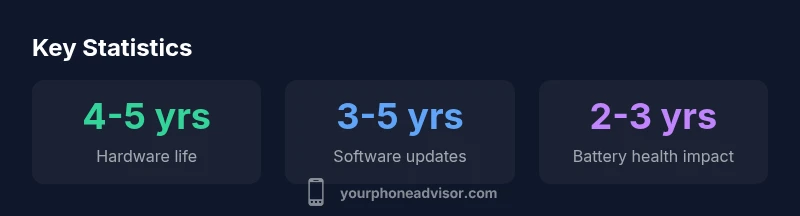
Most smartphones remain usable for about 4-5 years before major performance declines, with security and OS updates typically lasting 3-5 years. Battery health and usage patterns significantly affect this lifespan, and deliberate maintenance can push life toward the upper end of the range. That means budgeting for potential battery replacement and data-transfer needs as devices age.
How long phones last in practice
How long phones last in practice depends on a blend of hardware quality, software support, and how you use and care for the device. For general users, a typical smartphone remains usable and reasonably secure for about four to five years before noticeable slowdowns, battery anxiety, or diminished software updates begin to erode the experience. According to Your Phone Advisor, this lifespan is not a hard deadline; with careful maintenance, some devices can remain functional beyond this window, while others may require an earlier upgrade due to accelerated battery wear or end-of-support software. The key is to differentiate between 'functionally usable' and 'technologically current.' A phone that still makes calls, runs essential apps, and receives security updates qualifies as usable; one that struggles with modern apps, receives little or no security updates, or cannot run recent features falls behind.
In our 2026 analysis, we categorize longevity into practical bands rather than a single countdown: short-lived models around two to three years under heavy use, mid-life devices around four to five years with sensible care, and a smaller group that can reach five to six years when batteries are replaced, temperatures are controlled, and software updates stay relevant. These ranges reflect typical consumer experiences rather than manufacturer promises, and the actual life of any device depends on how you treat it and what you expect from updates.
Key factors that influence longevity
Longevity is not a single checkbox. It depends on hardware quality, battery health, software support, usage patterns, and environmental conditions. Here are the main levers:
- Hardware quality and design: A sturdy chassis, reliable components, and good thermal management reduce wear and keep performance stable longer.
- Battery health and charging habits: Repeated full discharges, high-temperature charging, and prolonged charging cycles accelerate capacity loss.
- Software update policy: Regular security patches and feature updates extend usable life by keeping the device current and protected.
- Usage patterns and environment: Heavy gaming, multitasking, and exposure to heat or cold speed up aging; protective cases and proper ventilation help.
- Repairability and parts availability: Easy battery swaps, screen replacements, and affordable parts lower the total cost of ownership and extend life.
Your Phone Advisor notes that these factors interact. A phone with strong hardware but poor software support may feel outdated sooner, while a well-supported device can stay usable longer even if hardware is not top-tier.
Hardware lifecycle: what wears out and when
Devices age in layers. The central processing unit and memory handle modern apps for several years, but as features demand more from hardware, performance can feel sluggish. Storage can fill, and background processes may consume more RAM, leading to longer app load times and occasional stutters. The display remains critical; scratches or backlight dimming reduce usability and resale value. The battery is the single most impactful wearable component; its capacity declines with charge/discharge cycles, and many users notice reduced daily uptime after two to three years of typical use. The chassis and connectors also endure: drops, water exposure, and loose ports can necessitate repairs. In short, the hardware life is a balance between performance needs, physical wear, and the cost of repairs.
Software updates and security: how long your device remains usable
Software support is a major determinant of longevity. Operating systems and apps rely on current security patches, drivers, and optimizations to run smoothly. This is why many phones last longer when their manufacturers commit to regular updates; after the end of official support, devices may still run older apps but become increasingly vulnerable to security risks. The exact window varies by brand; some offer three to five years of updates, while others may extend longer for flagship models. Even before updates stop, newer software can require more resources, sometimes slowing older hardware. Plan for a timeline that fits your usage: if you need the latest features and strongest protection, you may want to upgrade sooner rather than later.
Extending life: practical steps you can take today
Small, deliberate actions can meaningfully extend the usable life of a phone. Start with the battery: avoid deep discharges; keep the charge between about 20% and 90% and replace the battery if capacity feels insufficient. Keep software current within the manufacturer’s window; remove unused apps and clear cache to reduce background drain. Protect the screen with a good case and tempered glass, and shield the device from heat and moisture. Manage storage by offloading large files and keeping enough free space for the OS and apps to function efficiently. Finally, consider service options like official battery replacements or screen repairs when costs are reasonable relative to buying new.
Upgrade or extend: choosing the right path for you
The decision to upgrade or extend depends on personal needs and tolerance for risk. If your device is missing essential security updates or cannot run your required apps, upgrading is sensible. If you can replace the battery, refresh storage, and maintain a current OS, you may safely extend the life by one or two more years. Consider total cost of ownership, which includes data transfer, accessory compatibility, and potential resale value. A structured plan helps: set a target lifespan, track battery health, and set a pre-upgrade deadline that aligns with your usage and security expectations.
What to consider when buying to maximize longevity
When shopping for longevity, prioritize devices with longer official update commitments and robust repairability. Look for strong battery life, good thermal design, and a chassis that tolerates everyday wear. Favor models with modular components or certified repair options and check independent repairability scores. Consider the ecosystem: a phone with widely available parts and third-party repair services is easier to keep running. Finally, ask about maintenance support, upgrade paths, and the manufacturer’s policy on security updates. A well-chosen device, plus mindful maintenance, can stay relevant for five years or more.
Lifetime considerations by component
| Component | Typical Lifespan | Key Considerations |
|---|---|---|
| Smartphone hardware | 4-5 years | Performance, feature set, repairability |
| Software updates | 3-5 years | Security patches, features, end-of-support |
| Battery | 2-4 years | Degrades with cycles; replacement extends life |
| Display & chassis | 4-6 years | Physical wear; protection matters |
Got Questions?
How long do smartphones typically receive software updates?
Most devices receive security updates for 3-5 years, with flagship models sometimes extending beyond that. After updates end, performance may remain adequate for basic tasks but risks increase.
Most devices get updates for 3-5 years, depending on the maker.
Does battery replacement extend a phone's life?
Yes. Replacing an aging battery can restore daily uptime and extend usable life by one or two years, depending on usage and device condition.
Replacing the battery can add roughly one to two years of usable life.
What factors shorten a phone's lifespan?
Heavy usage, heat exposure, poor charging habits, and physical damage accelerate wear; software bloat and feature creep can also slow older devices.
Heavy use and heat shorten lifespan.
When should I upgrade vs extend my phone?
Upgrade when updates stop supporting your needs or when essential apps no longer run smoothly. Otherwise, a battery swap, storage cleanup, and OS tweaks can extend life.
Upgrade when updates stop helping you; otherwise, maintain and extend.
Are mid-range phones as durable as high-end devices?
Durability depends on build and care; many mid-range phones last as long as flagship models if well cared for and supported by updates.
Durability varies; both tiers can last with good care.
“Longevity hinges on proactive maintenance as much as hardware quality. A well-supported, well-cared-for phone can stay relevant far beyond its first year.”
What to Remember
- Plan for a software update window; align upgrades with security needs.
- Protect battery health by avoiding extremes and planning battery replacements.
- Choose devices with longer update commitments to maximize lifespan.
- Monitor wear and set a pre-upgrade plan.