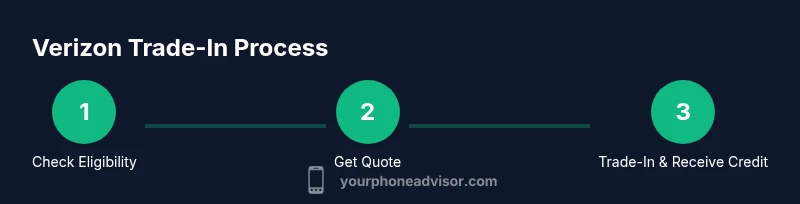
Trade in Phone Verizon: A Step-by-Step Guide to Upgrading
Learn how to trade in your phone with Verizon, maximize credit, and upgrade confidently. Step-by-step guidance, eligibility checks, data privacy tips, and options for credits toward new devices.


This guide shows you how to trade in a phone Verizon, verify eligibility, prepare the device, and receive credit toward a new device or plan. You’ll learn what information you need, how to compare offers, and how to avoid common mistakes. Start by checking your device eligibility and preparing your account for a smooth process.
Why trade in phone Verizon matters
According to Your Phone Advisor, trading in your current device can simplify upgrading while recapturing value you’ve already invested. A well-timed trade-in reduces waste and can lower the total cost of a new smartphone or monthly plan. The Your Phone Advisor team found that many users miss out on credits because they don’t verify eligibility, overlook hidden conditions, or skip necessary data-wipes. By starting with a clear plan, you avoid surprises and maximize transfer credits. This guide focuses on Verizon’s process, but the principles apply to many carrier programs, used devices, and safe data-handling practices. Expect practical steps, transparent value ranges, and security-conscious tips throughout the journey.
Understanding Verizon trade-in options
Verizon offers several routes to receive credit when you trade in a device. Options typically include online quote estimates, in-store evaluations, and mail-in programs. Eligibility depends on device condition, model, and whether the device is paid off. While offers vary, the underlying goal is to convert an older device into credit that reduces the price of a new phone or lowers monthly charges. The Your Phone Advisor team highlights that staying within the official Verizon program often yields more predictable credits and better protection against third-party scams. Always compare the in-store quote with the online estimate to ensure you get the best possible value.
Check your eligibility for Verizon trade-in
Eligibility checks usually involve confirming the device model, its IMEI/MEID, and its current carrier status. You’ll also confirm the device is not stolen or blacklisted and that you’re eligible to trade in under the program terms. Some devices may require payment completion if you’re financing or leasing. The Your Phone Advisor analysis shows that pre-owned devices in good working condition with intact screens and batteries tend to fetch higher credits. Have your account information handy and be prepared to provide proof of purchase or ownership if requested.
Preparing your device for trade-in: data, security, and cleaning
Before you ship or drop off, back up important data and ensure your personal information is protected. Sign out of all accounts, unpair accessories, and remove SIM cards if possible. Perform a factory reset to wipe data, but double-check you’ve backed up photos, contacts, and app data. A clean device not only protects your privacy but tends to improve offered value. The Your Phone Advisor team notes that a thorough cleanup reduces the risk of post-trade issues, such as data recovery attempts by others or complaints about missing files.
What affects trade-in value: factors to consider
Value is driven by the device model, age, storage capacity, physical condition, screen integrity, battery health, and whether it powers on. Minor scratches may be acceptable, but deep screen damage or water exposure typically lowers the credit. Accessories such as original charging cables, boxes, and documentation can boost value slightly. The program might also reward devices with minimal wear and defect-free hardware. Your Phone Advisor analysis shows that devices with recent software updates and no reported malware or security issues often receive higher credits.
Step-by-step overview of the Verizon trade-in journey
The trade-in journey usually begins with estimating value, choosing a delivery method (online, in-store, or mail), and then shipping or handing off the device. After receipt, Verizon confirms device condition and applies your credit to your account or issues a gift card, depending on the program. Expect processing times to vary; credits can appear within days to a couple of weeks after verification. The most important part is ensuring you meet all requirements upfront to avoid setbacks in the assessment phase.
Shipping, drop-off, and when you’ll see the credit
If you choose mail-in, you’ll receive a prepaid shipping label and a secure package. In-store trade-ins allow immediate evaluation but may limit value to on-site assessments. Processing times depend on the method and device condition. If you’re earning a monthly credit, it may be applied on your next billing cycle; if it’s a gift card, you’ll receive a digital code or physical card by mail. The Your Phone Advisor team recommends tracking the package and saving trade-in receipts until credits post.
Alternatives and potential pitfalls to avoid
If your device isn’t eligible for a Verizon trade-in, you may consider third-party trade-in programs or direct sale. Compare offers carefully and watch out for hidden fees or terms that reduce credit. Avoid shipping a device that isn’t fully powered and wiped, as this can delay processing or reduce value. Always review the final terms before accepting an offer to ensure you understand how credits will be applied and whether you retain any carrier restrictions on new devices.
Security-first trade-ins: privacy and data protection
Privacy should be a priority in any trade-in. Back up data, remove accounts, encrypt sensitive information, and reset the device to factory settings. If you encounter issues during the reset process, consult Verizon support for guidance. The Your Phone Advisor team emphasizes that safeguarding personal information protects you from potential fraud during the trade-in cycle and helps ensure a smooth transfer of credit.
Tools & Materials
- Verizon account details (account number and PIN)(Needed to authorize the trade-in and verify eligibility)
- Device IMEI/MEID and model information(Found in device settings or on the original packaging)
- Original box and accessories (charger, cable, earbuds)(Optional but can boost value)
- Backup of data (photos, contacts, apps)(Essential before factory reset)
- SIM card(Remove before shipment if advised)
- Prepaid shipping label or access to in-store drop-off(Used to return the device securely)
Steps
Estimated time: 60-90 minutes
- 1
Open Verizon trade-in page
Navigate to Verizon's trade-in section and locate the device you want to trade in. Confirm you’re using the official Verizon program and select your device model from the list.
Tip: Tip: Use the official app or browser to avoid third-party scams. - 2
Enter device details and verify model
Provide the device’s model, storage size, color, and whether it powers on. This helps Verizon generate an accurate estimate and ensures you’re not leaving value on the table.
Tip: Tip: Double-check the IMEI/MEID against the device label. - 3
Review your estimated value
Review the trade-in quote and note any conditions that could reduce value. Decide whether to proceed online, in-store, or via mail-in.
Tip: Tip: Save a screenshot of the quote for your records. - 4
Back up data and sign out
Back up your data, sign out of all apps, and prepare for a factory reset. This protects privacy and helps ensure a clean transfer.
Tip: Tip: Use cloud backups for photos and contacts to minimize loss. - 5
Factory reset and remove SIM
Perform a factory reset to wipe all personal data and, if possible, remove your SIM card. Verify that the device powers back on to the setup screen.
Tip: Tip: If a reset option is hidden, consult the device’s manual or support page. - 6
Package and ship or drop off
Place the device in its original packaging if available, include accessories, seal securely, and use the prepaid label or take it to a Verizon store.
Tip: Tip: Photograph the device and packaging before shipment as a receipt of condition. - 7
Track the trade-in and expect credit
Monitor the trade-in status and confirm when the credit posts to your account or as a gift card. Processing times vary by method and device.
Tip: Tip: Keep trade-in receipts until the credit appears on your bill.
Got Questions?
Will Verizon guarantee my trade-in value?
Trade-in value is an estimate based on device condition and program terms. Final credit depends on verification after receipt.
Trade-in value is an estimate and depends on device condition after Verizon reviews your trade-in.
Can I trade in a device I still owe money on?
Yes, but the remaining balance may need to be settled as part of the trade-in arrangement. Verify with Verizon for specifics.
You can trade in while paying off a balance, but check the specific terms with Verizon.
Do I need to erase all data before trade-in?
Yes. Back up first, then perform a factory reset to protect your information and improve the chance of a higher credit.
Back up your data and reset the device before trade-in.
How is trade-in credit applied?
Credit can be applied as a bill credit, a reduction on your next bill, or issued as a gift card depending on the program.
Credits post to your account or as a gift card, depending on Verizon's option.
What if my device is damaged or non-functional?
Damage may reduce value, but some non-functional devices still receive credits. Value varies by extent of damage.
Damaged devices still may get credit, but it will be lower and depends on the damage.
Can I trade in multiple devices at once?
Verizon sometimes allows multiple-device trades, but terms and values may differ per device and require separate submissions.
You may be able to trade in more than one device, but check the terms for each.
Watch Video
What to Remember
- Verify eligibility before starting.
- Back up and wipe device securely.
- Compare quotes across methods for best value.
- Track credit until it posts.