Trade In Your iPhone: A Practical Step-by-Step Guide
Learn how to trade in your iPhone for credit, compare offers, protect data, and maximize value with practical steps from Your Phone Advisor.


Ready to turn your iPhone into credit? This guide shows you how to trade in phone iphone, compare offers, and prepare your device for a smooth appraisal. Follow a step-by-step process to maximize value while protecting your data, with practical tips from Your Phone Advisor. It covers data erasure, accessories, timing, and where to check offers.
Why Trade-In Your iPhone Matters
According to Your Phone Advisor, trading in your iPhone can turn unused devices into credit that reduces the cost of a new model or service plan. The value you receive depends on the exact model, storage capacity, screen condition, battery health, and whether all accessories are included. In this section, we explore why trade-ins can be a smart move and what reputable programs typically offer.
Why it matters for you
- Access to new devices without paying full price
- Environmentally friendly option to recycle electronics
- Clear, predictable path to reducing device-related costs
This is not just about selling a device; it’s about smart budgeting and planning for your next upgrade.
How Trade-In Programs Work
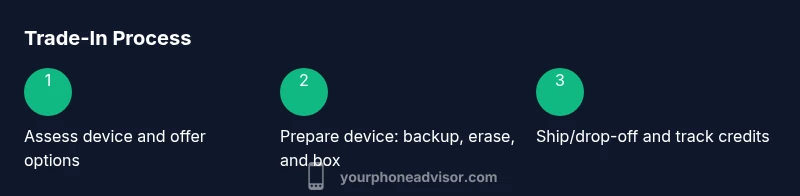
Most programs start with a quote based on your device model and reported condition. You’ll usually need to provide the serial number, storage size, and whether the screen has any cracks. After you ship or drop off the phone, the program inspects it to verify condition and applies the final credit. Quotes can change if the device arrives damaged or missing parts. To get the best value, collect multiple offers from carriers, retailers, and independent refurbishers.
What to expect during the process
- A preliminary quote based on model and stated condition
- A receipt and shipping label or in-store drop-off option
- Final assessment after receipt, which may adjust the credit
By understanding this flow, you can plan the timing of your upgrade.
How to Assess Your iPhone's Value
Know your model details (generation, storage, color) and assess condition honestly. Common factors that lower value include deep scratches, screen damage, battery wear, water damage, and activation lock. Compare quotes across programs and look at what credit you’ll receive versus the ease of processing. If the model is newer or has higher storage, expect a higher baseline offer.
Quick self-check checklist
- Confirm the exact model and storage level
- Inspect for screen scratches and any battery swelling
- Verify device is not stuck in activation lock
This upfront honesty helps ensure you don’t waste time chasing inaccurate quotes.
Preparing Your iPhone for Trade-In
Start with a data backup using iCloud or a computer. Sign out of iCloud, deauthorize iTunes (if applicable), and remove the device from Find My iPhone. Wipe the device to factory settings, then physically clean the phone with a microfiber cloth. Finally, gather the box, charger, and any original accessories to potentially increase the credit.
Why prep matters
- Clean hardware signals better condition and higher quotes
- A clean package reduces inspection questions
- Completeness of accessories can boost credit value
How to Choose Between Offers
Don’t settle for the first quote. Create a quick side-by-side comparison that shows credit value, required actions, and any restrictions (shipping, drop-off, or regional limits). Some programs offer immediate credits on a gift card, while others issue a bank transfer after receipt and inspection. Prioritize offers that minimize friction and maximize credit, even if the upfront quote is slightly lower.
Decision framework
- Credit value vs. processing time
- Required actions (shipping vs in-store drop-off)
- Any activation lock or data-removal requirements
A small nuance today can lead to a bigger credit later, so take a few minutes to compare.
Data Security and Activation Lock
Before you trade in, disable Activation Lock by signing out of iCloud and turning off Find My iPhone. Unpair any accessories that connect to the device and remove SIM cards. Back up and then erase all content and settings. Wiping ensures personal data cannot be recovered and reduces the risk of activation lock complicating the trade.
Safety checklist
- Sign out of iCloud and iTunes where applicable
- Disable Find My iPhone and Activation Lock
- Remove SIM card and any external storage
- Keep a backup until you confirm the credit posting
By following these steps, you minimize risk and ensure a smoother appraisal.
What to Include in Your Trade-In Package
Include the iPhone, original charger, and any cables if available. The better the condition of included accessories, the higher the credit often. If you have the original box and documentation, include them as well. Consider taking photos of the items for your records and proof of condition.
Maximizing the chance of a higher quote
- Include the original box and charging cable if you have them
- Photograph the device before shipping to document its condition
- Keep a note of the device’s serial number and IMEI for reference
Shipping, In-Store Drop-Off, and Timing
If shipping, use a sturdy box with padding and follow the program’s packaging guidelines to avoid damage. If dropping off in-store, bring valid ID and the device ready for inspection. Processing times vary by program; some provide credits within a few days of receipt, others after a formal inspection. Track your shipment and keep confirmation numbers.
What to monitor
- Shipping insurance and tracking numbers
- Receipt of credit posting and expected timeline
- Any changes to credit based on inspection outcomes
Knowing the timing helps you plan your next upgrade more effectively.
Common Pitfalls and How to Avoid Them
Avoid signing into any apps or accounts on the device during transit. Do not ignore activation lock or passcode issues. Do not ship a phone without removing the SIM card. Always back up data and wipe the device before sending. Lastly, compare multiple offers to avoid missing a better deal.
Common mistakes
- Skipping a backup and data erase
- Shipping without removing the SIM or deactivating Find My iPhone
- Failing to compare offers across providers
Correcting these mistakes can significantly improve your final credit.
Maximizing Your Credit: Practical Tips
Clean the device thoroughly, including the screen and ports. Keep accessories tidy and include them if possible. Check for carrier-specific requirements or eligibility rules that could affect credits. If you have multiple devices, consider trading all at once to simplify processing. Be mindful of seasonal promotions that may affect quotes.
Practical tips
- Cleanliness and complete packaging matter
- Include essential accessories to boost value
- Time your trade-in when new device announcements are likely
- Don’t hesitate to ask for a price match or additional bonus offers
With careful preparation, you can push the credit higher while keeping the process simple.
After You Trade-In: What Happens Next
Once your device is received and inspected, you’ll receive confirmation of credit and any remaining steps to redeem it. Credits may appear as a gift card, account credit, or direct payment, depending on the program. If your credit is delayed, contact support and verify your submission.
Final steps
- Note where and how you will receive credit
- Ensure your credit appears in the chosen form (gift card, account, or payment)
- Archive all receipts and tracking numbers for future reference
Tools & Materials
- Phone (iPhone model to trade-in)(Include storage size and color if known)
- Original charger and cable(If available; helps increase value)
- SIM-ejection tool(To remove SIM card safely)
- Microfiber cleaning cloth(For surface cleaning before appraisal)
- Original box and paperwork(Preferred, can raise credit)
Steps
Estimated time: 1- to 2-hours
- 1
Identify trade-in options
Start by listing potential outlets: carriers, retailers, and independent refurbishers. Note their quotes, processing times, and whether credit is immediate or delayed. This helps you compare fairly and choose the path that fits your upgrade timeline.
Tip: Create a simple side-by-side table to compare quotes. - 2
Back up and secure data
Back up your iPhone data to iCloud or a computer. This ensures you won’t lose photos, contacts, or apps. It also gives you a restore point if you change your mind.
Tip: Verify the backup completed before erasing. - 3
Sign out and disable security features
Sign out of iCloud, iTunes, and any other services. Turn off Find My iPhone to prevent Activation Lock issues during inspection.
Tip: Double-check you’re signed out on any connected devices. - 4
Erase all content and settings
Perform a factory reset to wipe data completely. Do not leave sensitive information on the device.
Tip: If available, perform a final reset after removing the SIM. - 5
Remove SIM card and accessories
Take out the SIM card and gather charger, cable, and any original accessories. This ensures the evaluation is based on the device alone and can influence value.
Tip: Pack accessories neatly to avoid loss in transit. - 6
Clean and photograph the device
Clean the device carefully and take clear photos from multiple angles to document condition. This helps validate the quote if there are later questions.
Tip: Photos should show screen, ports, and any imperfections. - 7
Submit trade-in request
Enter device details in the chosen program and follow their submission steps. Use the tracking number if shipping.
Tip: Keep a copy of the submission confirmation. - 8
Ship or drop off and track
Send the device via insured shipping or deliver to the store. Track the package and confirm receipt.
Tip: Retain all tracking and receipt numbers until funds are posted.
Got Questions?
Is it better to trade in my iPhone through my carrier or a third-party service?
Both options can yield credits; carriers may offer carrier-specific perks, while third-party services can provide greater portability of credit. Compare quotes, processing times, and any restrictions before deciding.
Both carrier and third-party options offer credits. Compare quotes and processing times to pick the smoother path.
Will I lose all data during the trade-in process?
If you back up and erase the device properly, you won’t lose data. Ensure Find My iPhone is disabled and that you have a verified backup.
If you back up and erase correctly, your data should be safe. Disable security features first.
Can I trade in a cracked screen or water-damaged iPhone?
Most programs will still accept devices with some damage, but quotes drop with more serious issues. It’s best to get preliminary quotes before repair work.
Yes, but expect a lower quote due to damage. Check multiple offers for best value.
How long does it take to receive credit after trading in?
Credit timelines vary by program. Some offer immediate virtual credits, while others pay after inspection and processing.
Credit timing varies; you’ll usually know within a few days after inspection.
Is activation lock a common issue in trade-ins?
Activation lock can delay or invalidate a trade-in if not cleared. Always disable it before shipping.
Activation lock can cause delays; make sure it’s off before you trade.
Do I need to erase my iPhone before trading in?
Yes. Erasing your device protects your data and is a standard requirement for most programs.
Yes, erase the device to protect your data and comply with program rules.
Watch Video
What to Remember
- Back up data before erasing.
- Compare multiple offers for best value.
- Disable Activation Lock and remove SIM.
- Include original accessories to maximize credit.