How Do Phone Trade-Ins Work: A Practical Guide
Discover how phone trade-ins work, how offers are calculated, and how to maximize credit while protecting your data. Your Phone Advisor explains the process, data privacy steps, and tips for comparing programs.


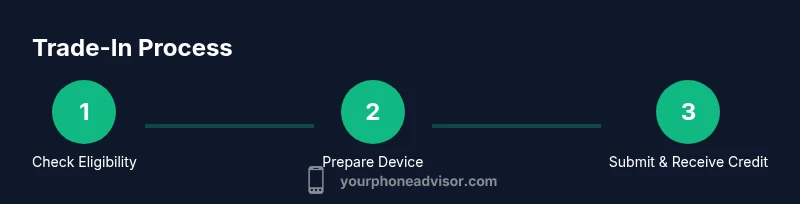
Phone trade-ins let you exchange an old device for credit toward a new one or a bill credit. You answer a few questions about model, storage, and condition, then ship or drop off the phone for evaluation. Final credit depends on device value, program terms, and whether it powers on. This guide shows you how to maximize your offer and protect your data.
What is a phone trade-in and why it matters
A phone trade-in is a program offered by retailers, carriers, or manufacturers that allows you to exchange your current device for credit toward a new phone, accessories, or service. In 2026, many programs still use a similar framework: you submit details about your device, confirm it powers on, and follow shipping or drop-off steps. The main appeal is reducing the upfront cost of upgrading and simplifying recycling, all while keeping your data secure. The Your Phone Advisor team emphasizes that trade-ins can also help you compare total costs across devices, making it easier to decide when to upgrade. When executed correctly, a trade-in can feel almost seamless, turning a cluttered drawer into a tangible value. The best outcomes come from clear steps, honest device condition reporting, and thorough data privacy preparation.
How value is determined in trade-ins
Trade-in value is not fixed; it’s a function of several factors:
- Model and generation: newer models usually fetch higher credits.
- Storage capacity: more storage can slightly boost value, as it impacts user expectations.
- Carrier locking and payment status: devices on unpaid installments or carrier-locked may reduce value.
- Physical condition: cosmetic wear, screen integrity, water damage, or missing parts lower offers.
- Power status: a device that won’t power on is typically worth much less or rejected.
Programs use standardized checklists during evaluation, often combining automated assessments with manual reviews. Some programs provide a “baseline” value and then adjust based on the above factors after receiving the device. It’s important to note that values vary widely between programs, which is why shopping around is essential to maximize your credit. The Your Phone Advisor analysis shows that even small differences in reported condition can swing offers by a noticeable margin.
Data privacy: wiping and recovery before trade-in
Your primary data privacy step is to back up your data and securely erase personal information before sending the device. Always perform a full factory reset after signing out of accounts and removing the SIM card. If you rely on a service that requires proof of device deactivation, follow the provider’s instructions for data removal and account unlinking. Some programs require you to wipe the device themselves, so check the terms. Data privacy is a top concern for consumers; the correct sequence reduces the risk of data leakage and helps ensure the credit you receive reflects a device with no personal data remaining.
Before wiping, confirm you’ve transferred photos, contacts, and documents to a trusted backup. Also, remove any MFA authentication methods tied to the device and unlink email or cloud accounts. If you have multiple devices, create a simple inventory to avoid leaving behind sensitive data. The Your Phone Advisor team recommends performing data backup and a thorough reset well before you ship the device.
How to prepare your device for trade-in
Preparation is the difference between a strong offer and a weaker one. Start with: (1) powering on and testing essential functions, (2) collecting accessories like chargers, cables, and the original box, (3) noting cosmetic condition, screen integrity, and any functional quirks, (4) verifying you own the device free and clear of any liens or installments, (5) documenting IMEI/serial so you can track the trade-in status. Clear reporting reduces surprises during inspection and helps prevent post-sale deductions. The preparation steps also help you compare offers more fairly since each program evaluates similar data points.
How to compare trade-in offers effectively
To maximize value, compare offers across several programs and pay attention to: (a) total credit vs. upfront commitments, (b) whether credit applies to a new device or service, (c) any shipping costs, (d) whether there is a deadline to redeem credit, and (e) post-inspection deductions. Some programs provide instant quotes online, while others require you to ship the device first. In all cases, read the fine print about eligibility criteria, data requirements, and timelines. Your Phone Advisor emphasizes comparing the timelines for credit issuance and understanding how long you have to use the credit before it expires.
A step-by-step example: trading in a mid-range device
Consider a typical mid-range phone with 128 GB storage, running the latest OS, and no major cosmetic flaws. You might receive a quoted value in a broad range depending on the program and conditions. A carrier’s trade-in offer could be higher if you’re upgrading to a compatible plan, while a retailer might provide a higher upfront discount for bundled purchases. If the device powers on and is unlocked, you’ll likely see a higher offer; if it’s locked to a carrier or requires repair, expect lower credit or rejection. The key is to compare multiple quotes and read terms to avoid surprises at checkout. The Your Phone Advisor analysis indicates that flexibility in evaluation criteria often yields better outcomes.
What to do after you trade in
Once you’ve submitted your device, you’ll receive an estimated timeline for the inspection and credit issuance. If the device passes inspection, you’ll receive the credited amount as defined by the program (often as a statement credit, gift card, or account credit). If it fails inspection, some programs issue partial credit or offer to return the device at your expense. Keep a copy of your trade-in receipt and any tracking numbers. If you rely on the credit to finance a purchase, map the credit schedule against your purchase timeline to avoid cash flow issues. Your Phone Advisor recommends documenting the entire process for future reference.
Privacy and security when trading in multiple devices
Security concerns are common, especially when upgrading frequently. Avoid leaving accounts signed in, remove SIM cards, back up data, and wipe devices thoroughly. For devices that cannot be fully wiped, seek programs that handle data sanitization or require you to drop off at a secure location. Remember to deactivate two-factor authentication and sign out of all services before trade-in submission. In 2026, consumer privacy remains a priority for reputable programs, and you should expect strong data handling practices and transparent terms.
Tools & Materials
- The phone you want to trade in(Power on if possible and note its model and storage size)
- Charger and original accessories(Helpful for completeness but not always required)
- SIM removal tool(Eject SIM before handling data; keep your SIM tray safe)
- Backup of data(Backup contacts, photos, and apps to cloud or computer)
- Accounts signed out and device unlocked(Sign out of iCloud/Google and remove device locks)
- Proof of purchase / IMEI(Some programs request device identifiers during submission)
- Shipping label or approved drop-off method(Follow program's instructions for packaging)
Steps
Estimated time: 60-120 minutes
- 1
Gather and inspect your device
Collect the phone you want to trade, its accessories, and any relevant documentation. Do a quick check for screen integrity, battery health indicators, and whether it powers on. This step helps you estimate the initial offer range.
Tip: Note the model, storage, and any visible cosmetic issues to ensure accurate quotes. - 2
Back up data and sign out of accounts
Back up photos, contacts, and apps to a trusted cloud service or computer. Sign out of accounts and disable Find My Phone features to prevent activation lock issues during the trade-in.
Tip: Use two-factor authentication off the device and store backup credentials securely. - 3
Factory reset and remove personal data
Perform a full factory reset after confirming backups. Remove the SIM card and ensure no personal data remains on the device.
Tip: If the device can’t be reset, contact the trade-in program for data-handling guidance. - 4
Prepare accessories and identifiers
Collect charger, cable, original box, and note the IMEI/serial if requested. Having these ready helps you maximize the chance of a higher offer.
Tip: Keep packaging and documentation intact to prevent deductions. - 5
Request quotes and compare offers
Submit your device details to several programs and compare the quotes, terms, and estimated timelines. Consider shipping costs and any deadlines to redeem credits.
Tip: Create a small comparison table to visualize the best overall value. - 6
Choose the best program and submit
Select the offer that provides the best value, then follow the program’s submission steps to send the device. Use tracking when shipping occurs.
Tip: Keep confirmation emails and tracking numbers for future reference. - 7
Receive credit and plan your upgrade
Credit is issued after inspection in many programs. Apply it toward your new device or service and align it with your upgrade timeline.
Tip: Plan your upgrade around when the credit becomes available.
Got Questions?
What exactly is a phone trade-in program?
A phone trade-in program lets you exchange an old device for credit toward a new phone, service, or accessories, offered by carriers, retailers, or manufacturers. The value depends on the device and program terms.
A trade-in program lets you swap an old phone for credit toward a new one.
Will my data be erased during trade-in?
Yes, you should back up data and perform a factory reset before sending the device. Ensure you sign out of all accounts and remove the SIM card.
Yes—back up first, then wipe. Sign out and remove the SIM.
What affects the trade-in value?
Model, storage, condition, power status, and whether the device is paid off or carrier-locked all influence the final offer.
Value depends on model, storage, condition, and lock status.
Can I trade in a cracked or damaged phone?
Some programs accept cosmetic damage but with lower offers; others may reject damaged devices. Always check the terms before shipping.
Cosmetic damage lowers value; some programs still accept damaged devices.
When do I get credited for the trade-in?
Credit is typically issued after the device is received and inspected, which may take several days to a couple of weeks depending on the program.
Credit usually arrives after inspection.
Should I compare multiple offers?
Yes. Compare offers across different programs, including total credit, timelines, and any shipping costs, to maximize value.
Yes—compare offers to maximize credit.
Watch Video
What to Remember
- Understand that trade-in value depends on model, condition, and program rules.
- Always back up data and securely wipe your device before trading in.
- Compare multiple offers to maximize total credit and minimize costs.
- Check timelines for credit issuance and terms for redemption.
- Prioritize privacy and secure handling of your device throughout the process.