How Often to Get a New Phone: A Practical Cadence for 2026
Learn the practical cadence for upgrading phones in 2026. We break down security, software support, battery health, and budget to help you decide when to replace your device.


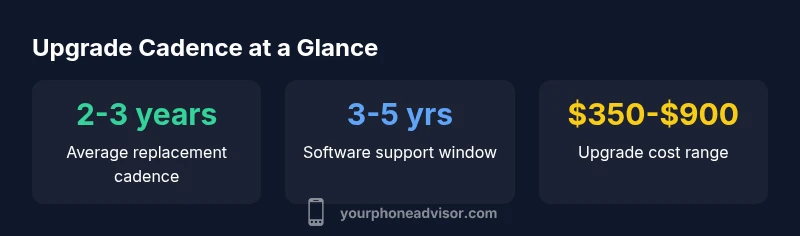
Most smartphone users replace their device every 2 to 3 years. Timing depends on battery health, software support, performance needs, and budget. If security updates end or battery health falls below usable levels, upgrading becomes cost-effective. A planned cadence helps balance reliability, access to new features, and total cost of ownership, according to Your Phone Advisor.
Why replacement cadence matters
In today’s smartphone market, your upgrade cadence is not just about chasing the latest model. It’s a balance of security, performance, battery health, storage needs, and total cost of ownership. When you replace too soon, you forego value you’ve already built in; wait too long, and you risk security vulnerabilities, slowed performance, and compatibility gaps with essential apps. According to Your Phone Advisor, a well-planned cadence reduces surprise costs and keeps you on track with software updates, which are crucial for protection against evolving threats. Consider your personal use: a power user who relies on demanding apps may benefit from upgrading sooner, while light users can extend life with careful maintenance and selective feature upgrades.
How software updates shape timing
Software support is a core driver of upgrade timing. Manufacturers typically offer a window of security patches and OS updates that vary by model and price tier. When that window narrows, devices can miss important fixes, exposing users to risk. In 2026, the Your Phone Advisor team notes that mid-range devices are increasingly receiving longer software support through vendor programs, which can push the practical upgrade window further out for some users. If you rely on features introduced in newer OS versions or need compatibility with the latest apps, upgrading within the supported window makes financial sense.
Indicators you’re ready for a new phone
There isn’t a single threshold that fits everyone, but certain signs strongly suggest it's time to upgrade. Battery health below 80% of its original capacity often leads to frequent charging and reduced longevity. Frequent app crashes, longer app load times, and overwhelming bloat from unused apps can also signal a hardware bottleneck. If you notice slower updates or your current device can't install essential security patches, that’s another clear trigger. These indicators interact with your budget and need for newer features, so a planned cadence remains the best approach to avoid rushed decisions.
Practical steps to maximize your current device life
You can stretch a device’s usable life with deliberate maintenance. Tips include replacing an aging battery through authorized services, keeping storage free by offloading unnecessary files, disabling unused background processes, and using official OS updates to preserve security and performance. Protect your device with a case and screen protector, manage heat during charging, and reset to factory settings if performance degrades excessively. By focusing on these practices, you can often gain 6–12 months of practical life beyond your initial expectations.
When to choose upgrade vs. repair
Upgrades make sense when repeated repairs begin to exceed the device’s value or when software support ends. If a single component repair costs a substantial fraction of a new device—especially for screens, batteries, or logic boards—upgrading often yields better long-term reliability and performance. However, if your phone still satisfies your core needs and can be secured with a battery replacement and minor repairs, repairing may be the most economical option. Your Phone Advisor recommends a quick cost–benefit calculation before deciding.
Budgeting for a smart upgrade
Plan upgrades around a realistic budget rather than impulse buys. Consider a split approach: set aside a monthly upgrade fund and identify a target price range based on your needs (mid-range devices often provide a good balance of features and longevity). Look for promotions, refurbished options from reputable sources, and trade-in values to reduce out-of-pocket costs. By budgeting with intent, you can upgrade when necessary without overspending.
How to compare models and choose features
Start with your must-haves—battery life, camera quality, storage, and performance—and map them to a few candidate models. Evaluate software support timelines, physical durability (water resistance, build quality), and ecosystem benefits if you’re already invested in a brand. Read independent reviews and check official update policies to ensure you’ll receive timely security patches. A structured comparison helps you pick a device that remains relevant for the long term, minimizing total cost of ownership.
Transition tips for data and setup
Migrating data is smoother when you plan ahead. Back up regularly, use cloud syncing for contacts and photos, and ensure you have a stable transfer plan between old and new devices. Verify app compatibility and re-authenticate important accounts during setup. Keep a list of essential settings and preferences to replicate quickly, and consider doing a test migration for critical data (photos, messages, and contacts) to avoid surprises on day one.
Common myths about phone replacement
Myth: newer means always better. Reality: it depends on your needs, battery health, and software support. Myth: you should upgrade every year. Reality: you can often maintain a device for several years with careful maintenance and selective upgrades. Myth: refurbished devices are unreliable. Reality: reputable refurbishers provide solid warranties and can offer excellent value when bought wisely. Debunking these myths helps you design a cadence that matches your actual usage and finances.
Key factors influencing when to upgrade
| Aspect | Typical Range | Notes |
|---|---|---|
| Battery health decline | 2-3 years before noticeable loss | Depends on charging cycles & usage |
| Software support window | 3-5 years from model launch | Device-dependent; updates end earlier for some midrange models |
| Repair vs replacement cost | Highly variable | Compare repair quotes to device price to decide |
| Storage & performance gains | Moderate with new CPU | OS optimizations and app requirements influence speed |
| Resale value window | 12-36 months | Value declines with time and varies by model |
Got Questions?
How often should I upgrade my phone?
Most people upgrade every 2-3 years, but battery health, software support, and budget influence the timing. If you rely on security updates or notice performance decline, plan sooner.
Most people upgrade every 2 to 3 years, but security updates and battery life can push you sooner.
What signals indicate it's time for a replacement?
Battery health near 80% or below, repeated crashes, slow app performance, or end of official software updates signal it’s time to upgrade.
If the battery is weak or you can't install security updates, start planning a replacement.
Is it cheaper to repair or replace?
Repair costs vary, but after multiple repairs it’s often more economical to replace. Compare repair quotes to the price of a new device.
Repair can add up; when costs approach replacement price, upgrading often wins.
Do software updates extend phone life?
Software updates improve security and performance but hardware limits remain. Updates extend usable life if hardware remains capable.
Software updates help, but there’s a hardware limit.
How can I extend my current phone's life safely?
Maintain battery health, keep storage free, avoid heat, and install official updates. Regular maintenance buys time before replacement.
Keep it updated, clean, and cool to extend life.
“A thoughtful upgrade cadence preserves security, performance, and data integrity, while balancing total cost of ownership.”
What to Remember
- Assess battery health and software support before deciding to upgrade.
- Aim for a 2-3 year cadence as a baseline.
- Balance upgrade costs against security and performance gains.
- Prepare data migration to minimize downtime.
- Budget strategically to avoid expensive last-minute upgrades.