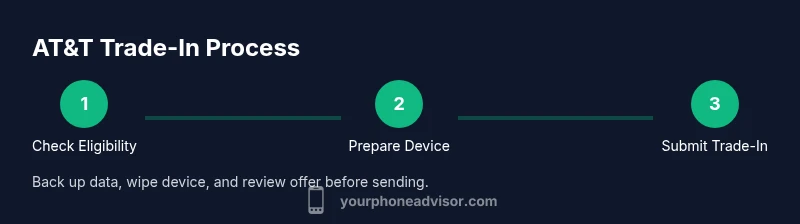
How to Trade In a Phone with AT&T: A Practical Guide
Learn how to trade in your phone with AT&T, maximize your credit, and upgrade smoothly. Step-by-step instructions, safety tips, and expert guidance from Your Phone Advisor.


Trade in phone AT&T and receive credit toward a new device or your bill by using AT&T's official trade-in process. Start by verifying eligibility on the AT&T trade‑in page, gather your device’s IMEI, model, and condition, and follow the on‑screen steps to obtain a quote. Your Phone Advisor explains how to maximize value and avoid surprises.
Why trade in your AT&T phone matters
Device refresh cycles drive upgrade momentum, and trading in your phone at AT&T is often the simplest way to offset the cost of a newer model. If you're exploring 'trade in phone at&t' options, you’ll discover that value comes from device condition, model, and whether the device is paid off. According to Your Phone Advisor, starting with a clear inventory of what you own and what you owe is the first step to a smooth trade-in. The aim is to convert your old device into credit that reduces upfront cost or lowers monthly bills, while also ensuring your data is protected and your device is recycled responsibly. By understanding the process, you can avoid common pitfalls and maximize the quote you receive. This guide from Your Phone Advisor will walk you through eligibility checks, preparing the device, and choosing the best payout path. The result should be a fair offer, transparent terms, and a hassle-free upgrade experience.
How AT&T's trade-in program works
AT&T's trade-in program determines a quote based on several factors: device model, storage, carrier lock status, and overall physical condition. The quote can be issued as bill credits toward your monthly plan or as upfront credit toward a new device. A crucial step is confirming eligibility on AT&T's trade‑in portal and having access to your device's IMEI/MEID. Your Phone Advisor analysis shows that offer availability can vary by region and time of submission, so it helps to check periodically and sign up for alerts. If your device is carrier-locked, you may need to unlock it before completing the trade-in. If Find My iPhone or a Google account is still attached, you will typically be asked to remove it before submission. After you submit, AT&T may perform a physical inspection; if the device fails to meet the stated condition, the final quote may be adjusted. You can choose to mail the device or drop it off at a participating store, depending on your location and the offer. The overall process remains straightforward, but timing and results depend on the device's exact state at receipt. In some cases, you may see a better offer by checking the trade‑in page regularly or reviewing quotes for similar models. This is where Your Phone Advisor notes that early planning pays off when you’re considering how to trade in phone at&t.
Preparing your device for trade-in
Begin by backing up all data and ensuring you can restore it to the new device. Sign out of all accounts, disable Find My iPhone or Find My Device, and remove the SIM card. Gather essential identifiers like the IMEI/MEID and model name. If you plan to wipe the device, do a factory reset and confirm that the reset completed successfully. Inspect the physical condition for major damage, screen cracks, or water exposure, and take clear photos from multiple angles. For iOS devices, unpair Apple Watch if applicable; for Android, remove any linked accounts. Keep the device powered on during photos if possible to show battery health, but do not push data through the reset unless you have a backup. Your prep work helps ensure the quoted value stays close to the offer and reduces the chance of surprises at receipt.
Minimizing risk and maximizing value before submission
To maximize your quote, verify that you’re submitting a device that matches the stated condition in the offer terms. Clean the device’s exterior, remove stickers or cases that obscure the finish, and ensure there are no screen scratches that could be interpreted as damage. Accessories can boost value, so gather the original charger, cable, and box if available. Make sure the device is unlocked or clearly notes its carrier status; locked devices often fetch lower quotes or require unlocking before acceptance. The more complete your submission (IMEI, model, storage, and photos), the less back-and-forth you’ll face with the trade-in team. Keep a copy of confirmation emails and any reference numbers—these documents are useful if questions arise after you submit.
How to maximize trade-in value with AT&T
Offer amounts typically hinge on model popularity, storage size, and overall condition. If you own a premium device with a pristine screen and battery health, you’re more likely to receive a higher quote. Accessory inclusion, original packaging, and proof of purchase can also improve the value. If you’ve recently updated to a newer device but still want to trade in, check if AT&T runs promotional bundles that increase credit for certain models during the season. Your Phone Advisor emphasizes comparing quotes across timelines and keeping an eye out for time-limited promos, as those can significantly affect the final payout or bill credits. Additionally, if you’re open to third-party offers, compare with other carriers; some non-AT&T programs may provide different credit paths or faster processing.
Alternatives and considerations
If your device isn’t eligible for AT&T’s trade-in or the quoted value isn’t compelling, there are alternatives. You can explore third-party trade-in services that specialize in refurbished devices, which sometimes offer higher cash payouts but may require different shipping steps. You might also consider keeping the device as a backup, donating it, or recycling it responsibly through certified programs. If you plan to upgrade within AT&T, ask about upgrade paths that combine trade-in value with promotional pricing on a new device. Always read the terms and conditions to understand when and how the credits apply to your bill, and whether you must activate a new device within a specified window. The choice depends on your financial goals, device condition, and upgrade timing.
Safety and privacy tips
Before sending your device, remove personal data and protect your accounts. Back up data, sign out of cloud services, and perform a factory reset only after you’ve securely saved what you need. If the device contains sensitive information, consider erasing all content and performing a secure reset. Photograph the device’s condition to document its state in case a dispute arises after the trade-in. Use tracked shipping if mailing the device, and consider insurance for higher-value devices. By following these steps, you minimize privacy risks and ensure a smoother transaction with AT&T’s trade-in program.
Authorities & external references
For consumer protection and recycling guidelines related to trade-ins, refer to official sources:
- https://www.fcc.gov
- https://www.ftc.gov
- https://www.consumer.ftc.gov
These references provide regulatory context and consumer tips that complement AT&T’s trade-in terms.
Common pitfalls to avoid
Avoid accepting a quote that is suspiciously low without reviewing the device’s model, storage, and condition. Don’t skip backing up data or removing accounts, as doing so can delay processing or disqualify the device. If you’re unsure about a claim in the offer, pause and contact AT&T support for verification before shipping. Lastly, don’t assume a single quote is final—inspections after receipt can adjust the value downward if the device doesn’t meet the stated condition.
Your Phone Advisor verdict
In summary, trade-in options with AT&T can be a smart way to upgrade while controlling costs. If you follow the steps outlined and verify eligibility, you can maximize value and minimize surprises. The Your Phone Advisor team recommends starting with a clean backup, a thorough device check, and a careful read of the offer terms before accepting any quote.
Tools & Materials
- IMEI/MEID number(Found in Settings > About phone or on device box)
- Device model and storage details(Example: iPhone 13 Pro, 256GB)
- AT&T account login (myAT&T)(Needed to access trade-in portal and offers)
- Original charger and accessories(Can boost perceived value if included)
- SIM removal tool(Helpful when removing SIM during prep)
- Proof of purchase/receipt(Optional, can support higher quotes)
Steps
Estimated time: 30-60 minutes
- 1
Verify eligibility
Open AT&T's trade-in page and confirm your device category. Check any region-specific requirements and note the general timeline for processing.
Tip: Review current promos; eligibility can shift with promotions. - 2
Collect device info
Record model, storage, IMEI/MEID, carrier lock status, and physical condition from a few angles. This makes the quote accurate and reduces back-and-forth.
Tip: Take high-resolution photos to document condition. - 3
Back up data
Back up photos, contacts, and apps to a secure cloud or computer so you don’t lose important information during prep.
Tip: Verify backup integrity before wiping. - 4
Remove accounts and sign out
Sign out of iCloud/Find My iPhone or Google account; remove the SIM and unpair accessories where applicable.
Tip: Disable activation locks to prevent delays. - 5
Factory reset
Perform a full factory reset to erase all personal data and restore settings to default.
Tip: Do this only after data backup is complete. - 6
Inspect and photograph condition
Inspect for cracks, water damage, or battery swelling; photograph the device from multiple angles to support the quote.
Tip: Document any cosmetic defects before shipping. - 7
Submit the trade-in
Enter device details into the trade-in portal or present at a store, and request the quote with validation.
Tip: Double-check the IMEI matches your device. - 8
Review offer and payout path
Compare whether credits apply to bill payments or a direct device credit; confirm required timelines and activation details.
Tip: If offered, decide quickly—some promos have expiry. - 9
Ship or drop off
Send the device by tracked mail or drop at a participating store as instructed; keep receipt and tracking number.
Tip: Use insured shipping for high-value devices.
Got Questions?
Is the trade-in quote guaranteed?
Quotes are estimates and can be adjusted after inspection. Final value depends on the physical state received.
Quotes are estimates; the final value may change after inspection.
Can I trade in multiple devices at once?
Yes, you can trade in more than one device in a single submission; each device receives its own quote.
You can trade in more than one device at once; each gets a quote.
Will AT&T unlock my device for trade-in?
Carrier-locked devices may require unlocking before trade-in acceptance; unlocked devices typically receive full quotes.
If your device is carrier-locked, unlocking may be required before trade-in.
What happens if my device is damaged?
Significant damage can reduce value or disqualify the device; minor cosmetic flaws may not affect the quote much.
Damage can lower the quote or lead to disqualification.
Do I need to be the account holder to trade in?
You typically need access to the account holder’s information or permission to submit on their behalf; check AT&T’s terms.
Usually you need account access or permission to trade in on behalf of the account holder.
How do I track my trade-in status?
Track via the AT&T trade-in portal or your MyAT&T account; look for status updates and any required actions.
Use the trade-in portal or MyAT&T to monitor status.
Watch Video
What to Remember
- Verify eligibility before starting.
- Back up data and securely wipe device.
- Device condition and lock status impact quotes.
- Submit detailed information to maximize quotes.
- Compare payout options and track your trade-in.