Why Would a Phone Go Straight to Voicemail? Quick Troubleshooting Guide
Learn why your calls go straight to voicemail and how to fix it fast with practical checks, step-by-step actions, and carrier tips. From Do Not Disturb to network issues, get back to normal calling.


Why would a phone go straight to voicemail? The most common causes are network issues, Do Not Disturb mode, or carrier routing problems. Start by checking your phone’s DND settings, then verify carrier service in your area, and test voicemail capacity. In many cases, a quick reboot or clearing the voicemail app fixes the issue.
Common reasons a phone goes straight to voicemail
If you notice that calls are consistently not ringing and land in voicemail, you're not alone. According to Your Phone Advisor, voicemail routing issues are often user-configurable rather than hardware failures. The most common culprits include Do Not Disturb or Focus modes, misconfigured call forwarding, a full voicemail inbox, network congestion, or temporary carrier-side outages. Some devices also have third‑party call-blocking apps that silently divert or silence incoming calls. Start by ruling out settings you control on your phone, then move to network and carrier checks to pinpoint the issue. In many cases, the fix is quick and reversible, empowering you to regain normal call flow without professional help.
From a practical perspective, addressing Do Not Disturb is usually the fastest win. If you routinely rely on DND during meetings, ensure you’ve added trusted contacts or allowed calls from favorites. If the inbox is full, freeing storage often clears the path for new call attempts. And if the problem recurs, it may reflect a broader network issue that your carrier must resolve. By methodically testing each piece, you can isolate whether the fault lies in-device, in the network, or in the mailbox itself.
How voicemail routing works
Voicemail routing is a multi-layer process. When you receive a call, your device and the carrier negotiate signaling to decide whether to ring or send the call to voicemail. If the network cannot establish a path for the call or if the target mailbox is full, the system routes the attempt to voicemail. Understanding this flow helps you diagnose where the failure happens—on-device settings, the carrier network, or the voicemail server. In most cases, the problem is not random; it is triggered by one or more specific knobs you can adjust, such as DND, voicemail storage, or call-blocking rules. Recognizing these components helps you troubleshoot with confidence and reduces unnecessary tech anxiety.
Quick checks you can do right now
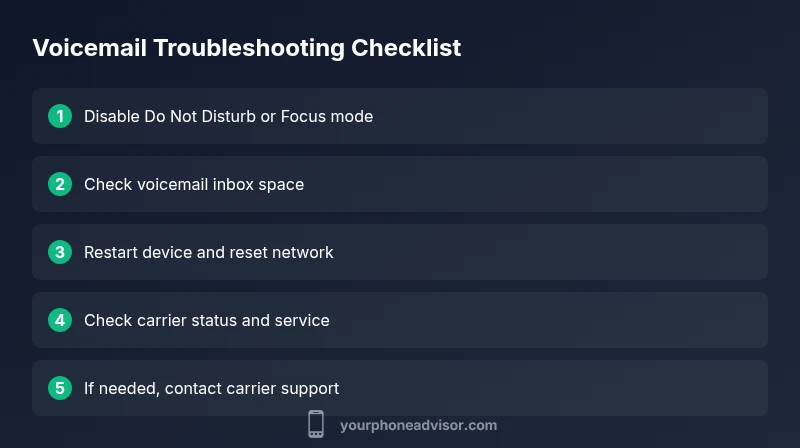
- Verify Do Not Disturb/Focus status: If DND is on, calls will go to voicemail by default. Toggle it off and test a call.
- Check voicemail inbox capacity: If the mailbox is full, new calls can’t be recorded. Clear old messages or delete saved voicemails.
- Look for blocked numbers or call-blocking rules: Review any apps or carrier settings that may block incoming calls.
- Test network status: Ensure you have a reliable signal and that airplane mode is not enabled. Turn off and on airplane mode to reset the connection.
- Restart the device: A simple reboot can reset lingering quirks in the OS or voicemail app.
- Try from another line: Have someone call your number to see if the issue persists across networks.
If none of these steps fix the problem, move on to more advanced checks or contact your carrier for routing issues.
Beyond basics: diagnosing more complex causes
If the quick checks don’t resolve the issue, the culprit may lie with your carrier or SIM card. Carrier outages, maintenance, or routing misconfigurations can temporarily send calls straight to voicemail. Check your carrier’s status page or service alerts for outages in your area. Resetting network settings or reinitializing the SIM card can fix registration problems. Finally, if the problem persists across multiple devices or SIMs, escalate to your carrier’s technical support. They can inspect account-level routing and mailbox settings that aren’t accessible from the phone.
Steps
Estimated time: 25-40 minutes
- 1
Check Do Not Disturb and Focus modes
Open Settings, navigate to Do Not Disturb or Focus, and ensure calls are allowed from your favorites or everyone. If you routinely use quiet hours, verify exceptions. After adjusting, place a test call to confirm whether ringing resumes.
Tip: DND settings are the most common quick fix; double-check exceptions for important contacts. - 2
Review voicemail inbox capacity
Open your voicemail app or carrier voicemail settings and confirm there is available storage. Delete old messages and empty the trash or archived folders to free space for new calls.
Tip: Even a small amount of space can block new recordings; remove clutter and verify cleanup completes. - 3
Test with another line
Ask a friend or family member to call you from a different carrier or device. If the call still goes to voicemail, the issue is likely network or mailbox-related; if it rings, the problem could be inbound blocking on your line.
Tip: Testing across networks helps isolate carrier-side vs device-side problems. - 4
Restart and recheck network settings
Restart your phone, then toggle airplane mode on for 30 seconds before turning it off again. If needed, reset network settings (note this may erase saved networks and passwords).
Tip: Restart is a safe first step before heavier resets. - 5
Evaluate SIM and carrier status
Remove and reinsert the SIM card, or try another SIM in the device. Check your carrier’s service status page for outages in your area and confirm that voice services are active on your plan.
Tip: Carrier outages are common and often resolved quickly; don’t hesitate to report ongoing issues. - 6
Escalate to carrier support
If the issue persists across devices or SIMs, contact your carrier’s technical support for routing checks and mailbox configuration. Provide timestamps and a summary of steps you’ve tried to speed resolution.
Tip: Have your account details handy to shorten wait times during support calls.
Diagnosis: Calls go straight to voicemail for most or all numbers
Possible Causes
- highDo Not Disturb or Focus mode enabled
- highVoicemail inbox full or storage quota reached
- mediumCarrier outage or network issues in your area
- lowCall blocking or caller-ID settings on your device or carrier
- lowSIM card or network registration problem
Fixes
- easyTurn off Do Not Disturb/Focus mode and test a call
- easyClear voicemail storage or delete old messages
- easyRestart device and reinsert SIM if needed
- easyCheck carrier status page and toggle airplane mode to reset network
- mediumReset network settings or contact carrier for routing checks
- easyIf unresolved, request carrier technical support
Got Questions?
Why is my iPhone going straight to voicemail?
Common causes include Do Not Disturb, a full voicemail box, or carrier routing problems. Start by checking DND settings, mailbox storage, and carrier status before escalating.
Most iPhone voicemail redirects come from DND, mailbox fullness, or carrier routing. Check settings and storage first.
Why would an Android phone go straight to voicemail?
Android devices often experience this due to DND or misconfigured call settings. Review Do Not Disturb, call blocking apps, and network settings to resolve.
Android voices go to voicemail mainly because of DND or call-blocking apps; adjust settings and test.
What does it mean when voicemail is not reachable?
It usually indicates a carrier outage, mailbox issues, or a misconfigured routing rule. Check status pages and mailbox capacity, then retry or contact support.
Not reachable often points to carrier outages or mailbox issues; check status and try again.
How can I fix voicemail routing on my carrier?
Start with device settings like DND and voicemail storage, then check carrier alerts. If unresolved, contact customer support for routing checks and mailbox configuration.
Fixing carrier voicemail routing usually starts with device settings; if needed, contact support.
Does Do Not Disturb affect all calls or unknown numbers?
DND behavior varies by device and settings. Some configurations block all calls, while others only block unknown or non‑favorite numbers.
DND can block all calls or only certain callers depending on settings.
Watch Video
What to Remember
- Start with Do Not Disturb and voicemail storage checks
- Test call flow from another line to isolate issues
- Restart device and reset network settings if needed
- Escalate to carrier support for routing or mailbox issues