How to Phone Without Airtime: Your Practical Guide
Learn practical, step-by-step ways to phone without airtime using Wi‑Fi calling, VoIP apps, and emergency services. This comprehensive guide from Your Phone Advisor covers setup, privacy, and real‑world tips to stay connected when minutes run out.


You can phone without airtime by using Wi‑Fi calling, VoIP apps, or emergency services when available. First, ensure your device and carrier support Wi‑Fi calling. Then install reliable VoIP apps (WhatsApp, Skype, Signal) and use a stable Wi‑Fi or mobile data connection. With these options, you stay reachable even without minutes.
Understanding airtime-free calling options
The phrase how to phone without airtime is about using internet-based methods to place calls when traditional cellular minutes are unavailable. In practice, most modern smartphones support Wi‑Fi calling, which routes calls over a data connection rather than the cellular network. Your Phone Advisor emphasizes that the first move is to verify carrier compatibility and device support. If your carrier enables Wi‑Fi Calling, you can ring out to traditional phone numbers using a familiar dialer, provided you have a working internet connection. Beyond Wi‑Fi Calling, you can leverage VoIP apps that route calls over data. These options are especially useful when you’re traveling, in areas with weak cellular coverage, or trying to limit costs. Remember, the reliability of airtime-free calling hinges on a stable internet connection and properly configured apps. Your Phone Advisor analysis indicates a growing acceptance of these methods as people shift toward data-first communication.
How Wi-Fi calling works and when to use it
Wi‑Fi calling uses your internet connection to complete voice calls and text messages that would normally go through your carrier’s network. When cellular coverage is weak or you’ve exhausted minutes, Wi‑Fi Calling often provides a more reliable link. To use it, you typically enable a toggle in Settings > Phone >Wi‑Fi Calling (naming may vary by OS and carrier). It’s especially convenient at home, in cafés with reliable speed, or when you’re abroad and want to avoid roaming charges. Not all carriers support it everywhere, so check your plan’s documentation. For the question of how to phone without airtime, Wi‑Fi Calling is usually the simplest path, requiring minimal changes and offering familiar dialing experiences with your regular contacts.
VoIP apps: Choosing the right tool for your situation
Voice over Internet Protocol (VoIP) apps let you place calls using data rather than a traditional phone line. Popular apps include WhatsApp, Skype, and Signal, but many others exist for different regions and needs. The main advantage is flexibility: you can call other users on the same app for free and call traditional numbers if the app supports it (often at low data-based rates). When selecting an app, consider factors such as contact availability, call quality, end-to-end encryption, and whether the app can be used over both Wi‑Fi and mobile data. If you’re seeking practical ways to stay reachable without airtime, a reliable VoIP app is a strong complement to Wi‑Fi Calling.
Emergency calling rules and accessibility
Emergency services policies vary by country, region, and carrier. In many places, you can dial emergency numbers even if you have no cellular minutes, provided you have some network connectivity—whether cellular, Wi‑Fi, or a VoIP connection. However, not all regions support VoIP-based emergency calling, and some countries require a traditional connection for dispatch. Before relying on airtime-free options in critical situations, confirm local regulations and test the emergency dialer in a safe setup. If you’re traveling, carry a basic awareness of how to reach local services, and know that coverage can differ between networks.
Security, privacy, and data usage considerations
Using Airtime-free calling methods introduces new data exposure contexts. VoIP calls and Wi‑Fi calls travel over data networks, so encryption, app permissions, and network security matter. Prefer apps with strong end-to-end encryption and transparent privacy discussions. Be mindful of data usage, especially on limited plans; video calls consume more data than audio calls, which can surprise you if you’re not monitoring usage. Always review app permissions, disable unused features, and keep devices updated to minimize risk when making calls without airtime.
Step-by-step overview for setting up airtime-free calling
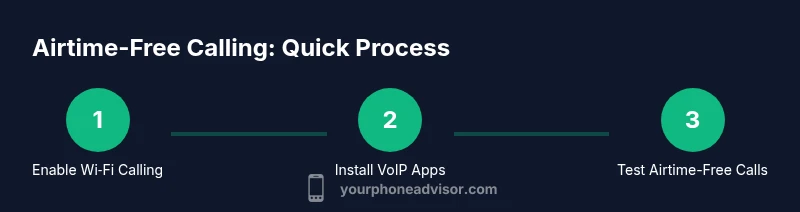
To make practical airtime-free calls, you need three things: a capable device, a reliable data or Wi‑Fi connection, and the right apps. Start by enabling Wi‑Fi Calling if your carrier supports it, then install one or two VoIP apps to cover calls that Wi‑Fi can’t handle (for example, landlines or mobile numbers not on your contact list). Finally, test both methods in a safe environment and note the call quality, latency, and whether you can access emergency numbers when needed. The goal is to have a reliable fallback that keeps you connected when minutes aren’t available.
Practical test plan: try-before-trusting
Create a simple test plan to validate airtime-free calling options. Test 1) a local call over Wi‑Fi, 2) a VoIP call to a contact on the same app, 3) a call to a landline or mobile number via a VoIP service if supported, and 4) an emergency call scenario in a controlled environment to understand what is and isn’t possible in your region. Document call quality, battery impact, and data usage. Use this data to decide which method you’ll rely on most during a period without airtime.
Tools & Materials
- Smartphone with data/Wi‑Fi capability(Any modern device supports Wi‑Fi Calling if enabled by the carrier)
- Stable Wi‑Fi network or reliable mobile data(Prefer networks with 2 Mbps+ for smooth audio calls)
- VoIP/communication apps (WhatsApp, Skype, Signal, etc.)(Install 1–2 trusted apps beforehand)
- Emergency numbers stored or easily accessible(Know your local emergency numbers and policies)
- Headset or hands-free accessory(Improves call quality and privacy)
- Power supply or charger(Keep your device charged during longer calls)
Steps
Estimated time: 30-45 minutes
- 1
Check options and prerequisites
Review whether your phone and carrier support Wi‑Fi Calling and what VoIP apps you plan to use. Confirm you have a reliable internet connection and the apps installed. This upfront check saves time when you actually need airtime-free calls.
Tip: If you’re unsure about carrier support, contact customer service before relying on Wi‑Fi Calling. - 2
Enable Wi‑Fi Calling on your device
Go to Settings and turn on Wi‑Fi Calling. Follow the on-screen prompts to verify your address for E911 (emergency) services if your region requires it. You should see a network indicator showing Wi‑Fi Calling is active.
Tip: Test a short call to a colleague to confirm the option works as expected. - 3
Install and sign in to VoIP apps
Download one or two VoIP apps and sign in. Add frequently contacted numbers to your favorites for quick access. Set the app to use Wi‑Fi whenever possible to minimize data charges.
Tip: Enable encryption and review privacy settings to protect your conversations. - 4
Test airtime-free calls over Wi‑Fi
Place a test call via Wi‑Fi Calling to a regular contact. If unavailable, use a VoIP app to connect to another user. Observe call quality, latency, and whether the call disconnects during movement.
Tip: Test from different locations (home, cafe) to verify reliability. - 5
Test calls to traditional numbers via VoIP
If your VoIP app supports calling landlines or mobile numbers, perform a test call to a local number. Note the rate structure and data usage. This helps quantify the cost when airtime is unavailable.
Tip: Keep a data usage log to avoid overage surprises. - 6
Review emergency calling capabilities
Check how emergency services respond when you’re on Wi‑Fi Calling or a VoIP call. Some regions route emergency calls differently, so know what to expect in your area.
Tip: Confirm that your device shows the correct location for emergency dispatchers if supported.
Got Questions?
Can I make emergency calls without airtime?
Emergency calling rules vary by country and carrier. In many places, it’s possible to reach emergency services without a plan, but VoIP options may not always be supported. Check local regulations and test in a safe environment.
Emergency calls without airtime depend on your location and carrier. Verify local rules and test the dialer in a safe setup.
Is Wi‑Fi Calling available on all carriers and devices?
No. Availability depends on your device model, OS version, and carrier. Check your carrier’s support page and enable Wi‑Fi Calling in your phone settings if supported.
Wi‑Fi Calling isn’t universal. Confirm compatibility with your device and carrier before relying on it.
Do VoIP apps require a data plan?
VoIP apps require an internet connection, which can be Wi‑Fi or mobile data. Your usage will count against your data plan if you’re on mobile data, so monitor consumption.
VoIP needs data—either Wi‑Fi or mobile. Expect data usage if you’re not connected to Wi‑Fi.
Will calls over Airtime-free methods incur charges?
Calls via VoIP are typically data-based; some services offer free calls to other users, while calls to traditional numbers may incur data or service charges. Check each app’s terms.
VoIP calls may be data-based or free between users; calls to real numbers can incur charges depending on the app.
Can I use airtime-free calling on a device without a SIM?
Yes. You can place calls using Wi‑Fi Calling or VoIP apps on devices without a SIM, such as tablets or Wi‑Fi-only phones, provided you have internet access.
You can call without a SIM on Wi‑Fi or with VoIP apps, as long as you have internet access.
What about international calls without airtime?
VoIP apps often offer affordable international calling. Check app rates and ensure you have a stable data connection to minimize latency and charges.
VoIP apps usually provide cheaper international calls; verify rates and keep data usage in check.
Watch Video
What to Remember
- Enable Wi‑Fi Calling if supported by your carrier and device
- Keep one or two VoIP apps ready for airtime-free calls
- Always test your setup before you need it
- Understand local emergency calling policies and data usage