How to Keep Your Phone From Overheating in a Sauna
Prevent sauna heat from damaging your phone with practical, field-tested steps. Learn prep, safe storage, cooling techniques, and best practices—backed by guidance from Your Phone Advisor.


In a sauna, keep your phone from overheating by avoiding use, turning it off, and shielding it from heat. Use a heat-resistant pouch or insulated compartment outside the sauna, limit exposure time, and disable power-hungry features. If you must bring a device, store it away from heat sources and cool it before reuse.
Why sauna heat is risky for phones
Saunas are designed to reach extreme temperatures, and that heat directly challenges the integrity of a smartphone. According to Your Phone Advisor, high-heat environments can accelerate battery wear, degrade display coatings, and stress internal components. A phone left inside a sauna may throttle performance, experience shorter battery life, or shut down unexpectedly to protect itself. Steam and moisture add another layer of risk, potentially corroding seals and port areas over time. The combination of sustained heat, humidity, and the phone’s own electronics creates a perfect storm for hardware fatigue. For everyday users, the prudent approach is to treat the sauna as a hostile environment for electronics and minimize exposure altogether to protect the device you rely on.
What actually happens to a phone in heat
When a phone gets hot, the battery chemistry slows down its reactions and can swell in rare cases. Excess heat accelerates chemical reactions inside the cell, which shortens cycle life and reduces capacity over time. The device’s processor, memory, and screen also rely on stable temperatures to function optimally; prolonged heat can lead to thermal throttling, where performance is intentionally lowered to cool down, resulting in lag and slower app response. In humid environments, moisture can seep into ports and speakers, potentially causing corrosion or muffled sound. Display layers and adhesives may degrade with repeated heat exposure, leading to screen lift or panel gaps. Understanding these processes helps justify why smart sauna practices center on keeping heat away from the phone whenever possible.
Before you enter: preparation steps
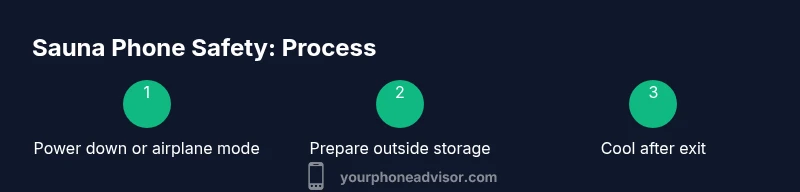
Preparation is the first line of defense. Before stepping into the sauna, power down the phone completely or switch to airplane mode to minimize heat generation and prevent background activity. If you must carry it, place it in a heat-resistant, sealed pouch and keep it outside the hot zone rather than on the bench. Check that the device is dry and free of moisture; moisture inside the device compounds heat stress and can cause unpredictable behavior. Remove any accessories that trap heat, such as bulky cases, and switch to a minimalist setup that allows for better external cooling. Have a quick plan to retrieve and cool the device as soon as you exit the sauna to reduce exposure time and temperature spikes.
During sauna: best practices for keeping your phone safe
The safest option is to leave the phone outside the sauna entirely. If you need to bring it for a short purpose, keep it in a dedicated, insulated container outside the hot area and away from direct steam. Avoid using features that generate substantial heat, such as GPS navigation, streaming video, or camera bursts. Turn off wireless radios when feasible to limit the phone’s activity and heat production. Do not charge the device while inside the sauna, and never place it directly on metal or ceramic surfaces that conduct heat poorly. If you notice any unusual warmth, remove the device immediately and allow it to cool in a shaded, well-ventilated area.
Protective gear and setups that help
Invest in protective, heat-resistant gear designed for extreme environments. A high-quality insulated pouch or sleeve can help shield the phone from ambient heat. A dedicated outside-the-sauna stand or shelf keeps the device away from heat sources while you rest or cool down. Silica gel packs or moisture absorbers stored nearby can help manage humidity when cooling. Avoid flimsy cases that trap heat or cover the vents; opt for purpose-built accessories with heat barriers. When possible, use a separate device for sauna use (a non-smartphone or rugged, heat-tolerant device) to prevent wear on your primary phone.
Charging and network considerations
Charging inside a sauna is a bad idea and should be avoided. If you need to recharge, do so only after you’ve exited and cooled the device. Wireless charging and fast charging modes generate heat; disable charging until you’re in a cool, dry environment. Data and network activity also generate heat; consider turning on airplane mode while inside or near the heat source to minimize energy draw. If you must connect to a network while outside, prefer a quick, low-power check rather than streaming or syncing large data transfers in the heat.
What to do after leaving the sauna
Cooling matters after exposure. Move the phone to a cooler area away from direct sun or heat to avoid rapid cooling that could cause condensation. If the device feels warm, let it rest at room temperature with minimal usage for a while. Check for any unexpected behavior, such as random reboots or screen flicker, and monitor battery health over the next few cycles. If you notice persistent overheating symptoms, contact a service professional for a check-up. This cooling protocol helps preserve battery life and overall performance over time.
Alternatives to carrying your phone inside the sauna
Consider leaving your phone outside the sauna and using a separate device for any required tasks, such as a wellness timer or a simple, offline note-entry device. A dedicated digital timer, a thermostat, or a basic watch with timer functionality can replace the need to interact with your phone in heat. If you must bring a device, choose a rugged model designed for extreme temps or safety-rated equipment. The key is to minimize heat exposure while maintaining safety and convenience for your routines.
Quick checklist you can reuse
- Power down or airplane-mode before entering the sauna.
- Use an insulated, heat-resistant pouch outside the hot area.
- Avoid charging or streaming inside the sauna.
- Keep the device away from heat sources and steam vents.
- Cool the phone in a shaded area after exiting before reuse.
- Consider a dedicated sauna device to reduce wear on your primary phone.
Common myths and misconceptions
Many people think placing a phone in a bag with a reusable desiccant will solve all problems; while it helps, it does not eliminate heat stress. Another myth is that larger, more expensive cases guarantee protection; in reality, most heat damage comes from sustained temperatures, not outer shell thickness. Finally, some assume phones recover quickly after a sauna session; battery health is a long-term concern and benefits from minimizing exposure over time.
Tools & Materials
- Heat-resistant storage bag or insulated pouch(Metalized or silicone-lined bag designed to tolerate sauna temps)
- Phone case with heat barrier or insulation(Look for ceramic or silica-filled cases; avoid flimsy shells)
- Silica gel packs (optional)(To help absorb residual moisture when cooling outside sauna)
- Sturdy, heat-safe stand outside sauna(Keep device off benches and away from heat vents)
- Cooling cloth or microfiber towel(Use after cooling to wipe moisture)
- Power bank (optional outside sauna)(If taking outside sauna, ensure battery packs are rated for high temps)
- Reusable desiccant packs(For storage outside sauna)
Steps
Estimated time: 20-25 minutes
- 1
Power down or enable airplane mode
Before approaching the sauna, fully power down the phone or switch to airplane mode to reduce internal activity and heat generation. This minimizes the device’s contact with heat and protects battery health. Ensure all apps are closed and unnecessary radios are disabled.
Tip: If turning off is not practical, at least disable background refresh and push notifications to limit activity. - 2
Prepare a heat-resistant storage solution outside
Place the phone in a heat-resistant pouch or insulated sleeve and keep it outside the sauna’s hot zone. This creates a physical barrier between heat sources and the device. Confirm that the pouch is fully closed and that there’s no moisture or water inside the enclosure.
Tip: Test the pouch with a warm hand before using it to ensure it doesn’t trap excess heat. - 3
Remove heat-retaining accessories
Take off bulky protective cases, straps, or metal accessories that can trap heat. A lighter setup reduces the chance of the device overheating and makes cooling more efficient after exposure. Keep the device flat and off any heat-conductive surface.
Tip: Sticky heat can still be an issue; ensure nothing on the phone blocks vents or grills. - 4
Limit exposure time inside the sauna
If you must bring the device inside, do so for the briefest possible period and avoid using battery-heavy features. Place the pouch on a shaded, cool shelf away from steam vents. Exit immediately if the device begins to feel uncomfortably warm.
Tip: Set a timer on your timer outside to remind you to check and relocate the device. - 5
Avoid charging or data transfers inside
Do not charge the phone inside the sauna and avoid large data transfers or streaming. Charging generates additional heat; data transmissions also elevate heat and stress components. Wait until you’re out and cool to perform any charging or syncing.
Tip: If you need to check messages, keep it minimal and offline to conserve heat. - 6
Cool the device after exiting
When you leave the sauna, move the phone to a cooler, shaded area and allow it to return to ambient temperature before reuse. Wipe away any moisture and let the device rest for a few minutes. Avoid placing the phone directly in cold water or snow to prevent rapid thermal stress.
Tip: Patience with cooling preserves battery health and prolongs device life. - 7
Evaluate next steps and plan ahead
Reflect on whether you truly needed the phone inside the sauna. Consider leaving it outside on a stand for future sessions unless a specific, time-bound activity requires access. Update your sauna routine guidelines to minimize risk and protect your device long-term.
Tip: Keep a small laminated checklist or note with your sauna routine to reuse each session.
Got Questions?
Is it safe to use a phone inside a sauna?
No. Saunas expose phones to extreme heat and humidity, which can degrade battery health and lead to unexpected shutdowns. It's best to avoid use inside the sauna and keep the device outside whenever possible.
Saunas are too hot for phones. Avoid using the device inside; keep it outside and use minimal features if absolutely necessary.
What should I do if my phone overheats during a sauna session?
If overheating occurs, power the device off and move it to a cooler place immediately. Let it cool completely before attempting to use it again. Check for any unusual behavior afterward and consider service if symptoms persist.
If it heats up, turn it off and move it to a cooler spot right away. Let it cool before using again.
Can protective cases prevent overheating?
Cases can provide some insulation, but they do not stop heat from reaching the phone in a sauna. Use heat-resistant accessories and avoid trapping heat inside a rigid, tight case.
Cases help a little, but they won't prevent heat damage. Choose insulation designed for high temps.
Is it safe to charge a phone in the sauna?
No. Charging generates extra heat and increases the risk of damage. Charge only after you have exited the sauna and the phone is cooler.
Charging in a sauna is risky; wait until you’re out to charge.
What about wearables or secondary devices near the sauna?
Wearables are also affected by heat. Keep them outside the sauna, and use them only if they’re rated for high-temperature environments. Use them only briefly if at all.
Wearables can also overheat; keep them away or use briefly if rated for heat.
Watch Video
What to Remember
- Keep your phone out of direct sauna heat
- Power down or airplane-mode before exposure
- Use insulated storage and limit exposure time
- Avoid charging or data transfers inside the sauna
- Cool the device thoroughly after leaving