How to Bring a Phone into a Sauna Safely
Practical guide on bringing a phone into a sauna safely, covering risks, protective gear, timing, and safer alternatives to protect your device from heat and moisture.


Learn how to bring a phone into a sauna safely by weighing risks, using protective enclosures, and limiting exposure. This guide covers temperature awareness, battery stress, and moisture risks, plus practical steps to protect the device if you must use it. Know when to abort the session to prevent permanent damage.
Why bringing a phone into a sauna is risky
Saunas create an environment of intense heat and rising humidity that can severely challenge smartphone design. Exposed electronics may experience accelerated battery wear, screen delamination, and moisture ingress through ports or seals. Even brief encounters with sauna heat can cause temporary throttling, reduced performance, and long-term reliability concerns. This section unpacks the core risks—heat, steam, and condensation—and how they interact with common phone components, so you can make an informed decision about whether to bring your device into a sauna at all.
YourPhoneAdvisor analysis emphasizes that most devices are not engineered for sustained sauna exposure. While rugged cases and protective sleeves offer some protection, they do not eliminate risk. If you need access to information during a session, consider safer alternatives or outside-the-room usage. The aim is to minimize potential harm without compromising safety or your experience.
How saunas impact phone components
In a sauna, ambient temperatures can push internal temperatures well above what smartphones are built to tolerate. Lithium-ion batteries are particularly sensitive to heat; prolonged exposure can accelerate capacity loss and increase the risk of swelling. OLED and LCD screens may exhibit color shifts or reduced brightness after heat exposure, and seals or adhesives inside the device can loosen, allowing moisture to penetrate deeper. Circuit boards may experience transient faults or long-term reliability issues if heat saturates the chassis. Even if the surface feels cool, internal temperatures can spike when steam is present, making temperature management essential. This section translates heat physics into practical implications for your device and helps you decide if a sauna session with a phone is acceptable for your needs.
Protective enclosures and accessories
Protection matters, but it isn’t a magic shield. A heat-resistant pouch or silicone sleeve can create a buffer between the device and direct heat, while a waterproof dry bag can mitigate condensation. For best results, pair any enclosure with a secure attachment so the phone stays close to your body yet off hot surfaces. Avoid metal cases, which can quickly heat up and transfer heat inward. A temperature indicator patch can help you gauge live heat exposure during initial trials. Remember, even with protective gear, enclosure performance depends on sauna type and exposure duration.
Battery health, charging, and software considerations
Before introducing a phone into a sauna, minimize active processes by turning off nonessential apps and enabling airplane mode to reduce heat-generating activity. If the device must stay powered on, avoid charging in the sauna—charging behavior in high heat is unpredictable and can stress the battery. Keep brightness low, disable auto-brightness, and consider offline use to limit heat from radios and sensors. After exposure, inspect the battery indicator, edges, camera housing, and charging port for signs of distress. These checks help you determine if sauna exposure affected the device and whether you should seek professional servicing.
Safe-use guidelines: when it's ever reasonable
Only consider taking a phone into a sauna if you have a clear, time-limited objective and a proven protective setup. Limit sessions to brief intervals and stop immediately if you notice excessive warmth, unusual screen behavior, or battery swelling. When possible, keep the device outside the hottest zone and rely on external devices (voice assistants, timers, notes) for information. In most cases, leaving the phone outside yields higher reliability and preserves device longevity while still allowing you to enjoy the sauna experience.
Step-by-step procedure overview
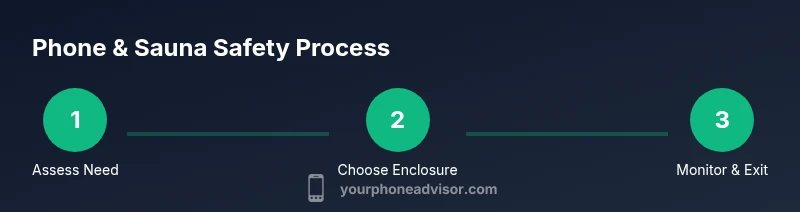
- Decide if bringing your phone into the sauna is truly necessary, and if it can be accomplished without risking the device.
- Prepare a protective enclosure before entering; ensure it is heat-resistant and sealable.
- Power down or enable airplane mode to minimize heat from background processes.
- Place the phone inside the enclosure and secure it to your body away from direct heat surfaces.
- Enter the sauna for a brief test run, monitoring onset of warmth and any fogging or condensation around seals.
- If heat becomes uncomfortable or you notice signs of strain, exit immediately and remove the device from the enclosure.
- After the session, allow the phone to cool fully in a dry spot, then inspect for moisture or warping and check battery health.
- Decide if future sessions are advisable; consider safer alternatives for ongoing needs.
Tip: Always have a plan to abort quickly if your device shows signs of distress. This keeps your sauna experience safer for you and your tech.
Safer alternatives to keep phone accessible near the sauna
If you rely on quick access to information, consider alternatives that stay outside the heat: a waterproof smart speaker, a rugged timer device, or a small external display placed away from heat sources. Use voice assistants from a device outside the sauna to fetch weather, timers, or health reminders. For routine needs, pre-load essential data or take notes outside the room, then consult them without bringing the phone inside.
Environmental factors to monitor: humidity, steam, and bench materials
Humidity and steam are the sneaky culprits behind condensation and corrosion. Sauna design varies: dry heat can still affect seals, while steam can infiltrate small gaps. Wooden benches, metal fittings, and glass doors influence heat distribution and transfer; contact with hot surfaces can dramatically raise local temperatures. Always assess the specific sauna environment, keep the device away from direct contact with hot surfaces, and be mindful of where steam pools in the room. Understanding these factors helps you judge when and where a phone could survive, if at all.
Post-sauna care: drying and inspection
When you finish, let the device cool in a dry, ventilated area away from direct sun. Inspect for condensation inside ports, camera modules, and sensors; if you notice moisture, avoid powering the phone on and seek professional evaluation. Battery health indicators and performance should be tested gradually; if you observe rapid drain, swelling, or heat during basic use, discontinue use and consider battery replacement. A cautious post-sauna check protects both you and your device.
Authority sources
- https://www.osha.gov/heat-exposure
- https://www.cdc.gov/niosh/topics/heatstress/default.html
- https://www.nist.gov/topics/heat
Tools & Materials
- Heat-resistant phone pouch or pouch with silica lining(High-temperature silicone or aramid fiber pouch, withstands sauna temps)
- Waterproof/dry bag(Sealable and moisture-resistant to guard against condensation)
- Heat-resistant protective case(Silicone or polycarbonate, designed for exposure to heat)
- Temperature indicator sticker(Helps monitor device temperature during initial trials)
- Moisture-absorbing desiccant pack(Used inside enclosure to reduce moisture risk)
Steps
Estimated time: 20-40 minutes
- 1
Decide if bringing the phone is necessary
Assess whether you truly need access to the device inside the sauna. If the requirement is optional, opt to leave the phone outside to protect both device and session quality. If you must proceed, ensure you have a tested protective setup and a plan to abort at the first sign of heat stress.
Tip: Ask yourself if you can complete the task before entering the sauna. - 2
Prepare a heat-resistant enclosure
Assemble a dedicated, heat-resistant pouch or sleeve and seal it securely. Verify there are no gaps where heat or steam could bypass protection. Attach the enclosure to your body in a secure, accessible position to minimize handling in the hot environment.
Tip: Do a dry run in a cool room to confirm fit and seal integrity. - 3
Power down and limit activity
Turn off nonessential apps and enable airplane mode to reduce heat from radios and background processing. Avoid charging the phone in the sauna; charging can increase heat and stress during warm sessions.
Tip: Use offline data or preloaded content to minimize need for network activity. - 4
Place the phone securely in the enclosure
Insert the phone into the protective enclosure and ensure it is sealed and cushioned away from direct heat surfaces. Position it on your body so it stays away from benches or heater walls.
Tip: Verify the enclosure remains closed during the session. - 5
Limit exposure time to safe bursts
Enter the sauna for brief periods (1–2 minutes) and monitor any warmth perceived by the device. Rotate out quickly if any heat is detected through the enclosure.
Tip: Use a timer to enforce short exposure windows. - 6
Exit and cool down
Leave the sauna whenever you notice excessive warmth or fogging on the enclosure. Move to a cool, dry place to allow the phone to return to ambient temperatures before handling.
Tip: Do not power on the device while still warm or damp. - 7
Inspect for moisture and signs of stress
After the session, check ports, speakers, and the camera area for moisture or condensation. If you see any signs of moisture, avoid powering on and seek professional advice if needed.
Tip: Document any unusual behavior for future reference. - 8
Decide on future sessions
Evaluate whether continued sauna exposures are worth the risk to your device. If uncertainty remains, opt for safer alternatives and avoid repeating high-heat exposure.
Tip: Prioritize device longevity over convenience.
Got Questions?
Is it safe to bring a phone into a sauna?
Generally, frequent sauna exposure is not recommended for phones due to heat and moisture risks. If you must, use protective gear, limit exposure time, and monitor for signs of damage. Consider safer alternatives whenever possible.
In most cases, it’s not safe to bring a phone into a sauna. If you must, protect it and keep sessions very short, then inspect for damage afterward.
Will a heat-proof pouch protect my device?
A heat-proof pouch can reduce direct heat exposure and moisture. It is not foolproof, and does not guarantee device safety in high-heat environments. Use it only as part of a broader safety plan.
A heat-proof pouch helps, but it’s not a magic shield, so use it with caution.
Can I use my phone to control a sauna heater?
Controlling a sauna heater from a phone increases risk, given wireless signals and heat. It is generally safer to use dedicated controls from outside the hot zone whenever possible.
Controlling the heater from your phone is risky; use external controls when available.
What are signs of phone damage after sauna exposure?
Look for battery swelling, screen delamination, fogged cameras, water droplets inside ports, or rapid unexplained battery drain. If any appear, stop using the device and seek professional assessment.
Watch for swelling, fogging, or port moisture after exposure; seek help if you see any.
Does IP rating matter for sauna use?
IP ratings relate to water and dust resistance but do not guarantee heat tolerance. Sauna environments still pose heat and steam risks that IP ratings do not fully mitigate.
An IP rating doesn’t guarantee sauna safety because heat and steam are additional risks.
What should I do if the phone overheats?
If overheating occurs, exit immediately, power down if possible, and move the device to a cool, dry area. Do not charge or turn it back on until fully cooled and inspected.
If it overheats, leave the sauna and let the phone cool completely before checking it.
Watch Video
What to Remember
- Assess whether the phone needs to be inside the sauna.
- Use a heat-resistant enclosure; protect against moisture.
- Limit exposure to brief bursts and monitor temperature.
- Consider safer alternatives to stay connected.
- Inspect the device after the session and decide on future use.