How to Deal with Phone Overheating: A Practical Guide
Learn practical, step-by-step methods to cool a hot phone, prevent future heat, and protect battery health with safe charging habits and smart usage tips.


This guide helps you safely deal with phone overheating by identifying causes, cooling the device, adjusting charging habits, and preventing recurrence. Start by moving to shade, removing cases, pausing intense apps, and updating software. If overheating continues, seek professional help. These steps cover immediate cooling and long‑term prevention.
Why smartphones overheat
Overheating happens when a device cannot dissipate heat quickly enough, causing the internal components to warm beyond their design tolerances. The main culprits are sustained high CPU/GPU load from gaming or video editing, camera use, and demanding apps running in the background. Environmental factors like direct sunlight, hot rooms, and insulating cases can trap heat, making it worse. A degraded battery or old charging habits can amplify heat generation because the battery chemistry becomes less efficient at converting energy into useful power as it ages. In many cases, overheating is not caused by a single factor but by a combination of software load, hardware limits, and ambient temperature. According to Your Phone Advisor, these contributors interact, so addressing heat requires both in‑the‑moment actions and ongoing habits to keep temperatures within safe ranges. Understanding these drivers helps you act quickly to protect performance and battery longevity, especially during long gaming sessions or heavy multitasking.
Quick, safe immediate actions you can take
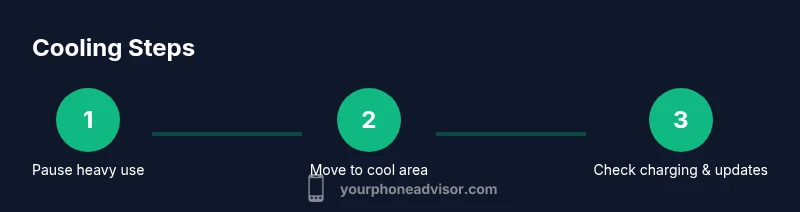
When you notice your phone getting uncomfortably hot, start with simple, reversible steps that don’t require tools. Move the device to a shaded, well‑ventilated area and remove any bulky case if possible to improve airflow. Pause or close graphics‑intensive apps (games, video editing, live streaming) and disable features that drain power in the background, like high refresh rate, location services, or constantSync. If the phone is charging, unplug it to stop extra heat from the charging circuit and place the phone on a cool, hard surface away from fabrics or papers. Avoid placing the device in a fridge or freezer as rapid cooling can damage internal components. Wait for the device to cool for several minutes before resuming normal use. These actions reduce thermal stress and help prevent downstream issues while you plan longer‑term fixes.
The role of charging in overheating
Charging generates heat because the battery chemistry and the charger work harder to move energy into the cells. High ambient temperatures, using non‑original chargers, or charging through a case can trap heat around the device. If your phone starts to overheat while charging, the safest option is to stop charging and allow it to cool before resuming. Use the manufacturer’s approved charger and cable, avoid wireless charging through a bulky case, and never charge in direct sunlight or inside a hot car. Regularly inspecting the charger and cable for damage helps prevent heat buildup and potential hazards. In many cases, simply switching to a cooler charger or charging in a cooler room reduces heat quickly and reduces unnecessary stress on the battery.
Managing heat during heavy use
Long gaming sessions, extended video capture, or high‑resolution camera work are common heat accelerants. To manage heat, lower the device’s workload: reduce screen brightness, enable battery saver or performance mode that throttles the CPU, and close unnecessary apps running in the background. Consider temporarily disabling features like high refresh rate and advanced motion effects. If you’re gaming, switch to a framed rate that your device can sustain without overheating. Keeping the device on a flat, hard surface that allows air to flow around the chassis also helps. These adjustments can dramatically improve temperatures during intensive tasks.
Software updates and background processes
Out‑of‑date software can contribute to overheating due to inefficient code or unresolved bugs. Check for and install OS updates and app updates, then review battery usage to identify rogue apps driving heat. In Android, go to Settings > Battery > Battery usage to spot heavy consumers; on iOS, open Settings > Battery to review activity. Turn off auto‑refresh for apps that don’t need real‑time data, disable unnecessary background processes, and reset network settings if overheating coincides with connectivity issues. Regular software maintenance helps keep power management efficient and temperatures lower over time.
Environment and usage habits to prevent overheating
Prep your daily setup to minimize heat exposure: avoid direct sunlight, keep the device out of hot car interiors, and work in a cooler room when possible. Use a well‑ventilated area and a hard, flat surface to encourage air circulation. Long periods of video streaming or gaming should be balanced with breaks to allow cooling. Consider scheduling heavy tasks for cooler parts of the day and limit background activity. Lower ambient temperatures, lighter loads, and proper ventilation are the three pillars of sustained cooler operation and better battery health.
Battery health and long-term maintenance
Battery aging can increase heat because degraded cells heat up more easily under load. If a phone consistently runs hot even after software updates and usage adjustments, battery health may be the underlying issue. In such cases, it may be time to consider a battery replacement or a device check by a professional. Your Phone Advisor analysis shows that many overheating issues stem from battery degradation rather than a single software fault, so monitoring battery health and planning for eventual replacement can restore normal temps and performance. Regularly calibrating the battery (full charge cycles) and avoiding extreme discharges also helps maintain healthier temperatures over the device’s lifetime.
When to seek professional help
If overheating occurs frequently, or the device becomes hot enough to temporarily shut down functions, it’s time to seek help. Contact the manufacturer support line or visit an authorized service center for a diagnostic check, especially if you notice signs like rapid battery drain, swollen battery, or unusual smells. Do not attempt dangerous fixes such as opening the device yourself or forcibly cooling with extreme methods. Persistent overheating can be a sign of hardware fault, software corruption, or battery failure that needs professional intervention. The sooner you get a professional assessment, the better your chances of preventing long‑term damage.
Quick at-a-glance cooling checklist
- Pause heavy apps and reduce workload
- Move to shade or a cooler environment and remove the case
- Unplug charging if the device is hot
- Update OS and apps, review battery usage
- Enable power saving mode and lower brightness
- Avoid extreme cooling methods (fridges, freezers)
- Check battery health and consider professional help if heat persists
Tools & Materials
- Smartphone(Any model subject to overheating)
- Original charger and USB cable(Use manufacturer-certified charger)
- Stable, ventilated surface(Flat surface away from fabrics)
- Cool environment (shade or air-conditioned room)(Ideal room temp around 20-22°C)
- Soft microfiber cloth(For wiping moisture if needed)
- Timer or clock(To track cooling time)
- Additional cooling option (optional)(Small fan or cooling pad if available)
- Updated apps and OS(Check for updates in settings)
Steps
Estimated time: 30-60 minutes
- 1
Pause high-load activities
Immediately stop intensive tasks like gaming or video editing. This reduces CPU/GPU load and limits heat generation. If the device remains hot, move to a cooler environment first before continuing.
Tip: Note which apps were running when the heat started; you may need to reconfigure usage habits. - 2
Move to a cooler environment and remove case
Place the phone on a hard, flat surface away from direct sunlight, and remove a bulky case if it traps heat. Airflow around the chassis helps dissipate heat more quickly and evenly.
Tip: Avoid touching the device with sweaty or damp hands to prevent moisture ingress. - 3
Unplug charger if hot
If charging, unplug the cable and let the device cool. Charging can add heat, especially in warm rooms or with a damaged cable.
Tip: Inspect the charger and cable for wear; replace with OEM parts if you notice any damage. - 4
Close background apps and restrict refresh
Review running apps and close those not needed. Disable automatic background refresh and location updates to reduce ongoing power draw.
Tip: On Android: Settings > Apps > Running. On iOS: swipe up to close apps and disable background refresh where appropriate. - 5
Enable power-saving mode
Turn on a power-saving or battery-preserving profile to throttle CPU/GPU activity and reduce heat.
Tip: You can automate this for when temperature thresholds are reached. - 6
Update software and apps
Install the latest OS updates and app updates, which often include energy and heat management improvements.
Tip: After updates, monitor temperature to confirm improvements. - 7
Restart after cooling
If heat persists, perform a gentle reboot after the device has cooled for several minutes to clear temporary software processes.
Tip: Avoid forced shutdowns; a normal restart is safer for the system state. - 8
Monitor battery health and charging habits
If overheating recurs, check battery health and charging patterns; consider replacement if the battery is degraded or swollen.
Tip: Regularly calibrate the battery and avoid letting it drop to 0% frequently. - 9
Plan long‑term cooling maintenance
Adopt consistent habits: cooler ambient temps, moderated workloads, and timely updates to reduce recurrence.
Tip: Set reminders to review usage patterns monthly.
Got Questions?
What causes overheating on phones?
Overheating results from a combination of high CPU/GPU load, graphics tasks, environmental heat, and aging batteries. Software bugs and background processes can worsen the effect. A hot device is typically not caused by a single issue but by multiple factors acting together.
Overheating usually happens because your phone is under heavy use in a warm environment, often with an aging battery or background apps draining power.
Is it safe to use a phone while it’s overheating?
Using a hot phone can cause discomfort and potential damage over time. If the device is hot, pause use, allow it to cool, and avoid charging or performing high‑intensity tasks until temperatures drop.
If your phone is hot, stop using it until it cools down to protect the hardware.
Can overheating damage the battery?
Yes. Repeated overheating can degrade battery health, reduce capacity, and shorten overall lifespan. If overheating recurs, consider battery health checks or replacement.
Repeated heat can wear out the battery, so check its health and consider replacement if needed.
How can I prevent overheating during gaming or video recording?
Lower game settings or frame rate, enable power saving, close background apps, and ensure the device rests on a ventilated surface. Play for shorter sessions and take breaks to cool down.
Lower settings and give the phone breaks to keep it cool during heavy tasks.
Should I reset my phone to fix overheating?
A factory reset is rarely required for overheating. Try software updates, managing background activity, and battery health checks first. If problems persist, seek professional support.
Usually not needed; update software and adjust usage first, then if needed get professional help.
When should I seek professional help for overheating?
If temperatures stay high after cooling, the phone shuts down, or you notice battery swelling or odor, consult the manufacturer or an authorized service center. Ongoing heat can indicate hardware or battery issues.
If it won’t cool down or you see signs like swelling, get professional help.
Watch Video
What to Remember
- Identify heat sources quickly
- Cool device safely and avoid rapid temperature swings
- Adjust charging habits to prevent future overheating
- Update software to fix overheating bugs
- Monitor battery health and seek service if overheating persists