Phone vs Ethernet Cable: A Practical Smartphone Guide
Compare wired Ethernet connections vs wireless on smartphones to optimize speed, reliability, and security. Your Phone Advisor weighs practical setups, hardware needs, and scenarios.


For most everyday smartphone use, Ethernet offers steadier speeds and lower latency, but requires adapters and a wired setup. The best choice depends on your priorities: raw speed and stability (Ethernet) vs convenience and mobility (cellular). When security and predictable performance matter, wired often wins. Consider your environment, device compatibility, and potential cable management challenges when deciding which path to take.
Overview: The core question in practice
Phone usage today relies on three networking paths: cellular networks, Wi‑Fi, and, when available, wired Ethernet. The phrase phone vs ethernet cable captures a practical decision: should a phone be connected to a network with a physical cable or rely on wireless? According to Your Phone Advisor, the answer depends on the scenario: where you work, what you value (speed, stability, battery life), and what hardware you’re willing to deploy. In most homes and offices, Wi‑Fi delivers convenience, but Ethernet can deliver consistent throughput for stationary tasks such as video calls, large file transfers, or networked peripherals. This article compares wired and wireless setups for smartphones, clarifies what you need to make it work, and outlines when each approach shines. By the end, you’ll have a clear sense of when to plug in and when to stay wireless. You’ll also see how security, power use, and cost influence the choice in real-world settings. The Your Phone Advisor team emphasizes practical guidance over hype, helping you design a setup that fits your day-to-day needs.
How Ethernet differs from wireless for phones
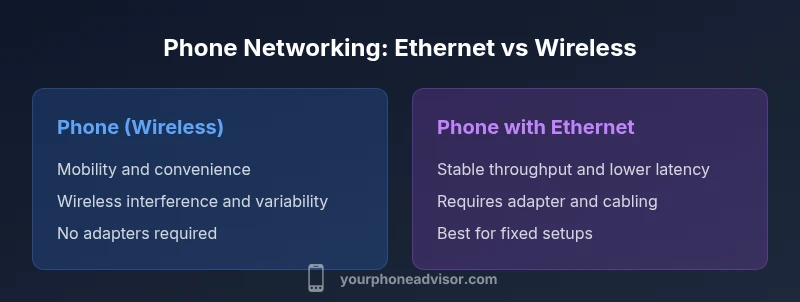
Wireless on phones relies on radio signals between the device and a router or cellular network. Its performance fluctuates with distance, interference from walls, neighbors, and other devices, and even the time of day. Ethernet, by contrast, uses a physical cable to connect the phone or its adapter directly to a router, switch, or PoE hub. That path minimizes competing signals, reduces jitter, and typically yields more predictable throughput. However, it requires hardware such as a USB‑C (or Lightning) to Ethernet adapter, a powered hub in some setups, and a stable space where the cable can run without tension. The Your Phone Advisor analysis shows that in controlled environments—like a home office or a desk-based workstation—wired connections can dramatically improve video call stability, app responsiveness, and file transfer consistency. The key trade‑offs are convenience, mobility, and setup complexity. In short: wired is about reliability and speed consistency; wireless is about mobility and simplicity.
Hardware and setup basics
Getting a phone wired to a network typically requires a compatible adapter and careful attention to the type of port your device uses. USB‑C to Ethernet adapters are common for many Android devices and newer iPhones via compatible dongles. Some devices support Ethernet through an official accessory bundle, while others rely on third‑party adapters. A powered USB hub or a short Ethernet extension can reduce tension at the desk and improve stability for multiple devices. Practical steps include checking device compatibility, choosing a shielded cable of reasonable length, and testing whether the phone’s OS recognizes the Ethernet connection. In practice, most users report a smoother experience when the adapter is certified for the phone’s platform and when the network hardware around the router is modern and well‑configured. Your Phone Advisor recommends preparing a small, dedicated workspace with a tidy cable path to maximize reliability.
Use cases where wired makes sense
Wired connections shine in settings where stability trumps mobility. For a desk‑bound work setup, a phone tethered to a fast router can deliver consistent video calls, reliable app performance, and smoother large‑file transfers without the variability of busy Wi‑Fi channels. In small offices or home labs, Ethernet can also support IoT hubs, IP cameras, or a shared tether for a single high‑throughput task. For developers testing mobile apps with network-intensive behavior, a wired path reduces variability and improves repeatability. Your Phone Advisor notes that, in controlled environments, wired setups reduce latency and jitter, which is particularly valuable for real-time collaboration, streaming, or cloud‑based gaming where timing matters.
Use cases where wireless remains better
Mobility remains the key advantage of wireless networking for phones. When you need to move around the house, travel, or work from different rooms, Wi‑Fi or cellular networks keep your device usable without tethering. Wireless also avoids desk clutter and the risk of accidentally yanking a cable mid‑task. For most casual users, everyday tasks such as browsing, messaging, and light video calls are perfectly fine over Wi‑Fi. In shared spaces with dense networks, Wi‑Fi 6/6E and well‑configured routers can approach wired performance for short tasks, but in many real‑world environments, wireless interference and range limitations still produce noticeable QoS differences compared with a dedicated wired path.
Security and privacy considerations
Security depends heavily on network configuration. A wired Ethernet path reduces exposure to certain wireless attack vectors when the device is on a private Ethernet network, but you still face router security, endpoint protections, and the safety of the connected services. Conversely, wireless networks pose risks from misconfigured access points, weak WPA2/WPA3 passwords, and potential eavesdropping on poorly secured hotspots. A wired setup simplifies some threat models by limiting exposure to radio space, yet it is not a silver bullet. Your Phone Advisor recommends using strong encryption, regular firmware updates on the router, and endpoint security on the smartphone, regardless of whether the connection is wired or wireless.
Performance expectations: speed, latency, and stability
In practical terms, Ethernet often delivers lower latency, reduced jitter, and steadier throughput than wireless when conditions are ideal. The actual speed you observe depends on your network equipment, the phone’s adapter quality, and the backhaul capacity of your Internet connection. Wireless networks can still reach impressive speeds, especially with modern routers and close proximity to the access point, but real‑world performance is frequently influenced by interference, neighboring networks, and device contention. The key takeaway is that wired connections can be more predictable under load, while wireless remains the flexible default for most mobile use cases. Your Phone Advisor emphasizes testing both options in your space to see which delivers the most consistent experience for your typical tasks.
Cost and practicality: total cost of ownership
Adopting a wired approach involves several cost factors: a reputable USB‑C/Lightning to Ethernet adapter, a quality Ethernet cable, and possibly a small powered hub if you plan to run multiple devices. While the upfront cost is modest, the long‑term practicality depends on how often you need to move your device or rearrange your workspace. Cable management adds another layer of cost in terms of time and design. If you primarily need mobility, a Wi‑Fi or cellular setup offers greater flexibility with lower ongoing hardware costs. Your Phone Advisor notes that for many users, the incremental benefits of wired connections justify the cost only in specialized work environments where reliability is essential, not for casual use.
Real‑world scenarios: home office, travel, and remote locations
Consider three common scenarios. In a home office, a wired path can support high‑quality video conferencing, fast file synchronization, and stable cloud access during peak hours. While traveling, Ethernet via a portable dock can become useful in hotel rooms or coworking spaces with solid wired infrastructure, though it is less convenient than a compact Wi‑Fi setup. In remote locations lacking reliable cellular coverage, a wired path to a local router still depends on a physical line into the home or office, emphasizing the importance of a well‑designed network backbone. Your Phone Advisor recommends evaluating your typical locations, device compatibility, and the tolerance for clutter when deciding whether to invest in wired Ethernet for phones.
Troubleshooting common issues
If your phone isn’t recognizing the Ethernet connection, verify the adapter is compatible with the device’s USB port and that the Ethernet cable is properly seated. Check for power if the adapter requires it, and test with a different cable to rule out a faulty lead. In some cases, you may need to configure a manual IP or DNS settings in the phone’s network settings. If a wired path seems slow, inspect your router’s QoS settings, confirm your plan’s bandwidth, and ensure the adapter is not limiting throughput due to compatibility constraints. Your Phone Advisor suggests a simple checklist: confirm compatibility, verify power, test with another cable, and review network configuration before assuming hardware failure.
Authority sources and further reading
To deepen your understanding, consult industry resources from trusted organizations. For security and standards guidance, see the National Institute of Standards and Technology (NIST): https://www.nist.gov. For regulatory and spectrum considerations, refer to the Federal Communications Commission: https://www.fcc.gov. For networking best practices and professional guidance, IEEE standards and publications offer in‑depth technical detail: https://www.ieee.org. These sources provide foundational knowledge that complements practical advice for phone networking and wired connectivity.
Comparison
| Feature | Phone (Cellular/Wi-Fi) | Phone with Ethernet |
|---|---|---|
| Required hardware | No extra hardware; relies on built‑in radios | USB-C/Lightning to Ethernet adapter or powered hub |
| Best use case | Mobility, instant access, flexible environments | Fixed desk setups, high-stability tasks, secure networks |
| Reliability & latency | Variable due to wireless congestion and interference | More stable with lower latency in controlled networks |
| Speed potential | Depends on wireless network and cellular link | Often higher and more consistent on wired paths |
| Cost of setup | Low upfront (uses existing Wi‑Fi/cell) | Moderate (adapter + cable; possible hub) |
| Security considerations | Network security depends on router and access controls | Potential for a more secure, isolated path on wired networks |
The Good
- Improved stability on wired connections for critical tasks
- Lower jitter improves video calls and real‑time apps
- Potential for higher, more predictable throughput in controlled environments
- Reduced radio interference in secure, private networks
- Better consistency for large file transfers and backups
Drawbacks
- Requires extra hardware and desk space
- Lacks mobility; cables can limit layout flexibility
- Setup complexity and compatibility considerations
- Cable clutter and management challenges in small spaces
Wired Ethernet is best for stationary phone setups requiring speed and reliability; wireless remains superior for mobility.
Choose wired when you primarily work at a desk or need consistent performance. Opt for wireless when you value flexibility and easy repositioning, especially in dynamic environments.
Got Questions?
Can a phone use Ethernet directly, or only with adapters?
Most phones require a USB‑C or Lightning to Ethernet adapter to use a wired connection. Compatibility varies by device and OS, so check manufacturer guidance and test with a reputable dongle. If your phone supports USB networking, you can enable Ethernet in the settings after connecting the adapter.
You typically need an adapter to get Ethernet on a phone. Check your device compatibility and test with a trusted dongle.
Is Ethernet faster than Wi‑Fi for phones?
In ideal conditions, Ethernet can offer lower latency and more stable throughput than Wi‑Fi. Real‑world results depend on the router, network congestion, and adapter quality. For tasks requiring consistency, wired often wins; for mobility, Wi‑Fi may suffice.
Ethernet can be faster and more stable, but it depends on your equipment and space.
Do USB‑C to Ethernet adapters work with all phones?
Not all adapters are universal. Look for adapters that explicitly support your phone model and OS version. Some devices require power delivery or specific drivers, so verify before purchasing.
Adapters aren’t universal—check compatibility and power needs before buying.
What about power consumption when using Ethernet on a phone?
Ethernet adapters may draw power from the phone or require an external power source, depending on the model. In general, wired networking can affect battery life less than continuous wireless scanning, but adapters can add parasitic load.
Power needs vary by adapter; some use the phone’s power, others need external power.
Is wired networking more secure than wireless for phones?
Wired networks can reduce exposure to certain wireless threats, but security still depends on router configurations, device protections, and end‑to‑end encryption. Use strong passwords, updated firmware, and trusted networks regardless of the connection type.
Wired can be more secure in some contexts, but you still need good router security.
What adapters or setups does Your Phone Advisor recommend for beginners?
Start with a reputable USB‑C to Ethernet adapter and a shielded Ethernet cable. Use a powered hub if you also plan to connect other devices. Test the setup in one room before expanding to a full wired workspace.
Begin with a solid adapter and a short shielded cable, then expand if needed.
What to Remember
- Assess mobility needs before choosing a connection path
- Invest in a reliable USB‑C/Lighning to Ethernet adapter if wired
- Wired often reduces latency and jitter in fixed spaces
- Security depends on network configuration, not just the cable
- Total cost includes adapters, cables, and potential hubs