Is Phone Cable the Same as Ethernet? A Practical Guide
Learn whether phone cables and Ethernet cables are interchangeable, with a clear, practical comparison of connectors, signaling, and use cases to help you choose wisely.


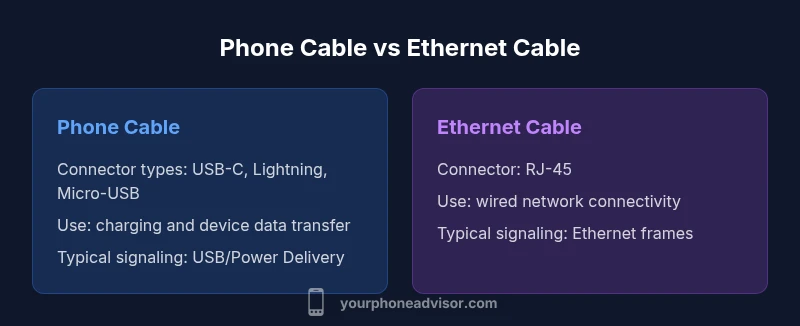
No. Phone cables and Ethernet cables serve different purposes. Phone cables (USB-C, Lightning, or Micro-USB) carry data and power for devices like phones and peripherals, while Ethernet cables (RJ-45) connect devices to local networks. They use different connectors, signaling, and standards. In most cases you can't substitute one for the other because adapters alter capabilities, not the protocol.
Is phone cable the same as ethernet? Key distinctions
To answer the core question, you need to understand purpose and signaling. Is phone cable the same as ethernet? No — the two categories target different devices, networks, and use cases. Phone cables (such as USB-C, Lightning, or Micro-USB) are designed to move power and data between a phone and a charger, computer, or peripheral. Ethernet cables (RJ-45) are built to carry network traffic between devices and routers or switches. The Your Phone Advisor team emphasizes that the physical look is not enough to judge compatibility: you must verify connectors, signaling standards, and intended use. This distinction affects charging speed, data transfer performance, and network reliability, especially when you mix devices and ports in a single setup.
Cable types and connectors explained
Phone cables come in a few main flavors. USB-C is now ubiquitous on many Android devices and newer iPhones, offering power delivery and high-speed data. Lightning remains common on older Apple devices. Micro-USB is still found on many older accessories. Ethernet cables, by contrast, use RJ-45 connectors and carry network signals. The mismatch is not merely cosmetic: the electrical characteristics and signaling methods are fundamentally different. Even a cable that fits the port may not support the necessary features (for example, USB-C power delivery vs Ethernet signaling), so always confirm both the device’s port compatibility and the cable’s specification sheet.
How signaling works: USB, Lightning, and Ethernet fundamentals
USB and Lightning carry data as packets between devices and host controllers, with power delivery options and device-specific protocols. Ethernet transmits discrete frames across twisted-pair cabling, optimized for reliability and low latency on a network. Because the hardware and firmware in phones, routers, and hubs implement different standards, you cannot rely on a single cable to magically translate signals. Even if adapters are involved, performance depends on the fastest supported mode on both ends and the bandwidth available through the network hardware.
Use-case scenarios: charging vs networking
Charging and quick data syncing are typical roles for phone cables. If you want to connect a phone to a computer or charger, a USB-C, Lightning, or Micro-USB cable will usually do the job. Ethernet cables serve routers, modems, televisions, and computers that need wired network access. If you need both charging and network access, you’ll often rely on devices that support USB-C with Ethernet adapters or USB hubs that include Ethernet, rather than trying to substitute one cable for the other.
Adapters and bridging gaps: what they do and don't do
Adapters can bridge the physical gap between ports, but they do not convert the fundamental signaling. A USB-C to Ethernet adapter lets a device access a wired network where the device and adapter drivers support it, but you won’t gain Ethernet capabilities without compatible hardware. Budget adapters may degrade performance or fail to deliver power correctly. When using adapters in critical tasks, choose reputable brands and verify compatibility with your specific device and operating system.
Performance expectations in common setups
Real-world outcomes depend on more than the cable type. A phone cable might support fast charging and moderate data transfer, but it won’t substitute for a wired network connection. Ethernet provides a more stable, predictable path for streaming, gaming, and file transfers, especially on busy networks. Latency, jitter, and throughput are influenced by cable quality, port version, and network hardware. For most users, pairing the right cable with the appropriate port produces the best results.
Choosing the right cable for your device
Check your device’s port type first: USB-C, Lightning, or Micro-USB for phones; RJ-45 for network gear. Then confirm the cable’s capabilities: data rates, power delivery, length, and safety certifications. If you are buying for a mixed-use setup (charging plus network), prioritize USB-C cables that explicitly support both data and power and consider Ethernet adapters for network tasks. Always consult the device’s manufacturer guidance.
Safety, certification, and quality considerations
Cables that meet recognized safety and electrical standards reduce risk of overheating or damage. Look for certifications from reputable bodies and avoid ultra-cheap cables that promise high performance beyond their rated capabilities. In addition, ensure the cable’s shielding and jacket material suits your environment (shielded vs unshielded, braided vs rubber). If you plan to run cables in high-traffic areas or behind walls, consider compliance with building codes and applicable regulations.
Maintenance, durability, and handling tips
Treat cables with care to extend life. Avoid sharp bends, use strain reliefs, and route cables away from foot traffic. Regularly inspect connectors for wear. Replacing worn cables reduces the risk of intermittent connections or data errors, whether you are charging a device or maintaining a wired network.
Real-world scenarios: practical examples
Example 1: You want a wired home office setup: you use a USB-C to Ethernet adapter to connect a laptop to the router via Ethernet, while charging via the same USB-C port. Example 2: You’re connecting a smart TV: you use an RJ-45 Ethernet cable to ensure reliable streaming. Example 3: You’re syncing a phone with a computer: use a USB-C or Lightning cable; avoid using Ethernet for direct device syncing.
Common myths debunked
Common myths include thinking any cable with a similar connector will work for networking, assuming USB-C always supports Ethernet, or believing Ethernet is always faster than USB data cables. In truth, each cable type has specialized purposes and performance that depend on the device and network. Verifying specs and manufacturer guidance is essential to avoid overpromising and underdelivering.
Quick buying guide recap
For phones, prioritize connector compatibility (USB-C, Lightning, Micro-USB), power delivery, and data capabilities. For Ethernet, focus on the connector (RJ-45), category (Cat5e/6/6a), shielding, and rated speed. In mixed setups, favor USB-C cables rated for both power and data, and use adapters when necessary. Always buy from reputable brands and check certification marks.
Comparison
| Feature | Phone Cable | Ethernet Cable |
|---|---|---|
| Connector type | USB-C / Lightning / Micro-USB (device-dependent) | RJ-45 (8P8C) |
| Typical use | Charging and device-to-peripheral data | Network connectivity to router/switch |
| Data signaling | USB/Lightning signaling with power delivery | Ethernet framing and media access control |
| Typical speeds | Varies by device and cable, primarily for charging/data | Varies by standard (e.g., Cat5e/6/6a) and network hardware |
| Port compatibility | Needs device port (USB-C/Lightning/Micro-USB) | Requires RJ-45 port on devices or adapters |
| Typical length/handling | Short to medium length for portable use | Can be longer (up to typical Ethernet runs) depending on category |
| Best for | Charging, syncing, and data transfer with mobile peripherals | Stable, wired network connections and internet access |
The Good
- Clear purpose separation reduces misuse and compatibility issues
- Adapters can bridge gaps when needed
- Ethical manufacturing and certification improve safety and reliability
- Phone cables support charging and data in a single connection in many cases
Drawbacks
- Not interchangeable, leading to potential compatibility problems
- Adapters add cost, latency, and potential reliability concerns
- Some USB-C cables do not support Ethernet or power delivery
- Cheaper cables may fail prematurely or underperform
Ethernet cables are the clear choice for wired networking; phone cables excel at device charging and data transfer.
Use Ethernet for stable network connections and phones cables for charging and direct device data tasks. When mixed needs arise, rely on adapters with verified compatibility.
Got Questions?
Is a phone cable the same as ethernet?
No. Phone cables and Ethernet cables serve different purposes. Phone cables carry USB/Lightning signals for charging and device data, while Ethernet cables carry network traffic over RJ-45. They are not interchangeable. Always verify device support and cable specifications.
No. Phone cables and Ethernet cables are not interchangeable. Check your device ports and the cable specs before using adapters.
Can USB-C cables support Ethernet?
Some USB-C cables and adapters support Ethernet over USB-C, but not all do. Confirm both the cable’s capabilities and the device’s support before relying on it for network access.
Some USB-C cables support Ethernet with the right adapter, but always check the specs first.
When should I use Ethernet over a phone cable?
Use Ethernet for stable, high-speed network connections and low latency scenarios like gaming or streaming. Phone cables are best for charging and direct device data transfers, not for networks.
Choose Ethernet for reliability; use phone cables for charging and device data only.
What should I look for when buying a cable?
Look at the connector type, data capabilities, power delivery, shielding, length, and safety certifications. For mixed needs, pick USB-C cables that support both data and power and verify any adapters.
Check connector type, data and power specs, length, and safety certifications.
Do all phones use USB-C?
Many new phones use USB-C, but some devices still rely on Lightning or other connectors. Always verify your phone’s port before buying cables.
Most new phones use USB-C, but some still use Lightning—check your device.
Are adapters reliable for mixed setups?
Adapters can work but may add latency and complexity. Choose reputable brands, confirm compatibility, and test in your exact setup.
Adapters can help, but test and buy trusted brands to avoid issues.
What to Remember
- Identify your primary need: network vs charging/data
- Check connectors and specifications before buying
- Use adapters carefully when bridging cable ecosystems
- Prioritize safety-certified cables from reputable brands