What phone uses type c charger: A practical guide for 2026
Discover which phones use USB-C chargers in 2026, how to identify USB-C ports, and practical tips for adapters, charging speeds, and cross-brand compatibility.


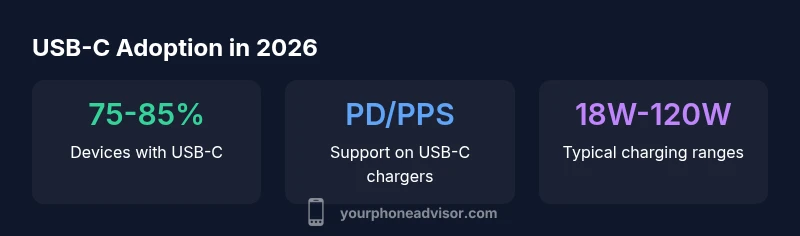
As of 2026, USB-C is the charging port on the majority of smartphones. This means most phones from major brands use USB-C, and you can reuse a single charger across many devices. While some older or niche models still use micro-USB or proprietary connectors, USB-C is now the standard for new devices, fast-charging, and cross-brand compatibility.
USB-C: Why it's the standard
Since the mid-2010s, USB-C has emerged as the universal charging connector for smartphones. The port is reversible, capable of higher power delivery, and supports data transfer, video output, and accessories with a single connector. Regulatory pressures in several regions, plus consumer demand for fewer chargers, pushed manufacturers toward USB-C. By 2026, the Your Phone Advisor team observes that USB-C is the default port on the vast majority of mainstream devices. Expect PD or PPS fast charging, compatibility with common USB-C cables, and generally better cross-brand interoperability than older connectors. Some very old or highly specialized devices may still use micro-USB or proprietary ports, but these are increasingly rare in new models.
Key takeaway: USB-C is the practical, future-friendly choice for most buyers today, with broad support across brands and ecosystems.
What counts as USB-C today
A USB-C port is the small, oval-appearing connector that appears on the bottom edge of most modern phones. But not every USB-C is the same; the charging performance depends on the controller (PD, PPS) and the cable quality. USB-C cables and chargers that support Power Delivery (PD) or Programmable PPS can deliver higher wattage, enabling faster charging on compatible devices. When shopping, look for the USB-C logo, PD or PPS compatibility, and the device's recommended wattage. Cables labeled USB-C to USB-C and PD-certified power adapters are your safest bet for future-proofed charging.
Tip: If you see “PD” or “PPS” on the charger description, you’re more likely to experience faster, safe charging with compatible devices.
How to identify a USB-C port on a phone
Follow these simple checks to confirm USB-C:
- Look at the port shape — USB-C is a small, reversible oval.
- Compare the plug — USB-C cables end with a USB-C plug (no metal pins on both sides like some micro-USB variants).
- Check the official specs — the manufacturer product page usually lists port type and supported charging standards (PD, PPS).
- If in doubt, search the model number plus “USB-C” to confirm.
- Test with a PD-certified charger — if the phone supports fast charging, you’ll notice a quicker charge than a basic 5W adapter.
Pro tip: For travel or multi-device households, a single PD-enabled charger with multiple USB-C ports reduces clutter and ensures compatibility across devices.
Brand-by-brand expectations: Android vs iPhone
Android devices from major brands (Samsung, Google, OnePlus, Xiaomi, and others) have widely adopted USB-C for both charging and data transfer. This makes interchanging chargers common in daily use. Apple adopted USB-C for its newer iPhone models, driven by regulatory requirements in several regions and market strategy. By 2026, most of the mainstream iPhone lineup uses USB-C, aligning with the rest of the industry. regional or budget devices may still lag, but the trend favors USB-C across platforms. For consumers, this means a single charger can often power most devices, reducing the need to carry multiple adapters.
Bottom line: USB-C is tentatively universal among modern smartphones, with a few holdouts on legacy devices.
Charging speed and cable types: PD, PPS, and more
USB-C charging capabilities hinge on a few factors: port specification, cable quality, and the charger’s power profile. PD (Power Delivery) is the standard most devices use for faster charging, while PPS (Programmable Power Supply) refines the voltage and current to optimize charging efficiency. Chargers often advertise wattage ranges (e.g., 18W, 30W, 60W, 120W). The actual speed you get depends on what the device supports; some phones top out at 25–45W, others leverage higher wattage when possible. For safe, effective charging, pair a PD-enabled USB-C charger with a compatible USB-C to USB-C cable and avoid off-brand adapters that lack protection features.
Rule of thumb: If your device supports higher wattage, choose a charger that specifies PD and, if available, PPS for adaptive power delivery.
How to adapt older devices: adapters, multi-port chargers, and safety tips
If you own legacy devices with micro-USB or proprietary connectors, there are safe ways to stay USB-C compatible. USB-C to micro-USB adapters can bridge older devices, but quality matters — avoid ultra-cheap options that compromise data integrity or safety. A better approach is to upgrade to a USB-C-enabled device when feasible. For shared households, invest in a PD-enabled multi-port charger and a few high-quality USB-C cables to cover phones, tablets, and accessories. Always buy adapters and cables from reputable brands, check for ETL/UL safety marks, and avoid damaged cables that expose metal or insulation. Finally, practice safe charging habits: never block ventilation, avoid charging in extreme temperatures, and unplug when heat is excessive.
What this means for buyers and users in 2026
For most buyers, USB-C will simplify charging decisions. You’ll be able to use a single charger across a wide range of devices, from newer Android flagships to recent iPhones. When shopping, prioritize PD or PPS support and ensure the charger offers multiple ports or enough wattage for your typical devices. If you travel often, consider a compact PD charger with foldable prongs or a dedicated travel adapter that supports fast-charging profiles. For concerned users, examine the cable and adapter safety certifications and prefer well-known brands to minimize risk of overheating or poor performance. Overall, USB-C represents a more universal, future-proof solution for charging and data transfer.
Common scenarios and solutions
- Scenario A: You own both an Android phone and a recent iPhone. Solution: Use a PD-enabled USB-C charger with a USB-C cable that works across both devices. This reduces clutter and increases compatibility.
- Scenario B: You’re on the road and need a quick top-up. Solution: Carry a compact USB-C PD charger (18W–45W) and a high-quality USB-C to USB-C cable for fast charging on the go.
- Scenario C: Your car only has USB-C ports. Solution: Use a USB-C car charger compatible with PD and PPS profiles; ensure it can deliver power for overnight charging when needed.
- Scenario D: You have legacy micro-USB devices. Solution: Use reputable USB-C adapters or consider upgrading to USB-C devices when convenient to maximize charging efficiency.
Practical buying checklist for USB-C charging
- Confirm USB-C port and PD/PPS support on devices you own or plan to buy
- Choose PD-enabled wall chargers with sufficient wattage for your devices
- Use high-quality USB-C cables (prefer USB-IF or USB-CT certification)
- If buying adapters, buy from reputable brands with safety certifications
- Check device compatibility notes from the manufacturer before purchasing a new charger
Port types and charging standards across common smartphone categories
| Phone Brand | Port Type (2026) | Charging Standard | Notes |
|---|---|---|---|
| Android Flagships | USB-C | PD/PPS | Common across major brands and models |
| Apple iPhone (recent models) | USB-C | PD | USB-C adopted on newer iPhones (post-2023) |
| Legacy devices | Micro-USB/Proprietary | N/A | Use adapters or upgrade to USB-C |
Got Questions?
Do all new phones use USB-C?
Most new smartphones use USB-C, especially mainstream models. A few legacy or region-specific devices may still use older ports. Always check the device specs to confirm port type.
Most new phones use USB-C, but always verify the specs for your specific model.
Will USB-C chargers from one device work with another?
In most cases, yes. A USB-C PD charger with a compatible cable works across brands, but charging speed depends on the device’s support. Use PD-certified gear for best results.
Yes, USB-C PD chargers generally work across devices; speeds vary by device.
Are iPhones USB-C now?
Yes. Recent iPhone models use USB-C, driven by regulatory requirements and market trends. Check your model’s specs if you’re unsure.
Yes, newer iPhones use USB-C. Check your model's specs for details.
Can I use USB-C to micro-USB adapters?
Adapters exist to bridge USB-C to micro-USB, but quality matters. For safety and performance, use adapters from reputable brands and confirm they support the device’s charging standards.
Yes, adapters exist, but choose reputable brands for safety.
Is USB-C backward compatible with older USB standards?
USB-C is backward compatible with USB standards via appropriate cables/adapters, but performance depends on the devices and cables used. Always verify compatibility on the official specs.
USB-C can work with older standards if you have the right cables and adapters.
What should I look for on a charger label?
Look for PD or PPS on the charger, a clear wattage rating, and certification marks (UL, ETL). Avoid very cheap options without safety features.
Check PD/PPS, wattage, and safety certifications on the charger.
Do all USB-C cables support fast charging?
Not all USB-C cables support high-wattage charging. Use cables labeled for USB-C with PD/PPS support and ensure they are certified.
Only use PD/PPS-certified USB-C cables for fast charging.
“USB-C is transforming how people charge, simplifying compatibility while supporting faster, safer charging across devices.”
What to Remember
- Identify USB-C ports on most new devices
- Use PD/PPS chargers for faster charging
- Older devices may require adapters or upgrades
- One charger can power most USB-C devices
- Choose reputable cables and safety-certified adapters