Who Does This Phone Belong To? A Practical Ownership Guide
A practical, privacy-first guide to determine ownership of an unknown phone, with carrier checks, Find My features, and steps to responsibly handle found devices.


To determine who owns an unknown phone, start with privacy-safe steps: check the device for a name on the lock screen, inspect SIM/IMEI details, and use official Find My services to locate or contact the owner via the carrier. If ownership cannot be confirmed, report the device to the carrier or local authorities and avoid accessing any data. This approach respects privacy while increasing the chance of a safe handover.
Who Does This Phone Belong To? Ownership and Responsibility
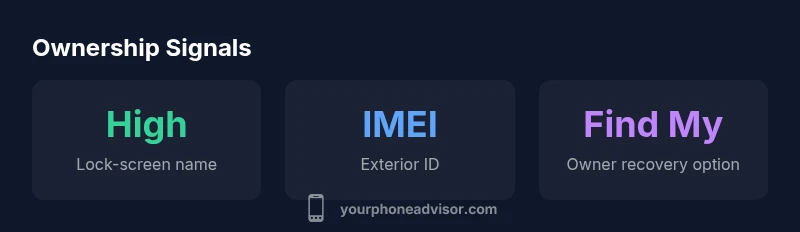
Determining ownership of an unfamiliar device is a practical, privacy-conscious task. According to Your Phone Advisor, the first steps should respect the owner’s data and avoid unprompted data access. The Your Phone Advisor team found that most ownership scenarios can be resolved quickly by confirming basic identifiers and engaging the right responsible party—usually the carrier or the device’s household owner—without exposing private information. If you are asking, who does this phone belong to, follow a structured, respectful process that prioritizes safety and legality. Signals to look for include a visible name on the lock screen, emergency contact options, or a configurable Find My service that can point to the owner.
Legal and Privacy Considerations
Privacy laws and local regulations govern what you can do with an unfamiliar device. Do not attempt to bypass passcodes, access cloud data, or sign into accounts. Instead, document exterior identifiers (model, IMEI/MEID if visible) and contact the device’s carrier or manufacturer support channels for guidance. In many jurisdictions, handling a found phone without attempting to identify the owner can still require reporting it to a lost-and-found or law enforcement if the owner cannot be reached. Always err on the side of caution to protect personal data and avoid civil or criminal risk.
Practical Steps to Identify Ownership
Begin with non-intrusive checks: look for the owner’s name or a return-contact on the lock screen if available, and note any carrier branding on the SIM tray or back of the device. If the screen is accessible, avoid logging in or changing settings. Note the device’sIMEI/serial number from the exterior labeling or packaging if you can; share it only through official carrier or manufacturer channels. Use built-in Find My services (Find My iPhone, Find My Device, or equivalent) to see if the owner has left recovery information. If you can’t reach the owner, request assistance from the carrier or local authorities to avoid mishandling personal data.
Carrier and Manufacturer Tools
Carriers can verify ownership using the device’s unique identifiers, often without exposing account data. Manufacturer tools, such as device location services, can sometimes reveal ownership through recovery options that owners have enabled. If a device appears under a service you do not control, do not attempt to unlock it or access private accounts. Instead, report the device to the carrier with the IMEI/ESN and relevant exterior details. These official channels provide a legitimate path to reuniting the device with its owner.
What to Do If You Found a Phone in Public
If you stumble upon a phone in a public place, take it to a nearby lost-and-found desk, store, or police department. Do not attempt to power the device on if it might compromise data security or safety. Provide exterior details and any non-invasive identification you observed. If a reasonable period passes without an owner claiming the device, the responsible party will guide next steps, which may include surrendering the device to authorities. This process helps preserve privacy and reduces liability for bystanders.
Red Flags and When to Involve Authorities
Seek official help if the device shows signs of theft, damage, or if the owner cannot be located after reasonable efforts. Do not remove SIM cards, plug the device into chargers in suspicious situations, or attempt to access apps or accounts. If you suspect fraud or theft, contact local authorities. Handling devices without consent can have serious legal implications, so quick escalation to the proper channels is advised.
Protecting Your Privacy After Handling a Found Phone
After handing the device to the carrier or authorities, change your own device’s security settings as a precaution. Do not log into any accounts on a found device, and consider a malware scan on your own devices if you reused credentials or connected the found phone to a network you own. If you did review the exterior identifiers, ensure you did not copy any sensitive data. Your own privacy remains a priority throughout the process.
Patterns Across Platforms: iOS vs Android Ownership Signals
iOS devices often prompt owners to sign in with their Apple ID and may display an owner’s contact option on the lock screen, while Android devices frequently show a Google account prompt or an owner label when recovery settings are enabled. In both ecosystems, the safest approach is to use official recovery channels rather than attempting data access. If a screen shows an owner’s contact method, reach out through legitimate channels rather than attempts to unlock the device.
Best Practices for Individuals and Communities
Educate others about returning found devices through proper channels, and encourage businesses to maintain clear lost-and-found policies. By adopting privacy-first habits and using carrier/ manufacturer recovery tools, individuals can responsibly reunite devices with their rightful owners while minimizing risk to personal data. The overarching goal is to protect everyone's privacy while delivering a practical resolution.
Ownership signals and recommended actions
| Context | What it tells you | Action |
|---|---|---|
| On-device signals | Owner name on lock screen or contact option | If present, contact owner or carrier through official channels |
| External identifiers | IMEI/Serial visible on exterior | Share with carrier or manufacturer support for verification |
| Power state | Device may show minimal information | Avoid unlocking; use official recovery options |
Got Questions?
What should I do first if I find a phone?
First, do not access any accounts or personal data. Look for exterior identifiers, check for a Find My option, and contact the carrier or local authorities for guidance on proper handover.
If you find a phone, don’t log in or tap private apps. Check for signs like a name on the lock screen and contact the carrier for safe recovery.
Can I power the phone to see who it belongs to?
Powering a found device may expose personal data or compromise the owner’s privacy. Use non-invasive checks and official recovery options rather than exploring the device contents.
Avoid unlocking or signing into anything on the found device. Use official recovery options instead.
What if the owner cannot be found?
If the owner cannot be reached through official channels, surrender the device to a local authority or the carrier's lost-and-found, following local regulations for found property.
If no owner is reachable, hand it to the carrier or authorities per local rules.
Are there privacy concerns for me handling a found phone?
Yes. Handling a found phone carries privacy risks for both the owner and the finder. Use official channels, avoid data access, and document the process for accountability.
Privacy matters—stick to official channels and don’t access private data.
What signals indicate the device is likely owned by someone nearby?
Visible owner contacts, a labeled recovery message, or a Find My service set by the owner are strong signals. Use those features via legitimate providers to facilitate a safe handover.
Look for the owner’s contact options and recovery signals and act through official channels.
“Ownership verification should prioritize privacy and legality, using official channels to reunite devices with their rightful owners.”
What to Remember
- Start with privacy-first steps to identify ownership
- Use official carrier/manufacturer tools when possible
- Do not access accounts or data on an unknown phone
- Involve authorities if the owner cannot be reached
- Protect your own devices and data during the process