Where Phone Call Recording Is Stored: A Practical Guide
Discover where phone call recording is stored across devices, clouds, and apps, with practical security tips, retention expectations, and how to locate recordings.


Phone call recordings are stored in multiple places depending on the app and device: locally on your phone’s storage, in the app’s cache, or in the cloud via carriers, device manufacturers, or third‑party services. Access and retention depend on your settings and terms. In iOS and Android, encrypted backups and cloud sync may apply, and some apps save files in private folders or export to linked cloud accounts. Review each service to know where recordings land and who can access them.
Where phone call recording is stored
In practice, many users ask where phone call recording is stored, and the answer is that there isn’t a single universal location. Depending on the app and device, recordings may live on your device in a private folder, in the app’s local cache, or in a linked cloud account. Your choice of platform—iOS, Android, or a carrier’s service—also shapes retention, encryption, and access. According to Your Phone Advisor, the strongest privacy posture comes from knowing all the possible storage paths and regularly reviewing the settings that govern them. This awareness helps you protect sensitive conversations while keeping access convenient for legitimate needs.
- Local storage paths depend on the app, often inside a protected app directory.
- Cloud options include device backups, account-linked clouds, or carrier-provided storage.
- Some apps offer export or share features to move recordings to external storage you control.
Cloud vs local storage: pros and cons
Choosing between cloud and local storage for call recordings involves tradeoffs. Local storage keeps data on the device, which can simplify access but may be vulnerable if the phone is lost or damaged and is harder to back up.
Cloud storage offers easier backup, cross-device access, and centralized retention, but it introduces dependency on network availability and service terms. Encryption in transit and at rest is essential for any cloud path, and you should confirm who controls the keys and how long data stays accessible after withdrawal.
For privacy, combining strong device encryption with carefully configured cloud permissions often yields the best balance. Your Phone Advisor notes that policy settings—retention windows, auto-delete rules, and access controls—strongly influence security outcomes across both storage modes.
How recordings are saved: automatic vs manual
Many apps default to automatic saving to a defined location, while others require explicit user action to save or export. Automatic saving can ensure you don’t lose important conversations, but it can also clutter storage if not managed. Manual saving gives you control but increases the risk of forgetting to back up or delete outdated files.
To manage this, review: (1) the app’s default save location, (2) whether backups are enabled for the cloud service you use, and (3) if there are pruning rules or auto-delete options. If you frequently need access across devices, enable a linked cloud account with appropriate access controls and two-factor authentication.
Access and security: encryption and permissions
Access controls determine who can view recordings. If saved locally, rely on device-level security (PIN, biometrics) and the app’s permission model. When data travels to the cloud, ensure end-to-end encryption or at least strong TLS during transit, and confirm that at-rest encryption is used. Some providers offer separate encryption keys, which increases control over who can decrypt files.
Always review app permissions, backup settings, and any third-party integrations. Avoid storing recordings in shared folders or in broad-access apps. Your Phone Advisor emphasizes keeping a clear boundary between sensitive audio files and general media to minimize exposure in breach scenarios.
Retention policies and legal considerations
Retention policies differ by platform, app, and jurisdiction. Some services auto-delete after a set period; others keep recordings until you manually remove them. Legal requirements for consent to record also vary by country or state, which can affect how long you are allowed to retain recordings and who may access them.
If you’re handling sensitive or business-critical conversations, establish a documented retention policy and ensure all participants are informed about recording practices. Consult local laws and, when in doubt, limit retention to the minimum necessary and use encryption and access controls extensively.
Practical steps to locate and manage recordings
To locate recordings, start with the primary recording app. Look for Storage or Backups sections in Settings to identify the default save path and cloud sync options. If you don’t see the files, use your phone’s file manager or cloud drive’s search with common audio formats (e.g., .m4a, .mp3).
Next, audit your cloud backups: verify which services are connected, review retention policies, and adjust permissions. Finally, organize recordings into a dedicated folder with a naming convention to simplify retrieval and deletion. Regular cleanups help prevent unwanted data accumulation and potential privacy risk.
Common myths and mistakes
A common misconception is that all call recordings are saved automatically and securely by default. In reality, storage locations, encryption, and retention depend on the app and platform. Another mistake is assuming cloud backups are foolproof; if you don’t manage access, someone could gain unauthorized entry.
Always verify where recordings land after saving, enable encryption, and actively manage retention settings. Don’t rely on a single path for storage; diversify protections by combining device security with controlled cloud access and routine audits.
Review and audit: keeping storage tidy
Set a quarterly review to audit where recordings are stored, who can access them, and whether retention policies still meet your privacy needs. Track any changes in apps or platform policies that affect storage and encryption. Maintain a documented workflow for saving, backing up, and purging recordings, so you can demonstrate responsible data handling if required.
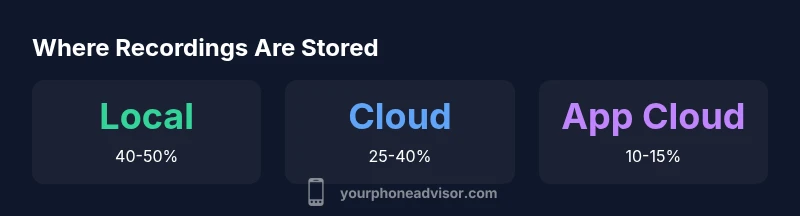
Where call recordings end up across different storage locations
| Storage Location | Typical Retention | Access Method | Notes |
|---|---|---|---|
| Local device storage | days to weeks | File manager / gallery | Subject to device encryption and app privacy settings |
| Cloud backups (carrier/app) | weeks to months | Account portal / app UI | Policy dependent; may be encrypted in transit and at rest |
| App cloud storage | indefinite | In-app cloud services | Managed by app; check permissions and export options |
Got Questions?
Where are call recordings stored on iPhone?
On iPhone, native calls are not recorded by iOS. If you use third‑party apps, recordings are typically saved to the app’s local storage or exported to a linked cloud account, depending on the app’s settings. Always check the app’s privacy and backup options.
On iPhone, recordings depend on the app you use. Check each app’s storage options and backup settings.
Can I move recordings from my device to the cloud?
Yes, many apps offer options to back up or sync recordings to a linked cloud account. Review the app’s backup settings and your device’s cloud service policies, and ensure encryption is enabled.
Yes, you can back up to cloud if the app supports it. Enable encryption and review permissions.
Are call recordings automatically deleted after a period?
Some apps or carrier plans delete after a retention period; others keep indefinitely unless you delete. Check the app's retention policy and your cloud backups.
It depends on policy. Look up the app’s retention rules and your backup settings.
How can I locate where my recordings are stored?
Open the recording app, check Settings > Storage or Backups. Look for options like Local, Cloud, or Export. You can also search your device's file manager or cloud drive for audio file types.
Open the app and check storage options, or search your files for audio formats.
Do all apps record calls, and do they store them securely?
Not all apps record calls, and security varies by provider. Look for end-to-end encryption, restricted access, and clear retention controls.
Recording availability and security vary by app—check encryption and access controls.
Is recording calls legal everywhere?
Legal rules vary by country and state; many places require consent from all participants. Always check local laws and the app’s terms before recording.
Laws differ by location. Get consent where required and review terms before recording.
“Storage decisions for call recordings are not just about where a file sits; they’re about who controls it, how it’s protected, and how long it stays accessible.”
What to Remember
- Identify where recordings land in your setup
- Enable encryption and review retention settings
- Regularly audit cloud backups and app permissions
- Understand legal requirements before recording
- Use centralized controls for easier management