Is My Phone Unlocked? A Practical Guide for Checking and Unlocking Your Device
Learn how to determine if your phone is unlocked, why it matters, and official steps to unlock with your carrier. Practical, safe guidance from Your Phone Advisor.


Understanding whether your device is unlocked matters for carrier flexibility, international roaming, and resale value. An unlocked phone can accept SIM cards from different networks and is not tied to a single carrier. To verify, review your device settings, test with a different SIM, or reach out to your current carrier’s unlock portal for confirmation.
Is My Phone Unlocked? Why the Question Matters
If you’re asking is my phone unlocked, you’re not alone. Unlock status determines whether you can switch carriers without buying a new device, use international SIMs while traveling, or take advantage of prepaid regional plans. An unlocked phone can save money and increase flexibility, but it also requires you to manage software updates and warranties through the correct channels. This section clarifies what unlocked means in practical terms and sets expectations for how unlocking interacts with your device’s security, updates, and carrier agreements.
How Carrier Locks Work and Why They Exist
Carriers often lock devices to ensure customers complete payment plans and to subsidize hardware costs. A locked phone will typically reject SIM cards from other networks until it receives an official unlock. Procedures and eligibility vary by country and carrier; some unlocks occur automatically after obligations are met, others require a portal submission. Importantly, unlocking does not inherently reduce security or disable updates; it simply removes the network lock that restricts which SIMs you can use. Knowing this helps you plan upgrades, travel, and resale with confidence.
How to Check If Your Phone Is Unlocked: A Practical Overview
There isn’t a universal on/off switch labeled “unlocked” across all devices. A simple field test is to insert a SIM from a different carrier and see if you can connect to the network and place calls. If the phone accepts the new SIM and operates normally, it’s likely unlocked. If you encounter a SIM-not-supported message or the network doesn’t register, the device may still be carrier-locked. OS-specific paths vary: on
Practical Testing Methods for
What to Do If Your Phone Is Locked to a Carrier
If you discover your device is locked, don’t panic. Start by verifying eligibility with your current carrier and reviewing any remaining obligations (e.g., unpaid device balance). Use the official unlock portal or request unlock via customer service once criteria are met. After approval, insert the new SIM and reboot to test the network. If unlock is denied due to outstanding obligations, address those items first. In some regions, re-purchasing or returning the device can be options; always consult official channels to avoid scams.
Authoritative Sources and Best Practices
For consumer protections and unlocking policies, refer to reputable sources from government or major publications. This section provides guidance from official channels and trusted outlets to help you navigate unlocking legally and safely. Always rely on official portals rather than third-party services that promise rapid unlocks, which can jeopardize security or warranties.
Security and Privacy Considerations When Unlocking
Unlocking a phone via legitimate channels preserves device integrity and keeps security updates intact. Be wary of unofficial unlock services that require full device access or personal data. After unlocking, verify that you can apply software updates and that your security settings remain active. If you travel, ensure you understand roaming implications and regional SIM regulations. Keeping your device password and biometric protections enabled remains essential regardless of unlock status.
Tools & Materials
- Smartphone (iPhone or Android)(Any model; ensure it's a model you can unlock through official channels.)
- SIM card from a different carrier(Used to test unlock status with a non-original carrier.)
- Carrier account access(Needed to verify eligibility or submit unlock requests.)
- Stable internet connection(Needed for portal access and device checks.)
- PIN or passcode(Required to adjust settings or approve unlock actions.)
Steps
Estimated time: 30-60 minutes (plus potential carrier processing time)
- 1
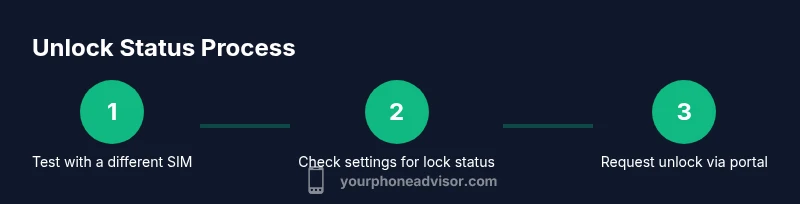
Test with a different SIM
Power off, insert a SIM from another carrier, and restart. If calls and data work, the phone is likely unlocked. If not, the device may be carrier-locked or require an official unlock.
Tip: Use a SIM from a reputable carrier to avoid compatibility issues. - 2
Check built-in lock indicators in settings
Navigate to Settings and look for Network, SIM, or Carrier Lock sections. Some devices display lock status under About or Security. If you see a lock indicator, note the provider and any required steps to unlock.
Tip: Document the exact wording shown in Settings; it helps when contacting support. - 3
Contact your current carrier
Log in to your carrier account or call customer service to inquire about unlock eligibility and timelines. Be ready to share your device model, IMEI, payment status, and contract terms.
Tip: Use official contact channels listed on the carrier’s site to avoid scams. - 4
Submit an unlock request via official portal
If eligible, submit the unlock request through the carrier’s portal. You may receive a notification stating approval or next steps. Expect processing times that can vary by carrier and country.
Tip: Keep a record of the unlock reference number and any confirmation emails. - 5
Power cycle and test with the original and new SIM
After approval, power off, insert the new SIM, and reboot. If the device remains compatible, the unlock was successful. If issues persist, recheck the unlock status and contact support.
Tip: Perform a full reboot to ensure network settings refresh correctly. - 6
Confirm software updates remain intact
Verify you can install OS updates after unlocking. This ensures ongoing security and feature availability.
Tip: If updates fail, confirm network compatibility and carrier unlock status with support. - 7
Back up data before major changes
Before starting unlock processes or making SIM changes, back up your photos, contacts, and apps.
Tip: Use cloud backups or local backups to avoid data loss. - 8
Know when to seek OEM or carrier help
If unlock attempts fail or you encounter unusual behavior, contact the device manufacturer or your carrier for official guidance.
Tip: Avoid non-official unlock services that promise fast results.
Got Questions?
What does it mean when my phone is carrier-locked?
A carrier-locked phone works only with SIMs from the carrier that financed or sold it. You usually unlock it after meeting terms such as payment completion. Unlocking enables use with other networks.
A carrier-locked phone only works with its original network unless it gets an official unlock.
How long does unlocking typically take?
Unlock timelines vary by carrier and country. Some unlocks are instant after approval; others may take a few hours to several days.
Unlock times vary; expect a few hours to several days depending on the carrier.
Will unlocking affect my warranty or updates?
Unlocking through official channels generally preserves warranty and update access. Always verify with your carrier or OEM before proceeding.
Official unlocks usually keep your warranty and updates intact.
Can I unlock a financed phone before finishing payments?
Many carriers require that you finish or be near completion of payments. Some devices may be eligible early; check with your carrier.
Most carriers require payments to be fulfilled or near completion before unlocking.
Are there safe, quick ways to unlock my phone?
The safest method is through official carrier portals or device manufacturers. Avoid shady services claiming instant unlocks.
Stick with official unlock paths; avoid unverified services.
What to Remember
- Verify unlock status with a live SIM test.
- Use official portals to request unlocks.
- Document references and timelines for accountability.
- Unlocking preserves updates and safety features when done properly.