How to Prevent Phone Number Spoofing: A Practical Guide
Learn practical, layered defenses to prevent phone number spoofing. From device settings to carrier protections and reporting, protect yourself and your contacts.


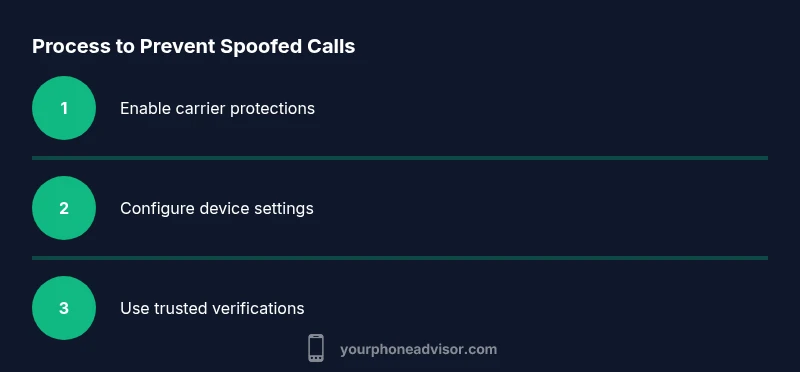
To prevent phone number spoofing, you will enable call filtering, verify calls through trusted channels, and configure device and carrier protections. Start by turning on built-in spam blockers, enabling STIR/SHAKEN verification where available, and applying strong passwords for your accounts. Stay vigilant: never share verification codes, and report spoofing incidents to your carrier. This layered approach reduces risk without sacrificing essential communication.
Understanding spoofing and why it matters
Spoofing, or displaying a different caller ID than the actual source, is a common tactic used by scammers to gain your trust or cause confusion. When you learn how to prevent phone number spoofing, you reduce the chance of falling for fraudulent requests and avoid exposing sensitive information. This guide explains how spoofing works, what protections exist, and practical steps you can implement today. According to Your Phone Advisor, awareness is the first line of defense, and layered protections are essential for real-world safety. By combining device settings, carrier features, and smart habits, you create a robust shield around your calls and messages.
How verification works: STIR/SHAKEN and beyond
Telephone networks increasingly rely on verification protocols like STIR and SHAKEN to authenticate caller information. In practice, these standards help the network verify that the number shown on your screen matches the originating source, enabling carriers to label or block unverified calls. However, spoofers adapt, and gaps can exist across different networks and international routes. The practical takeaway is that verification is powerful but not perfect, so you should pair it with device-level protections and user vigilance to minimize exposure to spoofed calls. Your Phone Advisor emphasizes using available protections and staying informed about evolving standards.
Practical steps you can take today to reduce spoofing risk
There are several immediate actions you can implement without purchasing new tools. First, enable call-blocking and spam-filtering features on your phone and through your carrier account, which catches many spoofed calls before they reach you. Second, never share verification codes, passwords, or one-time passcodes in response to unsolicited calls or texts. Third, be cautious of numbers that imitate local areas codes or institutions; verify through official channels instead of relying on the displayed caller ID. Fourth, maintain a current contact list and use a trusted secondary channel (official website, email) to verify unfamiliar numbers. Fifth, educate household members about spoofing to extend your protection. Finally, review and adjust settings with your carrier to take advantage of all available safeguards. Implementing these steps creates a multi-layer defense that reduces risk without major friction to everyday use.
Configuring your iPhone and Android for spoofing protection
Device configuration is a cornerstone of prevention. On iPhone, enable Silence Unknown Callers to reduce knock-based spoofing while allowing important contacts through when you want to receive calls. Also manage third-party caller ID apps via Settings to ensure only trusted tools can identify callers. On Android, use the built-in spam filtering in the Phone app, turn on Block numbers, and enable Caller ID & spam protections. If your device or carrier supports it, enable network-based verification features like STIR/SHAKEN and ensure they stay active. These steps collectively raise the bar against spoofed calls while preserving legitimate communications.
Carrier protections and plan features that help
Carriers often provide layered protections, including automatic call filtering, spam labeling, and network-based verification. Review your account settings to enable these features and regularly check for updates. If STIR/SHAKEN is supported on your line, verify that it is active and functioning. For high-importance lines (doctors, clients), consider whitelisting key numbers to bypass some filters while keeping others in place. Remember: carrier protections work best when paired with device controls and consistent vigilance. Your Phone Advisor advocates a layered strategy combining network-level protections with personal precautions.
Third-party apps and services for spoofing protection
A growing number of reputable apps can complement built-in protections by providing real-time labeling of suspected spoofed calls and enhanced spam filtering. When choosing apps, prioritize those with transparent privacy policies, clear data handling, and frequent updates to block lists. Use only one or two trusted apps to minimize conflicts and review their permissions regularly. If a call is misclassified, adjust the app’s settings to avoid false positives and maintain access to legitimate numbers. Third-party tools should augment, not replace, core protections.
How to respond to suspected spoofing and report it
If you suspect spoofing, end the call and do not disclose sensitive information. Document the caller's number, time, and content. Report the incident to your carrier and consider filing a complaint with your local consumer protection agency or cybercrime unit. In the United States, you can report suspicious activity to federal channels, while other regions have equivalent bodies. Sharing examples with your network helps improve awareness and filters for everyone. By acting promptly and providing details, you contribute to a broader reduction in spoofing attempts.
Staying vigilant: staying ahead of spoofing attempts
Spoofing evolves as scammers try new tricks, but your defenses can evolve faster with regular reviews. Schedule routine checks of your call settings, block lists, and app permissions. Keep devices updated and maintain a habit of verifying callers through trusted channels. The Your Phone Advisor team recommends a proactive, layered approach: combine technical protections with cautious behavior, and promptly report suspicious activity to strengthen the collective defense.
Tools & Materials
- Smartphone with the latest OS updates installed(Ensures access to current security features.)
- Access to your carrier account or app(Needed to enable network protections and filters.)
- Spam-blocking or call-filtering app (optional)(Choose reputable apps with clear privacy policies.)
- Updated contact list and trusted numbers(Helpful for whitelisting legitimate callers.)
- Backup method for contacts and messages(Preserves data before changing settings.)
- Notes on common spoofing patterns(Useful for quick reference and training others.)
Steps
Estimated time: 30-40 minutes
- 1
Enable carrier and device protections
Turn on built-in spam filtering and any carrier-provided call protection features. This creates an initial barrier against spoofed calls and reduces the volume of suspicious traffic reaching your device.
Tip: Set reminders to review protection settings after carrier updates. - 2
Turn on call blocking and spam filtering
Activate call-blocking for unknown numbers and enable spam filtering in your Phone settings or carrier app. This helps intercept spoofed numbers before you pick up.
Tip: Test with a known safe number to ensure legitimate calls aren’t blocked. - 3
Verify calls via a secondary channel
Never trust an unknown caller solely on the displayed ID. Use a separate channel (official website, official customer service line) to confirm the caller’s identity.
Tip: Share your verification steps with family members. - 4
Enable STIR/SHAKEN where available
If your network supports it, enable network-based verification. It helps the network differentiate legitimate calls from spoofed ones.
Tip: Contact your carrier if you’re unsure whether this is active on your line. - 5
Educate household members
Explain spoofing concepts and safe habits to everyone who uses the phone. A shared understanding improves overall protection.
Tip: Create a one-page cheat sheet for quick reference. - 6
Monitor accounts and enable two-factor protection
Protect your accounts with strong, unique passwords and two-factor authentication. Spoofing is often a prelude to social engineering; strong credentials reduce risk.
Tip: Update recovery options and review recent activity regularly. - 7
Report spoofing incidents promptly
Notify your carrier and file a complaint with relevant consumer protection or cybercrime entities when applicable.
Tip: Keep a log of dates, times, and caller details for faster follow-up. - 8
Regularly review settings
Set a recurring reminder to audit call filtering, block lists, and app permissions. Regular maintenance keeps protections current.
Tip: Treat maintenance like a security habit, not a one-off task.
Got Questions?
What is phone number spoofing?
Phone number spoofing is when a caller falsifies the displayed number to impersonate someone else. It’s often used to make scams seem legitimate. Understanding spoofing helps you apply targeted defenses such as verification steps and device/carrier protections.
Spoofing is when numbers on your screen aren’t the real source. Use verification steps and protections to stay safe.
How can I tell if a call is spoofed?
Indicators include unfamiliar or unusual numbers, urgent or threatening language, and requests for sensitive information. Don’t rely on the number alone; verify via official channels when in doubt.
Look for unusual IDs and pressure tactics, then verify using a trusted method.
Do I need a special app to stop spoofing?
Not always. Many devices and carriers provide built-in protections that are effective on their own, and apps can supplement these protections if you choose wisely.
Built-in protections usually help a lot; apps can help if picked carefully.
What should I do if I answered a spoofed call and shared info?
If you may have shared sensitive data, change passwords, monitor accounts for unusual activity, and notify the relevant institutions. Report the incident to your carrier for enhanced blocking on future calls.
Change passwords, monitor accounts, and report it to your carrier.
Can STIR/SHAKEN prevent all spoofed calls?
STIR/SHAKEN improves verification, but it doesn’t eliminate spoofing entirely. Use it as part of a broader defense strategy including device settings and user vigilance.
It helps, but it’s not perfect; pair it with other protections.
How do I report spoofing where I live?
Report spoofing to your carrier and your local consumer protection or cybercrime agency. They can provide guidance and help tighten protections for others.
Contact your carrier and local consumer protection office for guidance.
Watch Video
What to Remember
- Enable layered protections: device, carrier, and apps.
- Verify through trusted channels, not caller ID alone.
- Educate household members to recognize spoofing cues.
- Report incidents to strengthen filters and defenses.
- Regularly review security settings and updates.